

The 7 Best Construction Time Card Apps in 2026

Written By: Nick Murphy
Last Updated July 27, 2026
Construction companies use time card apps to track, manage, and verify their employees’ work hours. Employees can use them to clock in and out at any job site using their mobile phones, as well as select the projects they’re working on for accurate job costing. That data is compiled into timesheets and reports in the system with hours automatically calculated, making it faster and easier than ever to run payroll.
In this post, we’re taking a look at the seven best construction time card apps. Below, you’ll find our detailed reviews covering what unique features each app offers, what types of construction crews they work best for, and how they compare to each other on price.
| Platform | Summary | G2 Rating | Free Trial | Starting Price |
|---|---|---|---|---|
| Buddy Punch | Best for small companies and general contractors, Buddy Punch has all of the time tracking features construction companies need at a fraction of the price of other tools. | 4.8/5 | 14 days | $4.99/user/month |
| Jibble | Best for teams with limited budgets, Jibble’s free plan for unlimited users lets you track employees’ time, log locations on clock in and out, and create geofences. | 4.7/5 | Via the free forever plan | Free plan available; contact Jibble for paid plan pricing |
| Workyard | Best for certified payroll reports, Workyard offers automatic job costing, includes mileage tracking, and lets you add Workers’ Comp payments to your payroll reports. | 4.8/5 | 14 days | $6/user/month |
| Timeero | Best for offline tracking, Timeero saves location, time, and mileage data to employees’ phones’ local storage and then uploads it when they’re back online. | 4.8/5 | 14 days | $5/user/month for a maximum of 10 users; $7.50/user/month for 10+ users |
| Arcoro Time | Best for multilingual crews, Arcoro Time (formerly ExakTime) has apps available in English, Spanish, and French and integrates with 80+ construction software tools. | 4.0/5 | 14 days | $9/user/month |
| ClockShark | Best for collecting updates from the field, ClockShark lets employees complete surveys and upload photos when clocking out and offers real-time team messaging. | 4.7/5 | 14 days | $9/user/month |
| ConstructionClock | Best for automated job costing, ConstructionClock uses geofences and the GPS tracking in employees’ phones to automatically clock them in and out of projects. | Not rated | 7 days | Free for a single user; paid plans start at $12/user/month |
1. Buddy Punch – Best for small construction companies and general contractors

Buddy Punch is a great fit for small construction companies and general contractors because of its affordability. Its plans are priced much lower than the other tools on this list for the same core features, it’s easy to use even for your least tech-savvy employees, and it gives your managers the tools they need to track time and attendance, create schedules, manage PTO, prevent time theft, and run payroll effortlessly.
Using Buddy Punch’s mobile apps (available in both English and Spanish), your crew members can punch in and out from anywhere. If you’re tracking time toward specific projects, you can create job codes in the system and assign them to the employees who are working on those jobs. Then, employees simply select the appropriate job code (if more than one is assigned) when clocking in to bill their time to that project.
Job costing is even simpler when you set up geofences. Simply create a geofence around a job site and assign a job code to it. When employees clock in inside of that geofence, their time is automatically billed to the corresponding job code. Plus, geofences also prevent employees from clocking in or out when they’re not on site, and reports will show you every instance where employees tried to punch while offsite.
Other features for preventing time theft include GPS on punch, real-time GPS tracking, and photos on punch. GPS on punch logs employees’ locations to their time cards when they clock in/out, real-time GPS tracking records their locations in real time the whole time they’re on the clock, and photos on punch requires employees to take a selfie when clocking in and out to prevent them from buddy punching.
Clock in and out data is transformed into timesheets in the platform, and regular hours, overtime hours, and pay are automatically calculated for you. If you work on government projects, you can also set up multiple pay rates in the system and assign those rates to specific jobs so the system calculates rates for prevailing wage jobs in addition to regular and overtime rates.
You can also have site foremen review and approve their crews’ timesheets before running payroll to make sure everything is accurate. Then, when it’s time to run payroll, you have three options. You can download a spreadsheet or CSV that’s preformatted for your payroll provider, send the data to payroll instantly with a payroll integration, or use Buddy Punch’s built-in payroll to save even more time.
Pricing
Free trial available. View Buddy Punch’s current pricing.
Learn more about Buddy Punch
- Start a free trial — no credit card required
- Watch a video demo
- Take an interactive product tour
- Request a personalized demo
2. Jibble – Best free construction time card app

Jibble is a good choice for construction companies that want to switch to digital time tracking without stretching their budget. It has a generous free plan that lets you add unlimited users and projects, track employees’ time, create a limited number of geofences, and log employees’ locations when they clock in and out.
A couple of standout features of Jibble include facial recognition and NFC/RFID punching when using the product as a time clock kiosk. Facial recognition validates employees’ identities before they’re able to access the platform, and NFC/RFID tags can be tied to specific team members in Jibble so they can clock in and out with a simple scan.
Geofences can also be created in Jibble to prevent employees from clocking in and out when they’re not at the job site, while geofence automations can automatically start and end work sessions as employees enter or leave designated job sites. On paid plans, businesses can view employees’ live locations during work hours for greater visibility into field teams.
All clock in and out data is compiled into timesheets with regular hours, overtime hours, and breaks all calculated automatically. If you’ve scheduled breaks for employees, the system will alert you to break violations like breaks that exceeded the allotted time or occurred outside of the break schedule.
Timesheets can be approved by managers before running payroll, and you also get access to audit trails that show you all changes that were made to timesheets. Finally, when it comes to running payroll, you can export your timesheet data and upload it to your payroll software, or you can use Jibble’s integrations with QuickBooks, Xero, and Deel.
Note that Jibble does offer paid plans in addition to its free plan. Pricing for its paid plans is not published, and there isn’t a detailed breakdown showing exactly what’s included in the free plan vs. paid plans.
Pricing
Free plan available. Contact Jibble for paid plan pricing.
3. Workyard – Best for certified payroll reports
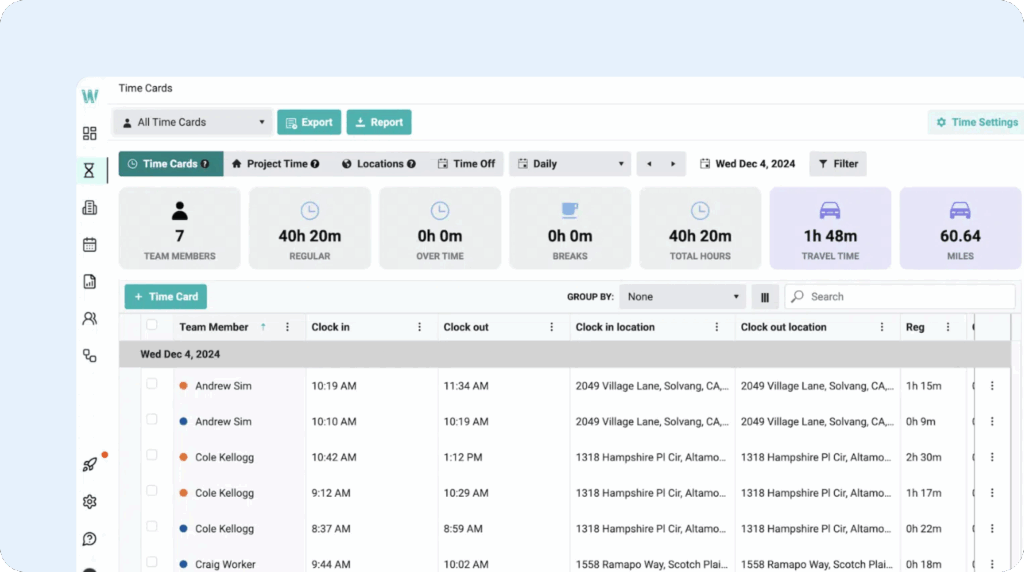
Workyard is a time tracking app that’s built specifically for construction companies. Beyond basic time tracking, it comes with lots of features that cater specifically to the way construction companies work, letting you include Workers’ Comp in your payroll, giving crews tools to upload project progress photos, letting you create certified payroll reports, and offering integrations with other construction programs.
Workyard’s GPS tracking features are highly accurate and let you track employees, equipment, and materials. You can also use its route mapping feature to visualize employees’ travel routes and see exactly how much time they spent at different job sites. Mileage tracking is also available if you reimburse employees for mileage.
For employees who are already clocked in, you can also automatically clock them in and out of different job codes as they travel from location to location. Simply set up geofences and attach them to their appropriate job codes. Then, you’ll be able to track exactly how much time they spent at those job sites without the employee having to remember to switch job codes.
Workyard also lets you include Workers’ Comp in your payroll. Simply edit the pay for the employee who’s on Workers’ Comp, and then you can add an effective date, Workers’ Comp code, and the applicable pay rate. Additionally, Workyard can also generate certified payroll reports. It simplifies this process by automating the data collection needed to fill out the federal WH-347 form (or state equivalents).
Finally, while most time card systems let you integrate with popular payroll and project management tools, Workyard takes it a step further by letting you integrate with popular construction platforms like Foundation Software, Sage 100 Contractor, Sage 300 CRE, and ComputerEase.
Pricing
Free trial available. View Workyard’s current pricing.
4. Timeero – Best for offline tracking

Timeero is built for teams that work in the field, making it another good option for mobile construction crews. It comes with all of the features mobile teams need: GPS tracking, geofencing, mileage tracking, and even offline tracking for teams that are working at sites that don’t have strong cell phone signals.
If your team often works in rural locations (i.e., places where cell phones don’t get a signal and can’t be used), Timeero has a good solution. When an employee loses their cell phone signal, it automatically logs their location, time, and mileage to their cell phone’s local storage and then uploads it to Timeero’s system when they’re back online.
Timeero’s segmented time tracking feature is great for crew members and foremen who travel to multiple job sites over the course of a day. Employees only have to clock in once at the start of the day. After that, the app will detect when they arrive at and leave your geofenced job sites, automatically applying the time spent at those sites to the appropriate job codes.
Beyond job costing, Timeero’s real-time GPS and segmented tracking features will also show you where employees traveled while they were on the clock, calculate exactly how many miles they traveled, and give you reports on exactly how much time they spent at each job site. You can view all employees’ locations at any time on a map or view breadcrumbs showing their movements across the workday.
Timeero’s geofencing feature also gives you a lot of flexibility. You can use it to prevent employees from clocking in/out when they’re not on the job site, remind them to clock in/out when arriving at or leaving a job site, or automatically clock them in/out when arriving at/leaving a job site.
Additionally, if employees often work in areas with poor cell phone reception, you can give them the option to override the geofence and clock in/out anyway. When doing so, they can leave notes in the app to let admins and owners know why they had to override the geofence rules.
One thing to keep in mind with Timeero is that while the platform has a low-cost Basic plan that runs $5/user per month, that plan is limited to 10 users. If you have more than 10 people using the system, you’ll have to upgrade to the $7.50/user per month plan even if you don’t need that plan’s features.
Pricing
Free trial available. View Timeero’s current pricing.
Learn more about Timeero
- Read our in-depth Timeero review
5. Arcoro Time – Best for multilingual crews

Arcoro Time (formerly ExakTime) is one of the most well-known construction time tracking apps on the market. It’s been around since 1999 and is 100% focused on the construction industry. And while it’s designed more for large construction companies with complex operations than it is for small construction businesses, it does offer a $9/employee per month plan that accommodates smaller business budgets.
One of the standout features of Arcoro Time is its in-app translations. Employees can choose their default language when signing up — English, Spanish, and French are available — and the app will always show all its text in the selected language in the future. While some of the other apps in this list offer Spanish translations for their apps, Arcoro Time is the only one that includes French translations.
Another highlight of Arcoro Time is its portable time clocks. If you don’t want employees having to clock in using their mobile phones, you can purchase one of the platform’s rugged time clocks. These devices are waterproof, weatherproof, and durable enough to withstand the rough conditions of construction worksites. Employees can clock in and out on them using individually assigned RFID badges or key fobs.
Like the other apps on this list, Arcoro Time also comes with employee location tracking features like real-time GPS tracking and geofencing. You can even use it to track the locations of your tools and heavy equipment. Plus, Arcoro Time’s inventory management feature lets you monitor usage of and inventory levels of all of the materials you have at each job site.
As far as integrations, Arcoro integrates with a handful of providers like ADP, QuickBooks, and ConstructionPayroll.com, or you can use Arcoro Payroll to get everything in a single tool. Much more impressive is Arcoro’s list of integrations with construction software. It offers more than 80 integrations with the apps construction companies use — significantly more than any other option on this list.
Pricing
Free trial available. View Arcoro Time’s current pricing.
6. ClockShark – Best for getting real-time updates from the field

ClockShark is another construction-specific time card app with all of the standard features that construction companies need: time tracking, scheduling, GPS monitoring, geofencing, facial recognition, and job/task codes. Additionally, ClockShark has built-in Spanish language support.
ClockShark’s most unique feature is clock-out questions. To track project progress, you can ask employees to provide updates, photos, or documentation when they clock out. This information is automatically forwarded to the office to help supervisors and admins keep track of the progress of projects even when they can’t be in the field.
In addition to the more asynchronous clock-out questions, crew members, project managers, and admins can also communicate with each other in real time using ClockShark’s team chat feature, Conversations. Unlike clock-out questions, Conversations are not tied to timesheets and can be used to ask questions and get less formal updates while employees are working.
If you have project plans, blueprints, contracts, or other documents that crews need to access while they’re at a worksite, you can upload those documents to ClockShark so employees can access them in the app. This can also be helpful if you need to collect receipts for expenses incurred in the field; employees can just take a picture of the receipt and upload it to ClockShark.
One thing to keep in mind when considering ClockShark is that you have to commit to a three-year contract to sign up for any of its plans. This is significantly longer than the other options on this list; most offer monthly contract options with the exception of Arcoro Time which requires a one-year contract. So if you’re going to sign up for ClockShark, do diligent testing first to make sure it’s right for your company.
Pricing
Free trial available. View ClockShark’s current pricing.
Learn more about ClockShark
- Read our in-depth ClockShark review
- Compare Buddy Punch vs. ClockShark
- Discover the best ClockShark alternatives
7. ConstructionClock – Best for automated job costing

ConstructionClock is different from the other construction time card software in this list because it doesn’t have manual clock-in and clock-out functionality. Instead, it uses geofencing to automate time tracking based on when employees arrive at or leave a job’s location, giving you more accurate records of the actual hours spent at different worksites.
Additionally, if employees leave a site and return to it on the same day to do something like collect or purchase materials, ConstructionClock automatically logs those time entries as travel time and adds it to the employee’s billable hours.
In addition to automatically clocking employees in and out of projects, ConstructionClock offers high-frequency GPS tracking. It’s not quite real-time tracking, but employees’ locations are captured frequently to provide you with breadcrumb trails of their movements across the workday.
One of the most unique features of ConstructionClock is that you can also use it to create tasks and assign them to employees. This is helpful if you have newer employees who need more guidance to know exactly what they need to do for the job, and it can also help you keep better track of how a job or project is progressing.
Another feature you’ll find in ConstructionClock is employee scheduling, which allows you to create schedules for your crew members and assign them to the specific locations you need them to work at. You can also schedule employees’ breaks in ConstructionClock and even specify if those breaks are paid or unpaid. Unpaid breaks are automatically removed from timesheets.
Pricing
Free plan and trial available. View ConstructionClock’s current pricing.
Learn more about ConstructionClock
- Read our in-depth ConstructionClock review
Pricing comparison for the best construction time card apps
The table at the beginning of this post compared the starting price for each of the apps on this list. However, the costs of the apps can vary significantly based on which specific features you need. To get a better understanding of what you’ll pay for each option given the features you need, here’s a comparison table showing the price you’ll pay for several must-have features for construction crews.
| Platform | Time Tracking | Job Costing | GPS Tracking | Geofencing |
|---|---|---|---|---|
| Buddy Punch | $4.99/user | $4.99/user | $4.99/user for GPS on punch; $6.99/user for real-time GPS | $6.99/user |
| Jibble | Free | Free | Free for GPS on punch; contact Jibble for pricing for real-time GPS | Free for limited geofences |
| Workyard | $6/user | Contact for pricing | $6/user for real-time GPS tracking | Contact for pricing |
| Timeero | $5/user for up to 10 users; $7.50/user for 10+ users | $7.50/user | Real-time GPS tracking is $5/user for up to 10 users and $7.50/user for 10+ users | $7.50/user |
| Arcoro Time | $9/user | $9/user | $9/user for GPS on punch | $9/user |
| ClockShark | $9/user | $9/user | $9/user for real-time GPS tracking | $9/user |
| ConstructionClock | $12/user | $12/user | $12/user for real-time GPS tracking | $12/user |
Choosing the right time card app for your construction business
Hopefully, the information above helped you come up with a shortlist of tools to consider. However, in addition to considering features and reviews, there are a few other things you should evaluate to make sure that the construction time card app you choose is the perfect fit for your business:
- Free trials and demos: The best way to determine if a tool is right for your team is to see it in action. Getting hands-on in a free trial is the best way to evaluate a new time tracking app, but if a free trial isn’t available, get a demo so you can see it for yourself and ask any questions you have.
- Pricing and budget: Construction time tracking apps can be on the more expensive side, and some apps lock their best features behind their highest-priced plans. Make sure you fully understand what features you’re getting for the price you expect to pay.
- Customer service: Payroll is incredibly time-sensitive, and you’re inevitably going to run into issues from time to time when using a time tracking app. Try sending a few questions to the app’s customer service team to evaluate how quickly you can expect to hear back and how helpful the responses you receive will be.
By considering these additional factors, you can increase the likelihood that the app you choose will work well for your team for years to come.

