

7 Best Time Clock Software for Small Businesses (2026)

Written By: Eric Czerwonka
Last Updated December 31, 2025
If your team still relies on handwritten timesheets and spreadsheets for time tracking, you’re probably losing more time (and money) than you think. Rounding, missed punches, and manual errors can easily add up to hundreds of dollars in payroll mistakes each month — not to mention the time you waste fixing them.
Employee time clock software gives you an accurate, transparent record of hours worked, whether employees are in the office, in the field, or working remotely. It automates payroll, simplifies scheduling, and keeps everyone honest without feeling intrusive.
Below, we’ve rounded up the seven best time clock software for small businesses. Whether you need a free app for basic clock-ins, GPS tracking for field crews, or all-in-one tool that includes payroll and scheduling, these tools make time tracking a point of clarity, not conflict.
Overview of the best employee time clock software
Here’s a brief overview of the best employee time clock software for small businesses. To learn more about a specific tool, click its link to jump down to our full review.
- Buddy Punch is best for its ease of use and affordability. It’s ideal for multi-location teams with time theft prevention features like GPS tracking and geofencing that managers can require for everyone or only turn on for specific employees.
- QuickBooks Time is unique for its native integrations with QuickBooks Online and QuickBooks Payroll, eliminating the need for separate data syncs.
- Time Doctor is designed for companies with knowledge workers. Its standout feature is its ability to perform silent employee monitoring to combat time theft in an office setting.
- Clockify is ideal for businesses that need a free time tracking solution. Its free plan is generous, offering basic time tracking for unlimited users across multiple platforms.
- Kimai is unique because it’s open-source and self-hosted, making it infinitely customizable via plugins and code for no monthly user cost.
- 7shifts is built for the restaurant and food service industry. It integrates with 37 different POS systems for clocking in/out and includes features like tip management and clopening alerts.
- Deputy stands out for its advanced AI scheduling tool that automatically builds schedules based on historical sales data and employee skills and availability.
How we chose the apps on this list
We started out by looking at customer ratings on G2 to determine which time clock systems are highest rated by their existing customers. This helped us find 77 highly rated options that we wanted to take a closer look at.
Then, we reviewed the features of all 77 of those apps. Since so many of the options on the market offer nearly identical feature sets, we wanted to identify those that offered something unique for specific types of work, pain points, or industries. We also wanted to make sure that each app included the must-have features listed above. This left us with 34 remaining options.
Next, we dug deep into the pricing for each tool. Since budget is always a concern for small businesses, we wanted to feature the software that offered the highest number of valuable features for the lowest cost. This led to us removing another 11 apps from the list that felt too expensive for the value they delivered.
Finally, we started free trials of the remaining 23 options. We tested each of them to make sure they were easy to use, included the features we expected to get in the plans we expected to get them in, and offered support when we requested it.
The winners of that process are the seven time clocks we’ve included below.
What is employee time clock software?
Employee time clock software is a digital system used to track the number of hours employees work. It replaces paper time cards with digital methods of clocking in and out using a computer, tablet, or mobile phone, and it replaces spreadsheets with digital timesheets that auto-calculate hours and detailed reports that can be sent directly to payroll for fast, accurate processing.
Related: What is Time Tracking Software and How Does It Work?
The benefits of using time clock software
When businesses move from manual time tracking to digital timekeeping using time clock software, they see many benefits:
- More accurate time records and payroll: Digital timekeeping removes human error from the equation. You get to-the-second clock-in and out values — not rounded times — and you no longer have to worry about miscalculations when adding up hours.
- Less time spent running payroll: Since you’ll no longer have to convert minutes to decimals and add up regular and overtime hours, you can complete payroll faster. Plus, downloadable reports and payroll integrations make it easier than ever to get your time data into your payroll system.
- Effortless compliance: Many time clock systems automatically identify overtime hours for you, track (and enforce) employee breaks, and keep records for the amount of time required by the FLSA so you’re always compliant with federal, state, and local laws.
- Time theft prevention: Many time clock tools include features that prevent time theft acts like buddy punching, clocking in before arriving at work, and wasting time on personal activities when on the clock.
- More accurate project and job costing: Time clock software comes with features that let your employees choose the projects their hours apply to, which ensures that your client invoices are accurate and you have the data you need to measure profitability.
Related: The 10 Biggest Benefits of Time Tracking Software
Key features to look for when shopping for time clock software
There are dozens of possible features you could need from your time clock software, depending on what industry you’re in, how (and where) your employees work, whether you have hourly or salaried employees, etc. However, there are some key features you’ll need to look for that all time clock software must have to be effective:
- A way for employees to clock in and out: Some apps work via visiting a URL, some by downloading a desktop app, some by integrating with software you already use, and some by downloading an Android or iPhone mobile app. The one you choose should have a method for punching that accommodates where and how your employees work.
- Automated timesheets: When employees clock in and out, the software should use that data to automatically create timesheets for you. The timesheets should identify both regular and overtime hours and automatically calculate the total number of hours each employee worked during a pay period.
- Payroll reports, integrations, or services: At a minimum, your time clock software should allow you to download timesheet reports you can send to your payroll provider. However, many offer integrations you can use to send time data to payroll automatically, and some offer a built-in payroll service so you can consolidate everything in one tool.
- FLSA-compliant recordkeeping: The Fair Labor Standards Act requires employers to keep timesheets for all employees for two years, so the time clock software you choose should either keep those records for you or allow you to download your timesheet reports to keep the records stored offline.
- Customizable access permissions: Time clock software can contain protected data like employees’ names, addresses, social security numbers, and pay rates, so being able to control who’s able to see what specific data in the platform is essential.
Related: 49 Essential Time Tracking Software Features to Consider
The 7 best time clock software for small businesses
Below, you’ll find our picks for the seven best employee time clock software for small businesses. We’ve written detailed reviews of each app — explaining what unique features they offer, which types of businesses they’re best for, and how they compare in price to other, similar tools — to make it easy for you to find the right fit for your team.
| Platform | Best For | G2 Rating | Starting Price |
|---|---|---|---|
| Buddy Punch | Affordability and ease of use | 4.8/5 | $4.99/user/month |
| QuickBooks Time | Integration with QuickBooks Online | 4.5/5 | $10/user/month |
| Time Doctor | Office workers | 4.5/5 | $6.67/user/month |
| Clockify | A generous free plan | 4.5/5 | Free |
| Kimai | Open-source time clock software | 4.8/5 | Free if self-hosted |
| 7shifts | Restaurants and other food service businesses | 4.5/5 | $39.99/location/month |
| Deputy | Combined time tracking and scheduling | 4.6/5 | $5/user/month |
1. Buddy Punch – Best time clock software for affordability and ease of use
Buddy Punch tops our list of the best time clock software for small businesses due to its ease of use, high customer ratings, affordability, and wide range of features. While it can be used by any type of company in any industry, it’s especially appealing for mobile, remote, and multi-location teams thanks to its mobile time tracking app and employee accountability features like GPS tracking and geofencing.
As simple as you need it to be
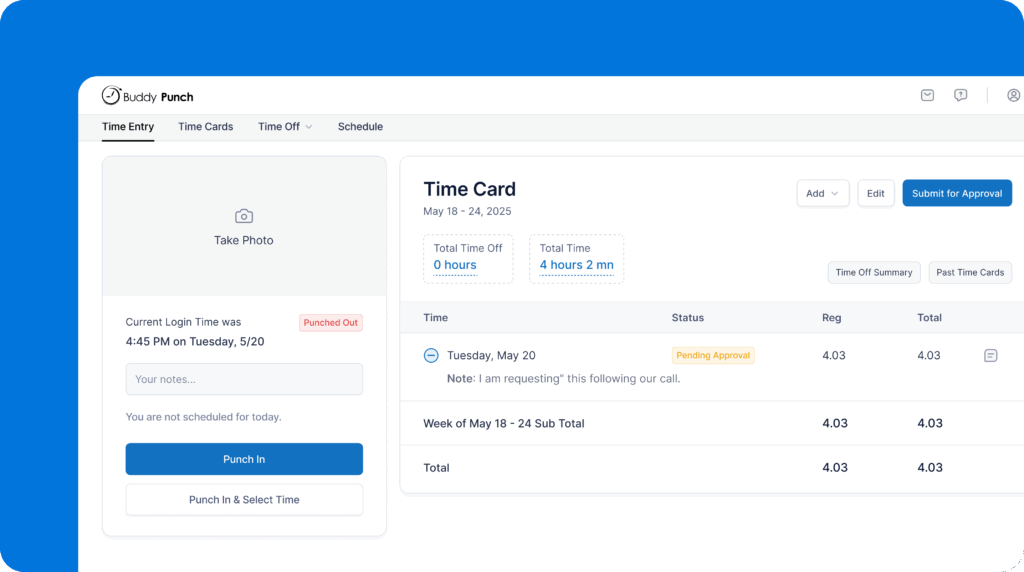
If you’re adopting time clock software for the first time, the best path forward initially is to keep things as simple as possible. An app that has tons of features, requirements, and distractions will likely make it harder to get employees to actually use it, particularly if your employees aren’t particularly tech-savvy.
Buddy Punch can be as simple as you need it to be. When employees log in, they see a big button that says “Punch In” or “Punch Out.” This makes the action they need to take clear and prevents any confusion about what they’re supposed to do.
That clock-in and out data is then compiled into timesheets that you or a manager can review and approve, edit, or reject before running payroll. Then, you can download reports for payroll or set up one of Buddy Punch’s integrations with 20 payroll providers like QuickBooks and Gusto.
As complex as you want it to be
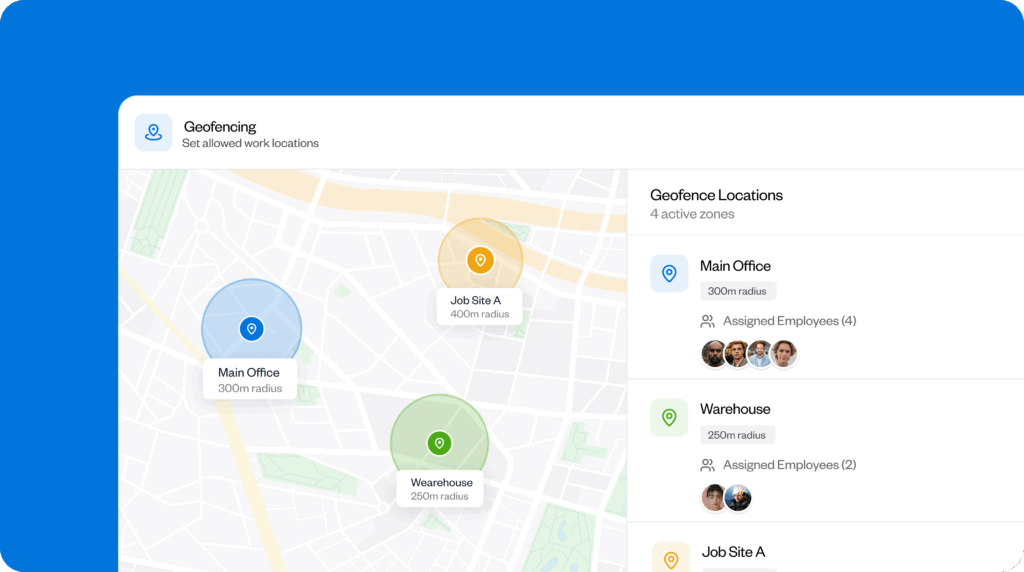
If you want to do a lot more than just basic time tracking, Buddy Punch has you covered, too. You can prevent time theft and keep your employees accountable with features like GPS tracking, geofencing, photos on punch, and facial recognition. These features prevent employees from clocking in/out while offsite or having a coworker punch in/out for them.
You can also use Buddy Punch’s employee scheduling tool to create and distribute work schedules, which opens up a lot more features. Reduce your labor costs by limiting how early employees can clock in before a shift, automatically clocking them out at the end of their shifts, and tracking break times to automatically remove unpaid break durations from timesheets.
And if your employees work at different locations, in different roles, or on different jobs/projects, you can create job codes for each of these things. Then, assign employees to the appropriate codes to track the time they spend on each. If they’re assigned more than one, they’re prompted to select the right one when clocking in.
All of these features are optional. Turn on the ones you want to use; leave the ones you don’t disabled. You can even turn features on only for specific employees. For example, if you have someone who you suspect clocks in before they’re at work, you can turn on geofencing for only that specific employee.
Flexible features for all types of businesses and working models
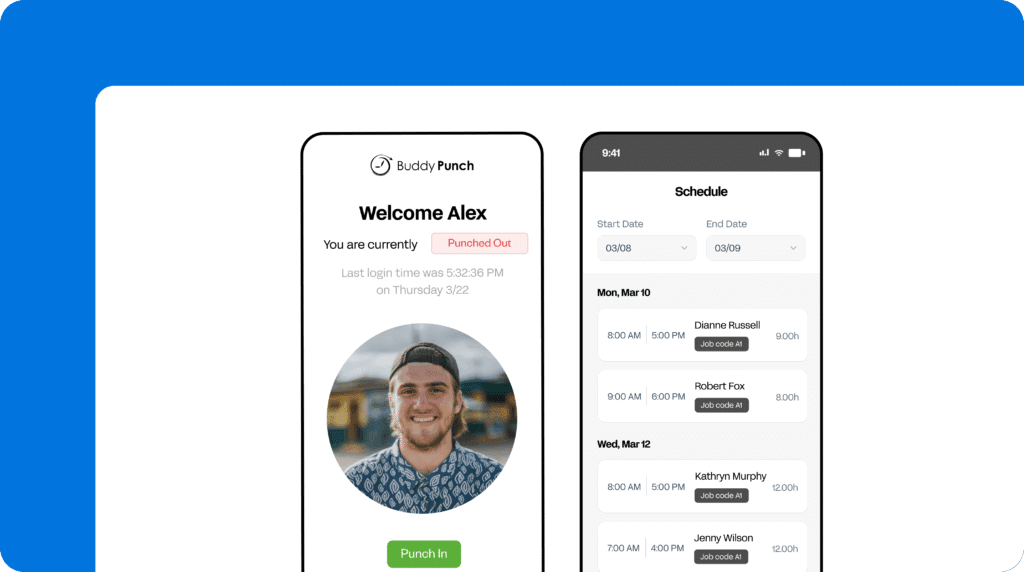
Buddy Punch accommodates all working styles. If your employees work on computers, they can clock in and out using the web app. If they work in the field, they can clock in and out using Buddy Punch’s mobile apps. If they all work in person, you can set up a kiosk that everyone can use to clock in and out.
Employees can clock in and out using a username and password, 4-digit PIN, or QR code. They can also send a text message to clock in and out, or you can have a supervisor clock all employees in and out at the same time using group punch. There’s also single sign-on available through Google, Okta, and OneLogin.
Finally, employees don’t need unique email addresses to be assigned an account in Buddy Punch. If your employees don’t have business emails, you can simply create accounts for them using an administrator’s email address.
Payroll integrations
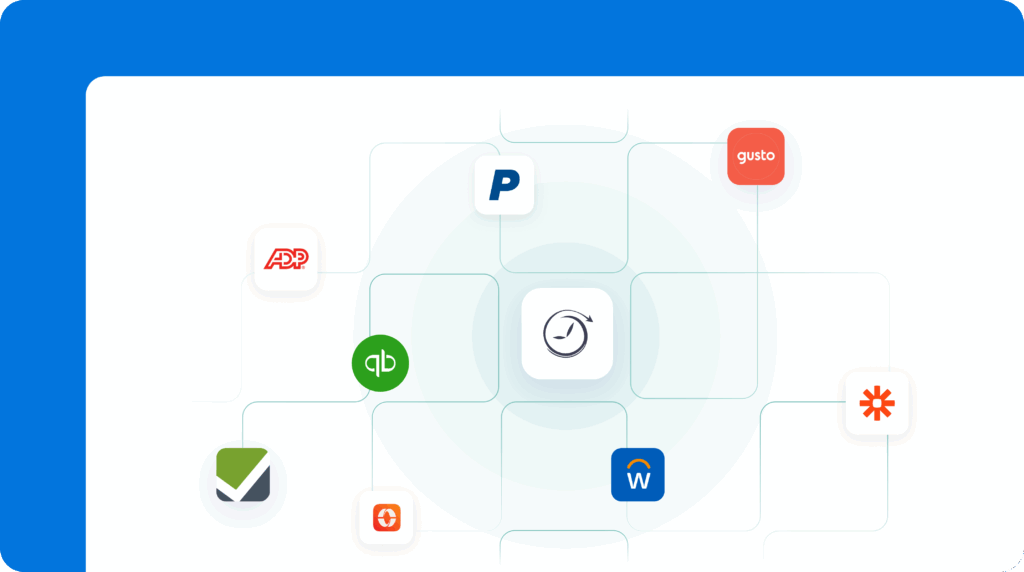
Buddy Punch offers integrations with more than 20 popular payroll providers, including QuickBooks, ADP, Gusto, Paychex, Justworks, Rippling, and Workday. It also offers its own built-in payroll service if you want to consolidate time tracking and payroll into a single tool.
Customer reviews
- “The features available are exactly what I need to run my small team efficiently. It took less than a week to fully set up and understand the basics of the app, so it was a very easy integration for my company.” Read the full review.
- “Competitively priced. If you’re looking for a feature-rich system at a small business price, look no further. It’s a really good time and attendance system. We looked at other systems before deciding on Buddy Punch.” Read the full review.
- “The best feature is definitely the price. We are a small company with only 2-4 part time employees at a time. I chose Buddy Punch because they were the most reasonably priced option out there without requiring an entire overhaul of procedures and equipment.” Read the full review.
Pricing
Buddy Punch starts at $4.99 per user per month (administrator users are free) plus a $19 per month base fee, making it one of the most affordable apps on this list for its breadth of features.
Learn more about Buddy Punch
- Start a free trial — no credit card required
- View pricing
- Watch a video demo
- Take an interactive product tour
- Request a personalized demo
2. QuickBooks Time – Best time clock software for QuickBooks

While many time tracking apps integrate with QuickBooks, you don’t have to step out of the Intuit ecosystem to get time tracking for your team. QuickBooks Time is Intuit’s own time tracking software, and as another Intuit product, it connects natively to QuickBooks Online and QuickBooks Payroll — no separate integration is required.
QuickBooks Time is a great choice for field services companies like construction, home healthcare, and landscaping. It comes with features like GPS tracking, mileage tracking, and geofencing that ensure your employees are only billing for the hours they work, even when you’re not all working together at the same location.
QuickBooks Time also supports automatic time tracking based on work schedules or geofencing, where clocking in and out can be triggered by location-based boundaries. Its smartphone apps can also record time entries even when employees are offline, syncing the data once reconnected.
For teams that do work together in the same space, QuickBooks Time can also be downloaded onto a tablet to create a time clock kiosk that all employees can use to punch in and out for their shifts. You can also require employees to take a photo of themselves when clocking in on the kiosk to prevent buddy punching.
Key features
- Use real-time GPS to track how many miles employees traveled.
- Set up geofences to automatically clock employees in and out.
- Create work schedules for your employees.
- Integrate automatically with QuickBooks Online and Payroll.
- Create job codes, locations, and geofences in bulk using an API.
Payroll integrations
In addition to its native integration with QuickBooks Payroll (Intuit’s own payroll service), QuickBooks Time also offers integrations with ADP, Square Payroll, Paychex, OnPay, and Justworks.
Customer reviews
- “Using QuickBooks Time, I can easily manage remote staff, and I get to see where the staff is occupied and on which tasks they are working. I can easily identify how much time is spent on each project, and based on that, I can bill the end client.” Read the full review.
- “We like to be able to keep track of our hours and for our guys to have access to seeing what hours they have in for the week. It also makes it easier for our guys who drive trucks daily because the office isn’t open in the mornings when they leave.” Read the full review.
- “Quickbooks Time is helpful for tracking the number of hours of work done by people. The upside of using Quickbooks Time is that the information easily imports into Quickbooks’ accounting software.” Read the full review.
Pricing
QuickBooks Time’s pricing starts at $10/user per month plus a $30/month base fee. It offers a discount to new customers where the base fee is discounted 70% for the first three months. It’s also worth noting that you must be a QuickBooks Online subscriber to use QuickBooks Time.
Learn more about QuickBooks Time
- Read our in-depth QuickBooks Time review
- Compare Buddy Punch vs. QuickBooks Time
- Discover the best QuickBooks Time alternatives
3. Time Doctor – Best office time clock software

Time Doctor is a time tracking and employee monitoring app that’s designed for companies with office employees that do most or all of their work on computers. In addition to letting you track the hours employees work and compile that data into timesheets and reports for payroll, you can also see exactly what employees are doing with their time while they’re on the clock.
Time Doctor has features like app and URL monitoring that let you see what websites and applications employees are spending their time on, automatic screenshots so you can see what they were doing on those websites, and idle detection so you can see when they’re logged in but not actually working.
Additionally, it has the ability to do this monitoring silently, meaning employees won’t know you’re monitoring their activities. This makes it a great choice if you believe time theft is a problem among your team of knowledge workers and don’t want people to find sneaky ways to work around your monitoring system.
Finally, Time Doctor’s built-in AI and reports keep you from having to monitor every employee individually. These tools provide you with overarching insights for your team, making it easy to identify employees whose performance has declined and may be burned out. You can also view benchmarks to see how your team’s productivity compares to other companies like yours.
Key features
- Capture screenshots of employees’ screens at regular intervals.
- Detect when employees are idle while billing time.
- See what websites and apps employees are viewing while on the clock.
- Identify automated methods of avoiding idle detection.
- Monitor employees silently so they’re not aware of the monitoring.
Payroll integrations
Time Doctor offers integrations with four third-party payroll systems: ADP, Gusto, Deel, and Payoneer. Unlike many of the apps on this list, Time Doctor does not offer its own built-in payroll processing.
Customer reviews
- “It does a good job of tracking user activity and providing insights into how time is spent. The productivity rating list is very useful because it lets you classify websites as productive or unproductive, which can help with better team oversight.” Read the full review.
- “Our team has been remote since before COVID-19 hit, and we have utilized Time Doctor to help manage our team, payroll, and reporting for years. It is easy to put in schedules. Customer support is responsive and helpful.” Read the full review.
- “Time Doctor is a great program to stay in control of your employees and ensure they are being productive. I like how easy to use the program is and how I can track employees as a whole or individually. It also helps notify us when an employee is going to a website that should not be used during work hours.” Read the full review.
Pricing
Time Doctor’s Basic plan starts at $6.70/user per month and includes timeline reports, screenshots, and offline time tracking. To get access to its payroll and project management integrations, you’ll need to be on the $11.67/user per month Standard plan.
4. Clockify – Best free time clock software
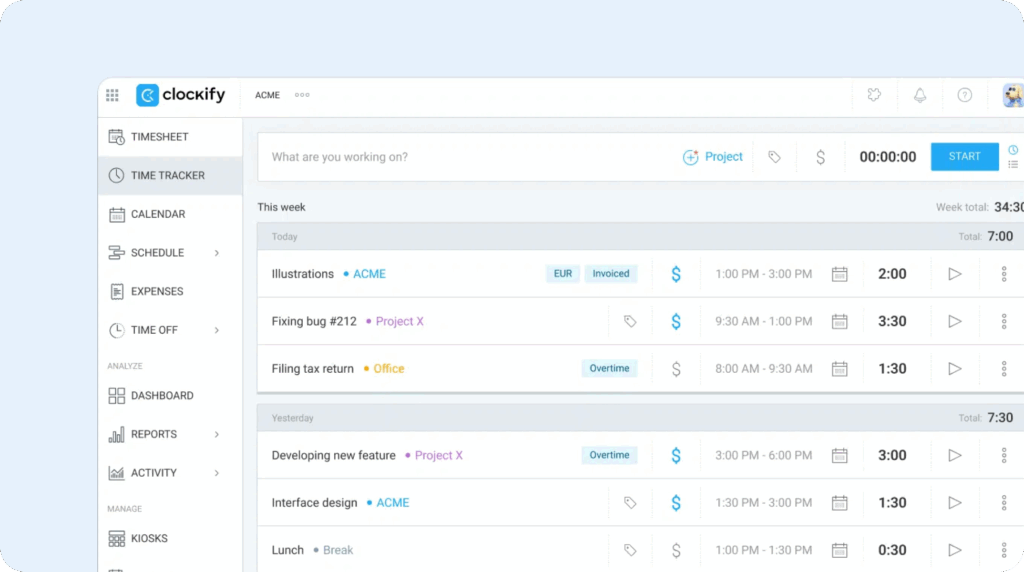
If you haven’t yet switched from time tracking with paper timesheets and punch cards because you can’t afford the cost of a digital app, Clockify might be the right choice for your business. Its free plan is one of the most generous free options on the market, letting you add unlimited users and download timesheet reports for payroll and FLSA compliance.
On the free plan, your employees can clock in and out online, using one of Clockify’s desktop or mobile apps, or using a tablet you’ve established as a time clock kiosk. It had one of the most robust sets of apps and extensions on the market, available as a downloadable app for iOS, Android, MacOS, Windows, and Linux, as well as extensions for Chrome, Firefox, and Edge.
You also get the system’s default reports (the ability to customize reports is only available on paid plans) which can be exported to send to payroll or keep for your records. Finally, you can track time toward specific projects and even set up different billable rates for different projects.
However, you’ll have to upgrade to a paid get access to a lot of the more advanced features you might need. To customize reports, add time for employees, or track breaks, you’ll need to be on the $3.99/seat per month Basic plan. To track time off, attendance, or overtime, you’ll need to be on the $5.99/seat per month Standard plan. To set up alerts or use GPS tracking, you’ll need to be on the $7.99/seat per month Pro plan.
All of that is to say that while Clockify is a great option if all you can afford is a free app, it may not be the right choice long-term. As your team grows and you need access to more advanced features, it quickly becomes more expensive than many of the other options on the market with comparable offerings.
Key free plan features
- Get basic time tracking for unlimited users for free.
- Download default timesheet reports for payroll and records.
- Create a time clock kiosk using a shared tablet/computer.
- Integrate with project management apps like Asana and Trello.
- Set individual billable rates for different projects.
Project management integrations
Clockify does not offer built-in payroll, and the only payroll application it integrates with is QuickBooks, which isn’t available on the free plan. For all other payroll processors, you’ll have to download reports to send to your payroll provider.
Customer reviews
- “Easy to use. It is free, but the paid version has better functions. It has many tools and functions such as dashboards, any type of reports, project control and management, project and team schedules, time off requests, and many more!” Read the full review.
- “We used to have employees just tell us the number of hours they worked every couple of weeks (that was when we just had two employees). As we grew, tracking time became more important to us for honesty and overall reporting purposes. This has been a simple and free solution for us.” Read the full review.
- “Clockify is extremely quick and easy to set up. For what our organization needed it for, it was free of charge. We got all of our employees set up tracking their productivity in Clockify in under an hour.” Read the full review.
Pricing
Clockify’s free plan gives you basic time tracking for unlimited users. Paid plans range from $3.99-$11.99/seat per month.
Learn more about Clockify
- Read our in-depth Clockify review
- Discover the best Clockify alternatives
5. Kimai – Best open source time clock software

One way to avoid the subscription cost of paying for time tracking software without sacrificing access to features is to use an open-source option that allows for self-hosting. It requires a lot of technical know-how to set up, but if you have dedicated IT support staff to assist with that, Kimai is a good choice.
Kimai has features to support time tracking, project time tracking, invoicing, and expenses. You can create private client portals — which can be shared via unique URL or password-protected — to share project progress with individual clients. It’s also pre-translated into 30+ languages out of the box.
You can also extend the functionality of the platform using plugins — some of which are free and some have a flat-rate cost. And since it’s open source, you can also build anything else you need into the platform. This makes it infinitely customizable to do exactly what you need it to do.
Key features
- Self-host the platform to get access to it at no monthly cost.
- Extend the functionality of the platform with plugins and custom code.
- Access an extensive JSON API for reading and writing data.
- Instantly translate all labels and fields in the platform into 30+ languages.
- Login to the platform using SSO via Google Workspace, Authentik, or Azure.
Payroll integrations
Kimai does not offer any pre-built integrations with other payroll providers and does not offer payroll itself. However, you are able to download reports for payroll in CSV and Excel formats, and you can also use its JSON API, which supports reading and writing data, to build your own integration.
Customer reviews
- “Kimai is a free and feature-rich time tracking solution. It’s easy to install and use. The filters on customers and projects are quick and very user friendly.” Read the full review.
- “It’s free, easy to install, and easy to use. I love this application and think it is the easiest way to keep track of the time spent on projects.” Read the full review.
- “Kimai manages to reduce time lost due to sloppy work. It also makes it easy to keep track of the particular tasks completed and is useful in justifying the time paid.” Read the full review.
Pricing
If you choose to self-host Kimai, you can use all of its features for free forever for as many users as you want; however, some of the platform’s plugins (such as its apps for Android and iOS) are only available for a fee.
6. 7shifts – Best restaurant time clock software
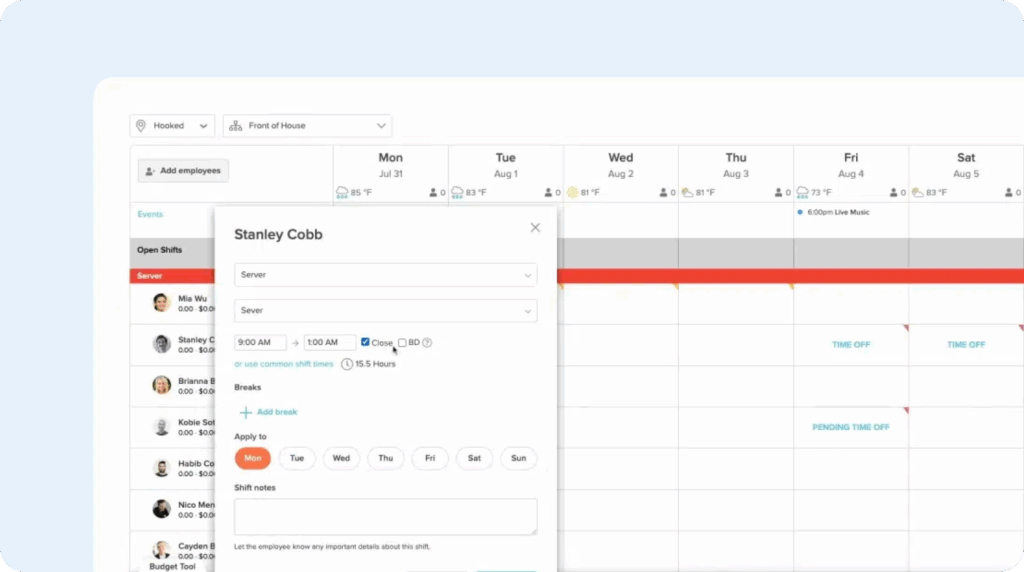
7shifts is the rare system that can keep pace with the Friday dinner rush and still help you get payroll out on time and accurately. It’s built specifically for restaurants, connecting time tracking directly to scheduling, tip pooling, and sales forecasts. It also flags clopenings, which is something outside the scope of most time clock software.
As far as time tracking goes, 7shifts integrates with 37 different point of sale (POS) systems like Square, Toast, TouchBistro, and Oracle MICROS Symphony. This lets your employees clock in and out directly from your POS system — no separate apps are required. You can see exactly when and where employees clocked in and get alerts for early punches and last clock-ins.
For scheduling, 7shifts can analyze your historical sales to put together sales forecasts that help you schedule shifts appropriately. It will tell you exactly how many employees you need in each role based on sales predictions. If you don’t want to use that specific feature, you can also build schedules from scratch, and employees can view their schedules any time in the mobile app.
Additional features that are great for restaurants, bars, cafes, and other food-service businesses include tip management, clopening alerts, and team messaging. Tip management automatically pools and distributes tips among your staff; clopening alerts will tell you if you’ve scheduled an employee for back-to-back closing and opening shifts; and team messaging lets you communicate with employees as a whole or individually.
Key features
- Use historical sales numbers to predict how many employees you’ll need for a shift.
- Integrate 7shifts with your POS system to turn it into a time clock kiosk.
- Let employees submit requests for time off, shift swaps, and shift covers.
- Get alerts for clopening shifts, employees nearing overtime, and missed breaks.
- Share updates with other managers using the manager log book.
- Use team messaging to communicate with all or individual employees.
Payroll integrations
7shifts offers its own built-in payroll processing service if you want to consolidate time tracking and payroll into one tool. If you already have an existing payroll provider, 7shifts offers integrations with 15 different payroll providers like ADP, Paycom, Heartland Payroll, Paylocity, and Wagepoint.
Customer reviews
- “We find it easy to use, and it offers everything we need in terms of time tracking, scheduling, and communication with our team.” Read the full review.
- “We used 7shifts for 11 restaurant locations. It was easy to implement. Their support was great as well; I did not have any issues trying to get things fixed.” Read the full review.
- “Scheduling platform, labor and sales, time clocking! It’s all in one and amazing. Makes life a whole lot easier at work. It’s easy to communicate with the team and keep track of employee feedback.” Read the full review.
Pricing
7shifts offers a free plan, but you’re only able to use it to create schedules, not to track time. For time tracking, its plans start at $39.99/location per month for up to 30 employees.
7. Deputy – Best time clock software for employee scheduling

Deputy is a combined employee scheduling and time tracking software built for shift-based teams in industries like hospitality, food service, retail, and healthcare. Employees can clock in and out using a computer, tablet, or their mobile phones, and features like facial recognition and GPS timestamps help to stop you from overpaying wages due to time theft.
Where Deputy really stands out, however, is with its scheduling features. It has a built-in AI feature that uses historical sales data and demand forecasts to tell you exactly how many employees you’ll need to cover shifts. Once you have that data, you can have the system automatically create a schedule for you based on employee availability and skillsets.
Both its time tracking and scheduling tools offer a number of features to keep you compliant. Overtime hours are automatically identified based on your policies and listed on timesheets and in payroll reports. Set up break tracking to ensure employees take breaks at the times required by your state. You can even create a record showing your compliance with Fair Workweek laws.
Finally, in addition to time tracking and scheduling, Deputy offers a lot of more HR-specific features. Post new job descriptions and publish them to thousands of job boards in a click, have new employees complete their paperwork and sign documents directly in the app, conduct employee engagement surveys, and even run your performance reviews through Deputy.
Key features
- Create schedules automatically using sales forecasts and employee availability.
- Access a manager dashboard showing things like real-time labor costs.
- Track regular hours, overtime hours, breaks, and PTO.
- Create custom break and overtime policies based on the states you operate in.
- Generate a record showing your compliance with Fair Workweek laws.
Payroll integrations
Deputy does not offer a built-in payroll service but does have a partnership with Paycor that you can register interest for. As far as payroll integrations, it connects to 25 payroll providers, including iPayroll, Astute Payroll, GoPayroll, Paycom, and ProLiant.
Customer reviews
- “The scheduling tool is phenomenal. I love the way it moves right over to the timesheet and is easy to use for my team members. The time clock is simple and easy to install. We also love the tasks app and the integration with our payroll software.” Read the full review.
- “Deputy helps us collect the timesheets for all staff in one easy to use location. It also helps to distribute important communications to staff via one channel. We are only at the tip of the iceberg in discovering all the benefits of Deputy and hope to implement more and more features.” Read the full review.
- “The best thing was the UI. My employees could trade shifts with such ease, and I could approve them as well.” Read the full review.
Pricing
Deputy’s base plan starts at $5/user per month and includes basic time tracking. For automatic scheduling and facial recognition on clock-in/out, you’ll need to be on the $6.50/user per month Core plan. HR features and team messaging are sold as separate add-ons.
How to choose the best employee time clock for your small business
The first thing you’ll want to do when shopping for time clock software is put together a shortlist. Hopefully, the list of options above helped with that. Just start by writing down the names of any options you find interesting. You’ll narrow down the list in the next steps.
Next, you’ll want to compile a list of features you’d like to have. At this stage, just write down anything you think would be helpful. When you’re finished, decide which features on your list are must-haves, and which are nice-to-haves:
- Must-haves are tablestakes, business-critical features that you can’t operate without.
- Nice-to-haves are things that you’d like but don’t absolutely need to operate effectively.
With this list of must-haves and nice-to-haves compiled, you can start narrowing down the options on your shortlist. Look at the features of each tool, and remove any that don’t include your must-haves.
Next is pricing and budget. Determine which of the tools on your list are priced within your budget. Remove any that cost more than what you can afford to spend.
A note on pricing: Make sure to spend extra time validating that the features you need are available at the price you can afford. Pricing for software tends to be intentionally vague, with many apps putting their most desirable features in higher-cost plans. Spend extra time at this stage reviewing price by feature availability.
After that, you can start to consider your nice-to-have features. Narrow your list down to three or so options that offer the highest number of features you want at the most reasonable price.
From there, start a free trial and test the apps. You’ll want to make sure that the features work the way you expect them to and that everything you need is available. You might also want to try reaching out to the provider’s support team to make sure they’re responsive when you run into issues and need help.
Following this process, you should be able to find the perfect time clock software for your team.

