
7 Best Employee Attendance Tracking Software in 2026

Written By: Emily Tarver
Last Updated July 29, 2026
When employees show up for work late, leave early, or call in, it has ripple effects on your business. Work doesn’t get done, productivity wanes, and your revenue starts to suffer. Without attendance tracking software, it can be hard to identify the root cause of these issues and hold employees accountable for showing up for work when they’re supposed to.
Employee attendance tracking software solves this issue. These tools can notify you of attendance issues in real-time, give you the information you need to identify employees who frequently call out or show up late, and provide the documentation required when you need to take action to solve the problem.
Below, you’ll find our detailed reviews of the seven best employee attendance tracking software. Keep reading to learn what unique features each of these tools provide, what types of businesses and working models they’re best for, and how they compare to each other on price.
| Platform | Summary | G2 Rating | Free Trial | Starting Price for Attendance Tracking |
|---|---|---|---|---|
| Buddy Punch | Best for companies with hourly employees who work in more than one place, Buddy Punch is a combined time tracking and scheduling tool with real-time attendance alerts and reports. | 4.8/5 | 14 days | $5.99/user/month |
| 7shifts | Best for single-location restaurants, 7shifts gives you a report that shows what percentage of time employees had attendance issues over a selected timeframe. | 4.5/5 | 14 days | $39.99/location/month |
| Hubstaff | Best for teams of fully remote knowledge workers, Hubstaff offers multiple features that let you know if employees were working when they were charging you for their hours. | 4.4/5 | 14 days | $4.99/seat/month |
| Jibble | Best for built-in facial recognition, Jibble can validate employees’ identities before they can clock in or out, and the feature is available on any device. | 4.8/5 | 14 days | $7.99/user/month |
| Hellotracks | Best for transportation and logistics companies, Hellotracks tells you when employees arrive at and leave customer sites and shows you their locations in real time. | 5/5 | 30 days | $10/user/month |
| Connecteam | Best for small businesses with 10 or fewer employees, Connecteam’s free plan lets you see which employees are running late on your dashboard and schedule. | 4.6/5 | 14 days | Free for up to 10 users; paid plans start at $29/hub/month |
| Fareclock | Best for creating an attendance point system, Fareclock lets you assign points to the employees you choose for specific types of attendance issues. | 4.8/5 | 30 days | $2.50/user/month |
1. Buddy Punch – Best for companies with hourly employees who work in more than one place
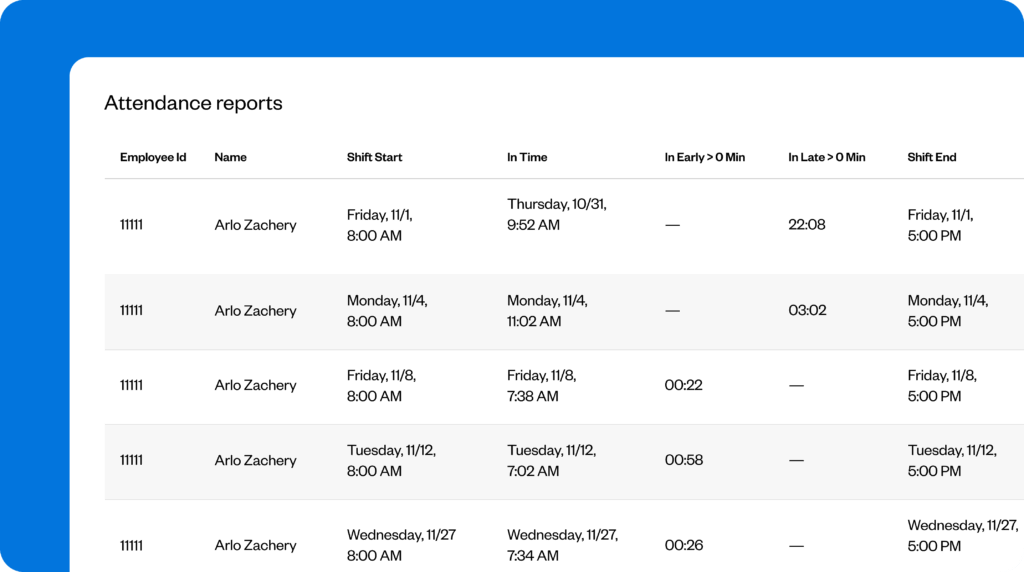
Tracking attendance is more difficult for companies with employees working across multiple locations. When you have multiple shops, restaurants, or worksites, you can’t be everywhere your employees are to make sure they arrive on the job when they’re supposed to. Buddy Punch is built to make attendance tracking as simple for dispersed teams as it is for teams where everyone works together at the same site.
You start by creating your employee schedules in Buddy Punch. Since the system knows when employees are supposed to be at work, it can send you a real-time alert if someone hasn’t clocked in when it’s time for their shift to start or if they clock out before their shift is supposed to end. Employees can clock in and out using Buddy Punch’s mobile apps, a computer, or a tablet you’ve turned into a time clock kiosk.
In addition to real-time alerts for attendance issues, you also get access to detailed attendance reports. The Early/Late Report lets you select a timeframe and see all instances where employees clocked in late or early, and the Absence Report shows you all instances where employees were scheduled to work but never clocked in. You can also see what’s happening with your team on the dashboard in real time.
Buddy Punch also comes with features that prevent employees from committing time theft in order to hide the fact that they weren’t at work when they were supposed to be. Geofencing prevents offsite punches so employees can’t clock in on their way to work or clock out after they’ve arrived at home, and photos on punch requires them to take a selfie when clocking in and out to prevent buddy punching.
In addition to tracking time and attendance, you can track and manage paid time off with Buddy Punch. Add lump sums of PTO at increments that match your policies, or set up PTO accruals to have PTO balances increase automatically. Employees can see their total PTO hours at any time in the Buddy Punch app, and used PTO is automatically removed from balances and added to time cards.
Finally, when it’s time to run payroll, you have multiple options. You can download reports formatted perfectly for your existing payroll provider, connect with your payroll provider using one of nearly 20 prebuilt integrations, or use Buddy Punch’s built-in payroll service. With built-in payroll, you can transfer your timesheet data to payroll in one click and pay employees via paper check or direct deposit.
Pricing
Free trial available. View Buddy Punch’s current pricing.
Learn more about Buddy Punch
- Start a free trial — no credit card required
- Watch a video demo
- Take an interactive product tour
- Request a personalized demo
2. 7shifts – Best for single-location restaurants

7shifts is a time and attendance platform that’s built specifically for restaurants. It integrates with your point-of-sale system to let employees clock in and out on the same system you use to process orders and collect payments, and it uses your sales data to help with creating optimized work schedules.
As far as attendance tracking, 7shifts has two main features. First, you can create rules in the system to flag attendance issues like no-shows, late arrivals, and call-ins. Those flags will appear in multiple places — on your employee schedule, on your Worked Hours and Wages report, and on your Scheduled Hours and Wages report. This makes it easy to see attendance issues at a glance.
However, you can also populate and download detailed reports showing attendance issues by each employee over a specific timeframe. The Attendance report uses the flags you’ve created to determine which columns to create (no-show, called in, or late) and shows both the number of instances of each infraction over the selected timeframe, as well as the percentage of times that issue happened.
The percentages on the Attendance report make it easy to have discussions with employees when needed. If someone has been late for 25% of their shifts over the last month — and the average for all of your other employees is closer to 5% — you can provide clear evidence to the employee showing that their attendance isn’t acceptable and use that data to set a goal for them to strive for going forward.
7shifts is a great option for single-location restaurants because of its location-based pricing. Unlike most other attendance tracking systems that have user-based pricing, 7shifts charges by location, meaning you pay one flat rate regardless of how many employees work at that location. This can make it more affordable than the other apps on this list if you have a lot of employees who all work at the same place.
Pricing
Free trial available. View 7shifts’ current pricing.
3. Hubstaff – Best for fully remote knowledge workers

If your team works from home and is spread out across multiple time zones, being certain that employees show up on time isn’t really a priority. You may not even care when employees do their work as long as their work is getting done. Your bigger priority is making sure that employees are actually working when they’re logging time. That’s where Hubstaff comes in, delivering features that let you answer that question.
First, if your employees work on company-provided computers, you can set Hubstaff up to start tracking their time when they start using the computer and stop when they stop using the computer. As long as they’re only using the computer for work, it’s a great way to get accurate timesheets without employees having to remember to clock in and out at the start and end of the day and for any breaks they take.
Second, Hubstaff can detect when employees are on their computers but not actually working. Its keyboard and mouse tracking feature detects when the computer is on but no work is being done, so you can identify employees who turned on their computers but then immediately started watching TV or folding laundry (because just showing up as a green dot in Slack doesn’t mean someone was working).
And finally, even if employees are using their mouse and keyboard, it doesn’t mean they’re working. That’s where app/URL tracking and automatic screenshots come in. App and URL tracking tells you what websites and apps employees visited/used while billing time, and the automatic screenshots feature takes screenshots of their computer screens at random intervals so you can see what they were doing.
In addition to its attendance tracking and time theft prevention features, Hubstaff also supports project time tracking. It integrates with 20 different project management tools (including Asana, Jira, Trello, Monday, and ClickUp) to pull your projects and tasks into Hubstaff so employees can log their time to them. You can even turn that data into client invoices and accept payments directly through Hubstaff.
Pricing
Free trial available. View Hubstaff’s current pricing.
Learn more about Hubstaff
- Read our in-depth Hubstaff review
- Compare Buddy Punch vs. Hubstaff
- Discover the best Hubstaff alternatives
4. Jibble – Best for built-in facial recognition

If you believe buddy punching is a serious issue for your business, Jibble’s facial recognition feature could be exactly what you need to get accurate employee attendance data. It works across all devices (unlike options like Buddy Punch that only offer facial recognition on Apple products) and can be used to validate employees’ identities before they’re allowed to clock in or out of work.
Jibble’s facial recognition technology uses artificial intelligence to identify distinct facial features. When employees install the app on their phones or tablets, they begin by capturing multiple images of their faces from different angles. Jibble then uses face detection to verify the employee’s identity before they log in. The system also captures a photo of the employee when they punch that managers can review later.
Beyond facial recognition, Jibble also offers features to prevent time theft by both deskless workers and those who do their work on computers. It offers GPS tracking and geofencing like Buddy Punch, as well as automatic screenshots and app/URL tracking like Hubstaff.
It’s worth noting that while Jibble has a free plan that lets you add unlimited users, its product isn’t as free as the platform’s website might lead you to believe. There are paid plans in addition to the free plan, and many of the features you might need (such as attendance reports) are only available if you upgrade to a paid plan. Unfortunately, the cost of paid plans and the features included aren’t listed on Jibble’s site.
For attendance tracking, you’ll need to be able to access the Attendance Insights Report, available on Jibble’s Ultimate plan. You can select a date range, download the report in XLS format, and open it in Microsoft Excel. It will show you details like how many days employees were scheduled to work, how many absences they had in that timeframe, and if they were late, early, or took an extended break.
Pricing
Free plan and trial available. Contact Jibble for pricing.
5. Hellotracks – Best for transportation and logistics

Hellotracks is a time tracking and dispatching app designed for transportation and logistics companies. It lets you add your customers, creates geofences in any shape you choose around their locations, and then plan the routes employees will take. Its route optimization feature lets you specify which sites employees need to visit, then it determines the routes employees should take to reduce travel time and mileage.
Because it’s designed for transportation companies, Hellotracks’ attendance tracking looks different from the other tools on this list. Managers and dispatchers can see where employees are located at any time on a map, watch them move from place to place in real time, and get alerts when they arrive at or leave customers’ locations. You can also get an alert if an employee leaves their designated travel zone.
This makes it easy to keep up with what’s happening in the field. You’ll know when deliveries have been completed, when employees are traveling to places where they shouldn’t be while they’re on the clock, and when things are running later than expected. The latter is particularly useful for letting your customers know when their deliveries will arrive — and when they’re going to be later than originally planned.
As far as time tracking, Hellotracks isn’t as robust as some of the other tools on this list. Employees can clock in and out using the mobile app when they start and stop working for the day, and that data is transformed into timesheets. However, there’s no built-in payroll and no payroll integrations, so you’ll have to download your timesheet data in XLSX format and upload it to your payroll provider to use it.
Additionally, while Hellotracks has features for both time tracking and scheduling, it doesn’t offer more traditional attendance reports showing late clock-ins, early clock-outs, and missed shifts. However, the data is all available in the system, so if you’re concerned about these types of attendance issues, you can compare your time tracking data to your employee schedules to identify attendance infractions.
Pricing
Free trial available. View Hellotracks’ current pricing.
6. Connecteam – Best free option for businesses with 10 or fewer employees

Connecteam’s free plan is very generous for small teams. It can be used by up to 10 people and gives you features from all three of its hubs that include time and attendance tracking, scheduling (for a single schedule), PTO management, team messaging, and HR features like org charts and quizzes.
There are several features in Connecteam that help you monitor employee attendance.
An “Attendance” component of the dashboard shows you the number of employees who are currently clocked in, running late, and on PTO. If you click on the “Running late” box, it will show you which employees are running late and how late they’re running. If you want to reach out to those employees to find out where they are, you can send them a direct message through the app right from the same screen.
You can also see who’s clocked in and who’s running late on your employee schedule. Simply open the schedule and make sure it’s set to display by list of users. You’ll see little icons next to each employee in the list showing whether they’re clocked in or running late.
Finally, you can build attendance reports that are automatically emailed to you on a schedule you select (though this feature isn’t included in the free plan). For example, if you create a report for late arrivals, you can get a report emailed to you at the end of each day showing everyone who was late for their shifts that day. However, there are no real-time alerts for notifying you when employees are running late.
Another interesting feature of Connecteam that can help reduce no-shows is shift acceptance. When you create schedules or change them, employees receive a notification that asks them to approve or reject the shifts they’re scheduled for. You’ll be able to see if an employee has rejected a shift — or if they haven’t responded to it — to identify when you have shifts coming up that don’t have guaranteed coverage.
One thing to keep in mind: if you outgrow Connecteam’s free plan, its pricing becomes very complicated. There are three hubs that each have four different plans (12 total). The starting price for each hub is $29/month, but certain features — like automated attendance reports — are only available on higher-cost plans (for example, automated reports are only on the Expert plan or higher, starting at $99/month).
Pricing
Free plan and trial available. View Connecteam’s current pricing.
Learn more about Connecteam
- Read our in-depth Connecteam review
- Compare Buddy Punch vs. Connecteam
- Discover the best Connecteam alternatives
7. Fareclock – Best for creating an attendance point system

Many businesses use a point system to provide guidance for employees on what level of attendance issues are unacceptable. Employees might get half a point for arriving late, two points for calling in, and four points for a no-call no-show. At eight points, employees are let go. If you want to set up a system that calculates these points for you automatically, Fareclock is your best option.
You start by enabling attendance tracking in Fareclock. Once enabled, you can create your policies in the system. Policies dictate how many points employees get for different types of infractions, the thresholds for what’s acceptable and unacceptable (e.g., if an employee has to be right on time or can be up to 5 minutes late without penalty), and when points expire.
Once you have your policies set up, you can create notifications that alert managers when employees meet specific thresholds. For example, if your employee handbook says that employees will get a written warning when employees accrue four attendance points, these notifications will remind managers that it’s time to have a discussion with the employee about their attendance issues.
Attendance policies can also be customized to apply only to specific employees. This can be helpful if you have, for example, union employees who must adhere to the point system and non-union employees who don’t accrue points for attendance issues. Simply select the specific employees in Fareclock that each attendance policy you create needs to apply to.
Finally, administrators get notifications in Fareclock when employees have attendance issues. If you open the notification, it will show you how many attendance infractions there were, and then you can click into the notification to see which employee had the infraction and what it was for. You can acknowledge the infraction to dismiss the notification or excuse it if you don’t want it to add points for the infraction.
Pricing
Free trial available. View Fareclock’s current pricing.
Choosing the best attendance tracking software for your needs
Every tool on this list can help you spot attendance issues, hold employees accountable, and build the documentation you need to take action, but the right fit depends on how and where your team works.
If your employees all work together at the same place, choose a tool that makes clocking in and out easy and offers reliable attendance reports. If they work at multiple locations, you’ll want real-time attendance alerts and geofencing so you know they’re where they’re supposed to be. If your team is fully remote, look for tools that tell you whether or not they were actually working while on the clock.
If buddy punching is inflating your labor costs, prioritize identity verification features like facial recognition or photos on punch. If you’re trying to fairly and consistently enforce your policies, look for a tool with an automatic attendance point system.
Additionally, factor in how the software will fit the rest of your workflows. Consider whether you need it to handle scheduling, PTO tracking, or payroll, and check that it integrates with the systems you already use. A tool that connects to your existing payroll provider or POS system simplifies everything.
Finally, take time to fully understand how each tool’s pricing works. Will user-based or location-based pricing be more affordable for your team? Are the features you need on the base or free plan, or will you need to upgrade to get access to key attendance reports? Pricing for software isn’t always transparent, so dig into the details upfront to avoid a bigger bill than you expected.
Once you’ve mapped your needs, take advantage of free trials. Set up a couple of your real schedules, run each option with your actual team for a week or two, and you’ll quickly see which one best fits the way you work.

