
The 8 Best Healthcare Payroll Software in 2026

Written By: Mark Fairlie
Last Updated July 1, 2026
Healthcare payroll is more complex than in other sectors for two reasons. First, people doing similar work often have different pay rates, shift premiums, overtime rules, or contract terms. Second, the records you need can come from several clinics and care teams, and they aren’t always ready to use.
You have to match every detail manually, from hours and rates to allowances and approvals. That’s made harder when timesheets come back with information missing, like premium hours, expense claims, role changes, or manager sign-off.
Many healthcare employers are now using healthcare payroll software to make each pay run easier to verify and less likely to go wrong. In this article, I review eight of the best healthcare payroll tools in the market and identify the most fitting use case for each one.
| Platform | Best For | G2 Rating | Base Fee | Starting Price for Payroll |
|---|---|---|---|---|
| Buddy Punch | Multi-site outpatient organizations | 4.8/5 | $68/month | $12.99/user/month |
| Viventium | Home health agencies | 4.7/5 | Contact for pricing | Contact for pricing |
| Fingercheck | Flexible ways to pay staff | 4.7/5 | $79/month | $10/employee/month |
| Paycom | Large healthcare organizations with central payroll teams | 4.5/5 | Contact for pricing | Contact for pricing |
| Patriot | Affordable payroll and tax filing | 4.8/5 | $17/month | $4/employee/month |
| Empeon | Skilled nursing facilities | 4.7/5 | Contact for pricing | Contact for pricing |
| HR For Health | Practices that pay staff in different ways | Not rated | $348/month | Contact for per-user pricing |
| DATIS | Behavioral health organizations | 3.9/5 | Contact for pricing | Contact for pricing |
1. Buddy Punch – Best for multi-site outpatient organizations
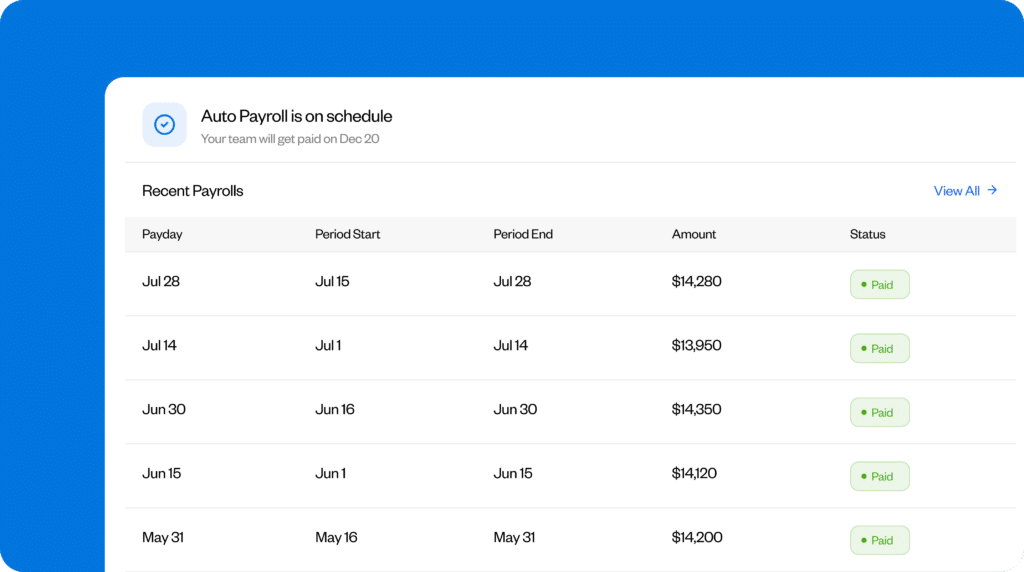
Buddy Punch is a strong fit for outpatient healthcare groups where the payroll team has to collect approved hours from several clinics before pay run.
Without software, you have to chase each manager for approved timecards, find and fix any mistakes or omissions, and manually convert separate clinic records into one set of hours and earnings across locations. I really like how Buddy Punch links each step, from scheduling and timekeeping right through to payroll.
First, create schedules for each location, either centrally or locally. Once you do this, each employee’s timecard updates for payroll every time they clock in or out.
Before the data gets to payroll, employees can review their own timecards and fill in any missing or incorrect entries. Managers can then check their team’s hours, breaks, PTO, and job codes, add any bonuses, reimbursements, and other earnings, then approve each employee record.
You can review the details you receive from managers and, if anything’s missing, send a query or request to the right manager. With the data now complete, you can:
- Use Buddy Punch Payroll to transfer the approved hours into the pay run, add bonuses, reimbursements, and other earnings, and calculate everyone’s wages
- Or export the approved hours to one of the 20 payroll providers with which Buddy Punch integrates, in the format it requires
I also like how the app helps payroll cut down on employee questions both before and after payday. For example, staff can enter their personal, tax, and payment details during onboarding and check their upcoming shifts in the app. After payday, they can use the website to view their paystubs and download year-end tax forms without asking payroll to send copies.
Pros
- Clinic managers can correct and approve their own team’s hours before sending it to payroll.
- You can run payroll directly through the Buddy Punch app or through one of its 20 partners.
Cons
- Staff can’t see their paystubs on the mobile app and have to log in to the Buddy Punch website.
- If a staff member needs to change their bank details, you need to restart the onboarding process.
Pricing
To access the payroll function, sign up for any Buddy Punch plan, which starts at a base fee of $19 per month plus $4.99 per user per month (billed annually). The Payroll add-on is available for $49 per month plus $8 per user per month (billed monthly).
Learn more about Buddy Punch
- Start a free trial — no credit card required
- Watch a video demo
- Take an interactive product tour
- Request a personalized demo
2. Viventium – Best for home health agencies

Home health agencies pay their nurses and therapists in several ways. Some clinicians receive an hourly wage or salary. Others earn a set amount for each completed visit, and a longer or more involved visit can be paid differently from a shorter routine visit. Depending on how your agency works, you may also pay the same clinician by the hour for travel, meetings, or completing visit notes, with mileage added separately.
Viventium is designed to handle these kinds of blended pay types. It can import completed visit information from your agency’s electronic health record (EHR) software. Once those visits are in the system, it uses the number and type of visits completed to work out earnings for clinicians based on per-visit pay. It also keeps their actual working hours separate from the visit count, which payroll needs to calculate overtime, sick leave, PTO, and benefits.
Alongside the visit pay, you can add hourly items, then include any mileage due in the same record. If the clinician earns different rates during the week, Viventium uses all their earnings and recorded hours to calculate blended overtime. I like how this gives payroll a single place to check each clinician’s week, instead of having to piece it together from separate records by hand.
I did feel there’s one gap. If a clinician makes a visit after payroll is run, you can’t manually add it to their current paycheck. But it’s helpful that Viventium assigns the visit to the original workweek, recalculates the clinician’s wages and any extra overtime, and adds the correction to a later pay run.
To make wages easier for staff to check and reduce paycheck-related questions, you can choose what appears on each employee’s paystub so they can see how their wages were worked out. Viventium can show visit dates, work locations, pay rates, and overtime premiums, so clinicians can tell payroll if a visit or rate is incorrect.
Pros
- Pay the same clinician for visits, travel, meetings, visit notes, mileage, and overtime in one run.
- Staff can see in their paystub if there’s a problem with a visit, location, or rate and tell payroll directly.
Cons
- Viventium doesn’t connect to every EHR tool, so your software may not be compatible.
- You can’t reopen a completed pay run to, for example, add a late visit record.
Pricing
Viventium doesn’t publish its rates on its website. You’ll need to contact the sales team for a customized quote based on the payroll services and support options you need.
3. Fingercheck – Best for flexible ways to pay staff

Fingercheck provides healthcare organizations with flexibility on how soon, and how early, they pay their staff. This matters because some employees may not have a bank account, and others may need advances to pay unexpected bills.
Fingercheck offers some standout features:
- PayCards: Staff can get their whole paycheck, or a fixed amount/percentage, loaded onto a Mastercard debit card, with any pending amount paid by direct deposit.
- Pay On-Demand: After getting their first paycheck, staff can request advances via the app, provided you approve them for the service. Or you can set up the system to let Fingercheck approve them automatically. Any amount paid out in advance is shown as a deduction on their next regular paycheck.
- Next-Day Payroll: Use Next-Day Payroll to pay staff as early as the next morning. This can be particularly useful when time cards, approvals, or reimbursements are processed late.
What made this more impressive was that Fingercheck funds all advances and early payments, relieving potential cash flow pressure on your business. It recovers the money from you when you run the next regular payroll by debiting your linked checking account, along with the rest of the amount needed for that payroll run.
PayCard and Pay On-Demand transfers arrive within 15 minutes to staff members’ nominated checking accounts. You can set up Pay On-Demand only after you’ve completed two successful payrolls funded through ACH. Note that this service isn’t free. You can choose to absorb the charges or pass them on to your employee.
Pros
- Pay staff the standard way and give them access to money in 15 minutes when they need it.
- Fingercheck funds all early advances, collecting the amount from you on the next payroll debit.
Cons
- PayCards can take up to 10 business days to arrive when you first apply.
- New starters cannot use Pay On-Demand until after they’ve been paid the first time.
Pricing
To access all the staff payment options, you need to subscribe to the 360 Plus tier at $129 per company per month and $12 per employee per month (billed monthly). A cheaper option is available at $79 per company per month and $10 per employee per month (billed monthly), but Next-Day Payroll isn’t available on this tier. Discounts may be available.
4. Paycom – Best for large healthcare organizations with central payroll teams

In large healthcare organizations, the challenge for central payroll teams is collecting and checking information from several hospitals and clinics in time for pay run. I was impressed by how Paycom handles this by keeping each employee’s timecards, expenses, and time off records in one place.
Staff use their apps to punch in and out, request time off, and submit expenses. Managers at each hospital or clinic can then review and approve their team’s timecards, expenses, and time off requests directly from their phones.
Beti, Paycom’s employee-facing payroll tool, takes that information and makes it accessible for each employee so they can check what they’re due. It works this out using approved hours, rates, tax information, benefit deductions, expenses, and time off records.
If anything’s wrong or incomplete, like a missed punch or an expense awaiting sign-off, Beti can send the task back to the employee or manager responsible for fixing it. I like the time-saving aspects of the app’s “Ask Here” feature for fielding payroll questions — although it can’t answer harder questions yet, which it forwards to the payroll team.
I appreciate how Paycom prepares earnings, deductions, and labor allocations for the accounting system, including reports covering several Employer Identification Numbers. This saves finance teams from having to put the figures together again for each hospital, clinic, or legal entity.
Pros
- Local managers can approve timecards, expenses, and time off requests so the data is ready for payroll.
- The app detects unfinished tasks and automatically sends them to the right person for resolution.
Cons
- Payroll still goes ahead even if tasks are unresolved, increasing the risk of errors.
- The Ask Here function is useful, but payroll still has to spend time handling more complex inquiries.
Pricing
Paycom is a joint HR and payroll platform. The company provides customized packages to each client. You need to contact its sales team directly for a quote.
5. Patriot Software – Best for affordable payroll and tax filing

Small medical, dental, and therapy practices have exactly the same payroll tax obligations as larger healthcare organizations. But many don’t have the budget to pay for a dedicated person to handle it, and they want to do the work themselves instead of paying an accountant’s fees. Patriot Software is a good fit for smaller practices wanting affordable payroll and tax filing.
Every time you run payroll within Patriot, it updates:
- Each employee’s gross pay, net pay, deductions, and tax withholdings
- Employer payroll taxes attached to that pay run
- Year-to-date wage and tax totals used for payroll records and W-2s
- The tax amounts it needs to collect, deposit, and report for the practice
Whether you pay wages weekly or monthly, it keeps up-to-date running tax totals for your practice and each member of staff. Link your checking account to the software, and it collects the money for direct deposits and payroll taxes, sends wages to your staff, and pays the relevant tax agencies.
I like how at the end of the year, it uses these same records to prepare and file federal payroll tax forms, including Forms 940 and 941, plus any state and local forms. It also handles W-2 and W-3 filings and keeps copies of filed forms and tax deposit reports in your account. Staff can see their paychecks, change their federal withholding, update their direct deposit details, and access their W-2s.
Pros
- The app files federal, state, and local payroll taxes based on the records stored during each pay run.
- Staff can update their tax and banking details and access their W-2 from the app.
Cons
- Standard direct deposit terms are four days, so you need to prepare Friday payroll on a Monday.
- Patriot doesn’t support local payroll tax in every state, so it may not be suitable depending on where your practice is based.
Pricing
The Full Service Payroll tier costs $37 per month plus $5 per employee paid per month (billed monthly). You need to subscribe to this to access the features mentioned in this review. There’s a cheaper option available at $17 per month plus $2 per employee paid per month (billed monthly), but it doesn’t have the local, state, and federal tax filings and deposits and other features.
6. Empeon – Best for skilled nursing facilities

Skilled nursing facilities like nursing homes and rehabilitation facilities have to send a quarterly Payroll-Based Journal (PBJ) report to the Center for Medicare & Medicaid Services (CMS), showing paid employee and agency hours. Empeon is a good choice for these facilities, because it uses the same time and attendance records for payroll, staffing checks, and PBJ reporting.
Empeon offers some other features that are well-suited to skilled nursing facilities:
- Pay each shift at the right rate: Set higher rates for evenings, nights, weekends, or particular duties. The app makes sure the correct shift differential is applied when you process wages.
- Manage payroll taxes: Empeon calculates your payroll taxes and prepares both quarterly and year-end tax forms, reducing workload on you and the team.
- Overtime checking: Use overtime alerts to see when staff are approaching overtime, then check those hours before they drive up pay totals or staffing costs.
- Give staff access to their documents: Employees can view and download their paystubs, W-2s, and other tax forms through the self-service app instead of having to go through HR or payroll.
Staff can clock in and out of each shift via the app. Managers at each location can then check missed punches, incorrect punch times, and team members’ timecards before the records feed into payroll and PBJ reporting.
I was also impressed by the overtime alerts and hours per patient day (HPPD) reports Empeon produced. These can help finance and operations teams keep an eye on how resident numbers and staffing costs compare, so they can spot when staffing costs are too high compared to the number of residents in the facility.
Pros
- Empeon uses the same staffing hours to power payroll, PBJ reporting, and HPPD tracking.
- The app automatically applies the right differentials for nights, weekends, and specialist duties.
Cons
- Hours recorded by labor agencies in another timekeeping system need to be combined with Empeon’s records for PBJ reporting.
- Staff can see their paystub only on the day wages are run, so they can’t report errors beforehand.
Pricing
Empeon is a combined time and attendance, payroll, HR, and recruiting app for healthcare firms. Contact the sales team directly for a customized quote. The price will depend on your specific needs, including the number of employees.
7. HR For Health – Best for practices that process different pay types

An office manager at an independent medical or dental practice may have to pay:
- Receptionists by the hour
- Hygienists, a set amount for each day
- Clinicians, a percentage of collections
- Practice managers, a salary
HR For Health is set up for this kind of arrangement. It lets you set a different pay type for each person, then pay everyone in the same run.
The app uses the pay type and rate you’ve entered for each staff member to work out what they’re owed. For example, your salaried employees receive their normal amount, per diem workers get their daily rate, and clinicians receive their agreed share. You can also use more than one rate for one employee and add production bonuses to the same payroll.
Then add anything else that affects their final wage, like overtime, PTO, holiday pay, reimbursements, and non-discretionary bonuses. I like how the app automatically deducts health insurance costs and 401(k) contributions from the employee’s pay, which will save time when you have several types of staff on the same run.
HR For Health may not be the right choice for practices that pay clinicians a set amount for each patient they see. It doesn’t offer per-patient pay as a separate option, so you’ll need to pay a base wage and then add production- or collection-based earnings on top.
Pros
- Pay hourly, salaried, per diem, collection-based, and contract workers in one pay run.
- Build PTO, bonuses, benefit deductions, and multiple rates into each employee’s wages.
Cons
- The per-patient pay setup is complex. You’ve to set up a base wage plus either production- or collection-based earnings.
- The range of features may make it too costly for practices where most employees are paid by the hour.
Pricing
HR for Health starts at $179 per month for one location, but payroll isn’t included in the Basic or Essentials plans. Payroll services are billed by employee count on Plus and Premium, with Premium offering next-day payroll processing for a charge. Setup fees start at $1,200 for Essentials, $1,600 for Plus, and $2,000 for Premium. HR for Health doesn’t publish its per-employee payroll rate.
8. DATIS – Best for behavioral health organizations

DATIS has the lowest G2 rating on this list, so I wouldn’t pick it for every healthcare employer. But it’s a good choice for behavioral health organizations where clinicians often work across roles, programs, departments, grants, and cost centers.
The app handles this complexity well by letting you set up each job position with its own pay rate, program, department, and cost center. This gives payroll a record of what each person should be paid and which service used those hours.
DATIS uses clinicians’ clock-in and clock-out information to create their timesheet. For community visits or shifts at another service location, you can use geofencing to check whether they clocked in where they were due to work. If they split their hours between different services during the pay period, each service manager can approve the hours charged to their own service before the timesheet goes to payroll.
When it’s time to run payroll, the app brings together the time recorded against each role and applies the rate attached to it, then accounts for any shift rates, skills differentials, and benefit deductions and garnishments. You can then check the run before submitting it, so you get a chance to catch missed hours, wrong rates, or deduction errors and correct them before finalizing payroll.
At that point, DATIS keeps a record of the labor cost attached to each program, department, grant, or cost center. For behavioral health organizations, this link is vital because it allows finance to see how much they spent providing a service against the available fixed grant or contract income. They can then spot when costs are using up funding too quickly and adjust staffing as needed.
Pros
- Pay one clinician correctly across several roles and rates without checking each shift by hand.
- Keep wage costs tied to each program or grant so finance can spot overspend earlier.
Cons
- Geofencing is great for checking attendance, but doesn’t import the details of that job for payroll.
- On split timesheets, you need sign-off from every manager involved before payroll can process them.
Pricing
You need to contact the DATIS sales team for a customized quote based on the number of staff you want to cover, the complexity of your payroll, and the features you want to include.
Feature comparison
| Platform | Payroll tax filing | Staff self-service | Time tracking | Multiple pay rates |
| Buddy Punch | ✅ | ✅ | ✅ | ✅ |
| Viventium | ✅ | ✅ | ✅ | ✅ |
| Fingercheck | ✅ | ✅ | ✅ | ❌ |
| Paycom | ✅ | ✅ | ✅ | ✅ |
| Patriot Software | ✅ | ✅ | ❌ | ❌ |
| Empeon | ✅ | ✅ | ✅ | ✅ |
| HR For Health | ✅ | ❌ | ✅ | ✅ |
| DATIS | ✅ | ❌ | ✅ | ✅ |
How I chose the tools on this list
I started with 32 leading payroll providers. While many of them targeted their service specifically to healthcare, I also wanted to include more general payroll services, because they often charge less and restrict their range of services to just payroll, tax filing, and basic employee self-service. For smaller practices that only need the basics, that can make them easier to use and cheaper to run.
I then assessed the following criteria before settling on the final nine:
- Whether they could handle hourly, salaried, per diem, per-visit, and mixed-rate workers
- How they dealt with overtime, shift differentials, bonuses, mileage, and other extra pay
- Whether managers could check and approve details and send corrections before pay details reach payroll
- How much manual checking and re-entry each app removed from the payroll process
An important consideration for me is how readily staff will adopt the software. Having deployed and reviewed commercial software for over 10 years, I know that whether employees use it depends on whether they feel comfortable using it.

