
Employee GPS Tracking 101: Types, Tips, and Tools

Written By: Kristina Proffitt
Last Updated June 17, 2026
Businesses with mobile teams commonly use employee GPS tracking to solve a wide variety of workforce management challenges — from verifying attendance to reducing payroll disputes. However, tracking raises important questions regarding what you’re allowed to track, and when.
Apart from legal considerations, there’s also the question of privacy: How do you implement GPS tracking to meet your business needs without making employees feel like they’re constantly being monitored? If you’re not transparent with your team about tracking, it can damage trust.
This guide explores how companies track employee location, the operational benefits and risks to consider when creating a tracking policy, and how to choose the most suitable tracking software for your business.
Understanding employee GPS tracking: Types and use cases
Employee GPS tracking is a common way for businesses to gain better visibility into field teams that spend most of the day away from a central office. This includes construction, delivery and logistics, transportation, home healthcare, cleaning and janitorial services, and landscaping and ground maintenance businesses.
For many companies, GPS tracking starts as a way to address attendance issues and time theft — when employees record hours that they didn’t actually work. Jake Romano, Owner of Gentlemen Plumbing & Drain Cleaning, shares:
“We had situations where employees would punch in from home before even arriving at their first job, or stay punched in long after they had finished for the day. We also uncovered cases where employees claimed they were out buying supplies or handling work-related errands when they were actually running personal errands on company time… What surprised me most was not just the amount of abuse we uncovered, but how normalized it had become.”
But GPS tracking can be a strong input for other workforce management processes, including payroll, scheduling, labor planning, and reporting. The specific benefits depend on how a company collects location data.
How do companies track employee locations?
Companies can track employee locations directly in real time, via their phone, or indirectly, by tracking their vehicle or equipment. They can also use location verification to confirm where employees are at a particular time.
1. Direct employee GPS tracking
This is the most common type of employee tracking. If your employee has a GPS-enabled phone and a location tracking app, you can track their movements directly. The app collects the worker’s location data during their work hours and sends this information in real time to a central dashboard which managers and authorized admins can access.
Direct tracking is useful for businesses where workers travel on their own, not in company-sponsored vehicles, and don’t carry trackable equipment with them.
Types of companies that use direct tracking
Employee GPS tracking is commonly used by:
- Home healthcare providers, where nurses and caregivers visit patients’ homes daily
- Field service businesses, where HVAC technicians, plumbers, and electricians move between job sites throughout the day
- Security companies, where guards patrol large facilities or campuses on foot
- Sales teams, where representatives spend most of their day visiting customers, prospects, or retail locations
- Cleaning companies, where cleaners travel from one site to another to complete multiple projects in a day
15 Industries That Use GPS Tracking + How They Use It
Use cases
Companies track employee GPS locations for:
- Visit verification: Companies can confirm that employees actually attended their scheduled appointments or service calls. This is particularly useful when billing depends on completed site visits.
- Faster dispatching: Managers can assign urgent service requests to the nearest available employee instead of having to call up multiple workers to know where they are.
- Customer communication: Customer-facing teams can provide more accurate arrival estimates and updates for scheduled workers. Axel “Mr. Clean” Avery, cleaner at Oakville Maids, shares their experience:
“We normally use a two-hour arrival window, but customers usually request a courtesy call 30 minutes before arrival. GPS tracking helps us know when they’ve finished working and are on the way to the next job and how long that’s going to take.”
- Worker safety: Managers can identify the most recent location of their employees working alone at a site or in remote areas if an emergency occurs.
2. Indirect employee tracking
When employers track employees indirectly, they collect location data based on company-owned assets. Instead of monitoring an employee’s phone, employers track company vehicles, equipment, or devices like laptops.
When Eliot Vancil, CEO of Fuel Logic LLC, implemented vehicle tracking, the team saw clear results.
“Previously, dispatchers spent 20 minutes on each delivery call to confirm driver location over cellular networks… Routing logistics teams automated spatial updates to save field service leaders up to 10 hours a week.”
Some businesses also use Bluetooth-based tracking for smaller tools and equipment. Small Bluetooth tags attached to devices can communicate with nearby phones or servers, which can help employers know where a tool was last used.
In indirect tracking, information about employees’ location may not be as updated as direct tracking, but as long as the worker and the asset remain nearby, employers can get a general idea of where the employee is. This is why this type of tracking is common in industries where the asset itself is central to the employee’s work.
Types of companies that use indirect tracking
This kind of tracking is often used by:
- Construction companies, which track trucks, trailers, excavators, generators, and other equipment across multiple job sites. Supervisors can see where crews are based on the location of their assigned vehicles and machinery.
- Delivery and logistics companies, where workers are on the road throughout the day driving delivery vans, trucks, and fleet vehicles. For these companies, vehicle location serves as a proxy for driver location.
- Landscaping businesses, where trucks, trailers, and equipment are constantly moving between customer properties.
- Utility companies, where field technicians are regularly assigned service vehicles.
- Agriculture and farming firms, where tractors, harvesters, and other machinery operate day to day across large areas.
Use cases
Companies that track vehicle or equipment location can improve:
- Fleet management: By monitoring vehicle locations, routes, and utilization, companies that manage dozens of vehicles can schedule crews more efficiently.
- Equipment security: Tracking high-value equipment that moves between sites reduces the risk of theft and helps recover lost or stolen assets.
- Asset utilization: Businesses can monitor whether equipment is being used efficiently or sitting idle, which helps them make better purchasing and scheduling decisions.
- Dispatch coordination: In case of service outages, emergencies, or schedule changes, managers can quickly identify which vehicle — or crew — is nearest to a new assignment.
3. Location verification
Rather than continuously tracking movement throughout the day, location verification involves collecting GPS data only at specific moments, typically when employees clock in or out, start a job, or end a job. This is why it’s considered a less intrusive tracking method.
Two common methods of location verification are:
- GPS-on-punch: This feature is commonly found in GPS time tracking software. These tools capture an employee’s exact coordinates the moment they clock in or out of their shift. By doing so, it verifies that workers are physically on site when they punch in or out.
- Geofences: These are virtual boundaries around a job site, customer property, or retail store that you can set up based on your needs. An employee can clock in only when they’re within this designated zone.
The Best Geofence Time Tracking Apps
Types of companies that use location verification
Many industries that track employee locations also use location verification to add another layer of safety:
- Construction and landscaping companies can verify whether workers clocked in at the right site and prevent employees from clocking in before their shifts start.
- Field service and home healthcare businesses can confirm that technicians or caregivers started work at the assigned customer or patient location at the right time and create records showing when service visits began and ended.
The benefits of employee location tracking
Location verification helps companies in multiple ways:
- Since work hours are tied to a specific location, companies can improve the accuracy of their workers’ attendance records.
- It makes it harder for employees to buddy punch; they can’t clock in or out on behalf of coworkers who aren’t at the site.
- Together, these help reduce payroll disputes, as the software creates a record showing where employees were when they logged time.
What type of employee location tracking makes sense for your business?
| If your employees… | Use employee GPS tracking | Use indirect tracking | Use location verification |
|---|---|---|---|
| Travel independently throughout the day | ✅ | ||
| Use personal vehicles for work | ✅ | ||
| Move between customer locations or job sites | ✅ | Can consider | |
| Need to be dispatched to urgent jobs | ✅ | Can consider | |
| Primary operate company vehicles | ✅ | ||
| Work with expensive equipment | ✅ | ||
| Lose assets frequently | ✅ | ||
| Manage a fleet of vehicles | ✅ | ||
| Need to be at a specific site at a specific time | ✅ | ||
| Clock in and out on behalf of each other | ✅ | ||
| Need better payroll and attendance records | ✅ | ||
| Want the least intrusive monitoring option | ✅ |
How GPS tracking supports workforce management
Collecting location data is only the first step. The value of GPS tracking comes from what you do after it has been collected.
Payroll and timekeeping
For businesses with mobile teams, payroll depends on accurate time records from multiple locations. Location data can provide additional context for timesheets by showing where employees were working when hours were recorded.
This gives managers a way to review exceptions such as unusually long shifts, unexpected overtime, or punches recorded from the wrong location before payroll is processed. It can also help resolve disputes when employers disagree about when work started, when it ended, or which job site hours should be assigned to.
Example
A construction company reviews weekly timesheets before payroll and notices an employee logged hours against the wrong project. Location records can help identify the correct job site and ensure accurate records.
Labor allocation and workforce planning
In businesses that manage crews working across multiple sites at the same time, supervisors need to understand where labor resources are being deployed without having direct visibility into every location.
Over time, location data can reveal staffing patterns, such as which sites consistently required additional labor or where crews spent the most time. Using this data, managers can identify imbalances in workload distribution and understand if staffing levels align with actual operational demands.
Example
A landscaping company reviews labor activity across all customer properties and discovers that one route regularly required additional crew members during peak season. They can then assign more workers to that route, adjust schedules, or rebalance workloads across crews.
Job costing and profitability analysis
Many field-based businesses need to understand how labor costs vary between projects, customers, or locations. When employee hours are connected to specific job locations, managers can compare estimated labor costs against actual labor costs and identify jobs that are consistently over budget.
This helps businesses understand which projects or customer accounts are profitable and which may need operational or pricing changes.
Example
A property maintenance company discovers that a particular project requires significantly more labor hours than originally estimated. It can then adjust future pricing or reconsider whether it wants to continue the project.
Scheduling optimization
Location data can help businesses evaluate whether schedules are realistic and efficient. By analyzing travel patterns between jobs, managers can identify unnecessary drive time or overlapping service areas, then use this data to build schedules that better reflect how work is actually done in the field.
Over time, this means reduced travel costs and increased productive time.
Example
A plumbing company reviews their location data and discovers that plumbers are frequently crossing into neighboring service territories to complete jobs. It can then redraw territories and adjust scheduling rules, reducing travel time and allowing plumbers to complete more service calls during their shift.
Accountability and documentation
Location records can provide supporting documentation when businesses need to review operational events after they occur. This helps managers compare location data with schedules, work orders, timesheets, and customer records to better understand what happened during a shift or service visit.
This can also support audits by providing additional evidence that work was performed at a particular place and time.
Example
A field services company receives a complaint that a technician never arrived for a scheduled appointment. The company can review the associated work order and location records to determine whether the visit actually occurred and respond appropriately to the customer.
How to implement GPS tracking: Risks and best practices
Despite all its advantages, employee GPS tracking also creates legal obligations, privacy concerns, and employee trust issues that employers need to manage carefully.
The most successful GPS tracking policies are built around three principles:
- Compliance with applicable laws
- Respect for employee privacy
- Transparency about how data is collected and used
Meet legal notice and consent requirements
State laws vary significantly, and some impose additional notice, consent, or privacy requirements compared to others. Employers should review applicable laws, both state and federal, before implementing a tracking program.
Understand:
- Whether you need to provide notice to your employees
- Whether written consent is mandated by law or only recommended
- What rules apply to tracking personal devices
- When location data can be collected
Then put all of this in writing. A written GPS tracking policy can help demonstrate that employees were informed about the company’s practices and expectations.
Collect only the data you actually need
Legal compliance is only one consideration. You also need to consider the ethical implications of employee tracking.
A good rule is to collect the minimum amount of location data needed to meet your business goal. For example, a company that needs to verify attendance at job sites should first determine if GPS-on-punch or geofencing meets their needs before considering continuous location tracking.
Limiting data collection can help reduce privacy concerns while still meeting your operational goals.
Uphold employee privacy outside working hours
Even if local laws allow you to track location outside of work hours, employees are more likely to view tracking as fair when it’s limited to work-related activities.
Clearly define:
- When tracking begins
- When tracking ends
- Whether tracking occurs on personal devices
- Whether company vehicles can be used outside work hours
Understand GPS limitations and use data responsibly
GPS data isn’t always perfect. Signal issues and poor network coverage in indoor environments, tunnels, underground locations, and dense urban areas can affect accuracy of location data.
Beyond that, location records can show where a worker was, but not why they were there or what happened during the shift.
Avoid relying on a single GPS record when reviewing attendance issues or investigating employee behavior. If a shift has gone unusually long, for example, get additional context before taking any action.
Review GPS data alongside:
- Work orders
- Schedules
- Customer records
- First-hand employee experiences
- Any other operational records
This reduces the risk of inaccurate conclusions and helps employers treat employees fairly.
Build employee trust through transparency
Most employee concerns around GPS tracking revolve around uncertainty regarding how it’s being used, rather than the technology itself. Convey clearly to your employees:
- Why tracking is being used
- What information is being collected
- How long data is stored
- Who can access the data
- How the company protects their privacy
When employees understand that GPS tracking is being used to support payroll accuracy, job site verification, customer service, and worker safety — and not to monitor their every move — they are more likely to accept it.
Dmitrii Malashkin, Founder and CEO at Born to Move, says their GPS implementation was a success “because we gave the workers insight into the primary application of the system.” The team did this by:
- Having supervisors listen to crew members’ concerns and reiterate why the system was launched: not to track worker location, but to “maintain accurate payroll hours, ensure crew safety for night jobs in customer homes, and streamline workforce logistics.”
- Showing the tracking dashboard to workers so they understood exactly what data the business could access.
Review policies and practices regularly
The work doesn’t end with creating a policy. Legal requirements, business operations, and employee expectations can change over time. Regular reviews help ensure that:
- Tracking practices and data collection remain compliant
- Privacy safeguards remain effective
- Employee concerns are being addressed before they become larger issues
This helps maintain both compliance and employee trust in the long run.
How to choose a GPS tracking tool
The right policies are important, but so is choosing the right software for your business. The best tracking software depends on what you’re trying to track and how location data fits into your operations. As you compare options, prioritize the features below.
Before comparing features, identify whether you need to track employees, vehicles, equipment, or simply verify attendance at job sites. Choosing the wrong type of tracking can leave you paying for features you don’t need or missing functionality that’s important for your operations.
GPS-enabled time tracking
For many employers, the goal is to ensure that location data supports accurate timekeeping and payroll. For this, the tool needs to capture time and location accurately.
Look for software that connects location records directly to employee timesheets. For example, Buddy Punch lets you collect GPS location data for all employees, or only specific workers, when they punch in. The tool then adds this information directly to their timesheets.
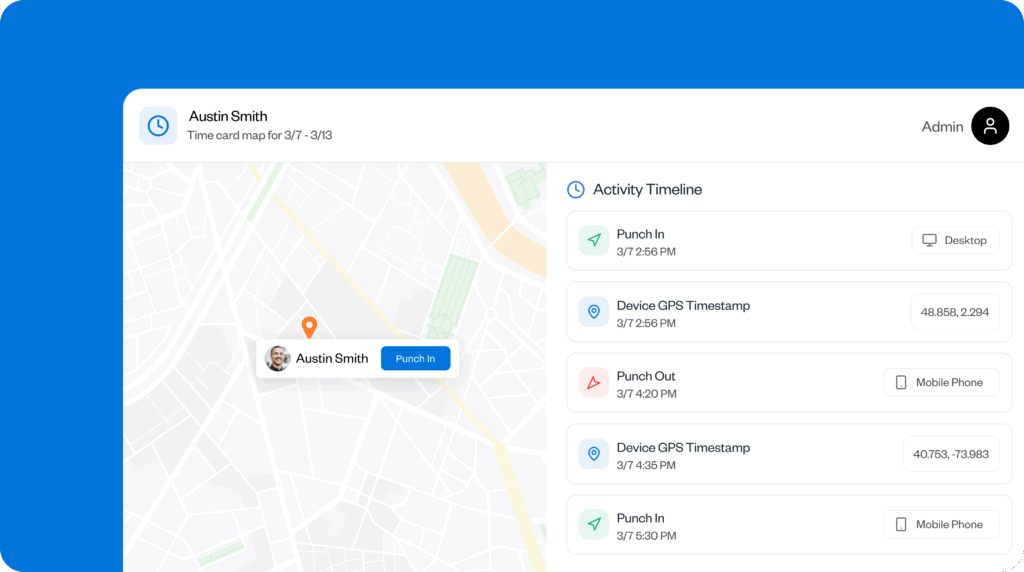
This makes it easier to review attendance records and correct discrepancies before payroll is processed.
Geofencing for job site verification
Businesses that operate from fixed job sites often need to verify that employees are physically present before they begin recording work hours.
Look for software that allows you to create geofences around your job sites. On Buddy Punch, you can create geofences around multiple sites, and employees can clock in only when they’re within this area. The tool doesn’t automatically clock in workers when they’re within the geofence, giving them more control over their recorded time.
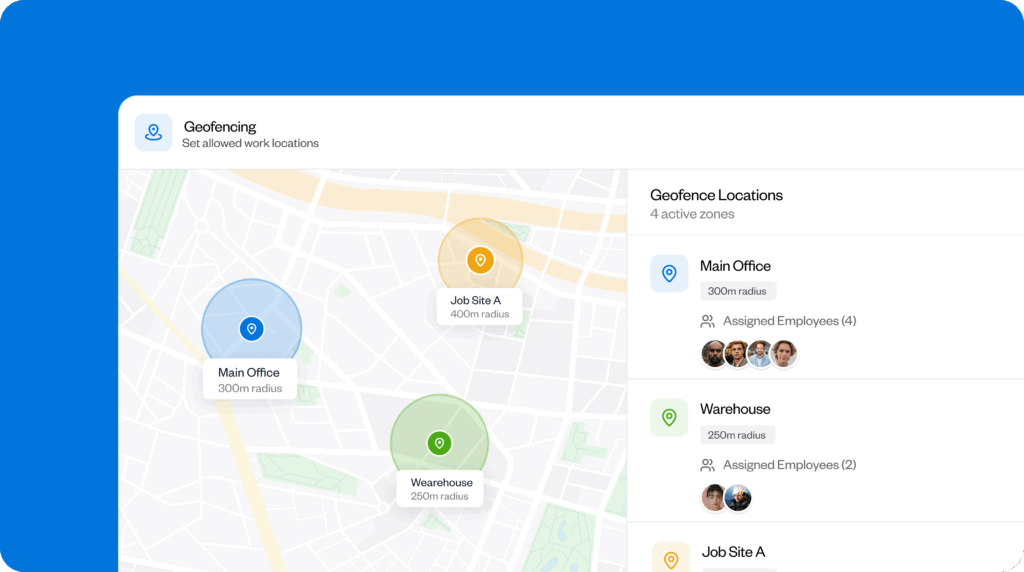
This reduces the risk of time theft and ensures work hours are tracked only when employees are at the site.
Compatibility with existing devices and systems
The best software tool can fail if employees can’t use it easily and conveniently.
Look for software that supports the devices your team already uses and doesn’t require complex setup or extra hardware. Buddy Punch, for example, works on web browsers, iOS devices, Android phones, and kiosks, and doesn’t require you to invest in additional equipment.
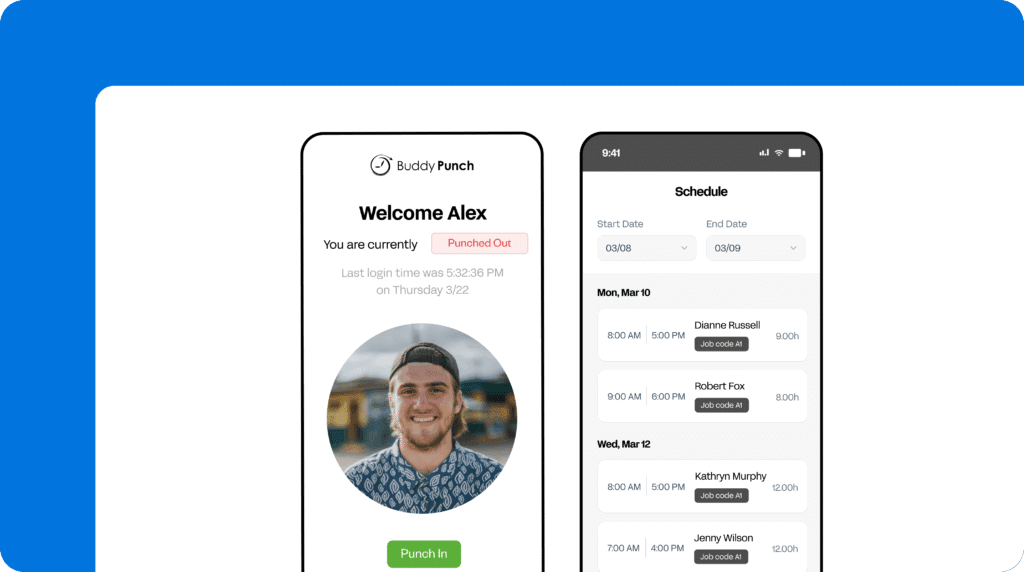
This makes it easier for you to implement and increases the chances that your team will consistently use it as they need to.
Reporting and audit trails
Location data is most valuable when you can review it later alongside other operational records.
Look for software that stores GPS data with attendance records, timesheets, schedules, and job information. Buddy Punch creates a documented history of where an employee was when they recorded time. You can also integrate it with other tools to build more advanced reports.
This makes it easier for managers to investigate payroll discrepancies, respond to customer complaints, and support internal reviews or audits.
Privacy controls and compliance features
GPS tracking software should help employers collect location data responsibly while respecting employee privacy.
Look for software that gives you control over when tracking occurs, who can access location records, and how location data is used in your organization. For example, Buddy Punch records worker locations only when they’re clocked in, and not outside their shift.
This upholds employee privacy and keeps businesses compliant with state and federal laws.
Payroll and workforce management integration
Location data becomes much more useful when it connects with the systems businesses already use to manage employees.
Look for software that integrates GPS tracking with scheduling, time tracking, reporting, and payroll so the same information doesn’t need to be entered multiple times. Buddy Punch brings these functionalities together on a single platform, allowing approved hours to flow directly into payroll.
This means reduced manual admin work, lower chance of errors, and higher payroll accuracy.
Getting started with employee GPS tracking
When implementing GPS tracking, clear policies, respect for employee privacy, and transparent communication are essential to get the most value from location data.
Choosing the right tool is equally important. The best GPS tracking software should support your goals while making it easier to manage time tracking, payroll, scheduling, and compliance.
Buddy Punch supports these efforts with a unified time tracking platform that helps businesses improve accountability, workforce visibility, and payroll accuracy.
Contributors
- Axel “Mr. Clean” Avery, Cleaner, Oakville Maids
- Dmitrii Malashkin, Founder and CEO, Born to Move
- Eliot Vancil, CEO, Fuel Logic LLC
- Jake Romano, Owner, Gentlemen Plumbing & Drain Cleaning

