

The 7 Best Field Engineering Staff Scheduling Software

Written By: Mark Fairlie
Last Updated May 14, 2026
Scheduling field engineers across multiple jobs is complicated. One site needs a single engineer for a boiler repair, while another needs a crew of four for a full HVAC install. For each one, you need to know who’s available, who’s qualified to do the work, and how much it will cost.
And that’s even before you run into unexpected changes to the schedule, whether it’s a job overrunning, an engineer calling in sick, or a high-spending customer wanting someone on-site immediately. Spreadsheets and whiteboards can’t keep up with this, so it’s all on you to keep every site covered before you end up paying an outside contractor.
To stay on top, you need a tool that shows real-time availability, confirms who’s on-site, and automatically ties every hour to the right job code. I’ve tested seven of the leading field engineering staff scheduling software systems to help you choose the right one for your team.
| Feature | Buddy Punch | ClockShark | Connecteam | Joblogic | Housecall Pro | FieldEdge | Workyard |
| Best for | All-round engineer staff scheduling | GPS-tracked field engineer scheduling | Frequently changing schedules | Tracking every job from quote to invoice | Managing online customer booking | Multi-truck service dispatch | Tracking labor costs by project and cost code |
| Starting price | $5.99/user | $9/user | $29/month | $59/month | $59/month | Contact for quote | $6/user |
| Drag-and-drop scheduling | ✅ | ✅ | ❌ | ✅ | ✅ | ✅ | ❌ |
| GPS tracking | ✅ | ✅ | ✅ | ✅ | ✅ | ✅ | ✅ |
| Job costing | ✅ | ✅ | ✅ | ✅ | ✅ | ✅ | ✅ |
| Mobile schedule notifications | ✅ | ✅ | ✅ | ✅ | ✅ | ✅ | ✅ |
The 7 best field engineering staff scheduling software solutions
Here are my reviews of the seven best field engineer scheduling software apps: Buddy Punch, ClockShark, Connecteam, Joblogic, Housecall Pro, FieldEdge, and Workyard.
1. Buddy Punch: Best all-round engineer staff scheduling software
Buddy Punch is an easy-to-use scheduling and time tracking tool for field engineering teams working across multiple job sites, built for companies with 10 to 100 staff.
Key features
- Day, week, and month views across job sites
- Shift filtering by location, department, and position
- Repeating shifts for multi-day job site assignments
- Schedule and shift notifications to engineers’ phones
- GPS tracking on clock-in, with live map add-on
- Geofences with adjustable radius (50–1,500 meters)
Pros
- Engineers can swap shifts and pick up open work without managers arranging every change
- Job codes assigned automatically when engineers clock in on site
- New sites and roles added in minutes, saving hours of admin
Cons
- Real-time GPS updates are not continuous (every 3–6 minutes)
- No automatic clock-out when engineers leave a geofence

Why I chose Buddy Punch: Buddy Punch is the best all-rounder for me because of how simple it is to build schedules for different types of engineers and quickly adapt them to changing site conditions. Plus, your engineers get an immediate alert with directions and instructions, so you’ll never leave a customer waiting because an engineer didn’t get the message.
Now, let’s take a more detailed look at the features I found most impressive about Buddy Punch and how they’re useful for field engineer managers.
Put the right people on every site

If your team has 30 engineers, each with different qualifications and experience levels, you need to know at a glance who’s right for each job. Buddy Punch brings this information together so every engineer’s skills are right there on the schedule where you’re making the decision. When you need a licensed high-voltage electrician for a shift, you filter by qualification, and you’re now choosing from three people, not 30.
Any unfilled slots appear in their own row, so you see exactly where you’re still short. I like how you can check one site, confirm the right engineers are on it, and then see the full week to make sure you haven’t left a gap somewhere else.
Keep engineers informed when schedules change
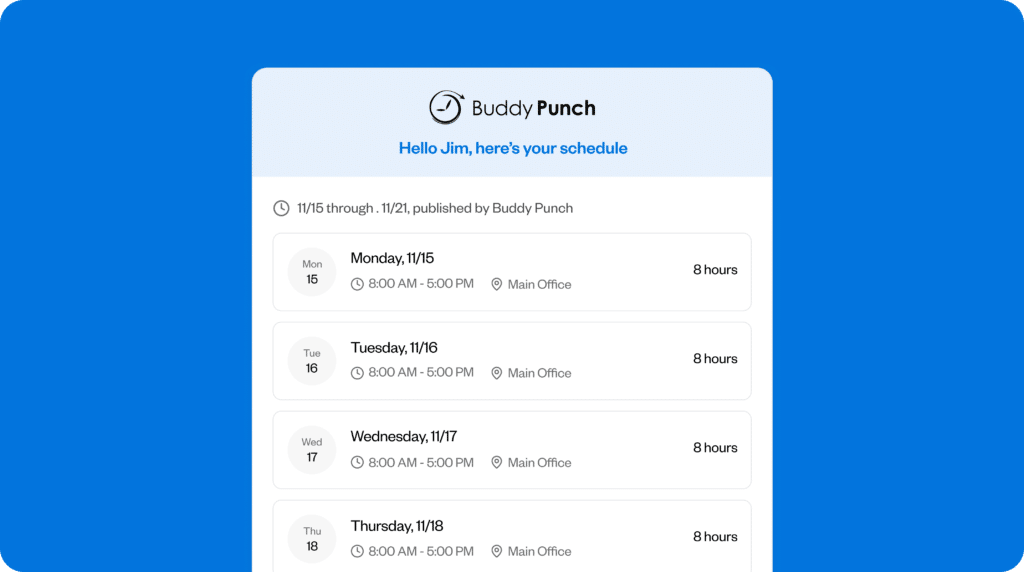
An engineer is taking longer than planned to complete a job, but you’ve already scheduled them to be somewhere else. With Buddy Punch, just open the schedule, see who’s free, and give them the shift. Immediately, your chosen engineer gets an alert on their phone, telling them where to go and when to arrive.
I like how you can let staff self-select by posting an open shift on the app, together with the job details. Engineers can also swap shifts between themselves if one of them can’t make it, so you don’t have to work through the roster yourself. You can still opt to approve any changes, so the right person ends up on the job, not simply the first one to respond.
Plan schedules with accurate job and time data

When teams of engineers are spread across different sites, it’s difficult to see how time is actually being spent on each job. Without that visibility, schedules are often based on estimates rather than reliable data.
With Buddy Punch, when an engineer clocks in within a geofence, the hours are automatically coded to the right project and customer. You can see exactly how long each job is taking as the week goes on, so if one site is running over or overtime costs are creeping up on a job, you can adjust upcoming shifts before it hits the wage bill.
Know where your engineers are all the time

Your engineers might have three or four jobs in a day, and you need to know they get there on time. Even a short delay can throw the schedule off, keeping clients waiting and affecting how much you can bill that day.
I really like how Buddy Punch lets you set a geofence from 50 to 1,500 meters around each job site, meaning engineers can only clock in once they’re actually inside the boundary. Between jobs, the real-time GPS add-on shows your team on a live map with updates every 3–6 minutes. When a client calls asking where their engineer is, you can give them an answer straight away or reassign the shift if necessary.
Integrations
Buddy Punch connects to over 20 payroll providers, including QuickBooks, ADP, Gusto, Paychex, Paycor, Paylocity, and Workday. You can also connect directly to over 3,000 apps with Zapier, covering project management, CRM, invoicing, and more.
Price
- Starts at: $19 base fee per month + $5.99 per user/month (when billed annually and including scheduling)
- Free trial available: Yes (14 days), no credit card required
- Free plan available: No
What users say about Buddy Punch
Buddy Punch has an overall rating of 4.8 out of five stars on G2 and Capterra. Users praise how easy its tracking and scheduling features are to use. One reviewer commented that “being able to see and have proof of time and location of employees is great.”
Learn more about Buddy Punch
- Start a free trial — no credit card required
- View pricing
- Watch a video demo
- Take an interactive product tour
- Request a personalized demo
2. ClockShark: Best for GPS-tracked field engineer scheduling
ClockShark is a time tracking and scheduling tool built for construction and field-service crews.
Key features
- Drag-and-drop crew calendar organized by job site and location
- GPS breadcrumb trails showing with location updates every 10–15 minutes
- Geofence alerts when crew members clock in away from the job site
Pros
- Track where your crews are all day so you know who’s available to send when a job overruns
- Project-based scheduling makes it easier to spot under- or overstaffing per job
Cons
- No recurring schedule for multi-day jobs
- Engineers can’t swap shifts or pick up open work, so the manager handles every change

What ClockShark offers: ClockShark helps managers track their crews across jobs rather than shifts, with full visibility of where they’ve been throughout the day.
Job-based crew calendar
ClockShark’s job-based calendar makes it easier to spot when a site is short-staffed or overstaffed. Engineers assigned to a job see the site and the task on their app, and if the schedule changes, they get an immediate notification.
When engineers clock in, the hours are logged against the correct piece of work. However, if a crew is on the same site for several days, you can’t set shifts to repeat automatically as you can in Buddy Punch.
Geofence alerts on clock-in
ClockShark lets managers establish a geofence around each job site, so when one of your crew clocks in, you know they’re where they should be. If someone doesn’t show, you can see who’s nearby and redirect them to cover. Clock-ins from outside the geofence still count, but you’ll get an alert.
GPS breadcrumb trail maps
ClockShark keeps a GPS trail of each crew member’s day, showing time at each site and travel between them. I found this useful for spotting when travel takes longer than expected, so future schedules can be adjusted accordingly.
Integrations
ClockShark integrates with QuickBooks, ADP, Gusto, Paychex, Xero, MYOB, Sage 100 Contractor, and Zapier.
Price
- Starts at: $40 per month base + $9 per user per month
- Free trial available: Yes (14 days)
- Free plan available: No
What users say about ClockShark
ClockShark’s customers rank it 4.6 out of five stars on Capterra and 4.7 on G2. Customers comment on how easy it is to schedule and track crews across job sites and track them when they’re working. One reviewer noted, “Overall, this application has great customer support, and scheduling works out for all employees. It is a valuable tool.”
Learn more about ClockShark
- Read our in-depth ClockShark review
- Compare Buddy Punch vs. ClockShark
- Discover the best ClockShark alternatives
3. Connecteam: Best for frequently-changing schedules
Connecteam is an employee management app for field service, construction, and maintenance teams, with built-in team chat and communication tools.
Key features
- Built-in team messaging alongside the schedule
- Notifications when shifts are rescheduled, reassigned, or canceled
- Geofenced sites that clock engineers out automatically when they leave
Pros
- Managers can rework the schedule on the spot when jobs change
- Engineers arrange their own shift cover, which managers can approve
Cons
- Extensive feature set means it takes longer to set up than simpler scheduling
- Engineers working multiple sites in a day need a separate shift for each job

What Connecteam offers: Connecteam keeps shift scheduling, GPS tracking, and team messaging in the same place, with day, week, and month views so managers can plan ahead and engineers know straight away when their shifts change.
Integrated messaging and scheduling
When schedules change, engineers don’t always know which version is the right one. I like how Connecteam brings messaging and scheduling together in the same thread, so the update and its reason sit in one place.
Shift swaps and cover management
If a team member calls in sick or a job goes on longer than expected, managers have to trawl through a list of employees and contractors to find someone qualified who’s also available. On Connecteam, the engineer can nominate their own backup and swap shifts with co-workers, subject to manager approval.
However, to check where engineers currently are, the manager needs to switch to the Time Clock screen, as there’s no map view inside the scheduler itself.
Geofencing and automatic clock-outs
On days when engineers work at two or more sites, it’s easy to forget to clock out of a job. Connecteam’s geofences, ranging from roughly 75 to 1,500 meters, automatically clock an engineer out when they leave the site. Not only does this keep timesheets accurate, but the manager also gets a notification so they know who’s left and can factor that into the rest of the day’s schedule.
One drawback is that, unlike Buddy Punch, Connecteam doesn’t automatically link the geofence to the job code. On a busy day with three sites to get to, some engineers might forget to change it between jobs.
Integrations
Connecteam integrates with QuickBooks Online, Gusto, Xero, Paychex Flex, ADP Workforce Now, and PrismHR.
Price
- Starts at: $29 per month for the first 30 users (Operations Hub, Basic plan) when billed annually
- Free trial available: Yes (14 days)
- Free plan available: Yes, up to 10 users
What users say about Connecteam
On Capterra, Connecteam scores 4.7 out of five stars, while on G2, it receives a 4.6-star rating. Clients are enthusiastic about the app’s easy-to-use features, especially scheduling and team collaboration. One customer said, “I like that scheduling, time tracking, and communication are all in one place, so nothing slips through the cracks.”
Learn more about Connecteam
- Read our in-depth Connecteam review
- Compare Buddy Punch vs. Connecteam
- Discover the best Connecteam alternatives
4. Joblogic: Best for scheduling and service management in one place
Joblogic is field-service management software for scheduling, tracking, and job handling, built for engineering and maintenance firms.
Key features
- Live engineer map with location updates every five minutes
- Compliance dashboard tracking certification expiry and renewals
- Customer portal where clients track job progress and log requests
Pros
- No wasted visits or compliance risks — only qualified engineers are scheduled
- Approved quotes converted to job assignments without re-entering details
Cons
- Scheduling is manager-driven — engineers can’t self-organize or swap shifts
- Limited offline functionality, so engineers in poor signal areas may lose data between syncs

What Joblogic offers: Joblogic connects scheduling, time tracking, quoting, and invoicing in one system, so every piece of work is tracked from the point a client agrees to the job to when they’re billed for it.
Job scheduling and engineer dispatch
I like Joblogic’s drag-and-drop scheduling calendar, which shows each engineer’s availability across daily, weekly, monthly, and yearly views. Managers can switch between an individual and team view and filter by specific engineers to check if anyone is overloaded. However, unlike Buddy Punch, Joblogic doesn’t let engineers pick up work or swap jobs. The manager has to build the schedule and dispatch the work themselves.
Compliance and qualification tracking
Joblogic lets managers track the compliance status of engineers, equipment, sites, and jobs from a single dashboard. This is important for trades where dispatching someone unqualified could pose a compliance and safety risk. The dashboard also shows which engineers’ qualifications are current or expiring and when they’re due for renewal.
Quote conversion and job tracking
On the scheduling calendar, when a customer approves a quote, managers can upgrade it to a job, sending the details across to the engineer on their phone. The engineer can send notes, photos, and signatures back when the work is done.
When the job is complete, the office creates the invoice from the job data rather than typing it up from scratch. I was impressed by how clients could track progress through the customer portal.
Integrations
Joblogic integrates with Sage accounting software, Zapier, and various management apps for scheduling, sub-contractor management, stock requests, and equipment hire.
Price
- Starts at: $59 with engineer tracking costing extra
- Free trial: No
- Free plan: No
What users say about Joblogic
Joblogic scores 4.3 stars out of five on both Capterra and G2. Clients appreciate the ease of use, online knowledge base, and helpful staff. One customer stated, “It is quick to understand for both office and field-based staff and all at a very competitive price.”
5. Housecall Pro: Best for managing online customer booking
Housecall Pro is a field service management tool designed for small home and commercial service businesses, including HVAC, plumbing, and electrical teams.
Key features
- Online customer booking with flexible, fixed-time, or manual scheduling settings
- Day, week, and month calendar views with drag-and-drop dispatch
- Real-time technician map with today’s jobs showing customer addresses
Pros
- Reduces manager admin by adding customer bookings directly to the schedule
- Customers get automatic updates at every stage without the manager chasing or relaying
Cons
- No geofencing to confirm technicians are at the right site before starting
- Engineers can’t initiate shift swaps or pick up open work

What Housecall Pro offers: Housecall Pro lets customers book their own service calls online, keeping them updated from scheduling through to invoicing.
Online booking and job creation
I like how Housecall Pro lets customers book their own appointments online via Google or the company’s site. Each job then appears on the calendar with all the customer’s details — no need for the dispatcher to call to get the address or job description. Managers can still decide which engineer is right for the job.
Calendar and map-based dispatching
The calendar offers a variety of layouts, including Schedule, Dispatch, Day, Week, Monday-to-Friday, Month, and View by Employee, allowing managers to plan by time period or by engineer. The on-screen GPS map shows where each team member is and who’s finishing up, meaning you can dispatch the nearest available engineer straight away.
However, unlike Buddy Punch, Housecall Pro doesn’t offer geofencing, so there’s no automatic confirmation that a technician has arrived at the right address.
Automated customer notifications
When jobs overrun, the customer waiting for the next appointment may wonder where their technician is. Housecall Pro keeps them informed with a confirmation when the job is booked and a text when the technician is on the way, reducing the need for managers to handle status updates and letting them focus on getting the schedule back on track.
Integrations
Housecall Pro integrates with QuickBooks Online and Desktop, Gusto for payroll, Force by Mojio for vehicle GPS tracking, CompanyCam, Google Local Services, and Zapier.
Price
- Starts at: $59 per month (billed annually)
- Free trial: Yes, no credit card required
- Free plan: No
What users say about Housecall Pro
Users rate Housecall Pro 4.3 out of five stars on G2 and give it 4.7 stars on Capterra. Customers praise the easy setup, simple operation, and how it integrates scheduling and invoicing. One client remarked, “Overall, it had great features for what it’s intended to do for a service-based business such as mine.”
6. FieldEdge: Best for multi-truck service dispatch
FieldEdge is field-service management software built for HVAC, plumbing, and electrical contractors running multiple trucks.
Key features
- Drag-and-drop dispatch board with live technician status
- Engineers get an alert on their phone when their schedule changes
- GPS and geofencing through FleetSharp integration
Pros
- Schedule and dispatch engineers by skill, location, and availability
- Managers see which jobs are done and who’s free without having to call each technician
Cons
- Technicians can’t swap jobs or pick up unassigned work themselves
- No compliance or certification tracking for technicians

What FieldEdge offers: FieldEdge’s live dispatch board matches technicians to service calls by skill, location, and availability, then syncs each job in real-time to accounting software QuickBooks.
Dispatch board with live technician status
FieldEdge shows every technician’s current status (pending, traveling, working, or last job completed) so managers can pick the most suitable person when a service call comes in. When assignments change during the day, technicians receive a push notification on their phone.
I like how customers can submit service requests through the online portal, which reduces some of the admin upfront. However, managers still need to call them back and manually assign a time slot.
On-site quoting from the flat-rate pricebook
When a technician is expected to quote on-site, FieldEdge’s pricebook puts parts, labor, and markups on their phone so they can present options to the customer. If they get the go-ahead to do the work straight away, the dispatch board shows the technician is now on that job, so the manager can move their other calls to someone who’s free.
GPS and geofencing through FleetSharp
Managers get a live view of each truck’s location through FieldEdge’s integration with FleetSharp, which can adjust clock-in and clock-out times based on the technician’s actual arrival and departure. Unlike Buddy Punch, where geofencing connects the clock-in, the location, and the job code in one place, FleetSharp is a separate premium add-on.
Integrations
FieldEdge’s integrations range from accounting and customer experience apps to client reviews and customer financing. Well-known integrations include QuickBooks, MailChimp, and CRM Podium.
Price
- Starts at: Doesn’t publish pricing — contact a sales rep for a quote
- Free trial: No
- Free plan: No
What users say about FieldEdge
Clients rate FieldEdge 4.5 out of five stars on G2 and 4.1 on Capterra. Reviewers praise its easy setup and usage, as well as its dispatching and invoicing capabilities. One customer said, “I use Field Edge daily for dispatching, invoicing, adding parts to the inventory, and sending invoices and quotes to customers.”
7. Workyard: Best for tracking labor costs by project and cost code
Workyard is a GPS time tracking and workforce management tool built for construction and field-service teams.
Key features
- Crews tag hours to projects and cost codes as they move between sites
- Project reports are filterable by time period, cost code, and team member
- Task scheduling is linked to projects with notes and checklists
Pros
- GPS-recorded hours give managers reliable data to plan and adjust schedules
- Travel and on-site time are separated automatically, so managers can allocate shift time more accurately
Cons
- No documented estimate-versus-actual budget tracking at the project level
- No built-in team messaging for communicating with crews

What Workyard offers: Workyard ties every hour to a project and cost code, so the manager knows exactly what each job costs in labor and travel rather than working from a single payroll total.
Project and cost code tagging
In systems that lack the ability to tag hours to projects, labor appears as a single total, making it harder to understand how time is spent across jobs. I like how Workyard lets crews log time against projects as they move between sites, so managers can see how long jobs actually take and adjust future schedules accordingly.
Project charts for hours and mileage
Workyard tracks mileage and travel time automatically, so managers can see exactly how much of a project’s cost comes from labor versus travel. If travel between sites consistently takes longer than planned, managers can leave a bigger gap when scheduling those jobs together.
With this information updating in real time, managers can also spot overruns early and take action before sending crews back on site.
Tasks, checklists, and project-linked scheduling
I like how Workyard sends notes, checklists, and photos to engineers’ cell phones, telling them exactly what’s needed before they leave for a scheduled job.
Managers can set tasks to repeat daily, weekly, monthly, or yearly for regular maintenance visits or recurring site work. Unlike Buddy Punch, however, Workyard doesn’t let crews swap tasks or pick up open work. This means the burden of covering a no-show or a last-minute change stays with the manager.
Integrations
Workyard integrates with accounting software QuickBooks and Sage, plus apps like ADP Run, ComputerEase, Gusto, Paychex, and Oracle NetSuite. There’s an API for even deeper integrations.
Price
- Starts at: $50/month base fee plus $6 per user per month
- Free trial: Yes, 14 days, no credit card required
- Free plan: No
What users say about Workyard
Customers rate Workyard highly at 4.8 out of five stars on both Capterra and G2. Clients remark favorably on its efficient time tracking and ability to track clients out of cell range. One reviewer commented, “We’ve been on Workyard for roughly five months now, definitely a game changer on time saving and cost coding”.
The benefits of field engineer scheduling software
In field engineering, schedules can quickly break down when jobs change or run over. Here are the main benefits of using a field engineering scheduling app:
Gain visibility across every site
Right now, checking who’s working where might mean gathering information from a spreadsheet, a whiteboard, and memories of previous emails or calls. It’s time-consuming to piece everything together, and it’s hard to be certain that every site has the right people when the job requirements aren’t next to the schedule.
Scheduling software shows you on one screen which sites don’t have cover, who’s free to take the work, and whether the person you’re assigning is qualified for it.
Get schedule changes to engineers fast
When an engineer calls in sick or a job overruns, you need to update the schedule quickly to make sure every site is still covered. If engineers head to the wrong site and a client’s job doesn’t get done, you could end up having to pay an expensive outside contractor to keep the customer happy.
With a scheduling app, you update the shift, and every affected engineer instantly gets the new plan on their phone. The client’s job gets done on time, and you keep the job costs within budget.
Know who’s on each site in real time
If you’re at four sites on one day, that’s four check-in calls every morning just to confirm your engineers are where they should be. Even then, that’s not proof they’re actually on-site.
Now, when your engineers clock in, you can see their location on the app, together with the time they arrived. You’ll also have a record you can refer back to if a client queries whether the work was done.
See labor costs before payroll
Overtime builds up across your sites during the week, but you might not realize until you’ve already submitted the week’s wages. By then, the hours are already higher than budgeted, and the owner wants to know why.
The best scheduling tools show labor costs in real time, so when engineers start approaching overtime thresholds, you can reschedule them or move work between sites to keep costs under control.
The bottom line on engineering staff scheduling software
Organizing a team of field engineers to attend different jobs, each with their own requirements, isn’t easy. You need to know the right engineers are available every day and structure the week based on the best estimates of how long each job will take.
With the right field engineer scheduling software, you can see the week’s schedule at a glance and quickly reassign engineers when a crew is short, someone calls in sick, or a priority job comes up. That means you spend less time on the phone chasing engineers and more time managing the work — and keeping your customers happy.
How I chose the 7 best engineer staff scheduling software solutions
I evaluated 39 scheduling tools before selecting seven for my shortlist of the best for field engineer scheduling. My focus was on:
- How well each tool gives managers visibility across multiple job sites
- How quickly you can update the schedule and communicate the changes to engineers’ phones
- How effectively the tool confirms who’s on-site, using GPS or geofencing tied to clock-ins
- How much of the rescheduling engineers can handle themselves, without the manager arranging every change
I also factored in ease of use, because, given how complex field engineer management is, a difficult app creates problems as well as solving them. In addition to scheduling software suitable for all industries, I also tested a number of options specifically for this sector.

