

The 7 Best Field Service Time Tracking Software in 2026

Written By: Eric Czerwonka
Last Updated June 11, 2026
While many companies are able to take steps to reduce time theft at the office, combating the issue is more complicated for field workers. You can’t see if employees are at work when they clock in, it’s difficult to know if they clocked in on time or left when they were scheduled to, and you don’t know exactly what they’re spending time on while they’re on the clock.
Implementing a field service time tracking app helps solve these problems. With mobile apps that let crew members clock in and out from any job site and features like GPS tracking, geofencing, and photo clock-ins to prevent time theft, it’s easier than ever to keep track of your employees and keep them accountable.
Below, you’ll find our in-depth reviews of the seven best field service time tracking software. We’ve researched each option in depth to help you understand what types of companies they’re best for, what unique features each app offers, and how they all compare on price.
| Platform | Summary | G2 Rating | Free Trial | Starting Price |
|---|---|---|---|---|
| Buddy Punch | Best for affordability, Buddy Punch offers GPS tracking, photo clock ins, break tracking, and attendance and overtime alerts at a lower cost than comparable tools. | 4.8/5 | 14 days | $4.99/user/month for unlimited users |
| QuickBooks Time | Best for QuickBooks Payroll customers, QuickBooks Time syncs automatically with other Intuit products and offers real-time GPS and mileage tracking. | 4.5/5 | 30 days | $8/user/month for unlimited users |
| Workyard | Best for construction crews, Workyard offers GPS and mileage tracking alongside features like safety checklists, photo uploads, and equipment tracking forms. | 4.8/5 | 14 days | $6/user/month for unlimited users |
| Timeero | Best for offline tracking, Timeero tracks time, locations, and mileage and saves data when there’s no phone service, syncing it when a signal is available. | 4.8/5 | 14 days | $5/user/month for up to 10 users |
| FieldServicely | Best for defining travel routes, FieldServicely’s route optimization feature ensures that employees travel the shortest path when moving from location to location. | Not rated | 10 days | Limited free plan available; paid plans start at $9/user/month for unlimited users |
| Jobber | Best for all-in-one field services management, Jobber has features for time tracking, scheduling, marketing, client management, and invoicing. | 4.6/5 | 14 days | $135/month for up to 5 users |
| Optsy | Best for corporate field services companies, Optsy offers automatic time tracking and lets you track time granularly so you can create more accurate estimates. | Not rated | Not available | Contact for pricing |
1. Buddy Punch – Best for affordability

Buddy Punch is a great option if you have a limited budget. It’s the most affordable option on this list, but that affordability doesn’t mean you have to sacrifice features. For the most part, you get the same features with Buddy Punch as the other options — just at a lower monthly cost.
With Buddy Punch, crew members don’t need to come to the office to clock in and out for the day. They can simply arrive at the job site and clock in using their mobile phones. If you have a large crew working at the same job site, a site foreman can clock everyone in and out at the same time, or you can download Buddy Punch onto a tablet to use it as a time clock kiosk.
If crew members work alone, there are lots of features to keep them accountable. You can log their locations on punch, track their locations in real-time throughout the day, set up geofences to prevent offsite punches, and require them to take a photo when clocking in and out to prevent buddy punching. You can also get alerts when someone is late, leaves early, or is getting close to hitting overtime hours.
Buddy Punch also lets you create work schedules that specify an individual’s working hours, role, and location. If your state has specific break laws you have to adhere to, you can schedule breaks times. Unpaid breaks can be removed from timesheets automatically, you can prevent employees from clocking back in before their break is over, and you can get a notification when an employee skips a required break.
Timesheet editing lets employees (with manager approval), managers, and admins edit time cards when mistakes are made, and you can also have managers approve timesheets for their crews before running payroll. Running payroll is easier than ever too. You can download perfectly formatted reports for your provider, integrate with them, or use Buddy Punch’s built-in payroll service for even more simplicity.
Finally, Buddy Punch also offers PTO tracking. Set up your accrual rules to add to PTO balances automatically, or add PTO in lump sums. Employees can see their PTO balances at any time in the app and request time off (requests go to managers for approval). And when you’re creating schedules, you’ll be able to see approved time off so you don’t accidentally schedule employees for shifts they can’t work.
Pros
- Significantly more affordable than other apps with comparable features
- Lots of features for preventing time theft and keeping track of field employees
Cons
- No mileage tracking
- No offline mode
Pricing
Free trial available. View Buddy Punch’s current pricing.
Learn more about Buddy Punch
- Start a free trial — no credit card required
- Watch a video demo
- Take an interactive product tour
- Request a personalized demo
2. QuickBooks Time – Best for QuickBooks Payroll customers

If you use QuickBooks Payroll, QuickBooks Time is a natural fit. Because both systems are Intuit products, data flows between them seamlessly — no separate integrations are needed. For the same reason, it’s also a good option if you use QuickBooks Online for client invoicing and expense tracking, though many other time tracking apps have a QuickBooks integration that allows you to pass data between the tools.
QuickBooks Time lets employees clock in and out on their computers, mobile phones, or a tablet used as a time clock kiosk. Real-time GPS tracking gives you a complete view of where all of your employees were over the course of a day. It also automatically calculates mileage for you, so if you reimburse employees for mileage, it lets you collect that data effortlessly — no odometer checking is required.
Another helpful feature you’ll find in QuickBooks Time is automatic check-ins and outs based on an employee’s location. If you set up geofences and attach them to job codes, you can have the system automatically log employees’ time to specific projects when they’re located within a geofence. Alternatively, you can use geofences to remind them to check in and out, preventing missed punches.
The time spent on projects syncs to QuickBooks Online if you want to use it for invoicing, but you can also send invoices and estimates for jobs through QuickBooks Time. Attach plans, contracts, and photos to your invoices, and receive instant notifications when an invoice is viewed or paid.
Finally, QuickBooks Time has a robust API that lets you make quick, bulk changes to your data: adding or deleting employees, geofences, locations, job codes, and more. This is a great benefit for larger field services companies with technical resources who can automate data entry and removal.
Pros
- Real-time GPS tracking lets you track employee mileage effortlessly
- Sync data automatically between QuickBooks Time, Online, and Payroll
Cons
- A QuickBooks Online subscription is required to use QuickBooks Time
- Though QuickBooks Time, Online, and Payroll are all Intuit products, you have to subscribe separately to all three systems to use them
Pricing
Free trial available. View Quickbooks Time’s current pricing.
Learn more about QuickBooks Time
- Read our in-depth QuickBooks Time review
- Compare Buddy Punch vs. QuickBooks Time
- Discover the best QuickBooks Time alternatives
3. Workyard – Best for construction crews
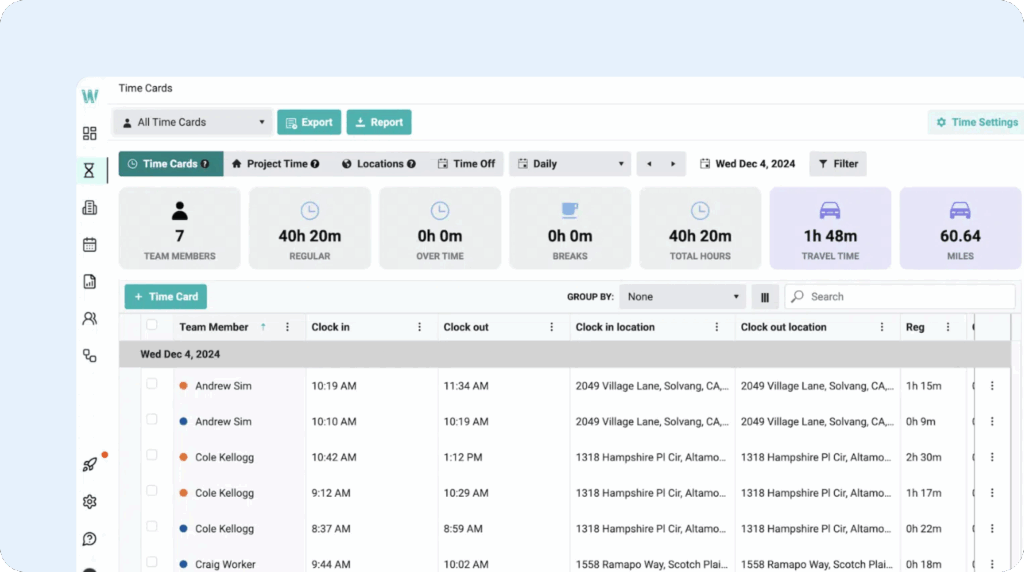
Workyard is built specifically for construction companies and general contractors. In addition to some of the features other apps on this list have for field employees, such as GPS tracking, job costing, and mileage tracking, Workyard also offers construction-specific features like equipment usage tracking forms, real-time field reports, and digital safety checklists.
Once your crew members clock in for the day, Workyard will start tracking their time, mileage, and locations automatically. You’ll be able to see where all employees are located at any time on a map and can view breadcrumb trails of their movements throughout the day.
With automatic project time tracking, available on Workyard’s Enterprise plan, you can also automate job costing. It uses employee location data combined with geofences that are tied to job codes to log any time spent at specific job sites to the projects connected to those locations. Employees don’t have to remember to change projects when switching jobs, and you get more accurate data to use for invoicing clients.
Crews can keep the office up to date directly from Workyard’s mobile apps. They can fill out project update forms, complete safety checklists, submit incident reports, send project progress photos, and even submit expenses with photos of receipts. You can also keep track of equipment by having crews log equipment usage hours and report any issues they experienced.
When it comes to payroll, Workyard integrates with platforms like ADP, Gusto, Paychex, Rippling, Paylocity, Paycor, and more. Additionally, it integrates with many construction-specific tools, such as Foundation Software, ComputerEase, Sage 50, Sage 100 Contractor, Sage 300 CRE, and Sage Intacct.
Pros
- Construction focus makes its features more targeted for the way construction companies work
- One of the few time tracking apps that integrates with construction-specific software
Cons
- Many of the platform’s best features are in its Enterprise plan, which doesn’t have published pricing
- The platform is only accessible if you and all of your employees are located in the U.S.
Pricing
Free trial available. View Workyard’s current pricing.
4. Timeero – Best for offline tracking

Timeero’s feature set is very similar to QuickBooks Time and Workyard. You get real-time GPS and mileage tracking on every plan, and there are add-on options for automatic project time tracking. Depending on what features you need, it can be less expensive than the other mileage-tracking options; its Starter plan starts at $5/user per month, though you can only use it for a maximum of 10 employees.
Timeero has mobile apps for Android and iPhone devices that make it easy for your team to clock in and out using their phones. They can report any incidents or delays so you have a record of why things took longer than expected, and they can also log materials or tools they used so you can keep track of inventory. Additionally, you can upload job site inspection checklists and other documents to the app.
With real-time GPS and mileage tracking, you can review an employee’s routes and verify when they started and finished visiting job sites. The app also automatically generates mileage logs for your records, which can be exported into QuickBooks and several payroll systems. Timeero even lets you record which company vehicle an employee used to make vehicle maintenance simpler.
Timeero’s standout feature is offline tracking. If employees are working at rural job sites with no internet or cell phone signal, they can still use the app to clock in and out. Once they’re back online, the system will sync automatically so you don’t lose any data.
With Timeero’s segmented tracking add-on, you can track project time automatically like you can in Workyard. To get it to work, you start by creating geofences and connecting those geofences to specific jobs or projects. Employees clock in once at the beginning of the day, and the system will automatically attach time spent at specific locations they visited throughout the day to the applicable jobs or projects.
Pros
- A low-cost option for teams of 10 or fewer who need mileage tracking
- Automatic project time tracking is available, though with an additional add-on cost
Cons
- Lowest-cost plans have a limit on how many employees can be added
- Many must-have features are only available in higher-cost plans or sold as add-ons
Pricing
Free trial available. View Timeero’s current pricing.
Learn more about Timeero
- Read our in-depth Timeero review
5. FieldServicely – Best for defining travel routes

FieldServicely has a similar feature set as Buddy Punch, though its base plan price is more than double the cost. It lets employees clock in and out using mobile apps, tracks their locations in real-time using GPS data, and lets you require employees to take selfies when clocking in and out to prevent buddy punching. However, unlike Buddy Punch, it does offer online tracking for areas with no cell phone signal.
Where FieldServicely stands out from the other apps on this list is with its route optimization feature. If your team travels to multiple job sites over the course of the day, you can simply enter those locations, and the app will automatically find the best possible route for you. It also provides employees with directions — in Google Map style — so they can easily follow the routes you set up for them.
If a call comes in for an emergency service, you can see all of your employees on a map to determine who’s closest to the location, then you can create a route for them using route optimization so they know the best way to get there. This can save you a significant amount of time and money: more optimal routes get employees to jobs quicker and in fewer miles, saving you on labor costs and vehicle maintenance.
Another interesting feature of FieldServicely is that the application can be self-hosted. While most field services teams don’t have the technical support they need to self-host an application, it’s a great option if you do have full-time IT support and want to retain control of all of your employee and client data.
FieldServicely’s scheduling tool is built for field services teams, making it easy to assign technicians to work at multiple job sites throughout the day. It also has a dispatching feature if you have idle crew members; you can send them a new job immediately as soon as a call comes in. You’ll be able to see locations and skills directly in the scheduling and dispatching interfaces to get the right person to the job.
Pros
- Route optimization lets you develop travel routes that use the least amount of time and mileage
- A free plan is available, though the features you get access to are very limited
Cons
- Though you can dictate routes, the platform doesn’t offer mileage tracking
- If you don’t need the route optimization feature, the platform is pricey for the features you get
Pricing
Free plan and trial available. View FieldServicely’s current pricing.
6. Jobber – Best all-in-one field service platform

If you’re just looking for a time tracking tool, Jobber won’t be right for you. However, if you want to redesign how your entire business runs, it’s a great choice. Jobber is a complete field services platform. From lead management and payment processing to employee scheduling and time tracking, it has features that help you manage every aspect of your field services business.
To start, Jobber will generate a complete website for your business that you simply need to edit as needed and publish to help customers find you online. There are built-in marketing campaigns to help you acquire more customers and get more online reviews, plus reports to show you which campaigns are having the biggest impact on your bottom line. Customers can fill out a form on your website to get in touch with you.
New leads are automatically added to the platform’s CRM. You’ll be able to see all of your requests in one place, build automations to send emails or text messages to leads automatically, and send quotes to clients that they can sign electronically. You’ll also be able to see your pipeline — the amount of revenue you currently have booked — and you can communicate with clients via SMS or emails through the Jobber platform.
Once you have quotes approved, you can use Jobber’s scheduling system to get your crew to the right places. You can assign employees to work specific jobs, quickly find a time for a new job based on how long it will take and employee availability, and generate optimized routes your employees can take to get from job to job more quickly (similar to FieldServicely).
When it comes to time tracking, Jobber handles it automatically like Workyard and Timeero. Employees clock in once at the beginning of the day, then the platform uses GPS tracking to determine when they arrive at and leave specific job sites. That time is automatically connected to your projects so you can see if you’re running over budget for the work. Finally, you can send clients invoices that they can pay online.
Pros
- The all-in-one platform lets you manage every aspect of your field services business
- Automatic time tracking means you don’t have to rely on employees remembering to switch projects
Cons
- If you just need time tracking software, Jobber will be too robust and expensive for your needs
- The platform is designed for smaller teams; its plans max out at 15 users
Pricing
Free trial available. View Jobber’s current pricing.
7. Optsy – Best for corporate field services companies

Optsy is the Jobber for large field services companies. Jobber’s plans max out at 15 users; it’s designed for small teams. Optsy, on the other hand, has the features you need to manage a major national field services brand with dozens, hundreds, or thousands of employees and customers. It can also be self-hosted on premises, which is great for teams with IT support that want to manage their own data.
Once a technician is scheduled for or dispatched to a job, Optsy starts tracking their time automatically — no manual clock-in required. Travel time, job start, and job completion are all logged in real time as the technician moves through their day. From the mobile app, they can also clock in and out manually at job sites, take breaks, and switch between tasks, projects, and clients with a tap.
What makes Optsy different is that time can be tracked against equipment. For example, a HVAC company can tie work time to specific air conditioner units and models, helping them understand how long diagnostics, repairs, and maintenance take for that unit. This data is extremely helpful for estimating future jobs. If you know what equipment a customer has and how long repairs take, you can estimate accurately.
Beyond time tracking, Optsy includes scheduling and dispatching with a drag-and-drop interface, so you can assign jobs and see technician availability in real time. Real-time GPS lets dispatchers see where every technician is and assign the nearest available person to new jobs. It also has inventory tracking, letting you assign parts and materials to specific jobs, manage restocks, and avoid stock shortages.
All of this data flows into Optsy’s reporting engine, where you can build custom reports on technician performance, project profitability, and labor efficiency, plus drill down into individual jobs, time entries, or assets. The one downside is that the only pre-built integration Optsy has is with QuickBooks. For all other payroll systems, you’ll have to download time reports or use Optsy’s API to create a custom integration.
Pros
- Built for scale: handles large, multi-location operations better than most others on the list
- Being able to tie work time to equipment helps you create more accurate future estimates
Cons
- Pricing is not published; you have to talk to sales to get a quote
- No pre-built payroll integrations
Pricing
No free trial offered. Contact Optsy for pricing.
Choosing the best field service time tracking software for your business
Finding the best time tracking software for your field services team comes down to what matters most for your business.
If you’re working with a tight budget, Buddy Punch gives you the most features for the lowest cost. If you’re already using QuickBooks for payroll or invoicing, QuickBooks Time will fit right into your existing workflow. Construction companies will get the most value from Workyard’s industry-specific features, while teams working in areas with spotty cell service should look at Timeero’s offline tracking.
If your crews are constantly on the move between job sites, FieldServicely’s route optimization can save you time and mileage. And if you’re looking to manage more than just time tracking — scheduling, invoicing, marketing, and client management — Jobber or Optsy are worth a look, with Jobber better suited for smaller teams and Optsy built for larger, multi-location operations.
Whichever option you choose, most of these tools offer a free trial, so you can test them out with your team before committing. Start with the one or two options that best match your priorities, and see which one best fits the way your crews actually work in the field.

