

The 5 Best Absence Management Software in 2026

Written By: Kristina Proffitt
Last Updated February 19, 2026
Managing absences through email chains, spreadsheets, or messages may seem fine. But day-to-day, these disconnected systems make it hard to find information and can lead to scheduling gaps, employee frustration, and serious payroll errors.
Absence management software can be the perfect fix, but many options fall short for small and medium-sized businesses (SMBs). Most aren’t built to handle hourly teams, shift work, or multi-location coverage. And some platforms have the opposite problem: They’re too complex for what you really need.
So, where’s the sweet spot? I’m here to show you with this guide to the five best absence management software for SMBs in 2026.
Methodology: How I chose the best absence management software
To create my list, I evaluated each absence management tool using the following criteria:
- Leave types and policy flexibility: Can it support different types of paid time off (PTO), including vacation, sick, unpaid, partial-day, bereavement, and custom leave?
- Accruals and carryover: Does it offer automatic leave calculations and track policy changes?
- Approval workflows: Is it easy to approve absences? And which users are allowed to do this?
- Visibility and scheduling impact: Does the software offer team calendars and alerts for conflicts caused by absences?
- Employee experience: How fast is it to request leave, and can employees check their balances and leave statuses?
- Time to set up: How quickly can you get to know the tool and start using it?
- Ease of use: Is navigating the software simple and intuitive?
- Reporting: What data does the tool collect on employee absences, if any?
- Mobile app: Can employees use it when out in the field, or do they need to be on a desktop?
- Calendar sync: Does it sync with their existing calendar?
- Payroll: Does it integrate with payroll, or does it have a built-in payroll tool?
The best absence management software: Quick comparison
| Buddy Punch | edays | Personio | Connecteam | Absentify | |
|---|---|---|---|---|---|
| Best for | Best overall | Global businesses | Additional HR features | Built-in task management | Microsoft 365 users |
| Multi-user free plan? | Yes | No | Yes | Yes | Yes |
| Prices start at | $19 base fee + $4.99/user/month | Contact for price | Contact for price | $29/month (up to 30 users) $0.80/month per additional user | $1/user/month |
| Mobile app | Yes | Yes | Yes | Yes | No |
| Absence and PTO tracking | Yes | Yes | Yes | Yes | Yes |
| Approval workflows and visibility | Yes | Yes | Yes | Yes | Yes |
| Reporting and payroll readiness | Built-in Payroll or Integrations | Integrations | Integrations | Integrations | No |
The top 5 absence management software solutions
Below, you’ll find my detailed reviews of my five favorite absence management apps for employers, including details on each tool’s unique features and its pricing.
1. Buddy Punch: Best all-around absence management software
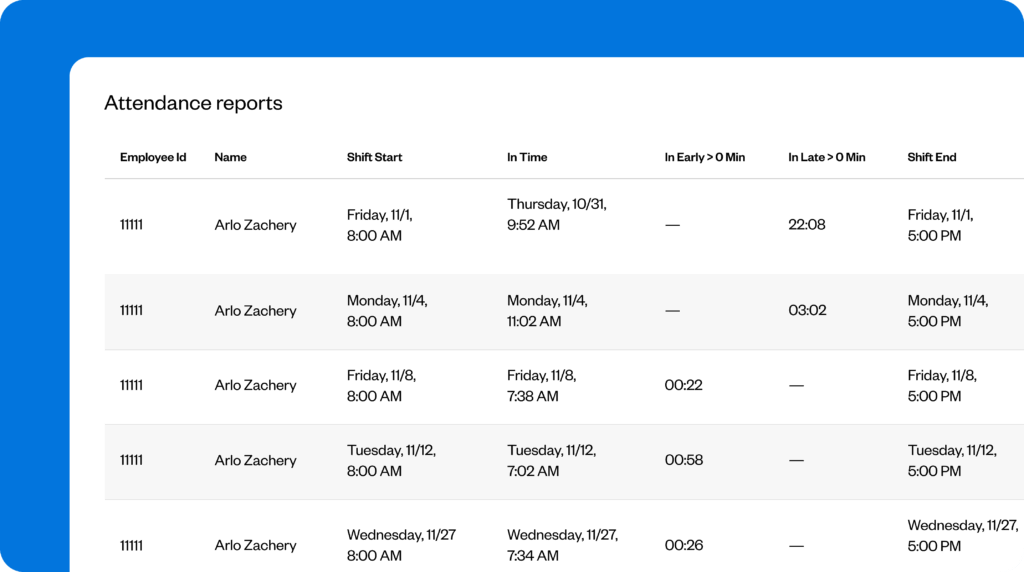
Buddy Punch is best known as a time tracking and payroll tool, but it also handles the full absence workflow — from policy setup and employee requests to approvals, balances, and reporting.
Key features
- Custom absence types
- Configurable PTO policies
- Automatic PTO calculations
- Clear approval workflow and request status visibility
- Mobile app for on-the-go absence management
Pros
- Very intuitive for both managers and employees
- Syncs with payroll software
- Strong PTO summary reporting for audits and payroll prep
Cons
- Calendar views are somewhat limited compared to other platforms
Why I chose Buddy Punch: The platform handles the day-to-day realities of absence management well. Employees can request leave quickly and easily; managers can request it without jumping through hoops; balances stay accurate; and upcoming absences are visible enough to prevent scheduling issues.
Let’s take a closer look at Buddy Punch’s capabilities for absence management.
PTO policy setup and leave types
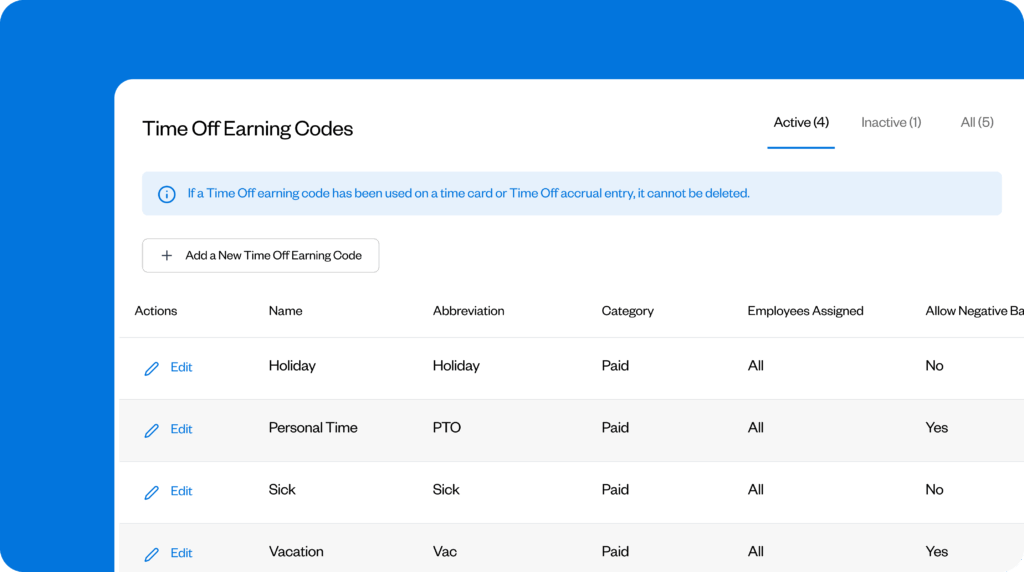
With Buddy Punch, you can create multiple leave categories and define how each behaves. There are options for standard leave — such as vacation, holiday, personal, and sick leave — and custom leave types, including volunteering, training days, and bereavement leave.
You can mark any leave type as paid or unpaid, which helps keep records consistent for payroll and reporting purposes.
Ease of use
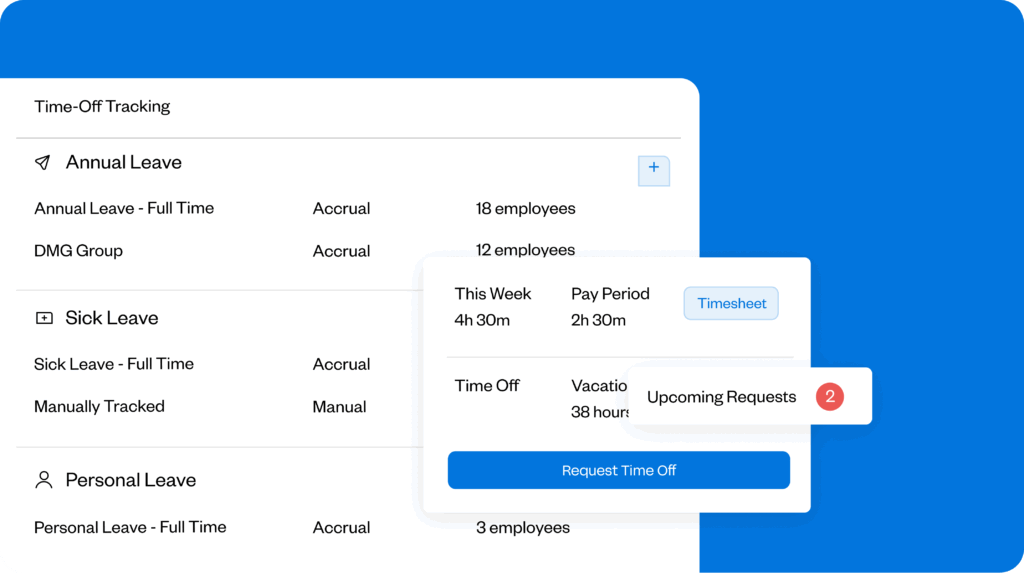
One thing that struck me was how intuitive Buddy Punch is from the moment you log in. Absence requests, balances, and approvals are easy to find, clearly labelled, and quick to action.
Many tools with so many features often require in-depth tutorials to get to grips with them, but not Buddy Punch. I can imagine this being particularly beneficial for time-poor managers and HR teams who want to better manage employee absences without learning a new app eating into their day.
As you’re getting to know the tool, a pop-up also offers to help you set things up if needed.
Fully customizable calendar
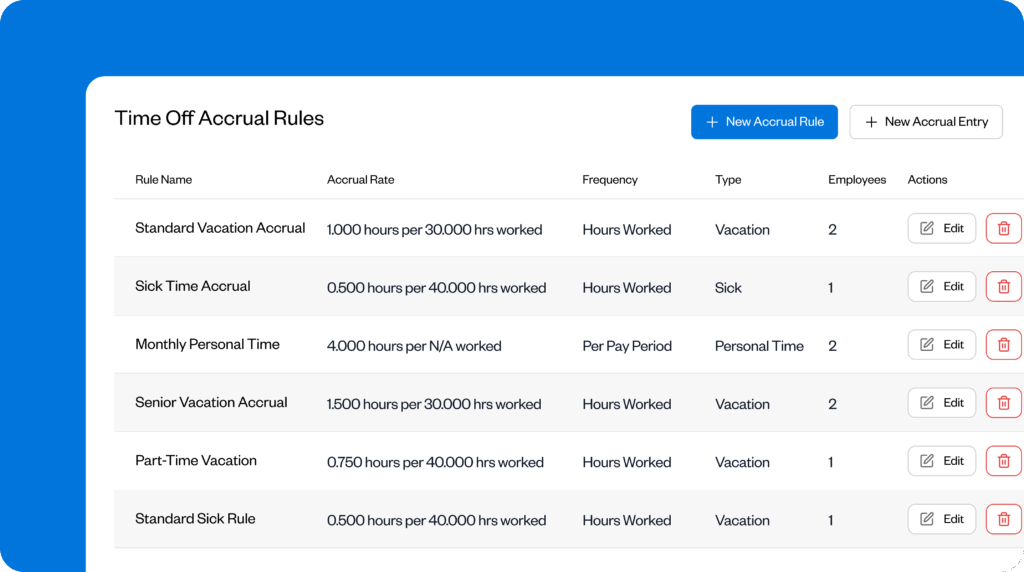
Every business has unique needs for absence management. Whether that’s company-wide blackouts where you need all hands on deck, special occasions, volunteer days, or something else.
Buddy Punch includes a fully customizable calendar. So, for example, if you have bereavement leave, you can create a custom time-off code for that, then mark it as paid or unpaid. This is perfect for companies with many employees across different locations or with complex handling of different types of days off.
You can also assign those types of days off to particular teams, so if one team has different codes from another, that’s totally fine.
Employee schedule visibility
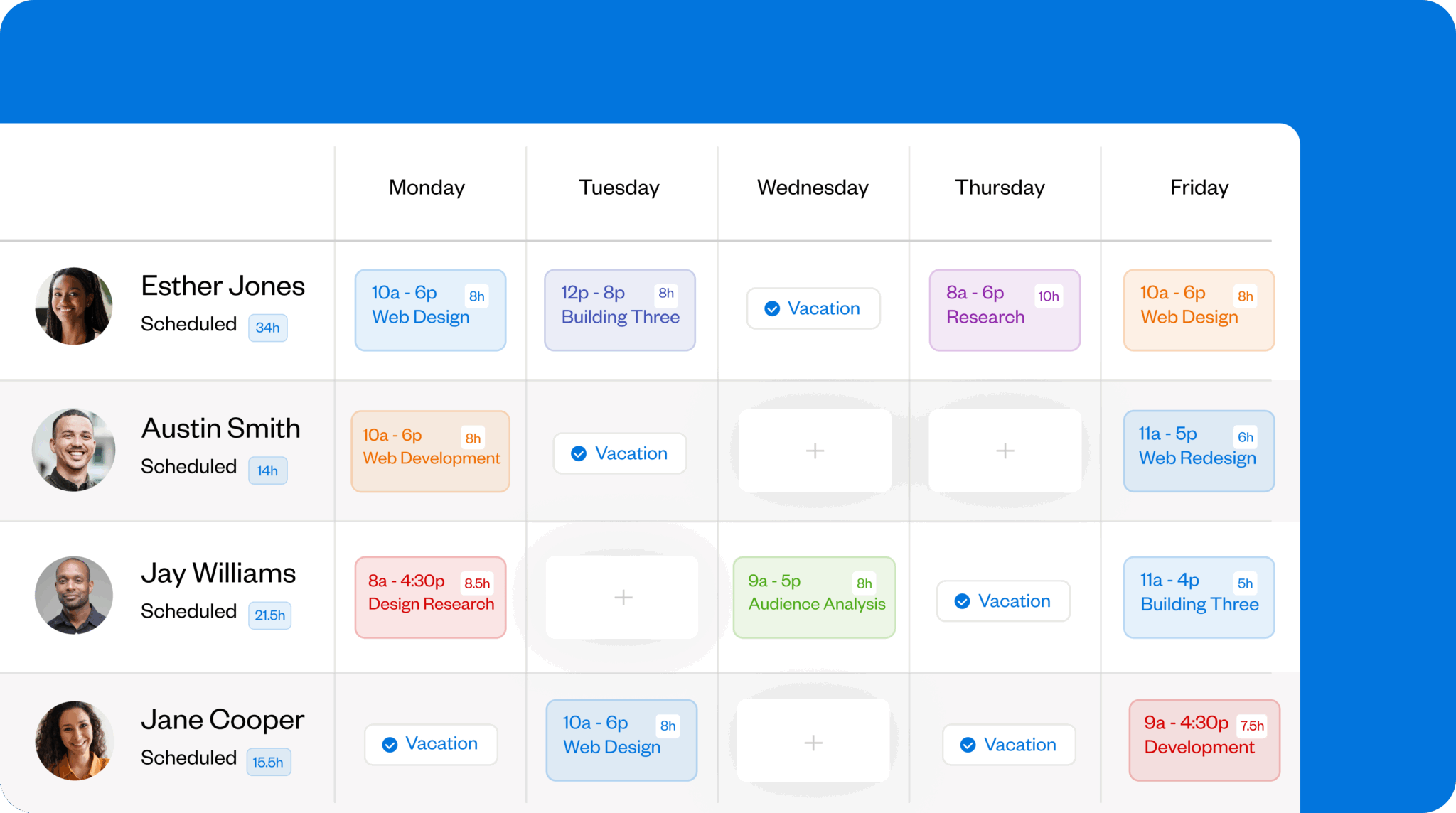
If someone is off sick, they’ll get a reminder if they punch in late. Being able to choose how you send the reminder — email, push, or both — ensures employees will see it in a way that suits them and your business.
This reminds them to mark that day as a day off, keeps data reliable, and makes payroll easier by ensuring the most accurate data. This accuracy gives managers greater visibility into employee schedules, allowing them to identify absence patterns before they become problematic. With such accurate data, you also get fewer disputes because there’s a reliable record to fall back on.
Shift-based working
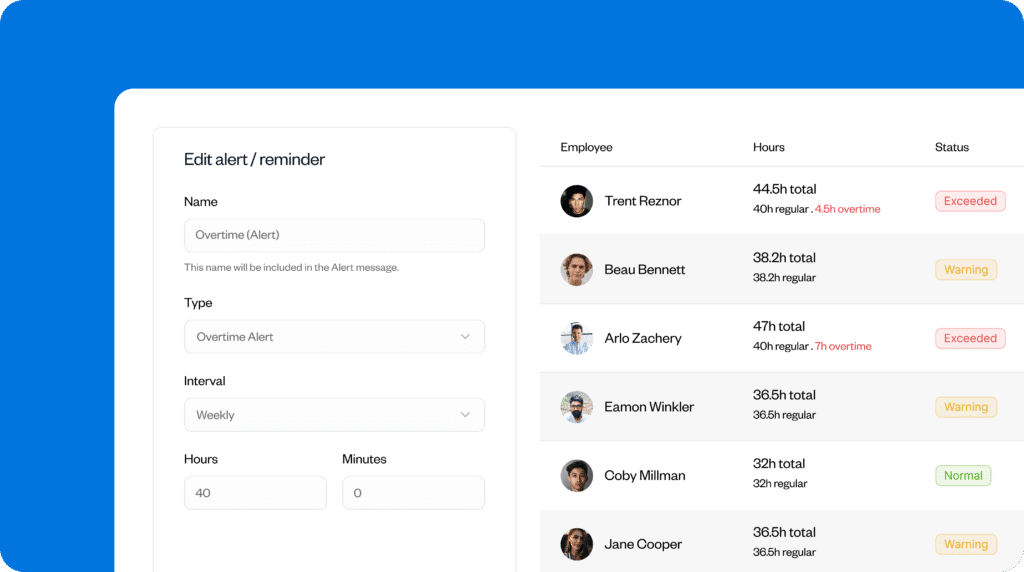
If you’re used to dealing with hourly or shift-based employees, clocking in can become complex. Buddy Punch covers features such as punch rounding, punch limiting, and overtime tracking, so you get clear visibility into when employees actually worked. This means that you can see what days off employees have accrued based on overtime worked, or any overtime pay they may be entitled to.
Integrations
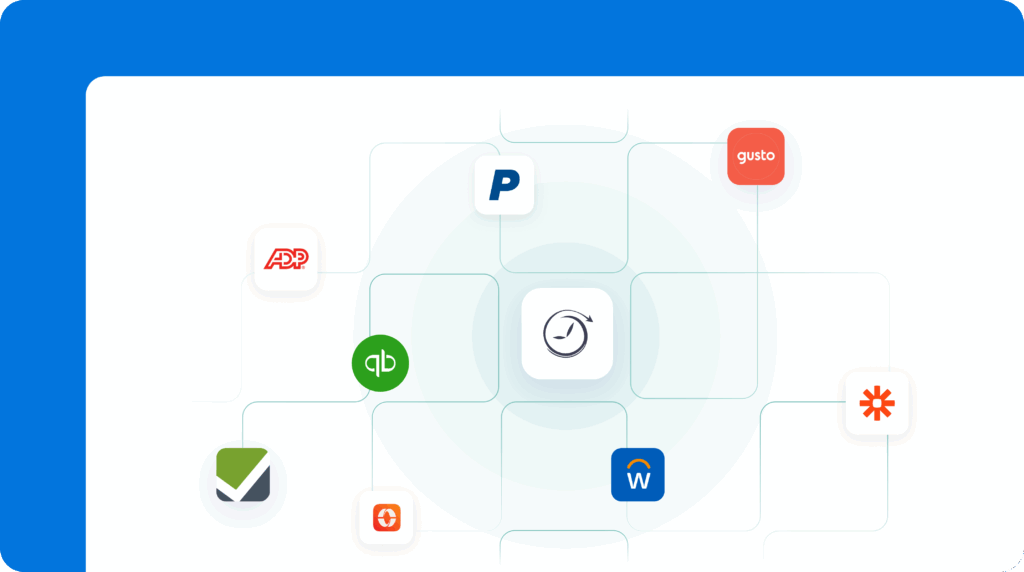
Buddy Punch integrates with apps including QuickBooks, ADP, Workday, and Zapier. It has 22 integrations in total, including Zapier, which is fewer than some other apps.
However, with the Zapier integration and Buddy Punch’s own functionality — for instance, it can also handle payroll — you have everything you need for absence management and the most complex parts, such as shift management, PTO calculations, and payroll.
Pricing
All Buddy Punch plans include a $19 monthly base fee.
BuddyPunch’s Starter Plan begins at $4.99 per user per month. Its Pro Plan includes everything in the Starter Plan, plus additional features such as QR Code Scanning, for $6.99 per user per month. Its Enterprise Plan is $12.99 per user per month.
Buddy Punch user reviews
“The software is very easy to use, which I appreciate. I especially like the vacation tracking features, as they make managing time off much simpler.” – Nikki Brown
“You can see when your employees are sick or taking vacation. It’s great! I don’t know what we would do without the BuddyPunch app.” – Tammy M.
Learn more about Buddy Punch
- Start a free trial — no credit card required
- View pricing
- Watch a video demo
- Take an interactive product tour
- Request a personalized demo
2. edays: Best for global businesses
Edays is an absence management platform that handles HR documents alongside leave requests. It has a UK/EU focus, including features that help businesses comply with EU regulations such as the EU Working Time Directive, but it can work for U.S.- or global-based businesses.
Key features
- Leave booked in days or hours
- Automatic carryover and accruals
- Country-specific templates
- Leave authorization chains
- Return to work support
Pros
- Clock out via mobile, desktop, or a printable QR code
- Integrates with existing HR tools
- Well-rounded sickness management
- Customize when the leave year starts
Cons
- Time and attendance tracking cost extra
- No free trial
What edays offers: Edays offers more out-of-the-box features than some of the other options on this list, including more types of leave and the ability to adapt to different countries’ regulations.
Country-specific regulations
Every country has different regulations around how much leave employees are entitled to for different situations. Edays can calculate accruals and round hours based on these rulings.
Users can also use edays to ensure employees take adequate breaks and cap weekly working hours.
Sickness management
Edays offers sickness management options that include well-being advice, return-to-work processes, Bradford Factor tracking, and open-ended absences. This wasn’t a built-in feature I noticed on other platforms, but it could be added manually to some of them.
Mobile app for end users
Employees can use the mobile app to request leave, manage overtime, and view group calendars. The mobile app is available on iOS and Android devices.
The mobile app is designed for end users, which means some features, such as absence reporting, are exclusive to the web app.
Pricing
Contact vendor for price.
What users say about edays
“The app is great for all our staff to easily book holiday and see who is off every day.” Yvonne T.
“Using the tools as an administrator can sometimes be complicated and unclear. Some processes are complicated and require help needed from the support desk.” – Ellie B.
3. Personio: Best for additional HR features
Personio is an HR platform that manages all aspects of HR, from recruitment through offboarding and everything in between.
Key features
- Data-driven absence reports
- Custom leave policy templates
- Create automations for approval requests
Pros
- 200+ integrations
- Automatically calculates vacation days
- Handles other aspects of HR, such as recruitment and employee surveys
Cons
- Long implementation period
- May be too complex for smaller teams
- No pricing without demo
What Personio offers: I chose Personio as an option for businesses that want leave management as a part of their HR software suite, rather than as the only feature.
Color-coded absence calendar
Personio has a color-coded system that makes it easy for managers to understand employee absences at-a-glance. It also includes custom leave policies for several countries that businesses can adapt to their own needs. If a business wanted to use it solely for this purpose, it could make the setup faster. However, the other features within the tool may slow it down.
Automatically calculates vacation time
Personio can automatically work out how many holiday days an employee is entitled to. Employees can then log in to see how much time they have left to use.
Admins can also create automations for tasks such as approval requests.
Custom policies
Since Personio is an all-in-one tool, businesses can use it to manage a range of HR processes. However, this may make the platform too complex for companies that need only absence management software.
I found the dashboard more challenging to navigate than some of the other tools on this list — it often required more steps to perform simple tasks, such as adding a new leave policy. This wasn’t because of its additional functionality; some aspects just weren’t laid out as intuitively.
Many features are also only available on its more expensive Core Pro plan. For example, on the basic Core plan, time tracking is limited to one legal entity, and workforce planning features aren’t included.
Price:
- Contact for pricing
- Free trial? No
What users say about Personio
“I like the team calendar a lot; it helps me check other colleagues’ attendance. The time off and attendance feature is also great because it helps me track my time and plan future holidays. As a user, everything works smoothly, and I find the initial setup very easy.” – Jebbari G.
“I noticed that whenever I want to look into the time off and attendance tab and see who is off today, I can search for the name but I need to go through the list of employees.” – Cosmin J.
4. Connecteam: Best for deskless teams
Connecteam is designed to help businesses manage a deskless workforce.
Key features
- In-app chat with read receipts
- Custom pay and break rules depending on location
- Visualize timesheet issues
- Time off calculations are automatic
Pros
- Conflict alerts
- In-depth customer support
- Easy to use
Cons
- Optimized for Google Chrome
- Doesn’t automatically sync with payroll
- Interface reviews are mixed
- Requires a mobile number for setup
- Slow to load
What Connecteam offers: Connecteam can automatically calculate an employee’s PTO and alert admins to PTO conflicts. Setup is easy, and it offers a range of additional team management features.
Timesheet “issues” column
Admins get visibility into timesheet issues, such as pending requests and potential conflicts, in one place. They can also lock timesheets to prevent anyone else from editing them if they notice anything that requires investigation or verification. This can prevent too many employees from taking time off at once.
Customize leave calendars and pay rules
Businesses can customize when their leave period starts and ends, and if an employee doesn’t use all their leave during the year, their PTO is carried over to the next year.
In Connecteam, you can also customize pay and break rules based on an employee’s or team’s location.
Pricing
- Starts at $0/month up to 10 users. Paid plans start from $29 for up to 30 users
- Free trial available: Yes — free for up to 10 users for life
What users say about Connecteam
“The support and customer service provided when needed are excellent. Like with any new app, it takes some time to get used to, the scheduling feature is brilliant.” – Sarah A.
“Although many find the platform intuitive, some users say the interface can be difficult to navigate, particularly for new or less tech‑savvy employees. This may slow down onboarding or daily adoption.” – Verified User on G2
Learn more about Connecteam
- Read our in-depth Connecteam review
- Compare Buddy Punch vs. Connecteam
- Discover the best Connecteam alternatives
5. Absentify: Best for Microsoft 365 users
Absentify is a vacation and absence management tool that integrates with Microsoft 365.
Key features
- Calendar sync
- Microsoft 365 focused
- Azure AI integration
Pros
- Fast implementation
- Minimal maintenance
- Manage everything from within Microsoft 365
- GDPR and ISO 27001 compliant
Cons
- Web-app based if you don’t use Microsoft 365
- No overtime management
- Doesn’t integrate with non-Microsoft tools
- Doesn’t integrate with payroll
What Absentify offers: Users comment on how easy Absentify is to use and how minimal the maintenance required is. However, because it’s designed for Microsoft 365, users without Microsoft 365 access have limited functionality.
Microsoft 365 integration
Absentify integrates with existing Microsoft 365 tools, syncing automatically with Teams, Outlook, and Microsoft Calendar. This means there’s no separate app to install or learn; absences can be viewed and managed from within the existing Microsoft Suite.
For those who don’t use Microsoft 365, Absentify is still usable but only as a standalone web app. It recommends that when users first sign up, they should “use Microsoft 365 for the best experience.” It allows users to connect later in the settings.
App synchronization
Recorded absences automatically sync across tools, from Teams to Outlook. That means it’s easy to see who’s absent and when. However, calendar sync is only available on the Plus plan.
Absentify can automatically send out-of-office emails so employees don’t have to remember to turn them on. Admins also have the option to create a generic out-of-office email to use across the organization.
To ensure employee privacy, the reasons for employee absences can be kept private.
Azure AI integration
Absentify offers Azure AI integration with the Plus plan. This is designed to help with absence tracking, but without switching to a paid plan, it isn’t clear how the AI supports this.
Pricing
- Free plan available for up to two departments and unlimited users
- Plans start from $1 per user per month plus tax
Absentify charges for data based on all users, including archived ones, to ensure data accuracy. This could quickly push the price up for smaller teams.
What users say about Absentify
“Absentify allows me to manage my colleagues’ leave very easily. Practical and intuitive to use. Quick setup as it is integrated with Microsoft Teams and Microsoft 365.” – Stephane L.
“Absentify cannot integrate into other platforms in the same fluid way that we use them. For instance, we need to manually key in information from Absentify to our payroll system, which not only increases the workload but also exposes our data to errors.” – Siwapong R .
The benefits of absence management software
When you adopt the right absence management software for your company, you can experience a range of benefits, including:
Better visibility into absences
With a leave management tool, managers can see when employees are in the office and how long they’ll be away for. This reduces scheduling gaps or overlaps, ensuring there are always enough people to complete tasks.
Improved payroll accuracy
When your absence records are consistent and centralized, it reduces the effort required to log employee hours and improves payroll accuracy. Every employee gets paid fairly. You also save money because payroll is processed faster.
Fairer, more consistent application of time-off policies
Many platforms integrate time-off policies with time-off requests. This helps ensure employees understand the rules before making their leave request.
Less admin work
Say goodbye to spreadsheets for absence management. When you automate your employee absences using software, you reduce the administrative tasks your managers need to do. So then they’ve got more time to support employees in other ways.
If the leave management software also integrates with payroll tools, it further reduces admin tasks and the chances of manual errors.
Fewer disputes
Clear, auditable absence histories reduce the risk of disputes because employees and managers can see their previous absence records.
Improved workforce planning
When you can clearly see who’s around and when, it means you can plan for absences more easily. You can also spot employee absence patterns, enabling you to take a more proactive approach to addressing them.
FAQs
What is absence management software?
Businesses use absence management software to track employee leave. Managers can approve or deny paid or unpaid time off, such as sick days, well-being days, and, on some platforms, custom days off like volunteering days. Some tools can also calculate how many days off employees are entitled to based on the hours they’ve worked.
Which attendance software is best?
The best attendance software will depend on your business’s size and needs, but if you want a flexible option, take a look at Buddy Punch. It helps businesses to manage their workforce, whether they’re office-based, in the field, remote, or hybrid. It can handle everything from absence management through to payroll, meaning it can grow as your business grows.
How do you keep track of employee absences?
Many small businesses manage employee absences with spreadsheets or email, but as the business scales, this approach can become confusing and impractical. Absence management software ensures all employee absence data is stored in a single, easy-to-access location. This then improves data accuracy and reduces conflicts around time off.
Many leave management tools also sync with calendars such as Outlook and Google, ensuring teams can see their colleagues’ availability without logging in to the app.
What’s the difference between absence management and PTO tracking?
The difference between absence management and PTO tracking is that PTO tracking focuses solely on paid time off, whereas absence management also includes sick leave, unpaid leave, and other leave types.
The bottom line on absence management software
Manual absence management might work for a short time or for small teams, but it’s not scalable. The right tool can help significantly reduce the risk of no-shows, last-minute covers, scheduling gaps, and other issues by offering complete visibility, consistency across teams and businesses, and payroll-ready data. (Some can even handle the payroll for you!)
Buddy Punch is a versatile absence management tool that works for field, remote, office-based, and hybrid teams. Its user-friendly design makes it easy for anyone to use, and the ability for employees to use it on the go helps maintain data accuracy.

