

The 9 Best Payroll Software for Landscaping Crews

Written By: Mark Fairlie
Last Updated July 15, 2026
Landscaping payroll is complex. Your crews work in the field across dozens or hundreds of job sites. And even when you get timesheets to the office admin on time, it’s hard to know if they’re accurate.
To help you simplify payroll, we’ve put together this list of the nine best payroll software options for landscaping businesses. Below, you’ll find my detailed reviews, including what types of landscaping businesses each option is best for, what unique features they offer, and how they compare on price.
| Platform | Best For | G2 Rating | Base Fee | Starting Price |
| Buddy Punch | Combining time tracking with payroll | 4.8/5 | $68/month | $12.99 per user per month |
| Patriot Software | Simple, affordable payroll | 4.8/5 | $17/month | $4 per worker paid per month |
| Paychex Flex | English- and Spanish-speaking crews | 4.1/5 | Contact for pricing | Contact for pricing |
| Fingercheck | Multiple ways to pay employees | 4.7/5 | $79/month | $10 per employee/ per month |
| ADP RUN | Handling workers’ comp | 4.7/5 | Contact for pricing | Contact for pricing |
| OnPay | Paying employees and contractors | 4.8/5 | $49/month | $6 per worker per month |
| Aspire | Larger landscaping businesses | Not yet reviewed | Contact for pricing | Contact for pricing |
| QuickBooks Payroll | Linking accounting and payroll | 4.4/5 | $88/month | $7 per employee per month |
| Gusto | Seasonal crew payrolls | 4.6/5 | $49/month | $6 per person per month |
1. Buddy Punch – Best for combining time tracking with payroll
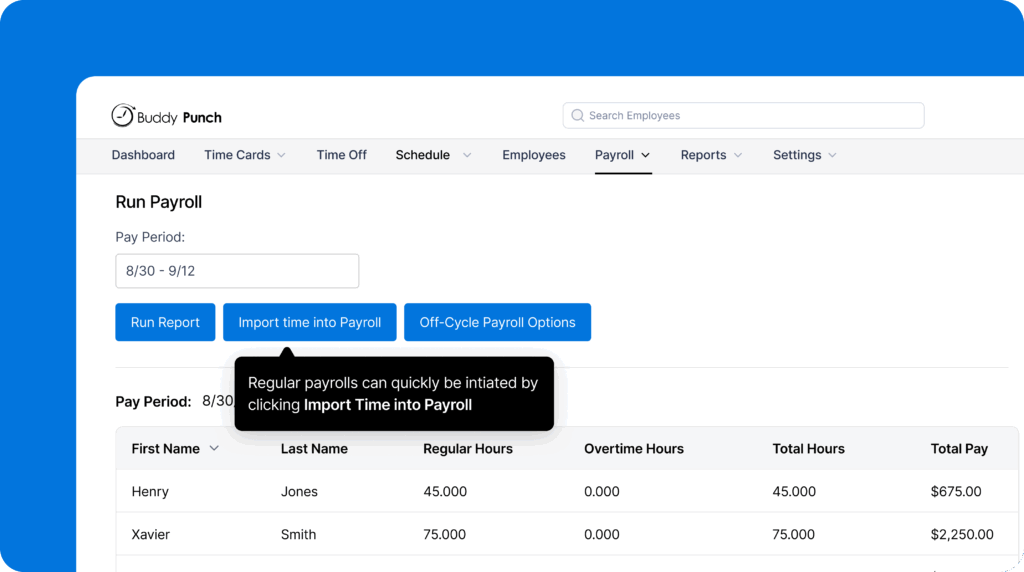
Buddy Punch saves your admins a lot of time by connecting time tracking to payroll. You’ll no longer have to download spreadsheets from your time tracking tool, reformat them, and upload them to your payroll software. Instead, your employees simply clock in and out using Buddy Punch’s mobile apps, that data is transformed into timesheets in Buddy Punch, and you simply import those timesheets into payroll.
With Buddy Punch, employees can clock in at a central time clock kiosk if they come to the office to pick up equipment before going out in the field. If they don’t need to come to the office for anything but clocking in, you can reduce your labor hours by letting them clock in and out from the field with Buddy Punch’s mobile apps. The mobile apps display in English by default but can be fully translated into Spanish too.
When employees clock in and out from the field, there are multiple ways to prevent time theft. You can require them to take a selfie when clocking in to prevent buddy punching, create geofences around your job sites to prevent clocking in and out before or after arriving at job sites, or see exactly where employees traveled over the course of the day with real-time GPS tracking.
If your state requires employees to take specific breaks, you can set up break tracking in Buddy Punch. It alerts employees when it’s time to take a break and prevents them from clocking back in before the required break duration has passed. At the end of the week, employees can submit their timesheets to their managers for approval, and timesheets can be edited if needed before payroll is run.
When it’s time to run payroll, you simply click a button to import your timesheet data into Buddy Punch. Regular hours, overtime hours, and pay are all automatically calculated for you. Buddy Punch can be used to pay both W-2 employees and 1099 contractors, employees and contractors can be paid via check or direct deposit, and two- or four-day payroll processing is available.
Buddy Punch also lets you create employee schedules and track PTO. You can set up recurring shifts, add locations to schedules, and let crew members request shift trades or covers that are delivered to managers for approval. PTO tracking lets you calculate PTO balances automatically with accruals by hours worked, pay period, or annually, and used PTO is added to timesheets automatically.
Pros
- Get time tracking, scheduling, PTO tracking, and payroll all in one system.
- There are multiple customizable features for preventing time theft and reducing labor costs.
Cons
- You must sign up for a time tracking plan to use the payroll feature.
- Payroll is only available for employers in the U.S.
Pricing
Free trial available. View Buddy Punch’s current pricing.
Learn more about Buddy Punch
- Start a free trial — no credit card required
- Watch a video demo
- Take an interactive product tour
- Request a personalized demo
2. Patriot Software – Best for simple, affordable payroll

Patriot is ideal for smaller, cost-conscious landscaping businesses that have one or two office workers who handle payroll alongside other tasks like sending out invoices, placing orders with suppliers, and organizing the working week.
Once an admin has collected the hours from everyone, running payroll is simple. Enter each worker’s hours and pay details and check their wages, deductions, employer taxes, and take-home pay before approving the run.
You can do unlimited runs, which is useful when someone’s hours come in late or managers send through last-minute corrections. If someone was underpaid, you can make a separate payment to cover the difference before the next payday.
I like how Patriot simplifies payroll through the employee portal. Employees can access their own paystubs, view their W-2s, update direct deposit details, and change their federal withholdings at any time. The app also lets admins pull up company payroll reports, tax filing records, tax deposit reports, and year-end forms for bookkeeping and compliance checks.
Pros
- Unlimited payroll runs mean you can get wages to staff faster, without paying anything extra, even when timesheets come in late.
- Employees can access their paystubs, W-2s, direct deposit details, and withholding forms in the portal.
Cons
- Direct deposits take up to four days, so if you want to pay staff on a Friday, you need to complete payroll work by Monday.
- Patriot doesn’t remit garnishments, insurance, retirement, or child support payments.
Pricing
No free trial offered. View Patriot Software’s current pricing.
3. Paychex Flex – Best for English- and Spanish-speaking crews

Many landscaping crews have both English- and Spanish-speaking team members. That means payroll teams need to make sure staff can check their own paychecks, deductions, direct deposit details, and tax forms without having to translate payroll information themselves.
I like how Paychex Flex provides support for both languages within the employee app so staff can review their payroll details in English or Spanish. That makes it easier for them to understand what they earned, what was deducted, where their money was sent, or whether their tax forms are ready without having to ask their manager or get in touch with the office.
Paychex also has Spanish-language support pages for tasks like direct deposit changes so employees have guidance in their own language when they need to update where their wages should be sent. That means they can handle more routine payroll tasks themselves in Paychex Flex rather than waiting for someone in payroll to explain a form.
Another useful feature is Paychex’s Pre-Check. When an employee’s paystub is ready before payday, they get an alert via the app or by text message. They can then review their withholdings, deductions, and net pay in advance, and if there’s a problem, they can report it early to an admin.
Pros
- Employees can review pay details before payday and report issues using Pre-Check.
- The mobile app provides both English- and Spanish-language access.
Cons
- Pre-Check lets staff review the check stub, but they can’t directly access the timesheet or expense records that were used.
- Spanish-language app access is helpful with routine payroll tasks, but it’s not available for all payroll questions.
Pricing
No free trial offered. Contact Paychex for pricing.
4. Fingercheck – Best for flexible employee payment options

Fingercheck is a suitable option for landscaping firms whose managers often send their timesheets in late, leaving admin rushing through last-minute checks for missed clock-outs, wrong totals, or any notes from crew leaders.
I was impressed by how Fingercheck’s Next-Day Payroll gives the office more time to complete those checks without delaying payday. On the 360 Plus plan, admin can bypass the normal 2-3 day processing time and submit payroll even one day before payday so that employees receive their wages on time.
There are two other payment options available. The first is the Fingercheck PayCard. An admin can add one for employees, or employees can request one during onboarding or from their Fingercheck account. Part or all of their wages can then be transferred to their Fingercheck PayCard, with any pending amount paid by direct deposit.
The other is Pay On-Demand. If a team member needs an advance, they can use this feature to request money before payday. The amount they receive early appears as deductions on their next regular paycheck, so the early payment is still tied back to the normal pay run instead of becoming a separate advance that the office has to track by hand.
Pros
- Get wages to staff faster with Next-Day Payroll, Pay On-Demand, and Paycard.
- Fingercheck advances Pay On-Demand payments and collects the money from you on the next pay run.
Cons
- Pay On-Demand isn’t available in all states.
- Next-Day Payroll isn’t available on every account, and it only works if you submit payroll by 6:15 p.m. the day before pay run.
Pricing
No free trial offered. View Fingercheck’s current pricing.
5. ADP RUN – Best for handling Workers’ Compensation

Crew members working for landscaping companies face a higher risk of workplace injury. That extra risk comes from crews doing physical work every day using mowers, trimmers, blowers, ladders, vehicles, and chemicals. I like how ADP links payroll to Workers’ Compensation premium payments instead of leaving it as another insurance bill for the office to track.
ADP’s Pay-by-Pay program calculates Workers’ Comp premium payments from the wages you process each pay period. That’s helpful for landscaping businesses because your roster can change throughout the year, especially during peak season when you may have more staff on the books and more overtime being worked.
Instead of making one large upfront payment based on an annual payroll estimate, you can spread the premium across the payroll cycle. This can make Workers’ Comp easier to budget for when the crew grows.
If you connect the system to a policy brokered through ADPIA, ADP’s own insurance service, the tool can also forward the premium payments to the insurance carrier so your back office team won’t have to write and track separate checks. Pay-by-Pay isn’t available with every compensation carrier though, and you need to use ADP’s payroll tax filing service to be eligible for it.
Pros
- Base Workers’ Comp payments on actual payroll data rather than yearly payroll estimates.
- ADP forwards premium payments to the carrier when you connect your payroll to a Workers’ Comp policy brokered through ADPIA.
Cons
- Pay-by-Pay isn’t available with every Workers’ Comp carrier, so it may not work with your current provider.
- You need to use ADP’s payroll tax filing service to be able to use Pay-by-Pay.
Pricing
No free trial offered. Contact ADP for pricing.
6. OnPay – Best for paying employees and contractors together

OnPay is an effective payroll app for landscaping companies with their own W-2 crews that need to bring in external contractors for specialist jobs like hardscaping, irrigation, or tree work. It lets you pay both groups from the same account while keeping employee and contractor records separate.
I was impressed by how OnPay stores each contractor’s W-9 details, payment records, and 1099 information, which is useful when someone needs to be paid for only a few jobs in the year.
This makes it simple to pay:
- Your regular employees on the normal payroll schedule
- A 1099 contractor brought in for specialist work
- Subcontractors who help finish one large installation
- Former employees who now work for you as contractors
You can include contractors in the regular pay run or make a separate run for them — for example, if someone needs to be paid before the next standard payday. I like how OnPay also offers unlimited pay runs. This means you can pay the contractor as soon as you’ve approved the work instead of holding the payment until the next scheduled run.
At year end, employees and contractors can also view and print their own forms, so your admin team doesn’t have to send copies out one by one or gather employee payroll records from one system and contractor payment totals from a separate spreadsheet.
Pros
- You can pay W-2 employees and 1099 contractors from the same payroll account.
- Contractors can be included in a regular pay run or paid in a separate run.
Cons
- Contractors doing different types of work at different rates may need separate 1099 pay items.
- OnPay doesn’t check whether the customer has paid the invoice before you pay the contractor.
Pricing
Free trial available. View OnPay’s current pricing.
7. Aspire – Best for larger landscaping companies

For larger landscaping firms, payroll prep gets complicated because finance teams have to pull hours from a number of crews, supervisors, branches, divisions, and properties. When there’s hundreds of people to pay, small errors in submissions or hours attached to the wrong branch, property, or crew can hold up the entire wage run.
Aspire helps by keeping labor hours attached to the correct job. Field managers can record paid job hours separately from paid non-job hours, such as travel, yard, or shop time. That gives the office a clearer payroll record before export instead of one total that has to be checked with a supervisor. It also makes it less likely that paid travel or yard time gets left out of the wage run.
I was impressed with how easy Aspire makes it for managers to review time records every day. Instead of waiting until the end of the week, they can make corrections and approve hours as they come in so the data reaches finance already checked.
Over the course of the week, the information payroll needs arrives in smaller, cleaner batches. Rather than becoming an end-of-week task, it becomes a daily checking task. There are far fewer errors to correct and details to confirm, meaning finance can prepare the payroll file without having to chase every branch or crew for last-minute updates.
With the final figures agreed upon, you can create an export file for your payroll provider or send payroll transactions straight to QuickBooks or Inova.
Pros
- Managers can check their team’s hours and records every day.
- The office can check if paid travel, yard, and shop time are correct before processing wages.
Cons
- Aspire prepares the hours for your payroll provider but doesn’t pay staff or file payroll taxes.
- You may need to create a custom export file if you don’t use QuickBooks or Inova.
Pricing
No free trial offered. Contact Aspire for pricing.
8. QuickBooks Payroll – Best for linking accounting and payroll

QuickBooks Payroll is ideal for landscaping firms that already use QuickBooks Online or that want to manage accounting and payroll in the same system. After each pay run, it records wages, employer taxes, deductions, and payroll liabilities in QuickBooks Online so you can see how they affect profit and cash flow.
To run payroll, add the hours a crew member worked during the period. QuickBooks Payroll then works out their wages using their pay rate. You can add bonuses, commissions, and reimbursements at this point. Then, review their gross wages and take-home amount and submit once you’re happy. Next-day direct deposit means staff get their pay as early as the next business day.
After you’ve processed payroll, QuickBooks Online records pay run totals in the chart of accounts. You can then use this data to understand:
- Profits: Run a profit and loss report to compare payroll expenses with materials, equipment, fuel, repairs, and other costs for the period. QuickBooks Online lists wages, bonuses, commissions, and employer payroll taxes as payroll expenses, so you can see how much profit remains after including staff and job costs.
- Cash owed: Run a balance sheet report to see what the business still has to pay after running payroll. This can include staff wages due now and later payments like payroll taxes, withheld taxes, and employee deductions. You can see how much cash you have to keep back in the business before paying for materials, equipment repairs, or the next payroll run.
The Payroll + Simple Start bundle lets you check overall payroll costs, payroll liabilities, profit, and cash still owed after payday. If you want to track labor costs against individual jobs or projects, you’ll need the QuickBooks Online plan with project profitability tools.
Pros
- QuickBooks automatically updates your chart of accounts after every pay run.
- See wages, employee taxes, and the dates they need to be paid for better cash flow management.
Cons
- You can see overall payroll costs only after you’ve completed the run, so you can’t change or correct the current week’s total.
- You can assign codes to wages to work out job-level profitability, but for this, you need a more expensive plan.
Pricing
Free trial available. View QuickBooks Payroll’s current pricing.
9. Gusto – Best for seasonal crew payroll

Gusto helps landscaping companies keep up with seasonal staffing changes. You might have a core team handling regular maintenance work, winter clean-ups, and smaller customer jobs. Then, during the hotter months, you may take on more staff to cover mowing, planting, mulching, and installation work.
Gusto handles these hiring and rehiring needs well. Each new employee you take on enters their own personal, tax, and payment details through the mobile app. This speeds up onboarding and saves admin time they’d otherwise spend collecting documents, bank details, and tax information, meaning you get your workers on site faster.
When the busy season is over, it’s easy to remove seasonal workers from future pay runs. I was impressed that Gusto keeps their records on the app, which makes it easier to rehire them for the next busy period. And even though you no longer employ them, ex-staff can still log in to view their paystubs and year-end tax forms, which saves you from digging out copies if they need them later.
You can also run regular and off-cycle payroll from the same Gusto account, which helps when crew numbers change through the year. This is particularly helpful if someone leaves before the next scheduled payday, or if a worker was underpaid and needs to be transferred the pending amount before the next payroll run.
Pros
- New employees can enter their own tax, bank, and personal details via the app for faster onboarding.
- Staff you want to rehire next season stay in the system, so you can reactivate their account with minimal admin work.
Cons
- Off-cycle payments, including corrections, can take two business days to reach staff.
- Admin may need to run I-9, offer letter, and profile checks before they can include someone on payroll.
Pricing
Free to try until your first payroll run. View Gusto’s current pricing.
How I chose the tools on this list
I identified 21 apps, some general and some made for field teams, to find the ones best suited for landscaping payroll. I then shortlisted nine by looking at where each app was strongest, including how well it:
- Runs payroll itself or generates approved hours that can be sent to a payroll processor
- Helps with seasonal staff, contractors, overtime, reimbursements, late fixes, and other payroll jobs common for landscaping companies
- Handles tax deposits, filings, year-end forms, and other documentation
- Gives managers, employees, and admin a way to check hours, approve corrections, view pay records, or update payroll details
I left out some apps that passed these tests because their interfaces or controls were too complex. In the 10 years I’ve spent reviewing and deploying business software, I’ve found that even the best apps fail if they’re difficult to use.

