
10 Best Trucking Payroll Software: Reviewed & Compared

Written By: Mark Fairlie
Last Updated June 17, 2026
Running payroll in the trucking sector is challenging. In a single week, you’ve to pay drivers in several different ways — by the hour, by the mile, by load, ticket or tonnage records, and more. You also need to stay on top of 1099 records for contractors and W-2 records for employees.
Many firms still do much of this work by hand. That means piecing together hours, miles, load details and deductions from spreadsheets, trip sheets, dispatch notes, and transportation management system (TMS) exports. If you’ve got to factor in per diem, reimbursements, fuel charges, and state tax rules, the workload gets bigger, and so does the room for error.
A growing number of companies are using trucking payroll software to automate the manual work and reduce discrepancies. In this article, I select the 10 best trucking payroll software packages on the market and tie each one to a real-world problem it solves.
| Platform | Best For | G2 Rating | Free Trial | Starting Price |
|---|---|---|---|---|
| Buddy Punch | Combined time tracking, location tracking, and payroll | 4.8/5 | 14 days | $12.99/employee/month |
| Roll by ADP | Running trucking payroll from a phone app | 4.6/5 | 3 months | $5/employee/month |
| Gusto | Flexible driver pay and reimbursements | 4.6/5 | Not available | $6/person/month |
| OnPay | Paying in-house drivers and external contractors in one place | 4.8/5 | Not available | $6/worker/month |
| QuickBooks Payroll | Driver payroll accounting | 4.4/5 | Not available | $6.50/employee/month |
| ADP Workforce Now | Complex multi-location payroll | 4.2/5 | Not available | Contact for pricing |
| Paylocity | Reducing payroll admin across distributed teams | 4.4/5 | Not available | Contact for pricing |
| Frontline Q7 | Driver settlements from completed loads | Not reviewed | Not available | Contact for pricing |
| Toro TMS | Bulk-haul payroll | 4.9/5 | Not available | Contact for pricing |
| SurePayroll | Small-fleet payroll tax filing | 4.4/5 | Not available | $7/worker/month |
1. Buddy Punch – Best for combined time tracking, location tracking, and payroll
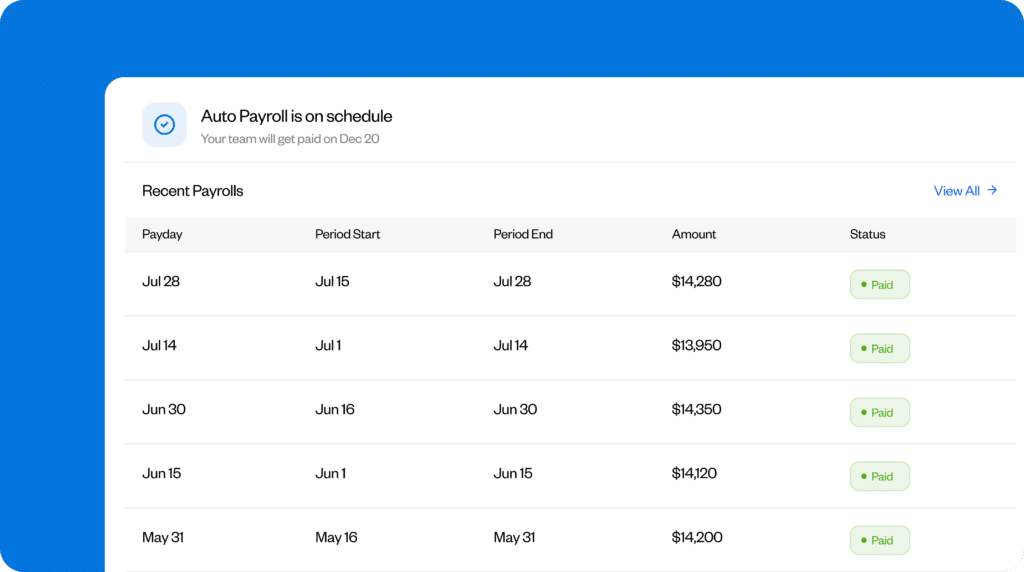
Buddy Punch is an easy-to-use and affordable payroll solution that’s best suited for trucking and logistics firms that want to simplify and integrate their job scheduling and payroll.
I like how simple Buddy Punch makes this whole process. First, you set up your employees, depots, and job codes. You can then assign a shift to the right team members with its drag-and-drop scheduling tool and customizable templates. When assigned employees punch in and out, their work hours get logged in the app’s payroll system.
When it’s time to organize and verify wages at the end of the week or month, the system already has all the details. It automatically calculates employees’ regular hours, PTO, overtime, and double time, so the figures it gives you are already grouped into the relevant payroll categories. This means you don’t need to build the run from spreadsheets, timecards, and time off notes.
I love how pay, taxes, paystubs, and W-2s and 1099s are handled in the same place where you build the schedule. For smaller teams, that’s a major benefit, as you need to manage just one system instead of two: There’s no need to copy timesheets into separate payroll software.
Employees and contractors can also use their Buddy Punch account to complete payroll onboarding. They can simply enter their personal, tax, and payment details, which saves you from having to chase up and collect all these details yourself.
After you’ve completed the pay run, staff can view their own paystubs, and contractors can view their payment records. Workers can also view and download their tax documents, so you don’t need to spend time collating, printing, and distributing copies to drivers and team members.
If you already have a separate payroll provider and are using Buddy Punch for time tracking, you can use the Payroll Export Report feature to send pay details based on employees’ work hours to your current provider. Buddy Punch also integrates with 20 listed providers, and if your provider is one of them, you can transfer payroll data automatically rather than manually exporting it.
Pros
- Buddy Punch automatically converts shift and job data into fully calculated payroll data.
- It connects to 20 payroll providers, or you can export the data easily if you want to continue using your current provider.
- Real-time location tracking and geofences make it easy to keep track of your drivers.
- Includes advanced time tracking features and time theft prevention tools.
Cons
- Mileage, per diem, and extra driver payments need to be entered manually before you run payroll.
- Employees can view paystubs on the website, but not on the mobile app.
Pricing
The payroll function is available as an add-on to any Buddy Punch plan. Plans start from $19 per month plus $4.99 per user per month (billed annually). The Payroll add-on comes at $49 per month plus $8 per user per month (billed monthly).
Learn more about Buddy Punch
- Start a free trial — no credit card required
- Watch a video demo
- Take an interactive product tour
- Request a personalized demo
2. Roll by ADP – Best for running trucking payroll from a phone app

Roll by ADP lets you run payroll from your phone or tablet, so you don’t have to wait until you get back to the office. Owner-run smaller trucking and transportation businesses with no dedicated admin or payroll person can check hours, make pay edits, and submit payroll on the go.
I like the ChatGPT-style interface on Roll by ADP. Instead of using a menu system, you can get work done using conversational prompts. For example, to add new workers, you can simply type “Hire employee” and enter the details needed for payroll. Roll then invites that worker to join the app. The platform supports different types of workers, including W-2 employees, 1099 contractors, as well as full-time, part-time, and seasonal workers.
When payroll is due, you can type “Run payroll” to go straight to the payroll task. You can review and change driver hours, rates, and one-off amounts before submitting, which is useful for when you need to, for example, add a one-off payment for a contractor or correct a job rate.
For team members who work the same hours each week, Roll fills in their standard hours and rates. Before you submit payroll, you can still change the hours, rate, or pay amount for anyone who worked fewer hours, picked up extra work, or needs a one-off payment. If someone didn’t work during a pay period, just enter 0 or use the Skip option below their name.
Roll’s self-service features make it convenient for workers to manage their pay details in a single place. On the app, they can:
- View and download paystubs
- Manage tax withholding
- Update bank details
- Download tax statements
Roll also sends payday alerts, task reminders, and deadline notifications, so your staff know when to check or update their details before payday.
You can pay employees by direct deposit or company check, handle payroll taxes, and create year-end tax statements from the app. Roll’s automatic payroll is useful for regular pay, but variable driver pay still needs a final check before the run goes out.
Pros
- Run payroll from a phone or tablet on the go.
- The app prefills routine payroll runs but still lets you edit hours, rates, and one-off payments.
Cons
- The chat interface is intuitive for smaller teams but may take too long on bigger runs.
- It’s better for owner-managers running payroll from their phones than finance or HR teams that work mainly on desktop systems.
Pricing
Roll by ADP is available for a $39 per month base fee plus $5 per employee per month on a monthly rolling contract. The company offers a three-month free trial.
3. Gusto – Best for flexible driver pay and reimbursements

Gusto is useful for trucking and logistics companies that need to run payroll with different pay types. For example, a driver may earn one rate for local hourly work and another for longer jobs, then receive reimbursed expenses, detention pay, or a fuel bonus on the same paystub.
The app lets you set these different rates for the same driver for one-off jobs. For regular jobs, Gusto can prefill the usual hours on each pay run, so you only need to change them when the hours differ. When you need to add other earnings, you can add these as separate items and decide whether each should be included when calculating a driver’s overtime pay.
On payroll reports and driver paystubs, Gusto lists each pay item under its own name. That means the driver and payroll admin can see different types of pay as separate lines.
Drivers can enter expenses, including mileage, in the mobile app. You set the mileage rate, the driver enters the miles, and Gusto calculates the reimbursement amount. You need to approve the expense before it applies to payroll. Once approved and paid, the driver sees it on their paystub as a separate “one-time reimbursement” line.
Pros
- Set different job rates for one driver, then enter work hours against the right rate.
- Show detention pay, per diem, fuel bonus, and mileage reimbursement as separate paystub lines.
Cons
- Gusto doesn’t have a load pay field, so admins may need to enter load pay as extra pay on each job.
- Mileage claims are not GPS-tracked, so drivers need to enter their miles themselves.
Pricing
Plans start at a base fee of $49 per month (billed monthly) with an additional $6 per employee per month.
4. OnPay – Best for paying in-house drivers and external contractors in one place

OnPay is a payroll app that works well for trucking companies that have to juggle:
- Company drivers on W-2 payroll
- Owner-operators on 1099 records
- Contractors who invoice for specific jobs
It does this by separating workers into different categories during onboarding and by adjusting the settings. Assign your employees by entering their job details, tax withholding, and banking information. For your contractors, add and invite them to the app. When they accept, enter their business and tax details, then choose their contractor payment type and rate.
This helps you avoid handling owner-operators and job-based contractors like you’d handle W-2 drivers during a pay run. OnPay keeps their business details, tax details, payment type, and rate on a separate contractor record. You can pay them at the same time as your employees or run a separate contractor payment when a one-off job needs to be paid for outside the usual payroll cycle.
OnPay can send payments by direct deposit, debit card, or paper check. You can also use direct deposit for some people and checks for others in the same pay run.
Staff members can access and download their paystubs through OnPay without asking the office for copies. Once their W-2s or 1099-NECs are ready, they can get those forms through the OnPay portal, then view, download, or print them when they need.
Pros
- Pay W-2 drivers and 1099 contractors from one payroll account.
- Process a contractor payment outside the usual payroll cycle without adding them to the main payroll run.
Cons
- If you want to keep contractor payments separate, you need to run a second payroll.
- You need to match contractor invoices against job or load records before approving payment.
Pricing
The base fee is $49 per month (billed monthly), with an additional charge of $6 per employee per month.
5. QuickBooks Payroll – Best for driver payroll accounting

If you already use QuickBooks Online for bookkeeping, you can add QuickBooks Payroll to the platform so your wage costs, payroll taxes, and deductions are connected directly to your accounts.
Start by creating employee records and setting a pay schedule. When it’s time to run payroll, enter each employee’s worked hours, preview the run, and submit it. Staff can check their paystubs in the QuickBooks Workforce app straight away.
QuickBooks Payroll can process direct deposits, so staff get paid on the pay date you choose. It can also handle tax payments and forms if you activate the automated taxes and forms feature.
I like how this setup keeps payroll costs visible after you’ve completed each run. In the settings, choose where QuickBooks posts wages, payroll tax liabilities, deductions, and other payroll amounts in your chart of accounts. This makes it easier for you to see what the wage cost is, what payroll taxes you owe, and whether those payments have been released. For trucking firms, this matters a lot, because wages and fuel are usually the biggest costs and affect the profit on each job.
You can track income by depot, department, customer, or route, then match driver payroll costs to the same categories in QuickBooks. That shows whether driver pay is making the job less profitable before you quote similar work, renew a customer account, or schedule more jobs on the same route.
Pros
- Run payroll from your existing bookkeeping/accounting platform to cut back on manual work.
- Track driver wages by depot or job for a more accurate measure of profitability.
Cons
- To access QuickBook Payroll, you need a subscription to QuickBooks Online.
- QuickBooks Payroll’s integration with QuickBooks Desktop is no longer available to new customers.
Pricing
QuickBooks Payroll costs $88 per month with a $6.50 monthly charge for each employee (monthly billing). This also includes basic accounting features.
6. ADP Workforce Now – Best for complex multi-location payroll

ADP Workforce Now is a good fit for trucking and transportation companies that manage complex payroll for workers across multiple locations. It’s particularly useful for larger fleets with drivers, mechanics, dispatchers, and office staff on different schedules and pay rules.
I was impressed by the level of flexibility it offers. For example, a typical payroll run might include multiple shift rates, union deductions, and retroactive pay changes. Payroll teams often receive last-minute timesheet corrections, pay adjustments, and bonus approvals. ADP Workforce Now copes with this complexity well even when these changes are coming from multiple terminals, depots, or operating locations.
Other useful features include:
- Batch imports: The app collects and uploads payroll data across each site automatically, reducing the need for manual data entry.
- Pre-approval checks: Review each pay run before submission, with dashboard alerts to help you catch errors and unusual pay changes.
- Payroll taxes: Calculate, deduct, and file federal, state, and local payroll taxes, which helps avoid the risk of large fines building up over time for non-compliance.
- Reporting and analytics: Use built-in reports, custom reports, and general ledger exports to check payroll costs by location, pay group, or accounting category for better cost control management.
Employees can directly check their pay and tax details in the app. If something looks wrong, they still need to speak to payroll or HR, but they have the payslip, tax form, or direct deposit record they need with them. Managers can also approve or fix timecards, which helps each depot or terminal sort out any local time issues before payroll goes for final processing.
Pros
- Check several pay groups, deductions, and corrections before approval.
- Use payroll preview and alerts to catch errors before payroll is run.
Cons
- The feature-packed system may feel bloated if you only have a few payroll groups to manage.
- It doesn’t automatically calculate driver pay from load, trip, or mileage records.
Pricing
You’ll need to get in touch with ADP Workforce Now for a custom quote. Pricing will be based on the number of employees and the features you want to access.
7. Paylocity – Best for reducing payroll admin across distributed teams

Paylocity is ideal for trucking and logistics companies whose drivers rarely visit or report to a central location. This includes regional freight carriers, pickup-and-delivery fleets, courier firms, multi-depot hauliers, and warehouse distribution teams.
This kind of an operation makes payroll harder because issues you otherwise could have sorted out in person — like checking a timecard, fixing a missing punch, or issuing a paystub copy — have to be handled remotely.
Paylocity manages this well by moving routine payroll admin into its app. Drivers can use its self-service features to update personal details and direct deposit information. They can also access paystubs and tax forms themselves, reducing their need to send routine payroll requests to the office.
Employees can clock in and out and check their timesheets from their phones, giving payroll a reliable record of the hours worked. The app sends alerts for missed punches and timecard errors, including schedule errors and approaching overtime. Managers can add, edit, remove, or approve punches on desktop or in the mobile app, so each depot or terminal can fix timecard issues ahead of payroll.
Managers can also add timecard comments when they change a punch, or use one-on-one chat if they need to check what happened in case of a conflict. Payroll then has the employee’s hours, the manager’s edit, and the reason for the change all in one place.
Pros
- Give drivers paystubs, tax forms, and direct deposit access without dealing with requests to the office.
- Fix missed punches and approve timecards before payroll closes.
Cons
- The tool doesn’t calculate driver pay from load, trip, or mileage records.
- You can use payroll codes for mileage and piecework pay, but need separate dispatch or TMS records to confirm miles or loads.
Pricing
Paylocity is a unified platform that provides HR, payroll, finance, and IT services. You can choose which features they want to access. The company gives you a quote based on the number of employees and the features you need.
8. Frontline Q7 – Best for driver settlements from completed loads

Frontline Q7 is a good option for fleets that calculate driver settlements based on the work already completed, then add reimbursements and deductions to the same settlement.
First, set up each driver’s pay profile based on how they are paid: by mile, load, revenue percentage, hour, or a mix.
Once a load is complete and authorized for pay, Q7 uses that driver’s profile to calculate what the load adds to their settlement. Payroll then reviews the signed-off amount instead of building the driver’s total from reports or spreadsheets.
I also like the control Q7 gives you over what enters each settlement. You can hold load payments back until paperwork or delivery details are ready. For larger runs, the batch pay tool can calculate pay across multiple loads or trips, including miles where relevant, so payroll can review the group at once instead of checking every load one by one.
You can include more than just load pay in a settlement, such as fuel card deductions, cash advances, reimbursements, recurring deductions, one-time pay, and payroll taxes. Payroll can review these items before approval to make sure each paycheck reflects the correct earnings, deductions, and reimbursements.
When you’ve signed off on everything, Q7 creates the settlement and builds it into the paycheck or direct deposit. Drivers also receive settlement statements showing their pay, deductions, and reimbursements, so they get a clear breakdown of how you calculated their pay.
Pros
- Calculate settlements from loads signed off by dispatch or operations rather than from spreadsheets.
- Check and approve deductions, reimbursements, and taxes before running payroll.
Cons
- The tool may not be suitable if you want settlements to feed into an existing payroll provider.
- It requires you to sign up for the Q7 software package to access payroll features, which can make it expensive.
Pricing
Frontline’s Q7 software is a platform for dispatch operations, fleet management, mobile logistics, and office productivity. It creates customized quotes for each client based on size and desired functionality.
9. Toro TMS – Best for bulk-haul payroll

Toro TMS is a good fit for bulk-haul companies where driver pay depends on:
- Tickets: Scale tickets, bills of lading (BOLs), and proofs of delivery show what the driver carried and delivered.
- Tonnage: Pay can depend on the weight, volume, or quantity moved.
- Repeat loads: One driver may complete several short loads in a day, each with its own pay rate.
That includes dump truck operators, hopper-bottom carriers, aggregate haulers, tanker fleets, and other dry or liquid bulk operations.
Before the truck leaves the yard, set up the load or template with the customer, commodity, origin, destination, and equipment details. Set up each driver’s pay profile separately, so Toro knows whether to calculate pay by mile, ton, load, hour, bushel, revenue share, or another rate.
Once delivery is complete, the driver can upload a scale ticket, BOL, or proof of delivery from their phone. Toro then pulls details such as ticket references and tonnage from the document and links them to the right load. That means payroll can check driver pay from the same completed-load record the office uses for billing and job costing.
Toro also works well for repeat bulk-haul jobs. Create a load template to store details about the customer, commodity, origin, destination, and equipment requirements. If you’re hauling the same material between the same locations several times a day, the template keeps you from re-entering the same load details and helps keep the right pay setup attached to the work.
When it’s time to pay the driver, Toro uses the rate saved on their profile and the load details already in the system. Once the tickets and load details have been checked, Toro calculates the driver pay and creates a payroll summary for systems such as ADP or QuickBooks Payroll.
Pros
- Calculate driver pay automatically from bulk tickets, tonnage, and saved pay rates.g
- Save recurring load details so you don’t have to repeatedly enter the same route and pay rate information.
Cons
- It calculates driver pay, but you need to run payroll through a partner like ADP or QuickBooks Payroll.
- It’s part of a wider fleet management app, so you may end up paying for features you don’t need.
Pricing
Toro TMS is a dispatch, fleet management, mobile logistics, and office productivity app with payroll features. You’ll need to contact the company for a customized quote.
10. SurePayroll – Best for small-fleet payroll tax filing

Small trucking companies often have to handle payroll and taxes without a dedicated admin. I appreciate how SurePayroll simplifies this work, especially when a pay run includes hourly staff, contractors, and driver pay that changes by job. Approved hours based on time tracking can feed into payroll, and you can add or verify the miles, per diem amounts, and contractor payments for that run.
SurePayroll handles tax filing effectively. When you submit a payroll run, the app calculates, files, and pays the relevant payroll taxes for you, including social security and Medicare taxes. This reduces the risk of missed deadlines, filing errors, or expensive penalties.
SurePayroll also stores the records needed after each payroll run. You can download payroll reports and paystubs and access forms such as 940, 941, W-2, and 1099. At year end, it can prepare and file required W-2 and 1099-NEC forms automatically, so employee and contractor tax records are not left as a separate admin job.
Pros
- It handles ongoing filing and deposit of payroll taxes and records, reducing administrative burden.
- Pay W-2 drivers and 1099 contractors without having to make a separate wage run.
Cons
- Not all options include tax filing, so you may need to choose a higher-priced tier.
- You need to work out and account for driver settlements from load, tickets, and tonnage yourself.
Pricing
Plans start from $29 per month (billed monthly) with an additional charge of $6 per employee per month. The final price will also depend on the number of states where your business operates.
Feature comparison
| Platform | Built-in payroll | Payroll tax filing | Payroll export/ accounting sync | Overtime/PTO calculation |
|---|---|---|---|---|
| Buddy Punch | ✅ | ✅ | ✅ | ✅ |
| Roll by ADP | ✅ | ✅ | ❌ | ❌ |
| Gusto | ✅ | ✅ | ✅ | ✅ |
| OnPay | ✅ | ✅ | ✅ | ✅ |
| QuickBooks Payroll | ✅ | ✅ | ✅ | ✅ |
| ADP Workforce Now | ✅ | ✅ | ✅ | ✅ |
| Paylocity | ✅ | ✅ | ✅ | ✅ |
| Frontline Q7 | ✅ | ✅ | ❌ | ❌ |
| ToroTMS | ❌ | ❌ | ✅ | ❌ |
| SurePayroll | ✅ | ✅ | ❌ | ❌ |
How I chose the tools on this list
To identify the best trucking payroll software tools, I compiled a list of 35 apps which were either standalone payroll apps or trucking management systems with payroll, driver settlement, or payroll export features built-in.
I then shortlisted the 10 best options, prioritizing:
- How efficiently each app handles trucking pay types, including hours, miles, loads, per diem, reimbursements, deductions, and settlements
- How clearly it manages year-end forms and worker and tax records for W-2 employees, 1099 contractors, and owner-operators
- How much manual payroll work each app removes when pay details come from timesheets, dispatch notes, tickets, BOLs, proof of delivery, or TMS exports
- How smoothly it connects payroll to trucking records such as timecards, accounting records, driver profiles, load records, settlements, or payroll exports
Ease of use is also key to my choice of tools. In my experience, business apps that are rich in features but have a complicated user interface often end up being underused or not used at all. I wanted to make sure that each of the apps in this article would be easier to implement than most current payroll workflows.

