

The 7 Best Multi-Location Employee Scheduling Software

Written By: Mark Fairlie
Last Updated July 1, 2026
Creating employee work schedules is never a simple task, but it is infinitely more complex if you’re scheduling employees to work across multiple locations. Small mistakes impact your business’s bottom line. Understaffing leads to customer service issues, and overstaffing leads to high labor costs.
Multi-location scheduling software gives you a single view of the coverage, hours, and costs across all of your locations. In addition to letting you specify when employees will work, you can specify where they’ll work. Additionally, you’ll be able to toggle back and forth between your master schedule that shows shifts across all of your locations and location-specific schedules for individual job sites, shops, or restaurants.
To help you find the right option for your business, I’ve put together this list of the seven best employee scheduling software for multiple locations. Below, you’ll find my detailed reviews of each tool, including what types of businesses each option is best for, what unique features they offer, and how they compare on price.
| Platform | Summary | G2 Rating | Free Trial | Starting Price for Multi-Location Scheduling |
|---|---|---|---|---|
| Buddy Punch | Best for attendance tracking and time theft prevention, Buddy Punch gives you tools to ensure employees are where they’re supposed to be when they’re supposed to be there. | 4.8/5 | 14 days | $5.99/user/month |
| 7shifts | Best for restaurants, 7shifts integrates with 36 different POS systems, combining your sales data with scheduling for estimating and calculating labor costs. | 4.5/5 | 14 days | $39.99/location/month |
| Deputy | Best for automatic scheduling, Deputy connects with your POS and lets you set scheduling rules and create employee profiles to build schedules for you. | 4.6/5 | 30 days | $5/user/month |
| Connecteam | Best for frequently changing schedules, Connecteam prompts employees to approve or reject schedule changes so you know if you have sufficient coverage. | 4.6/5 | 14 days | $49/month |
| When I Work | Best for scheduling part-time, seasonal, or temporary workers, When I Work will fill open slots in your schedule automatically with employees who are qualified. | 4.4/5 | 14 days | $5/user/month |
| FieldServicely | Best for dispatching, FieldServicely lets you see where all employees are located on a map to dispatch the right technicians to emergency calls. | Not rated | 10 days | $9/user/month |
| OnShift | Best for senior care organizations, OnShift offers credential tracking, CMS reporting, and a marketplace to find qualified contractors to fill open shifts you can’t cover. | 4.5/5 | Not offered | Contact for pricing |
1. Buddy Punch – Best for attendance tracking and time theft prevention
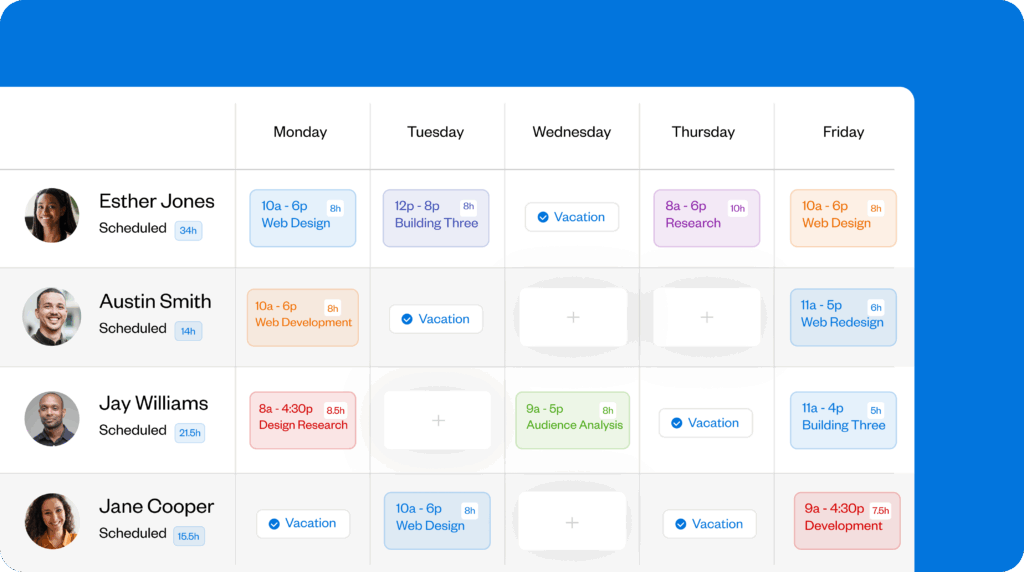
Buddy Punch is an employee scheduling and time tracking tool that works best for companies with deskless hourly employees. Whether you’re running a construction field crew, a franchise with multiple shops or restaurants, or a manufacturing plant or agriculture business with multiple workstations, it gives you a simple way to let employees know where they’re working and ensure they’re actually there.
You start by creating locations in Buddy Punch. Once you have your locations set up, you can assign locations to employees’ shifts to let them know where they’ll be working. From the admin side, you can view your master schedule showing shifts across all of your locations, or you can filter your schedule by individual location to build schedules for each of your locations one at a time.
Recurring shifts let you quickly build out schedules for future weeks, shift trades and covers let employees arrange schedule changes with their coworkers that you can review and approve, and on-calendar employee availability ensures you’re never scheduling someone when they can’t work. Employees can view their schedules at any time in the Buddy Punch app and get notifications of schedule changes.
Combining scheduling with time tracking is where Buddy Punch becomes very powerful. Because the system knows when employees should be clocking in and out, it can alert you when employees clock in late, clock out early, or miss a shift entirely. You can also turn on features that prevent unexpected labor costs, such as punch limiting (to block early clock-ins) and automatic clock-outs at the end of shifts.
Employee breaks can also be scheduled in Buddy Punch. You can send employees a notification when it’s time to take a break and prevent them from clocking back in before their required break time has passed. Or if you don’t have state-mandated breaks, you can automatically remove unpaid breaks from time cards so employees don’t need to remember to clock out and back in when taking an unpaid break.
Finally, you can set up geofences to prevent employees from clocking in and out when they’re not at the right location, turn on GPS on punch to see where employees were when they clocked in/out, or use real-time GPS tracking to see exactly where they traveled while they were on the clock. All of these features make it as easy to track distributed employees as it would be if you were all working together.
Pros
- Keep track of distributed employees with attendance and location tracking
- Schedule employees’ breaks to stay compliant with state-specific laws
Cons
- No automatic scheduling
- No POS system integrations
Pricing
Free trial available. View Buddy Punch’s current pricing.
Learn more about Buddy Punch
- Start a free trial — no credit card required
- Watch a video demo
- Take an interactive product tour
- Request a personalized demo
2. 7shifts – Best for restaurants
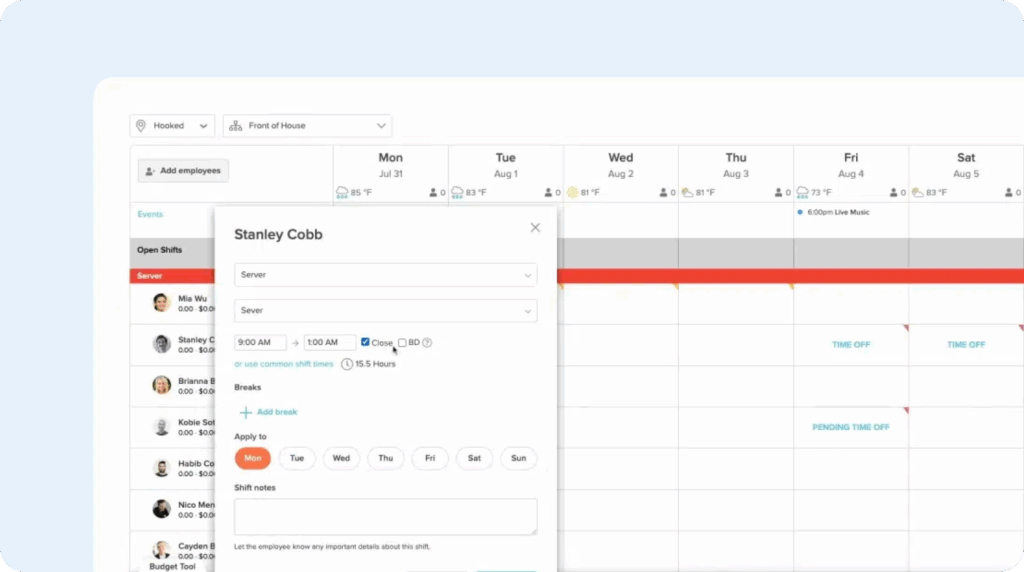
7shifts simplifies scheduling for businesses operating multiple restaurants or cafes. Administrative users can manage schedules for multiple locations using a single login. Timezones, hours of operation, and operating days can be set for individual locations. Additionally, you can turn on location-specific compliance safeguards for state-required meal and rest breaks or local predictive scheduling laws.
The most helpful feature of 7shifts is that it integrates with 36 different POS systems so you can view and estimate your labor costs. It applies sales data pulled from your POS to the wages employees earned to tell you what your exact labor costs were overall, by location, or by specific role (front of house vs. back of house), or you can also use historical sales data to predict labor costs for schedules you’re building.
Managers at each outlet build their own teams using role-based templates like front of house, kitchen, or bar. They can then build shifts and publish them to their own team. And if your employees are trained to work at multiple locations, 7shifts’ Shift Pool feature lets staff pick up open shifts or swap shifts with colleagues across all of your different locations.
7shifts can also be used to track employee time, and its POS integrations actually turn your existing POS into a time clock kiosk that employees can use to clock into and out of work. However, there’s also a mobile app that employees can download and use to see their schedules anytime, get notifications when new schedules are published, or request shift trades or covers with their colleagues.
Other 7shifts scheduling features you’ll find helpful include built-in weather forecasts (which is useful if the weather impacts how busy or slow your business will be), paid and unpaid break scheduling, auto scheduling (which tells you how many employees to schedule based on expected sales), and schedule views (which let you adjust your scheduling interface to display in a list of employees, by role, or by shift).
Pros
- Easy to see which locations have the highest labor costs
- Staff can pick up shifts at other locations without manager involvement
Cons
- Built exclusively for restaurants — not suitable for other sectors
- Per-location pricing can be expensive for businesses with multiple locations but few employees
Pricing
Free trial available. View 7shifts’ current pricing.
3. Deputy – Best for automated scheduling

7shifts uses data from your POS to predict how many employees you’ll need to schedule for specific shifts. Deputy takes this a step further: it will create draft schedules for you automatically.
You integrate it with your POS to pull in historical sales volumes, customer traffic, and labor patterns. Then, you set up rules for things like minimum coverage per role and ratio of staff to sales volumes. Finally, you create employee profiles, defining the maximum number of days/hours they can work per week, minimum rest times between shifts, roles they can work, etc.
With all of that in place, you can click a button in the scheduling tool to have Deputy’s AI create your schedule for you automatically. It will consider all of the data you entered above — as well as things like employee availability and approved time off — to create a draft schedule. You can review the schedule before publishing it, and if the system has any concerns about the schedule, it will flag them for you.
When creating schedules for multiple locations, Deputy also makes it simpler to stay compliant with local and state regulations than 7shifts. While you build location-specific rules in 7shifts manually, Deputy already has the regulations built into the platform. It will automatically flag managers of any scheduling issues with break, predictive scheduling, or fair workweek laws that apply to the specific location.
Like 7shifts, Deputy’s POS integrations let you turn your POS into a time clock, but employees can also clock in and out using Deputy’s mobile apps. If you let employees clock in and out using their phones, you can set up geofences to make sure they’re clocking in and out onsite. Everyone at a location gets the same rule, which keeps things simple, but it means managers can’t set tighter controls for individual staff.
Finally, managers receive alerts for late clock-ins, shifts that run longer than planned, and potential no-shows, giving them visibility across all locations without checking each site individually.
Pros
- Built-in compliance flags for state and local labor law adherence
- Works for all types of businesses that use POS systems — not just restaurants
Cons
- Geofencing applies to all team members with no per-employee override
- Schedule color-coding is by role, not by location
Pricing
Free trial available. View Deputy’s current pricing.
4. Connecteam – Best for schedules that change frequently

If your schedules change often and you’re constantly hearing the excuse “I didn’t know the schedule changed” when employees miss a shift or arrive late, Connecteam might be the right option for you. When you create schedules or change them, employees receive a notification that asks them to approve or reject the schedule change. They can also send you a direct message from the notification if needed.
You’ll be able to see well ahead of time if an employee has rejected a shift or schedule change, or if they haven’t responded to it yet. This lets you keep employees accountable — no more excuses for missing shifts or late arrivals — as well as recognize when you have shifts coming up that don’t have guaranteed coverage. You can open those shifts up as needed for other employees to claim if they want them.
Connecteam also has an auto scheduling feature, though it doesn’t use sales data from your POS like Deputy. Instead, it uses AI to create your schedules based on employee availability and profile data like qualifications and limitations. If you need to fill a shift that requires a specific certification, Connecteam will add only employees with that certification, and it will flag any issues where employees aren’t qualified.
Another interesting feature of Connecteam is that you can add tasks and checklists to shifts so employees can see what you expect them to do. Files like contracts and images can also be added, and you can collect employee signatures in the app to have them sign off that all tasks were completed. You can log into the app at any time to see how many tasks have been completed; it’s updated in real-time.
Beyond scheduling, Connecteam offers time tracking, team communication (via direct messages, group chat, and announcements), and a number of HR-focused features. You can create courses for your employees with built-in quizzes, set up digital onboarding workflows for new employees, publish job descriptions for roles you’re hiring for, and build an org chart that employees can reference at any time.
Pros
- Employees can approve or reject schedules or changes
- Get notifications when employees are scheduled for a task they’re not qualified for
Cons
- Pricing is complex with multiple features scattered across different hubs and plans
- Setup is more involved than simpler scheduling-focused tools
Pricing
Free trial available. View Connecteam’s current pricing.
Learn more about Connecteam
- Read our in-depth Connecteam review
- Compare Buddy Punch vs. Connecteam
- Discover the best Connecteam alternatives
5. When I Work – Best for scheduling part-time, temporary, or seasonal workers

If you have a roster of full-time employees who mostly work the same schedules week after week and then fill in the gaps in your coverage with part-time, temporary, or seasonal workers, When I Work is a good option to consider.
In one click, you can fill in the gaps in your schedule based on who’s available, eligible, and best suited to the work. You simply set up profiles for all of your non-full-time employees, listing their availability, what roles they can work, and any certifications they have. Then, When I Work will find people who can fill any shifts you haven’t covered yet and slot them into those shifts for you to review before publishing.
Like 7shifts and Deputy, When I Work can also integrate with your POS to let you use sales data to help with scheduling. Its forecasting tool compares scheduled hours against expected demand at each location. Before a manager builds the schedule, the platform shows which days are expected to be quieter or busier, making it easier to match expected demand to locations while building out your schedules.
The software organizes schedules by location, giving each site its own view. Business owners can see staffing coverage at a particular site by opening the relevant schedule on their dashboard. However, unlike Buddy Punch, which shows a single combined schedule with a location filter, When I Work doesn’t have a shared view across all sites.
Beyond scheduling, When I Work also includes features for time, attendance, and time off tracking, and it has a team messaging feature for one-on-one messaging, group chats, and team announcements. Overall, it’s one of the least robust options on this list in terms of advanced feature availability. However, it’s a good choice if all you’re looking for is a simple tool to help you create schedules more quickly.
Pros
- Auto-scheduler fills shifts across multiple location schedules
- Pricing is transparent with one plan for single locations and one for multiple locations
Cons
- POS integrations are not pre-built and must be connected using a tool like Zapier
- No single schedule view, so managers must switch between sites one at a time
Pricing
Free trial available. View When I Work’s current pricing.
6. FieldServicely – Best for dispatching

FieldServicely is a great option for trades businesses where technicians frequently need to be dispatched to different customer locations to handle emergency calls.
For planned jobs, you can build your schedule in FieldServicely like you can in any other tool. Add jobs to the calendar, select the amount of time you expect them to take, add the employee(s) who will handle the job, and then add any other information that’s needed, such as location and details the technician will need about the customer, their issue, or the site.
Once you have your planned schedule mapped out, you can use FieldServicely’s route optimization tool to specify which routes technicians should take to all of the locations they’re going to visit that day. Route optimization finds the route that takes the least amount of time and mileage, which saves you on labor costs and vehicle maintenance. Employees follow the directions in the FieldServicely mobile app.
When an emergency call comes in, you can see where all of your current technicians are on a map, as well as what they’re currently working on. This helps you quickly identify the best person to send on the emergency call based on who’s available and can get there the fastest. When an employee is dispatched, they get a notification on their phone, plus optimized directions for how to get there.
For ongoing or multi-day jobs, FieldServicely also offers recurring shifts so you can create a shift once and then reuse it across multiple days/schedules. And when jobs are completed, employees can attach photos of the finished job to keep the office admin up-to-date on what’s going on in the field.
Pros
- Dispatching feature accommodates electricians and HVAC technicians who get emergency calls
- Route optimization saves time and reduces mileage to help you save on costs
Cons
- One of the most expensive options on this list
- Mileage tracking is not included, so it may not be ideal for crews driving their personal vehicles
Pricing
Free trial available. View FieldServicely’s current pricing.
7. OnShift – Best for senior care organizations

OnShift is designed specifically for organizations providing senior care: assisted living, nursing homes, and post-acute and long-term care. When you build employee profiles in OnShift, you can log certifications like CPR and First Aid along with their expiration dates. If a credential expires, OnShift will flag it and prevent you from scheduling that employee in a role that requires the certification.
OnShift also has features to help you stay compliant with CMS regulations. It monitors your hours per patient day (HPPD) in real time, and when it’s time to submit to CMS, you can generate Payroll-Based Journal (PBJ) reports directly from OnShift.
On the day-to-day scheduling side, you create schedules using templates. When someone calls out of work, OnShift recommends replacements based on employee availability, hours worked, and cost. It will also automatically approve shift trade or cover requests from employees who aren’t in overtime.
One feature that’s unique to OnShift is its Schedule & Marketplace Integration, which connects your internal schedule with ShiftKey’s marketplace of independent healthcare professionals. When you have open shifts you can’t fill internally, you can post them to the ShiftKey marketplace directly from OnShift to find contractors to fill the shifts you can’t cover with your own team.
Employees access their schedules, pick up open shifts, and receive schedule notifications through OnShift’s mobile app. The app also includes earned wage access, which lets employees withdraw a portion of their earned pay before payday. This can help you get open shifts covered more easily; employees may be more open to picking up shifts if they can access their pay faster.
Pros
- Credential expiration tracking prevents scheduling employees who aren’t qualified
- Real-time HPPD monitoring and built-in PBJ reporting simplify CMS compliance
Cons
- Built exclusively for senior care and not suitable for other industries
- Pricing is not published; you have to contact OnShift for a quote
Pricing
No free trial offered. Contact OnShift for pricing.
How I chose the tools on this list
I surveyed 36 suppliers, selecting the seven whose features I believed were best matched for multi-location employee scheduling. I focused on how well each handled the following challenges, and assessed them all according to the same criteria:
- How well the tool gives management visibility and control at both the central and local levels
- How easily managers can control and report on separate sites and all sites for scheduling, hours, and labor costs
- How effectively the tool handles features that are important for multi-location management, like geofencing and site-specific rules
Ease-of-use was also a major factor because, as an experienced software reviewer, I have found that too many tools have great features but present a steep learning curve for users.

