

The 7 Best PTO Tracking Software (2026 Reviews)
Discover the 7 best PTO tracking software and compare their features and pricing to find the option that’s the best fit for your team.

Written By: Eric Czerwonka
Last Updated December 31, 2025

Your best engineer books a week off. It turns out two other engineers took the same week off. You didn’t notice the problem until the Friday before, because the spreadsheet didn’t warn you.
Spreadsheets weren’t built for PTO tracking. They break under accrual rules and edge cases. They don’t have automatic alerts.
PTO tracking software, on the other hand, does the math for you. It tracks every employee’s PTO balance live, and it shows managers who’s out before schedules collide.
We tested dozens of tools to uncover the seven best PTO tracking software on the market today. Below, you’ll find detailed reviews of the apps we selected, explaining what unique features each offers, which use cases each tool is best suited for, and they compare on pricing.
Overview of the best PTO tracking software
Here’s a quick snapshot of the best PTO tracking software and why they stand out. Click the link for any of the apps to jump down to our full reviews.
- Buddy Punch is excellent for teams needing combined time, attendance, and PTO tracking in one easy-to-use, affordable system.
- Vacation Tracker is the best choice for teams that live in Slack or Microsoft Teams and only need simple PTO tracking without extra HR features.
- Day Off is a straightforward PTO tracking system, like Vacation Tracker, but it excels by offering an integration with Outlook’s shared calendar.
- BambooHR is ideal for teams needing a comprehensive Human Resources Information System (HRIS) platform, with PTO tracking as one of its many robust features.
- Timetastic is best for small businesses with hourly employees who need a simple, mobile-accessible time off tracker.
- Gusto is perfect for teams that want all-in-one payroll and PTO tracking software managed in a single system.
- Calamari is a great choice for growing teams looking to keep costs low by only paying for the features they currently need.
What is PTO tracking software?
PTO tracking software is a tool that employers can use to manage their paid time off benefits. It tracks the amount of PTO that employees have earned and how much they’ve taken, giving everyone a real-time view of PTO balances. It also streamlines the process of making and approving paid time off requests.
The benefits of using PTO tracking software
If you’ve been tracking PTO for your employees manually, you can get a ton of benefits from upgrading to PTO tracking software:
- Better employee experience: Employees can easily view their PTO balance and history at any time, making it easier for them to plan their paid time off (and saving you from all those “How much PTO do I have?” questions).
- Time savings: PTO tracking software calculates PTO balances for you, automatically adding PTO hours based on your leave policies and removing them when used.
- Improved accuracy: Since you’re no longer having to track and calculate accruals and deductions manually, it eliminates errors in balance calculations.
- Simpler compliance: Since software calculations are less error-prone, it ensures adherence to your company policies regarding paid time off.
- Payroll accuracy: PTO tracking software also commonly offers either employee time tracking features or integrates with your time tracking software, ensuring employees’ PTO hours are included in their timesheets when running payroll.
- Better resource planning: Most PTO trackers come with a PTO calendar that lets you see exactly who is taking PTO when, making it easier for you to schedule projects and resources.
Key features to look for in PTO tracking software
When choosing a PTO tracker, focus on these essential features to make sure it fits your needs.
- PTO request and approval workflows: The best PTO tracking apps have an easy-to-use interface for employees to request time off and clear hierarchies for approving those requests.
- Leave type customizations: Make sure that the software you choose either has built-in support for the types of PTO your company offers or allows you to create your own custom policies.
- Automatic balance calculations: The biggest benefit of using PTO tracking software is not having to manually calculate balances. Make sure that the software you choose will automatically calculate all PTO accruals and deduct time off taken.
- Reporting and analytics: You’ll likely want to be able to pull a range of different reports from your system: used PTO reports for payroll, full-team PTO balance reports for encouraging employees to take time off if they’re not using their benefit, and upcoming PTO reports for resource planning and scheduling.
- Accessibility: Make sure the software you choose accommodates how your team works. If your team works in the field, you’ll want to choose an option that offers mobile apps. If everyone has Slack open all day, look for an option with a Slack integration.
- Integrations: If all the software you choose does is track PTO, you’ll want to make sure that it integrates with other systems you use that need PTO data, such as your time tracking, payroll, employee scheduling, and project management software.
It’s important to decide early on whether you only need PTO tracking or if you need a more comprehensive solution. While some options in the list below focus solely on PTO tracking, most platforms on the market include it as just one feature within a broader workforce management suite.
The 7 best PTO tracking software and apps
Below, you’ll find our detailed reviews of the seven best PTO tracking software. For each platform, we look at their overall time-off tracking capabilities, note what unique features they offer, and dive deep into their pricing so you know exactly what you’ll pay for the features you need.
| App | Best for | G2 rating | Free trial | Pricing |
|---|---|---|---|---|
| Buddy Punch | Combined time, attendance, and PTO tracking | 4.8/5 | 14 days | Starts at $4.49 per user per month |
| Vacation Tracker | Managing PTO in Slack or Microsoft Teams | 4.4/5 | 7 days | Free for one leave type; paid plans start at $50 per month |
| Day Off | Integrating into Outlook’s shared calendar | 5/5 | Available via the free plan only | Free for up to 10 employees; paid plans start at $20 per month |
| BambooHR | Teams needing a comprehensive HR platform | 4.4/5 | Not available | Starts at $10 per employee per month |
| Timetastic | Simple time off tracking for hourly employees | 4.7/5 | One month | Starts at $1.50 per user per month |
| Gusto | Teams looking for all-in-one payroll and PTO tracking software | 4.6/5 | Free to use until your first payroll run | Starts at $6 per person per month |
| Calamari | Growing teams that are looking to keep costs low | 4.6/5 | 14 days | Starts at $20 per month |
1. Buddy Punch – Best combined time, attendance, and PTO tracking software
Available on web, iOS, Android, and ChromeOS.
Buddy Punch combines time, attendance, and PTO tracking into a single tool. It sits at the top of our list due to its ease of use for both employers and employees, its wide range of features that make it useful for much more than just time off tracking, and its affordable pricing.
| Pros | Cons |
|---|---|
| – Easy to set up and use – Extensive, customizable PTO tracking features | – Part of a larger workforce management suite – Priced higher than standalone PTO tracking tools |
Key features
- Get access to an all-in-one time, attendance, and PTO tracking system
- Employees can request time off, and managers can approve those requests
- Add fixed PTO balances to employee accounts or set up automated PTO accruals
- Set up blackout dates for when employees cannot take time off
- View all scheduled PTO on a shared calendar
- Add taken time off to employees’ timesheets automatically
- Employees can view their PTO balances in real-time in the Buddy Punch app
Customizable leave policies
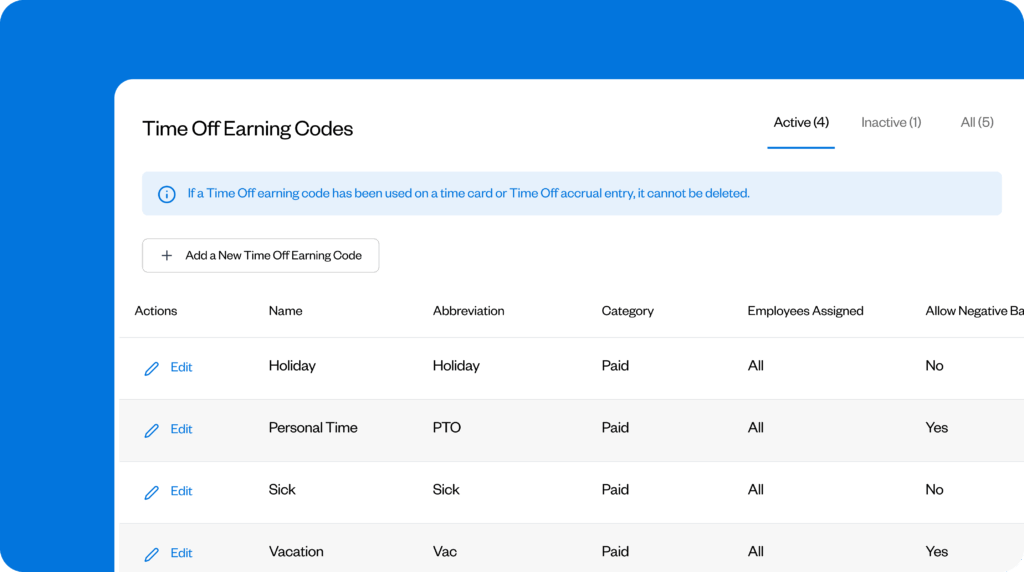
Buddy Punch lets you create as many different leave policies as you need. Create a single bucket for all time off, or create separate policies for vacation, personal time, sick leave, holidays, parental leave, etc. When you add a new leave policy, you can set it to be paid or unpaid, and you can assign the policy to everyone or only specific employees.
PTO accrual rules
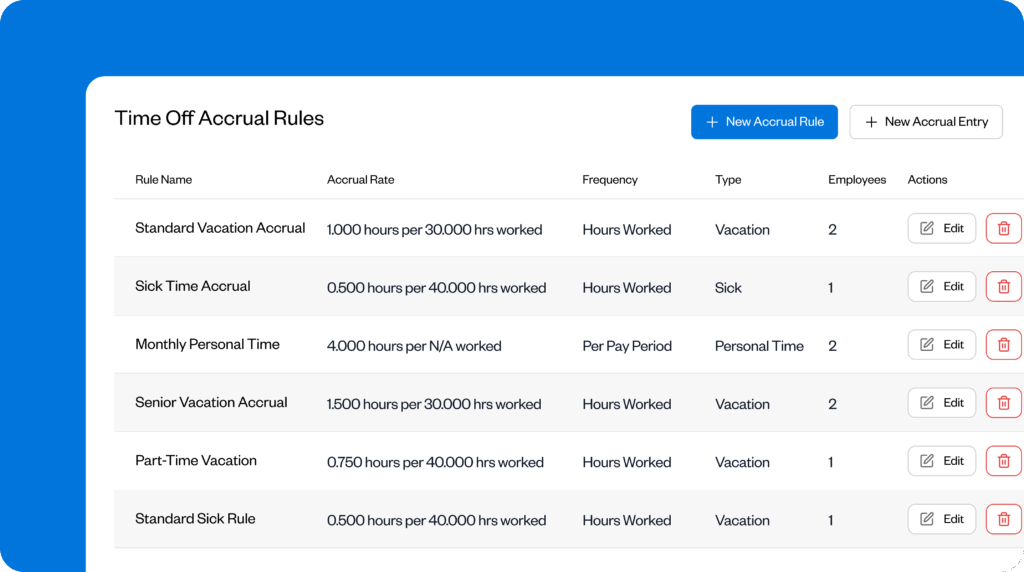
Buddy Punch automatically calculates each employee’s accrued PTO for you. You can have paid time off accrue based on pay periods, hours worked, or anniversaries.
You can also customize accrual rules per employee. This can be helpful if you have different policies for salaried employees than hourly employees, or part-time versus full-time employees. Additionally, you can specify how carry-over/rollover PTO works (i.e., if hours are lost at the end of the year or carry-over into the next year).
On the employee side, your team can log into the employee self-service portal and see their PTO balances whenever they want.
Time off and leave requests
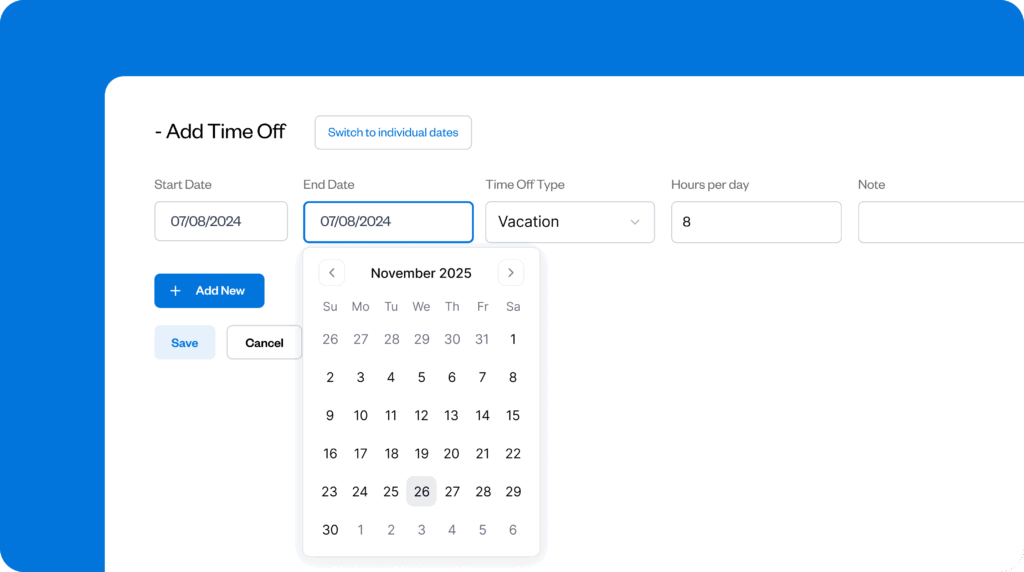
Employees can submit time-off requests in just a few clicks using Buddy Punch’s self-service portal, which is accessible on both desktop and mobile (iOS and Android) devices.
Employees can specify how much time they’re taking and what type of PTO they’re requesting, as well as leave notes for their managers.
On the admin side, you can set up rules for which employees need to have their time off approved (versus getting approved automatically) and which specific managers need to provide those approvals. Admins can also set it up so that managers receive real-time notifications for vacation requests by email.
Blackout dates

If your company has specific dates when employees cannot take off, you can set those as blackout dates in Buddy Punch. This either prevents employees from requesting time off for those dates or automates rejections for time off during those times.
Time off reports

Buddy Punch’s time off reports provide an overview of things like how much PTO employees have to carry over, their total holiday time accrued, how much PTO they used in a given timeframe, and how much they have left to use.
You can filter this info by date (e.g., a specific payroll period) and export the report as an Excel spreadsheet or PDF.
Time off calendar
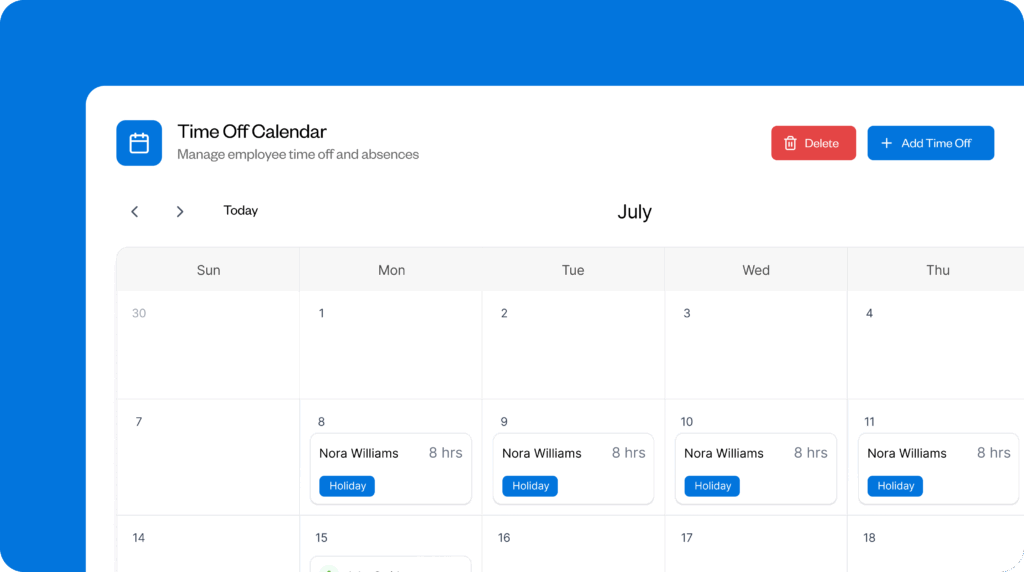
Employees, admins, and managers can see exactly who is off when using Buddy Punch’s time-off calendar feature. See all time off per month in a calendar view, or view it as a list.
Workforce management features
Beyond paid time-off tracking, Buddy Punch is a complete workforce management app that can be used for time and attendance tracking, employee scheduling, time theft prevention, and running payroll.
- Time tracking: Employees can easily clock in/out using Buddy Punch’s web and mobile apps. Built-in time theft prevention features like GPS tracking, geofencing, and photos on punch ensure your payroll is always accurate.
- Employee scheduling: Use Buddy Punch’s drag-and-drop schedule maker to easily create work schedules. See scheduled time off directly on the calendar when creating new schedules to avoid assigning people to shifts when they’re out of the office.
- Attendance tracking: Access detailed reports showing late arrivals, early departures, and missed shifts to stay on top of attendance automatically.
- Payroll integrations: Sync your time data (hours worked and PTO) directly to payroll providers like QuickBooks, Gusto, Paychex, SurePayroll, and more.
Customer reviews
- “We spent three months trying to set up a time clock system from a big company. The customer service was terrible, responses took days, and they could not handle our somewhat complex PTO requirements. We switched to Buddy Punch and were up and running almost immediately.” Read the full review.
- “The software has all the features I was using in my spreadsheet — but better as it took human error out of the equation! I gained reports that tallied PTO, which I used to have to pull manually from a spreadsheet. Employees can enter their own PTO requests (a huge time saver).” Read the full review.
- “We used to keep a manual journal for PTO entry and paper requests to use PTO. Buddy Punch eliminated all of that. We have a very complex accrual system for PTO due to our union contract. The only way we could keep track of that is with Buddy Punch.” Read the full review.
Pricing
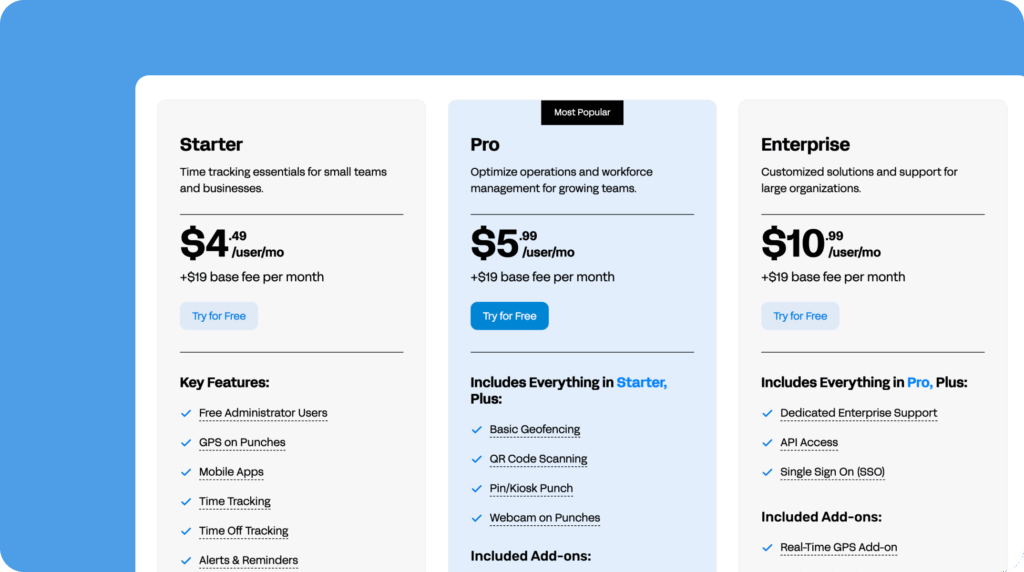
Buddy Punch’s plans start at $4.49 per user per month and include time tracking, PTO tracking, GPS on punch, payroll integrations, and more.
Learn more about Buddy Punch
- Start a free trial — no credit card required
- View pricing
- Watch a video demo
- Take an interactive product tour
- Request a personalized demo
2. Vacation Tracker – Best for managing PTO in Slack or Microsoft Teams
Available on web, iOS, and Android.

Vacation Tracker is a simple PTO tracking app that only offers time off tracking — it doesn’t have any of the bells and whistles of the other more robust time tracking, payroll, or HR tools on this list. This makes it a good fit for teams that are solely looking for PTO tracking software.
| Pros | Cons |
|---|---|
| – Simple, PTO-only tracking system – Slack, Teams, and Google Workspace integration | – No time tracking or payroll features – Limited reporting and customization features |
Key features
- Time off approvals, including multi-level and substitute approvers
- Location-specific policies for employees located in different countries
- Blackout dates for periods where time off is prohibited
- Time off accruals, time off in lieu, and annual carry-overs
- Customizable accruals or lump sum additions based on role or seniority
Integrations with Slack, Microsoft Teams, and Google Calendar

Vacation Tracker is especially good for teams of knowledge workers thanks to its Slack and Microsoft Teams integrations. Without ever leaving your company’s preferred messaging app, employees can request time off, and managers get notifications in Slack/Teams to approve those requests. A web app is also available for admins who need more detailed reports.
In addition to its messaging app integrations, Vacation Tracker can also integrate with Google Calendar to show all employee vacations and PTO on the same calendar you all use to work, making it easy for everyone to see who’s working and who’s out of the office.
Free plan

If you only have one leave type — great for companies offering unlimited PTO benefits — you can use Vacation Tracker for free for unlimited employees. The only drawback is that the free plan is also limited to one approver, so it may not work well if you have multiple managers who need to be able to approve time off requests for all of their employees.
Customer reviews
- “We run a small agency, and many of our long-term employees have built up significant PTO balances over the years. This tool really helps me keep track of all that and manage it effectively.” Read the full review.
- “We use Teams for everything. And to have Vacation Tracker work so seamlessly with Teams has made the process easier for staff to request and track their time out of the office.” Read the full review.
- “The implementation process was a breeze. It allows us to see exactly who’s on PTO, WFH, and when. It has cut down on people wondering where others are or contacting people when they’re out.” Read the full review.
Pricing

Vacation Tracker offers a free plan for unlimited users, but it is limited to one leave policy, one location, and one approver. Its paid plans start at $2/user per month with a $50/month minimum fee (i.e., you’re required to pay for 25 employees whether you have that many or not).
3. Day Off – Best for integrating time off into Outlook’s shared calendar
Available on web, iOS, and Android.

Like Vacation Tracker, Day Off is another simple PTO tracking system that is solely for leave management. In terms of features, the two apps are nearly identical. However, in addition to integrating with Slack, Microsoft Teams, and Google Calendar, Day Off also integrates with Outlook, allowing teams to view time off on the company Outlook calendar as well.
Day Off also has a lower minimum per-month price of $20, versus Vacation Tracker’s $50/month minimum.
| Pros | Cons |
|---|---|
| – Easy to use and beginner-friendly – Free plan for small teams with basic needs | – Doesn’t accommodate more advanced needs – Users report some UI quicks and bugs |
Key features
- Single or multi-level approval workflows
- Automatic PTO accruals and carry-over rules
- Integrations with Slack, Teams, Google Calendar, and Outlook calendar
- Location- and team-specific leave policies and holidays
- Balance, accruals, carryover, and other more detailed reports
Time off reports

Admins get access to several reports in Day Off’s web app. You can pull a report showing everyone’s PTO balances, all time off requests by employee (including type, start and end dates, and reasons), and balance carryover details (including how much time has been carried over, when accrued time off expires, and how much time off was removed due to expiration).
Team announcements
Another unique feature you’ll find in Day Off is announcements. You can send messages to everyone at the company, to employees belonging to a specific team, or to employees working at a specific location. This is great for notifying employees of new time off policies or changes to existing policies that apply to them.
Customer reviews
- “Using this platform not only helped supervisors and employees but also made tracking easy for our payroll team in completing their data in making salary computations with fewer mistakes.” Read the full review.
- “Day-off was easy to implement, and our team members have insight into PTO without having to ask the HR team.” Read the full review.
- “The app has been really useful for our team! Before Day Off, we had to email an admin, then put our PTO on a shared calendar. Now, our PTO request, approval, and tracking is much easier and better.” Read the full review.
Pricing

Day off offers a free plan that can be used for up to 10 employees that includes a single approver, team, location, and policy. Its paid plan starts at $2 per employee per month but has a $20/month minimum, so you’ll pay $20 per month even if you add fewer than 10 employees.
4. BambooHR – Best complete HRIS platform with time-off tracking
Available on web, iOS, and Android.

On the opposite end of the spectrum from simple PTO tracking tools like Vacation Tracker and Day Off is BambooHR, a complete human resources information system (HRIS). HR teams can use BambooHR for everything they need to manage, from payroll and benefits administration to hiring and improving the employee experience — and, of course, tracking time off.
| Pros | Cons |
|---|---|
| – Complete suite for HR teams at large companies – Unlimited, customizable leave policies | – Priced much higher than other PTO tools – Many features sold as add-on products |
Key features
- Built in system for making time off requests and approving them
- Time off calculator that lets employees see how much PTO they’ve earned
- Team PTO calendar and built-in reports
- Unlimited leave policies that can be customized by location, department, or individual
Features for HR teams

BambooHR comes with an applicant tracking system, onboarding and offboarding systems with templates and checklists, and employee engagement and performance monitoring tools. Newly released features of the platform also include compensation management, which lets you develop salaries based on aggregated salary data, and global employment, which is helpful if you’re a multinational organization.
PTO tracking

In terms of PTO tracking, BambooHR has a robust set of features. You can set up multiple policies for unlimited PTO, accruals, or leave requests; visualize who’s off with a full-company PTO calendar; run reports to track trends in time-off requests; and set up detailed PTO approval workflows. You can also use BambooHR for time tracking so you can consolidate everything into a single system and ensure employees get paid for their PTO.
Who BambooHR is best for
If you’re just looking for basic PTO tracking software, BambooHR’s feature set (and pricing) will be overkill. But if what you really need is a central platform that helps you manage everything your large human resources team needs to oversee and coordinate, it’s a great choice.
Customer reviews
- “Time off management is remarkably straightforward. Employees can quickly check their PTO balances and submit time off requests, while managers can approve them with just one click. The calendar view is especially helpful; it offers clear insight into team availability at a glance.” Read the full review.
- “It’s easy to navigate, even for people who aren’t super tech-savvy, which means fewer questions coming my way for simple things like PTO balances or updating personal info.” Read the full review.
- “BambooHR has really helped streamline a lot of the manual, time-consuming HR tasks we used to struggle with. Things like tracking PTO, managing employee records, and onboarding new hires are now way more organized and efficient.” Read the full review.
Pricing

BambooHR’s plans start at $10/employee per month, and volume and nonprofit discounts are available. There’s no information on the platform’s website about which features are included at the $10/employee/month pricing, so you’ll need to contact BambooHR for more details.
5. Timetastic – Best simple time off tracker for hourly employees
Available on web, iOS, and Android.

Timetastic is a simple PTO tracking app for small businesses with hourly employees. Team members can view their PTO, request time off, and get notifications when their time off has been approved directly in the platform’s mobile apps, which is great if your employees don’t do all of their work on computers.
| Pros | Cons |
|---|---|
| – Affordable for small teams – Good for straightforward PTO needs | – Customization and editing limitations – Limited integrations with other HR tools |
Key features
- Web and mobile apps so employees can access the platform from any device
- Auto-updating team and employee calendars showing all planned time off
- Google and Outlook calendar integrations let you sync PTO to your work calendar
- Email and in-app notifications for PTO requests and approvals
- Burnout calendar that lets you identify employees who aren’t taking enough time off
Org chart with time off details

Instead of a calendar, Timetastic displays all time off in an org chart view. You can see all of your employees listed in the org chart along with any time off they have coming up. Icons also display what type of time off the employee is taking (vacation, sick, parental leave, etc.).
Burnout report

If you’re concerned that your employees aren’t taking enough time off, Timetastic lets you establish policies that require employees to take time off at specific increments. Then, its burnout report shows you anyone who hasn’t taken time off in that timeframe — or is nearing the end of the timeframe — so you can intervene before the employee gets burned out.
Employee time off calendars

Your employees can see all of the time off they have scheduled for the entire year — including PTO and any company holidays — on their own, personal time off calendars. The employee view highlights days on the calendar that they’re scheduled to be off, calculates how much time off they have remaining, and breaks down the time off they’ve taken/scheduled by type.
Customer reviews
- “I love how easy it is to view everyone within the company, within a certain department, or a specific team at a glance. I can prepare for everyone’s scheduled assignments easily.” Read the full review.
- “The price is really good for what you get included in the package. It’s a basic system, simply for managing time off. It’s perfect for smaller businesses that need an overview of their staff’s attendance.” Read the full review.
- “I love that we are able to see everyone’s time off in one place so you can identify when there are days that align across the whole team. Also, the option to create group favorites (for small team tracking purposes) is really helpful.” Read the full review.
Pricing

Timetastic’s pricing starts at $1.50/user per month for the plan’s basic PTO tracking features like requests/approvals and time off calendars. Its Pro plan is $2.50/user per month and adds on features like the burnout calendar, third-party app integrations, and PTO accruals.
6. Gusto – Best combined payroll and PTO tracking software
Available on web, iOS, and Android.

Gusto is best known for its full-service payroll software. However, the platform can do a lot more than just help you with payroll. It has features for PTO tracking, time tracking, and employee scheduling, plus you can use it to purchase team health insurance, hire new employees, and manage performance. This all makes it more of an HRMS than a simple payroll processing tool.
| Pros | Cons |
|---|---|
| – All-in-one payroll and PTO tracking system – Employee and admin features are easy to use | – PTO policies aren’t as customizable – Only available if you also use Gusto for payroll |
Key features
- Rules to ensure PTO policies are compliant with state laws
- Approved PTO automatically syncs with payroll and calendars
- Automatic PTO accrual calculations
- PTO request notifications via in-app alerts or email
- Customizable PTO policies by individual, team, or employee type
PTO tracking

Gusto automates PTO tracking, including calculating accruals and deducting used PTO hours. Employees can view their accrued PTO balances and request time off through the system, while managers can approve or deny requests with a few clicks.
Additionally, businesses can create and manage custom PTO policies that align with their specific needs, and Gusto automatically syncs approved PTO with its payroll system so you can be sure employees get paid for their paid time off.
Payroll

Gusto’s payroll system is designed for companies with U.S.-based employees (though you can use it to pay international contractors). It gives you unlimited payroll runs, lets you deposit employees’ checks directly into their bank accounts, and automatically handles federal, state, and local tax filings. Taxes are automatically calculated and removed from employees’ paychecks.
HRMS features

More HR-specific features you’ll find in Gusto include the ability to purchase employer-sponsored health insurance, an applicant tracking system, syndication of your open roles to multiple job boards, new employee onboarding checklists, background checks, an employee handbook builder, and goal tracking/performance reviews.
Customer reviews
- “I don’t need 3 or 4 methods or apps for my timesheet, paystubs, tax forms, performance evaluations, benefits, contributions, and PTO because they are all in one place with Gusto.” Read the full review.
- “Gusto is a great platform because it is modern and easy to use. I really like how I can manage everything from PTO and time tracking to company contacts from one single app.” Read the full review.
- “One of the standout features for me is how easy it is to track sick hours and PTO. No more guessing or back-and-forth with employees — it’s all clearly logged and accessible.” Read the full review.
Pricing

PTO tracking is included in all of Gusto’s plans. Its lowest-cost plan starts at $6/user per month, and there’s a deal where new customers get 50% off for their first three months.
7. Calamari – Best for growing teams looking to keep costs low
Available on web, iOS, and Android.

If you know you need PTO tracking software but aren’t yet sure if you could also benefit from some of the time tracking and HR features of many of the other apps on this list, Calamari might be a good option for you. Unlike the other tools, it siloes these different features into different plans, giving you more flexibility as you scale.
| Pros | Cons |
|---|---|
| – Reasonable pricing with modular options – Region‑specific PTO rules and holiday calendars | – Time tracking and HR modules aren’t as strong – Users report setup and UI quirks and bugs |
Key features
- PTO calendar with overlapping requests report
- International absence policies
- Custom leave types and restrictions
- International holiday calendars
- Mobile apps for requesting and approving leave
PTO tracking

As far as PTO tracking, you’ll get all of the typical features you’d expect: requests and approvals, a time off calendar, and custom leave policies. Additionally, you’ll get access to some advanced features like an overlapping requests report that lets you quickly identify staffing concerns caused by having multiple team members off at the same time.
À la carte offerings

If down the line you decide you want to do more than just track PTO, you can also add on Calamari’s Time and Attendance, Core HR, or Performance plans:
- Time and Attendance gives you all of the traditional time tracking features — clocking in and out, paid/unpaid break tracking, and attendance management.
- Core HR gives you features like an employee directory, an org chart, and searchable document storage with detailed visibility permissions.
- Performance gets you access to talent management features like employee surveys, self-assessments, peer reviews, and an administrator panel.
Each of these plans are sold separately, allowing you the benefit of only having to subscribe to (and pay for) the specific features you need. This will let you keep costs low while you only need PTO tracking but add on additional plans in the future to keep everything under one roof.
Customer reviews
- “Keeping track of employee time off was a headache until I found Calamari. It integrates well with Slack. Balances are automatically updated throughout the year. I don’t even have to remember to reset everything at the beginning of the year.” Read the full review.
- “The calendar for knowing who’s in/out the office is great. It’s easy for users and admins. It integrates with Google Calendar.” Read the full review.
- “Calamari makes it super simple to count the days you’ll be off work. Whether you are sick, taking a vacation, or something else, their system helps you in a few steps to get it done and approved by your supervisor.” Read the full review.
Pricing

Calamari’s PTO tracking plan starts at $2/employee per month with a $20/month minimum (i.e., you’ll pay for 10 employees even if you have fewer than that) and includes a PTO calendar, multi-country absence policies, unlimited absence types, and automatic carryovers.
Choosing the right PTO tracking software for your team
Hopefully, the list above helped you put together a shortlist of 2-4 tools to evaluate more deeply. Now, the hard work begins.
To choose the right option for your team, you’ll want to take free trials of the software you’re considering — or get demos if trials aren’t available — so you can make sure that the tool does everything you need it to. In addition to having the features you need, here are some other things to keep in mind while making your decision:
- Do you actually need all of the features the tool offers? More isn’t always better when it comes to software. More features can make the tool harder to onboard and harder to use — for both you and your employees. Make sure to consider the balance between features and usability.
- Is the software easy to use from the employee perspective? If the steps employees need to take to view and request PTO are clear, they’ll use it on their own without pressure or encouragement from you. Consider bringing an employee into your free trial to test the tool alongside you.
- Can you do everything you need to do in the tool? If you have nonstandard PTO policies or are in an industry with unique regulations, you’ll need to spend time during your trial making sure that you can set everything up to work exactly how you need it to.
- Do you have the budget for the tools you’re considering? Subscription software pricing is notoriously confusing, so you’ll want to take extra time to ensure that you’re actually getting access to all of the features you need at the price you’re able to afford.
- Is the company there to support you when you need it? You (or your employees) will inevitably run into issues or have questions while using the tool. Try sending a support request to each of the providers you’re considering to see how easy it is to request support, how quickly they get back to you, and how helpful their responses are.
By getting hands-on with each tool and considering more than just feature lists and pricing, you can ensure that the software you ultimately choose will work for your business for the long haul.
Tips for implementing and using PTO tracking software
Once you’ve found the right software for your team and are ready to start using it, follow these tips for a successful, simple implementation:
- Set up your software: Before releasing the software to your employees, spend some time setting up all of your policies, accrual rules, and blackout dates in the new system.
- Connect it to payroll: You’ll also want to make sure that PTO recorded in the new system makes its way to payroll so employees get paid properly.
- Create training documents: For other admins and managers, create detailed documents explaining how the system is set up and how to use it. For employees, create simple guides showing how to do the things like view their balances and request time off.
- Run a pilot: Before giving your full team access to the new software, run a pilot with a handful of employees so you can gather feedback and see where people are going to run into issues. Update the system and/or your documentation as needed based on what you learn from the pilot.
- Explain to employees why you’re implementing the system: Consider hosting an initial training session where you introduce the new system to employees, explain its benefits, and demo how to use it.
- Encourage feedback: Let employees know that you’re there to help with any questions and are happy to hear any feedback they have about the software.
Finally, you’ll want to make a plan to regularly review and update your policies in the system to ensure it stays in line with your evolving business needs and legal requirements.

