

The 7 Best All-In-One Payroll and Timekeeping Software

Written By: Brooke Flemming
Last Updated June 1, 2026
When you track time in one system and run payroll in another, running payroll is time-consuming, and the process is more mistake-prone. You have to download reports from your time tracking system, make sure they’re formatted correctly, then upload them to your payroll system. One small mistake can throw off all of your numbers, which leads to rework in the best-case scenario and rerunning payroll in the worst.
Combined payroll and timekeeping software solves this problem. Since all of your data is in one system, there’s no downloading, formatting, and uploading work to do. When it’s time to run payroll, your employee time data is already there, so all you have to do is double-check that the numbers are right and click a button to get everyone paid properly and on time.
Below, you’ll find our detailed reviews of the seven best payroll and timekeeping software, covering the unique features they offer, who they’re best for, and how they compare on price. Use this information to create a shortlist of tools to consider and ultimately choose the best option for your company.
| Platform | Summary | G2 Rating | Starting Price for Payroll and Time Tracking |
|---|---|---|---|
| Buddy Punch | Best for small businesses with hourly employees, Buddy Punch has lots of features that keep your timesheets accurate and prevent employee time theft. | 4.8/5 | $10.49/user/month |
| Gusto | Best for agencies and professional services businesses, Gusto gives you access to time tracking, client invoicing, and payroll in a single system. | 4.6/5 | $12/person/month |
| Homebase | Best for restaurants and retail shops, Homebase connects with your existing point of sale system to turn it into a time clock kiosk and pull tips into payroll automatically. | 4.5/5 | $6/employee/month |
| ADP Workforce Now | Best for large and enterprise companies, ADP Workforce Now is a full human capital management system with built in AI issue detection and global payroll capabilities. | 4.2/5 | Contact for pricing |
| Paychex Flex | Best for growing businesses, Paychex Flex is a flexible platform that lets you keep costs low while you’re small and add on features as your business grows. | 4.1/5 | Contact for pricing |
| Fingercheck | Best for construction and healthcare companies, Fingercheck can generate certified payroll and payroll-based journal reports and run background checks. | 4.7/5 | $10/employee/month |
| QuickBooks Time + Payroll | Best for heavy QuickBooks Online users, Quickbooks Time tracks mileage, which QuickBooks Payroll can pull in for automatic mileage reimbursements. | 4.5/5 | $14.50/employee/month |
1. Buddy Punch – Best for small businesses with hourly employees
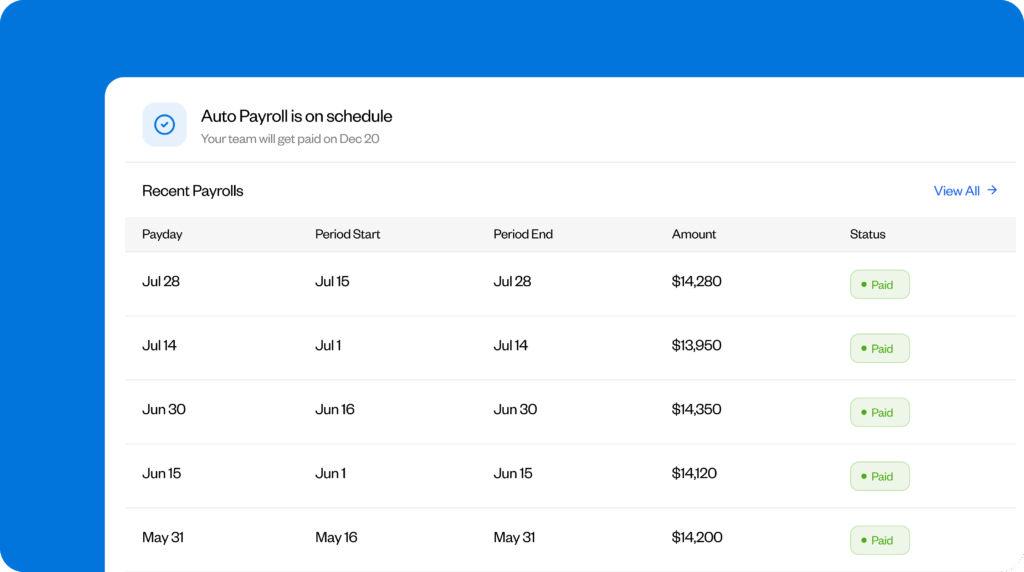
Buddy Punch is a complete workforce management platform that includes features for time tracking, payroll, employee scheduling, PTO management, and attendance tracking. It’s designed for small businesses with hourly employees, easy to use for employees and admins alike, and one of the most affordable options on the market. Plus, it has lots of features that keep your timesheets accurate.
Hourly employees can clock in and out using the Buddy Punch app on a computer, a tablet used as a time clock kiosk, or their mobile phones. Features like IP address locks and geofencing prevent offsite punches, photos on punch and facial recognition prevent buddy punching, and GPS tracking shows you where employees traveled while they were on the clock, which is great for field and mobile teams.
Employee punches are transformed into timesheets in the system with regular hours, overtime hours, and pay automatically calculated. Timesheet approvals keep payroll accurate by requiring managers to review and approve their employees’ time cards before payroll is run, and you can set up automatic breaks to automatically remove unpaid break times from timesheets, reducing the number of missed punches.
Since all of these features help ensure your timesheets are accurate, you can do less double-checking when it’s time to run payroll. Simply click a button to import your time data into payroll, do a quick scan to ensure everything looks correct, then run payroll. Buddy Punch can be used to pay both W-2 and 1099 employees, employees can be paid via check or direct deposit, and two- or four-day payroll processing is available.
On the payroll screen, you can also make changes if needed, adjusting hours or adding additional earnings for things like bonuses, commissions, or reimbursements. Buddy Punch handles all tax calculations and withholdings for you, and employees can log into the app at any time to change their home addresses or bank account information — or fill out new tax forms to adjust their withholdings.
Beyond payroll and timekeeping, you can set up PTO accruals, let employees make PTO requests, and have managers approve those requests. All approved PTO is added to timesheets and removed from PTO balances automatically. You can also create employee schedules easily in Buddy Punch, which opens up additional features like automatic clock-outs, early clock-in prevention, and attendance reports.
Pros
- Built-in time-theft prevention features ensure you’re paying employees properly.
- The system is both affordable and very robust; you won’t have to sacrifice features for price.
Cons
- Payroll is only available for U.S.-based companies and employees.
- Payroll can not be used alone; both time tracking and payroll are required.
Pricing
Free trial available. View Buddy Punch’s current pricing.
Learn more about Buddy Punch
- Start a free trial — no credit card required
- View pricing
- Watch a video demo
- Take an interactive product tour
- Request a personalized demo
2. Gusto – Best for agencies and other professional services businesses

Gusto’s project-based time tracking makes it a good option for agencies and other professional services businesses that are tracking time in order to invoice clients properly. You can set up your client projects in Gusto, then when employees clock in, they select the project they’re actively working on and can switch projects as needed throughout the day. A duration entry option is also available for entering project hours manually.
If employees work on computers, they can clock in and out using Gusto’s web app, and if they’re working in the field, they can clock in and out using Gusto’s mobile apps. Overall, the platform’s time tracking features are pretty basic, but if you’re only tracking time for invoicing and not for paying employees, it has what you need. There is, however, a geolocation feature for recording employee location data on punch.
The nice thing about Gusto for professional services businesses is that it has both invoicing and payroll, so you can pay employees and receive payments from clients in the same system. Unfortunately, your Gusto time tracking data doesn’t feed directly into invoicing, but you can integrate Gusto with accounting platforms like QuickBooks Online and Xero to push time data into accounting and pull it back into Gusto invoicing.
As far as payroll goes, tracked time is automatically synced with payroll if you need it; if not, you can set up employees as salaried in the system and enter their annual compensation to automatically calculate their pay each pay period. Employees can be paid via check or direct deposit, and next-day, two-day, and four-day payroll runs are available. You can also set up payroll to run automatically each pay period.
Gusto’s payroll system can be used to pay U.S.-based employees and contractors, as well as international contractors. For international contractors, you don’t have to pay Gusto’s monthly per-person fee, but you may have to pay foreign transaction fees. Finally, on the Plus plan that includes multi-state payroll and time tracking, you also get features like employee scheduling, PTO tracking, and hiring and onboarding tools.
Pros
- Get time tracking, payroll, and invoicing in a single system.
- The Pro plan includes several HR features like an applicant tracking system, org chart, and performance management.
Cons
- The system is primarily designed for paying U.S.-based employees; international employees can only be paid as contractors.
- Tracked project time doesn’t automatically import into Gusto invoicing, so you’ll have to calculate that data automatically or set up a circular integration with your accounting software.
Pricing
Free until you run your first payroll. View Gusto’s current pricing.
If Gusto feels like it’s close to what you’re looking for but not perfect, find a better fit in our list of the best Gusto alternatives.
3. Homebase – Best for restaurants and retail shops

Homebase’s time tracking software integrates with point-of-sale (POS) systems like PAR, Square, Clover, Toast, Shopify, GoDaddy, and Lightspeed, allowing you to turn your existing POS into a time clock. Employees can use the POS as a time clock kiosk, clocking in and out for both work and breaks without you needing to purchase a separate system or having to rely on employees using their mobile phones.
Homebase’s pricing also makes it an affordable option for small businesses with only one or two locations. While payroll is charged per employee, time tracking is charged by location. There’s a free time tracking plan available for one location and up to 10 employees, and paid time tracking plans start at $24/location per month for unlimited employees. This can make the platform much less expensive than some of the per-employee-priced alternatives.
While Homebase’s free time tracking plan is very limited and gives you access to clocking in and out only, the $24/location per month Essentials plan gets you a lot more. On that plan, you can integrate with your POS system, create custom overtime policies, set up break tracking, capture employee locations on punch, and have employees take photos of themselves when clocking in/out using your POS.
Another benefit of having a system that’s connected to your POS is that Homebase can pull tip data in when it’s time to run payroll. Hours and tips automatically feed into Homebase’s payroll system, so you don’t have to do any manual calculations or CSV uploading to know what employees should be paid. You simply review the data, select how you want employees to be paid, and submit payroll to run it.
Employees can be paid via check or direct deposit, Homebase automatically withholds taxes from paychecks, and paystubs, W-2s, and 1099s are automatically generated by the platform. If you’re already using another payroll system and want to switch to Homebase, its team will automatically transfer all of your employee and tax data over for you, and you get a dedicated payroll expert you can reach out to when you need help.
Pros
- POS integrations make clocking in and out easy and add tip data to payroll.
- Location-based pricing for time tracking makes costs affordable for businesses with only one or two locations.
Cons
- Only basic features are available in the free and low-cost time tracking plans, so you’ll likely need to upgrade to higher-cost plans to get all of the features you’ll need.
- The ability to pull tips into payroll is only available if you purchase an add-on, which adds another $25/location per month charge to your costs.
Pricing
Free trial available. View Homebase’s current pricing.
4. ADP Workforce Now – Best for large and enterprise businesses

ADP Workforce Now is a robust platform built for large businesses that has everything you need to run all of your HR operations. There are modules for time and attendance tracking, global payroll, engagement monitoring, benefits administration, hiring, and professional development. You also get prebuilt and customizable reports for your own data, as well as benchmark and labor trend reports for your industry.
There are multiple ways for employees to track time using ADP. They can enter their hours manually, download the ADP mobile app to clock in and out on their phones, or use the web app to clock in and out on their computers. Physical time clock kiosks are also available for purchase through ADP, which open up options for employee identity verification using facial recognition, fingerprint scanning, or voice commands.
Payroll updates in real-time in ADP, so there’s no need to import your time data into payroll — it syncs continuously and automatically. There’s a built-in AI feature that will automatically alert you to any anomalies in your data, such as missed punches or missing timecard approvals, so you can catch issues before running payroll. The AI will also alert you to overarching issues like missing tax registrations.
On the payroll dashboard, you’ll see your current and historical pay runs. A “Things to Do” tab shows you all of the issues that need to be corrected before running payroll so you can make the updates you need quickly. There’s also a “Worksheets” tab where you can see all time data and make edits instantly without having to exit the payroll module. When you’re finished editing, simply approve the payroll to get it running.
For companies operating internationally, ADP offers global payroll for 140+ countries and territories. The company has a team of global compliance experts that monitor changes in regulation and ensure the system is always kept up to date so you’re never out of compliance. ADP automatically handles exchange rates and processes payroll in each country’s local currency, and the portal supports 35 languages.
Pros
- Built-in AI identifies issues and anomalies so you can fix them before running payroll.
- International payroll is supported in more than 140 countries and territories.
Cons
- The system is overkill for smaller businesses in terms of both price and features.
- ADP’s pricing is not published, so you have to contact its team to get a quote.
Pricing
No free trial offered. Contact ADP to request a quote.
5. Paychex Flex – Best for growing businesses

If your business is growing and you want a system that you can use now while you’re small and continue using once you’re a larger company, Paychex Flex is a good option to consider. At its most robust, it’s similar to ADP Workforce Now, with tons of options for every aspect of HR operations. However, there are also lightweight options for small businesses that are affordable as you grow and can be expanded later.
When it comes to time tracking, Paychex supports both clocking in and out and duration entry. Employees can clock in and out using apps on computers, mobile phones, or tablets (which include facial recognition). Like ADP, Paychex also sells physical time clocks that can be installed onsite and use iris detection for identity verification before employees can log into the system or clock in and out.
Paychex can log employees’ locations when they punch in and out so you can see where they were located, and geofencing is available to identify and prevent offsite punches. You can block offsite punching entirely or send an alert to a manager when an employee clocks in/out outside of a designated location. Job costing, time card approval, and missed punch and overtime alert features are also available.
One big difference between Paychex and ADP when it comes to payroll is that while ADP supports global payroll natively, Paychex is designed for U.S. payroll only. However, they do have services to connect you with global payroll providers if you expand internationally. There are payroll plans for single employees (S-Corps), small businesses, and mid-sized to enterprise businesses, so you only pay for what you need.
Paychex imports all of your time data into payroll automatically, there’s an option to manually add tips, and garnishments are also available. Employees can be paid via direct deposit, paper checks, or pay cards. Finally, Paychex also offers professional employer organization (PEO) services that allow you to offer enterprise-level health, retirement, and wellness benefits to employees even while your business is small.
Pros
- Paychex’s flexible plans let you pay for only what you need while you’re small and add on features as needed when you grow.
- PEO services are available for offering best-in-class benefits and getting expert HR support.
Cons
- The wide variety of plans, options, and add-ons can make it difficult to determine what you need.
- Paychex’s pricing is not published, so you have to contact its team to get a quote.
Pricing
No free trial offered. Contact Paychex to request a quote.
6. Fingercheck – Best for construction and healthcare companies

Fingercheck’s payroll and timekeeping software is a good option for companies like construction and healthcare that have industry-specific compliance requirements. It generates certified payroll reports so businesses that are working on government projects can prove they’re paying prevailing wage rates, as well as payroll-based journal (PBJ) reports for long-term care facilities to submit to CMS each quarter.
For time tracking, employees can clock in and out using web or mobile apps, or they can punch by sending a text message. Identity verification features like fingerprint and facial recognition are available, and the app automatically captures employees’ locations at punch. Job costing is also available; employees simply select the project, job, or task they’re working on when clocking in or switching jobs.
Add-ons are also available for an additional cost: you can use Fingercheck to run background checks on prospective employees before hiring them, or you can add Workers’ Comp insurance with automated payroll reporting to your provider. There’s also a module included in the plans that have both time tracking and payroll that lets you log, view, and export incidents: illnesses, accidents, injuries, etc.
Fingercheck’s payroll lets you pay U.S.-based employees and contractors in multiple states and automatically generates and sends W-2s and 1099s to employees at the end of the year. It automatically calculates, files, and processes your payroll taxes, and you can run payroll as often as you need to with no additional fees. Next-day payroll is available on Fingercheck’s highest-priced plan.
Fingerchek supports expense tracking and automatically reimburses employees for approved expenses when you run payroll. Employees simply snap a photo of receipts and upload them into the platform. Finally, you’ll get access to a handful of hiring features. You get an applicant tracking system, can send offer letters and accept e-signatures, and can post job openings publicly through the platform.
Pros
- Certified payroll and PBJ reports are available for construction and healthcare companies.
- In addition to time tracking and payroll, you get access to a handful of hiring tools.
Cons
- That platform’s base fee of $79/month is one of the highest of any of the tools on this list.
- There’s no self-service free trial offered; you have to get a demo with Fingercheck’s sales team to get access to the platform.
Pricing
No free trial offered. View Fingercheck’s current pricing.
7. QuickBooks Time + Payroll – Best for heavy QuickBooks Online users

Last on our list of options is QuickBooks Time combined with QuickBooks Payroll. It’s a great option for businesses that are heavy users of QuickBooks Online. Since all three products are owned by Intuit, they all sync data back and forth between them without requiring separate integrations. However, it’s one of the most complex setups, which makes it a poorer choice for companies that aren’t already in the Intuit ecosystem.
Here’s what we mean by complexity: To use either QuickBooks Time or QuickBooks Payroll, you have to already be subscribed to QuickBooks Online. Then, QuickBooks Time and QuickBooks Payroll are both sold as separate products, so you have to sign up for each one individually. Where in the other options you’re working in multiple modules of the same platform, in QuickBooks, you’re managing three systems.
With that said, QuickBooks does offer some features you won’t find in the other options on this list. You can track both time and mileage in QuickBooks Time, making it easy to reimburse employees for mileage when you run payroll. Employees can track time on the web, using a tablet, or by clocking in and out on their phones, and both GPS on punch and real-time GPS tracking features are available for mobile teams.
QuickBooks Payroll handles all aspects of running payroll for you. It calculates garnishments and deductions automatically, files and pays your payroll taxes, and deposits employees’ wages directly into their bank accounts. Next-day direct deposits are available on all plans, and same-day direct deposits are available on higher-tier plans. You can use the system to pay both W-2 employees and 1099 contractors.
QuickBooks Payroll also makes it easy for your employees to add, update, and change their information as needed. Employees can log into the platform to view their paystubs, update their bank account information, and enter their tax info. W-2s and 1099s are generated automatically at the end of the year, and employees can access and download those as well using the employee self-service portal.
Pros
- Data syncs seamlessly between QuickBooks Time, Payroll, and Online.
- Mileage tracking is available in QuickBooks Time and reimbursable through QuickBooks Payroll.
Cons
- The need to buy three separate systems makes the product pricier than many alternatives.
- It is not possible to use either QuickBooks Time or Payroll if you aren’t also subscribed to QuickBooks Online.
Pricing
Free trial available. View current pricing for QuickBooks Time and QuickBooks Payroll.
If QuickBooks Time and Payroll don’t feel like the right fit for your company, there are a number of other time tracking apps that integrate with QuickBooks that you can consider using instead.
Choosing the right payroll and timekeeping software for your business
Choosing the right payroll and timekeeping software for your company depends on several factors, including your company’s size, industry, workforce structure, and specific needs. Here are some tips to help you make the best decision:
- Identify your needs: The first step is to identify what you need from your payroll and timekeeping software. Do you just need payroll and timekeeping features, or are you looking for a more robust platform that includes HR-focused features or offers PEO benefits?
- Make sure the software is secure: Payroll tools house extremely sensitive employee data, so look for tools with role-based permissions, encryption, and audit trails.
- See if it integrates with other tools you use: Depending on how your business operates, you may want to connect your payroll and timekeeping system to your accounting, HR, or project management software. Look for tools that offer the integrations you need out of the box.
- Think about the future: If you grow the size of your team or expand into other states/countries, will the software you choose now be able to scale alongside your business? It’s hard to change providers down the line, so consider not only what you need today but what you might need in a year or two as well.
- Consider your budget: Make sure you fully understand what you’re going to have to pay for the features you need. While some tools may look affordable after a short glance at their pricing pages, there may be hidden fees or severe limitations on what you have access to on lower-cost plans.
Use your answers to the questions above to put together a shortlist of options to consider. From there, read user reviews to see what other customers do and don’t like about the platform, and request demos or start free trials (or do both). Demos give you an opportunity to get answers to any questions you have about the software, and trials let you get hands-on to see if the platforms will work for you and your team.
Finally, you may also want to test out the level of customer service the provider offers by sending in some support queries. If you get a quick, helpful response back, you’ll know that the provider you choose will be there when you need their help. If you don’t, you may want to look for an option with better support. Payroll is time-sensitive, so having access to quick help when you need it is crucial.

