

Payroll for Small Businesses in 2026: Costs, Fees, & More

Written By: Brooke Flemming
Last Updated March 9, 2026
Between rising wages and increasing regulatory requirements, payroll expenses are getting harder to predict. If you’re trying to plan payroll for 2026, you’ve probably asked yourself the same question most small business owners do: What is payroll actually going to cost me?
While you can usually estimate salaries and taxes without too much trouble, it’s more difficult to pin down the extra expenses that come with running payroll day to day, like software subscriptions and admin time.
In this guide, we break down the payroll costs that small businesses face — including the hidden ones that many businesses overlook — and show you the best ways to reduce them.
Understanding the full cost of payroll
Just like onions, payroll costs have many layers.
The first layer consists of direct compensation costs. But this only scratches the surface; there are also indirect costs layered underneath. These include anything businesses must pay to maintain their workforce beyond their actual wages, as shown below:
| Cost | Direct or Indirect? | Types |
| Monetary compensation | Direct | Salaries, contractor payments, tips, bonuses |
| Non-monetary compensation | Direct | Benefits, e.g., health insurance |
| Taxes | Direct | State and federal taxes |
| Administration | Indirect | Transaction fees, professional services, payroll staff salaries |
| Software | Indirect | Time tracking and payroll systems |
Now let’s take a more detailed look at these costs and whether they can be reduced.
The direct costs of payroll
These are the most straightforward parts of payroll, representing your direct financial outlay to employees and the government.
Monetary compensation
Monetary compensation is generally the highest, most visible cost. It includes all wages paid to employees and contractors — whether that’s an hourly, annual, or per-project payment.
Depending on your workforce, this may include:
- Base salaries or hourly wages
- Commissions and tips
- Overtime pay
- Performance or retention bonuses
It’s only possible to reduce monetary compensation by adjusting pay rates or staffing levels, but businesses can control some aspects of how compensation impacts their payroll. For instance, you can accurately track hours to avoid overpaying staff, monitor overtime trends to prevent costs escalating, and use clear commission and bonus structures to prevent disputes or retroactive adjustments.
Non-monetary compensation
While contractors’ compensation is generally limited to cash payments, W-2 employees tend to receive additional benefits. Some examples include:
- Health insurance
- Paid time off (PTO)
- 401(k) matches
- Subsidies for wellness, professional development, or similar
As well as increasing your overall compensation costs, these need to be tracked carefully for tax purposes in order to avoid penalties.
As with monetary compensation, you can reduce costs in this area only by changing which benefits you offer your team.
Taxes and insurance
Every time you pay a W-2 employee, you also need to pay the government.
This includes federal and state unemployment taxes (FUTA and SUTA) and the Federal Insurance Contributions Act (FICA), which covers Social Security and Medicare. Some municipalities and states may have additional requirements.
While these taxes don’t apply to 1099-contractors, you may need to pay workers’ compensation insurance on their behalf, which covers them in case they get injured or hurt while working.
These employer-paid taxes and insurance costs can significantly increase the real cost of each employee beyond base wages. As Victoria Barkow, Field Underwriter at Barkow Group, points out, “Many small businesses begin their budgeting process by thinking about wages, not fully burdened wages. This additional cost can easily add 15% to the top.”
The table below gives a rough breakdown of what to expect.
| Tax type | % of employee wages | Factors impacting rate |
| Social Security | 6.2% | None (fixed federal rate) |
| Medicare | 1.45% | None (fixed federal rate) |
| Federal unemployment (FUTA) | 0.6–1.2% (or 6% without tax credits) | Employer liability for state unemployment tax credit |
| State unemployment (SUTA) | 0–12%+ | State, experience rating, years in business |
| Workers’ compensation insurance | 1–10% | State, industry, claims history |
In short, taxes are a fixed cost, but working with an accountant can help to boost tax efficiency.
The indirect costs of payroll
Beyond employee pay and taxes, payroll also involves less obvious costs that can add up, including the time, tools, and resources you need to process payroll accurately.
Administration
According to Elliot Sterling, a web content writer who works directly with business owners, “the most neglected cost with payroll is admin time.” When small businesses process payroll manually, it can result in one person on the team “wearing five different hats,” he says. Overall, processing payroll can be very time-consuming — and time is money.
One of the biggest factors here is whether your business handles its payroll internally or outsources payroll.
Some examples of costs for in-house payroll teams include:
- Staff time spent collecting, checking, and correcting timecards
- Tax filing costs
- Bank fees (such as direct deposit and transaction fees)
- Paycheck printing and delivery
- Compliance costs (for instance, filing penalties or court administration of garnishments)
Some businesses pay a payroll provider to manage the whole administrative process, from wage calculations to tax compliance. For instance, professional employer organizations (PEOs) act on behalf of small businesses to provide all of their human resources services. Here, costs can exceed $100 per employee per month.
The good news is that there’s plenty of scope to optimize admin and lower your costs. For instance, you could automate time tracking and payroll calculations to reduce manual work and free up valuable employee time.
Software
Naturally, automating processes by using software carries its own costs. There are some basic free tools, such as Payroll4Free, but to actually issue payments, file taxes, and access other advanced features, you’ll need to opt for a paid tool.
Understanding how payroll software is priced will help you estimate your true payroll costs. Here are some of the different pricing structures you might come across:
- Base fees: A fixed fee to use a software system, usually paid monthly. Typically $20–$200 a month for small businesses (depending on features).
- Per payroll: Instead of a base fee, some services charge per payroll run. Most common for legacy software.
- Per-user costs: A cost for each employee you add to the system. Typically $5–$20 per employee per month (in most cases, on top of the base fees for payroll).
- Add-on fees: Sometimes, software services charge extra to add an advanced feature or specific service to your package, such as tax filings.
- Percentage of total payroll: A provider charges a fixed percentage, which may apply if you opt for a professional employer organization (PEO) service; it often ranges from 1–3%.
You might find that your software essentially pays for itself. Gor Gasparyan, Co-Founder and CEO of Passionate Agency, explains:
“The best way to minimize the amount of money spent on payroll-related costs is to invest in a fully automated, compliant payroll software that takes care of the tax liability, state reporting, and compliance updates for you in an instant. This automation has human error levels reduced to near zero point zero percent while 80.00 percent of the administrative time is saved.”
To get the best value for money, take some time to find payroll software with as many features as possible in one place — bonus points if it means you get to ditch another system. But product offerings change, so it’s worth reviewing this every year to be sure a platform still makes sense for you.
Additional factors that affect payroll costs
Several other factors can impact your overall payroll costs. Luckily, these can all be optimized to minimize your overhead, as we explain below.
Number of employees
The more employees your company has, the more payroll costs stack up — especially if you’re using a payroll service that has a fixed cost per employee.
At the same time, larger teams stand to benefit the most from automating payroll with software. For instance, using bulk payment options can reduce transaction fees and cut down admin time, so larger organizations don’t feel the pinch so much.
Worker type
It’s worth noting that it’s more expensive to hire W-2 employees than 1099 contractors, since businesses must cover their taxes and additional benefits, so opting for contractors for flexible or short-term work can be an effective way to reduce costs.
But contractors come with their own cost considerations — they may be less familiar with your processes and so less productive, or they might expect higher payments. You’ll also need to track contractor payments carefully, as misclassifying workers can result in fines.
Frequency of payments
Businesses may pay their employees (or contractors) on a weekly, biweekly, or monthly basis. More frequent payments mean more admin, greater potential for costly mistakes and corrections, and possibly more bank fees.
Opting for less frequent pay periods and automating payroll runs both go a long way toward solving this.
Location
Every U.S. state has its own set of compliance requirements, which can make payroll and employment rules complex — and inevitably increase compliance costs.
For example, laws regarding meal and rest breaks, tipping, and sick leave all vary between states, so employers with hourly teams can easily get caught out. Compliance automations can help, however, by automatically applying the relevant rules when you select each worker’s state.
The hidden payroll costs most small businesses overlook
As if the payroll costs outlined above weren’t enough, there are many hidden costs that most companies don’t consider. Iryna Balaban, CEO of Elite Maids NY, explains that these can be significant:
“For small businesses like ours, hidden payroll costs amount to more than most business owners like myself ever realized. With a team of 35 cleaners, I’ve observed that just the administrative overhead, correcting timesheets, forgotten punches, and managing tax can represent between about 5%–7% equivalent of payroll.”
Below are some factors that could be quietly inflating your payroll costs.
Inaccurate time tracking
When team members are tracking their own time, it’s easy for errors to creep in. These may be innocent mistakes, like rounding up hours. But as Paola Accettola, CEO and Principal Consultant at True North HR Consulting, points out, “Small variances, missed breaks, and rounding errors compound, and in a small workforce, this can significantly impact your payroll costs.”
At other times, employees might dishonestly exaggerate their hours, which is known as time theft. An example of this is buddy punching, when an employee clocks in for a coworker.
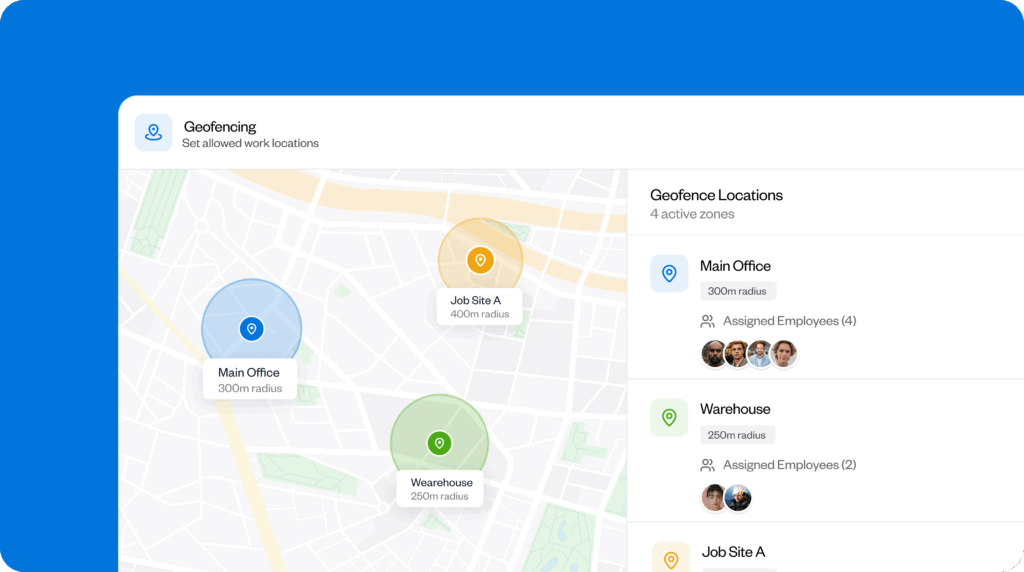
The solution to these issues is time tracking software that lets you track hours down to the minute without any extra effort from your team. For example, Buddy Punch’s geofencing feature can prevent employees from clocking in or out when they’re not at the job site, helping managers record hours and locations accurately and reduce costly error corrections.
Lost productivity
When employees have to spend time managing payroll instead of performing their core job function, it negatively impacts company productivity. And the smaller a business is, the greater the risk of employees being spread too thinly.
Kira Byrd, Chief Accountant at Curl Centric, has seen this firsthand. Her staff “spend hours correcting missed punches, updating pay codes, or resolving funding discrepancies that have been identified at the end of the cycle.” These corrective measures “can result in more than 20 hours per month in lost labor,” she says.
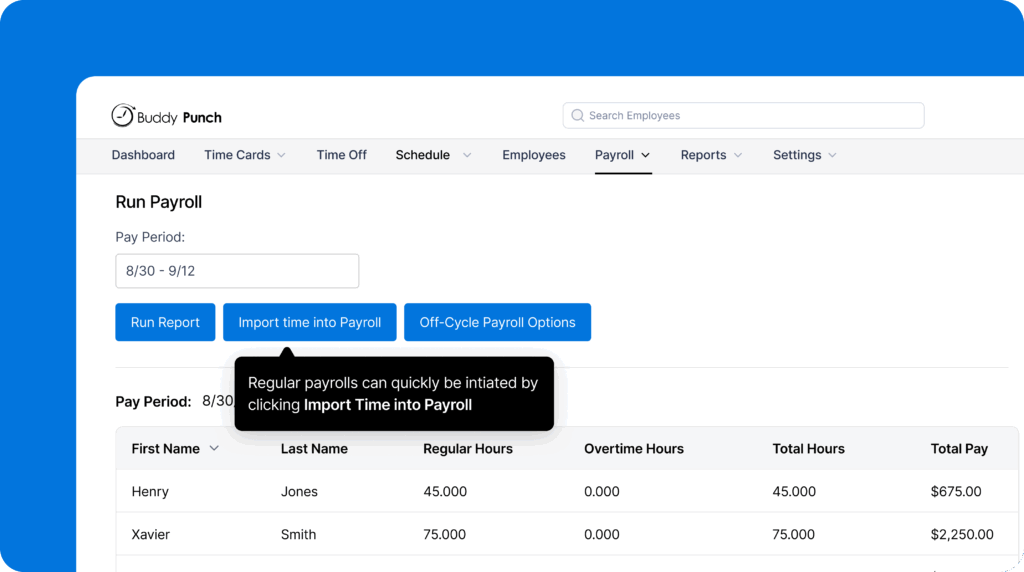
Automation plays a vital role in regaining these lost hours. For instance, Buddy Punch offers a quick import tool that brings all employees’ time data for the pay period into your payroll run. This makes it easier to prepare accurate payroll information, generate tax forms, and send payments.
Overtime miscalculations
In industries where overtime is common, payroll quickly becomes more complicated. Overtime laws vary by state, job classification, and company policies, making manual payroll calculations more prone to expensive errors.
For example, when you miscalculate overtime, you may need to pay retroactive pay (retro pay) to cover the difference between what the employee was owed and what they received. This could affect your company’s cash flow, increase admin, and negatively impact employee satisfaction.
Overtime errors can also lead to incorrect tax withholdings, leaving you open to potentially expensive penalties. And even small withholding errors can compound quickly for shift-based teams with irregular hours.
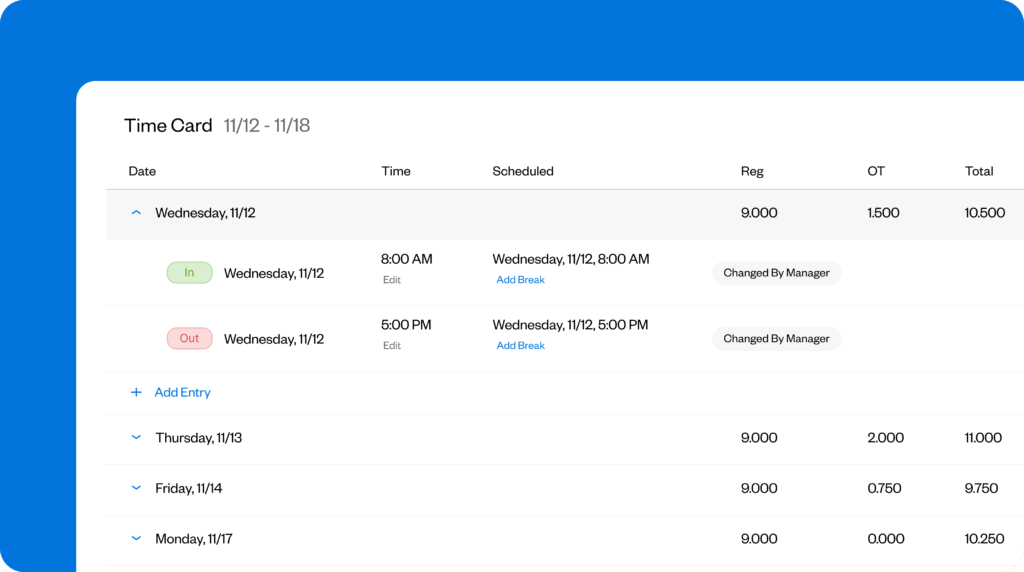
Again, time tracking software like Buddy Punch can help you categorize hours correctly from the outset and reduce the need for costly corrections later on. You can even set up alerts to let you know when an employee’s hours are approaching the overtime threshold so that you can re-assign shifts — another way to cut down on overtime costs.
Incorrect PTO tracking
PTO is another common area where payroll mistakes can creep in. For example, multi-state businesses often trip up by offering a PTO policy that doesn’t comply with the laws of every state in which they operate. This can lead to legal and financial risks.
For example, “use-it-or-lose-it” policies are illegal in California, meaning employees there are entitled to accrue vacation time they don’t use (although employers can still place caps). If an employer doesn’t let unused days carry over, they’re breaking the law.
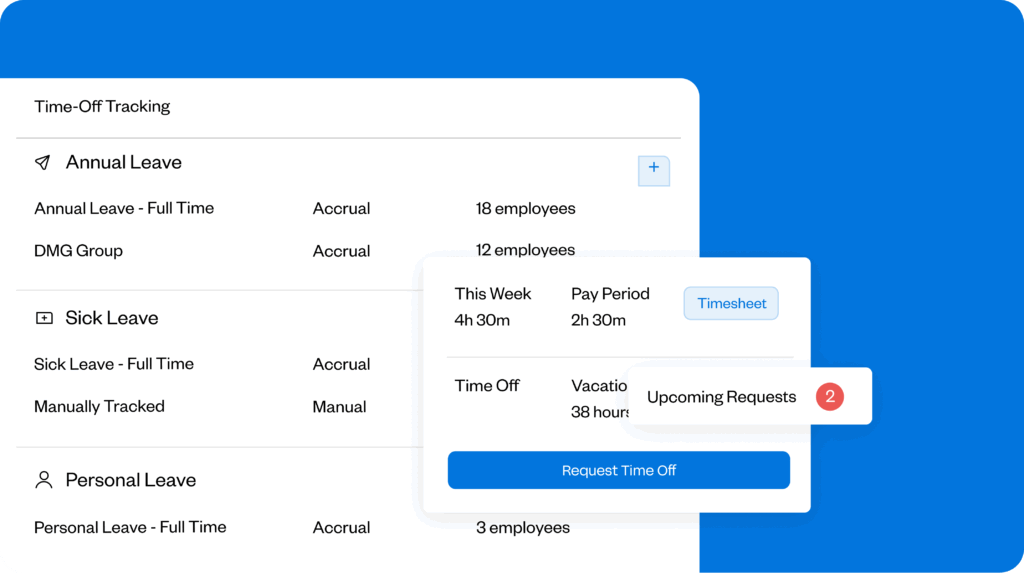
With good software, however, there’s no need to stay on top of every PTO rule for every state — just enter each employee’s location accurately, and it will choose the correct and legal way to track PTO.
Delays caused by missing or late time data
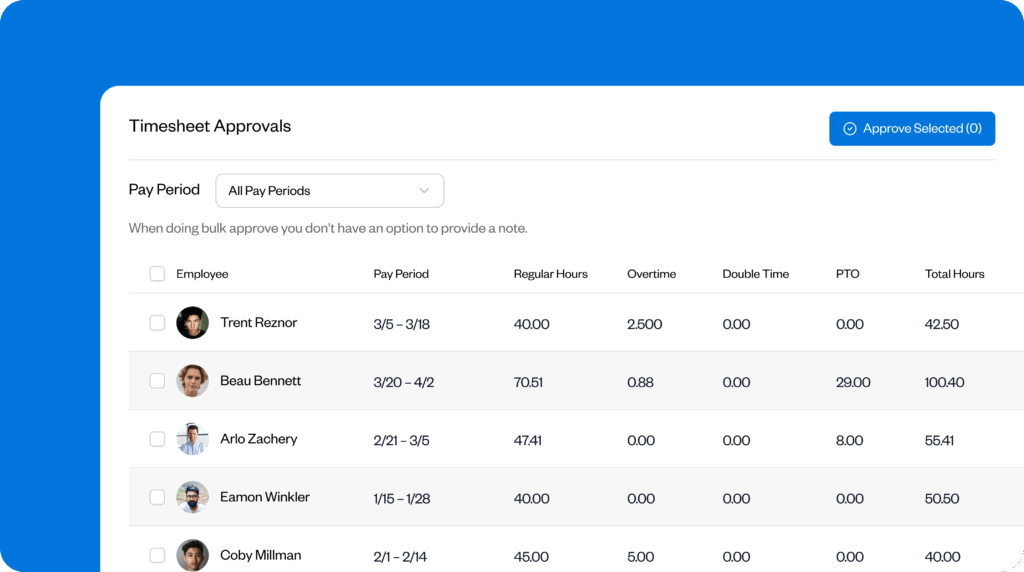
One of the most frustrating payroll issues is when employees forget to submit their time data altogether. This can result in bottlenecks in the payroll process and lost productivity elsewhere in the business, while managers waste time chasing information.
Buddy Punch’s timecard reminders help solve this problem by automating the process. Instead of chasing workers individually, you can create customizable reminders, schedule them in advance, and track who has responded straight from Buddy Punch.
Travel time
For businesses with field-based or remote employees, travel time can significantly inflate payroll costs. It can also be a massive productivity drain, as Emily Demirdonder, Director of Operations and Marketing at Proximity Plumbing, found when she looked more closely at her payroll data:
“My analysis showed that almost 18 percent of our entire weekly payroll expense was merely from transit time and not billable hours; so, it impacts our profit margin in that we are paying a wage but losing the potential income that our technicians would have earned while they were unable to work due to travel.”
To keep better tabs on how much payroll is tied up in transit, real-time GPS tracking is a game-changer. You’ll be able to see exactly where employees traveled over the course of the day, and you can even set up geofences that are tied to job codes to track how much time was spent on job sites and how much time was spent traveling.

What payroll actually costs: Small business examples
Given the numerous factors and costs listed above, it’s clear that the final numbers could vary considerably. Below, we’ve outlined a couple of examples of how to calculate payroll for a small business.
1. A company hiring all contractors
Let’s say there’s a construction company with 20 people, all of whom are contractors. These contractors earn $40 an hour and work an average of 33 hours a week.
Here’s how their monthly costs may stack up:
- Total labor costs: $105,600
- Taxes: $0 (contractors only)
- Workers’ compensation insurance: $3,200 (3% of the payroll)
- Payroll software base cost: $50
- Payroll software user cost: $140 ($7 per employee for 20 employees)
- Hidden admin costs: $2,400 (admin and overtime miscalculations)
Adding everything together, that’s $111,390 per month. A sizable sum — but there are opportunities for cost savings.
For example, while employing contractors can reduce spending on taxes and benefits, inefficient admin processes can eat into profits. By automating time tracking and using reporting tools to analyze travel time, this company could better align pay with productive hours.
2. A company hiring all employees
Now, let’s take the case of a healthcare company with 40 W-2 employees.
Its monthly payroll costs might look something like this:
- Total labor costs: $250,000
- Taxes: $25,000 (roughly 10% of total labor costs)
- Monetary value of non-monetary benefits (wellness perks, a 401(k) match, and life insurance): $18,000
- Payroll software base cost: $70
- Payroll software user cost: $320
- Hidden costs: $3,500 (admin and compliance costs)
All in all, that’s $296,890 per month.
The easiest way to cut costs here would be to reduce benefits, but it’s a careful balancing act — making employees so dissatisfied that they leave the company, forcing a rehiring process, would be even more expensive. One option would be to keep the 401(k) match and the life insurance while reducing wellness perks.
How to minimize payroll costs in 2026 without cutting corners
To sum things up, here’s a quick checklist of everything small businesses can do to reduce their payroll costs in 2026:
- Automate time tracking to reduce forgotten punches, manual edits, and corrections.
- Standardize timecard submission and use reminders.
- Monitor overtime trends.
- Use integrated software systems instead of disconnected tools.
- Audit payroll regularly for leaks.
- Make use of free software trials.
- Negotiate with software providers before signing up.
- Only pay for software features you need.
- Review your software plan yearly to ensure it’s the best deal for your business.
Reduce payroll costs today with Buddy Punch
Workforce costs are always a significant outlay for any business, but they vary depending on factors like worker classification and company size. The good news is that the right software can help you cut costs while reducing payroll errors.
Buddy Punch solves multiple business problems by bringing time tracking, employee scheduling, and payroll features together in one place. Employees can clock in on their mobile devices, with hours automatically entered into timesheets to prevent errors. Advanced tools, such as automated tax filings and payments, can reduce the admin burden — and your costs — even further.
Learn more about Buddy Punch
- Start a free trial — no credit card required
- Watch a video demo
- Take an interactive product tour
- Request a personalized demo
FAQs
How much do payroll services cost for a small business?
While payroll service costs vary by industry, they typically cost $5–$10 per employee per month, plus a base fee of $20–$200. When including hidden fees, the total cost could be 15–50% of revenue (depending on the sector).
Why is running payroll so expensive?
The need for payroll to be accurate and compliant keeps costs high, and hidden expenses like admin can exacerbate the problem. Automation tools like Buddy Punch offer time tracking, scheduling, and more to reduce costs where possible.
Can I do my own payroll for my small business?
Yes, it’s possible to do your own payroll. But to avoid the risk of calculation errors and compliance missteps, we recommend using specialized software. Tools like Buddy Punch make the process easier by providing accurate time tracking.
Contributors
- Victoria Barkow, Barkow Group LLC, Field Underwriter
- Elliot Sterling, Opus Virtual Offices, Web Content Writer
- Gor Gasparyan, Passionate Agency, Co-founder and CEO
- Iryna Balaban, Elite Maids NY, CEO
- Paola Accettola, True North HR Consulting, CEO and Principal Consultant
- Kira Byrd, Curl Centric, Entrepreneur, Chief Accountant, and Compliance Strategist
- Emily Demirdonder, Proximity Plumbing Ltd, Director of Operations and Marketing

