

Free Construction Timesheet Templates for Excel, PDF, Word, Docs, and Sheets

Written By: Eric Czerwonka
Last Updated March 25, 2026
Looking for an easy way to track your crew’s time? We’ve put together five construction timesheet templates you can use for free. Grab your template of choice below, or keep reading to learn why you might be doing yourself a disservice by relying on paper timesheets instead of a construction time tracking app.
Free construction timesheet templates
Use these five construction timesheet templates — available in PDF, Microsoft Word, Microsoft Excel, Google Docs, and Google Sheets formats — to track time for your construction crew. Along with each template, we’ve provided instructions for how to use the template to track your team’s time.
Microsoft Excel construction timesheet template

Our construction timesheet template for Microsoft Excel includes both a blank timesheet and an example. Get started by editing the projects that appear in the “Project” dropdown to make sure the timesheet displays the projects your company is currently billing time toward.
After that, employees simply need to enter the date they worked, select the project they’re working on, and enter their start and end times. Then, you can calculate their hours and place them in the right columns — regular hours, prevailing wage hours, overtime hours, and paid time off. The Excel file will automatically calculate the total hours for you.
If you also want to calculate employee pay, you can enter the employee’s hourly rate of pay, prevailing wage rate, overtime rate, and paid time-off rate, and the spreadsheet will also calculate the employee’s total pay.
Google Sheets construction timesheet template

Our timesheet template for Google Sheets includes both a blank timesheet and an example. It allows you to track employee hours overall, by project, and by type of wage.
Start by editing the projects that appear in the “Project” dropdown to make sure the timesheet displays the projects your company is currently working on. After that, employees simply need to enter the date they worked, select the project they’re working on, and enter their start and end times.
Then, you can calculate their hours and place them in the right columns — regular hours, prevailing wage hours, overtime hours, and paid time off. The Excel file will automatically calculate the total hours for you.
If you also want to calculate employee pay, you can enter the employee’s hourly rate of pay, prevailing wage rate, overtime rate, and paid time-off rate, and the spreadsheet will calculate the employee’s total pay.
Microsoft Word construction timesheet template

To use this Microsoft Word timesheet template, simply duplicate the template for each employee on your roster, then send it to them to fill out each week.
If you have a payroll cycle that’s different than weekly, you can just right-click and select “Add row” to add more rows to the table. And if you want to remove information like pay rates, you can select that row, right-click, and choose “Delete row” to remove it.
This template has fields like “Total Hours,” “Hourly Rate,” and “Total Pay” for your convenience, but unlike the spreadsheet templates, you’ll have to manually calculate these fields. If you want to make that simpler, use our free time card calculator.
Google Docs construction timesheet template

To use this Google Docs timesheet template, simply duplicate the template for each employee on your roster, then send it to them to fill out each week.
If you have a payroll cycle that’s different than weekly, you can just right-click and select “Add row” to add more rows to the table. And if you want to remove information like pay rates, you can select that row, right-click, and choose “Delete row” to remove it.
This template has fields like “Total Hours,” “Hourly Rate,” and “Total Pay” for your convenience, but unlike the spreadsheet templates, you’ll have to manually calculate these fields. If you want to make that simpler, use our free time card calculator.
PDF construction timesheet template

To use this PDF timesheet template, simply download it and then print out the number of timesheets you need to distribute to employees. This template is sized to be printed on a normal 8.5×11″ piece of paper.
5 signs your construction business has outgrown manual timesheets
On a construction site, paper timesheets are as common as high-visibility jackets and bricks. For small teams working on a single site, they serve their purpose — offering an easy-to-use solution with a simple setup.
But as you scale up and juggle budgets, deadlines, and teams across multiple projects, relying on paper timesheets can quickly create problems such as approval bottlenecks and payroll delays.
If you’re starting to question whether manual timesheets are still fit for purpose, you’re not alone. We spoke to a range of construction business owners about the challenges that ultimately led them to switch to a digital system.
Below, we walk through five clear warning signs your construction business may have outgrown manual timesheets.
1. Bottlenecks appearing in the approval process
Few things are more stressful for payroll administrators than discovering on Friday afternoon that a stack of timesheets is still waiting to be signed off. If timesheets regularly arrive late each pay cycle — or you don’t even know where they are — approval bottlenecks may already be emerging in your workflow.
With a small team, paper timesheets are relatively easy to manage. But as construction businesses grow, timesheets no longer move through a frictionless chain. Instead, they pass through multiple people, sites, and approval stages, each increasing the potential for delays.
Bottlenecks tend to happen when:
- Manual timesheets change hands multiple times (from workers to foremen to managers).
- Employees forget to sign timesheets.
- Timesheets are misplaced in transit.
- Workers and managers dispute time entry approvals.
- Managers forget to approve holidays and overtime.
What this means for your business
While approval bottlenecks may not significantly impact the bottom line, they can still hurt productivity.
Research in 2025 by Ricoh found that employees can spend up to 15 hours a week on admin tasks. In businesses with hourly employees, much of this lost time relates to timesheets. When managers don’t receive timesheets on time, or they’re incomplete, it’s frustrating for them to divert their efforts from site operations to admin.
Frequent follow-ups and disputes can also strain working relationships and ultimately reduce employee satisfaction. After all, most construction workers don’t want to feel like they’re facing a confrontation every time their manager checks their timesheets.
Further downstream, if payroll administrators don’t receive approved timesheets on time, they have to chase the managers. As well as being another area where morale can suffer, this increases the risk of payroll running late.
How to scale up
Sometimes, there are quick fixes to make manual processes more efficient. For instance, a central drop-off point for all timesheets can reduce the risk of documents going missing, and clearly communicating deadlines for managers and workers helps to boost accountability and get everyone on the same page.
But if you’re still facing approval bottlenecks, it may be time to streamline your processes.
By switching to a digital timesheet system, foremen and managers no longer need to work as middlemen. The process looks something like this:
- When a worker arrives at the site, they open a time tracking app on their phone.
- They clock in by opening the app and tapping a button.
- They go about their shift as usual (possibly logging their lunch break on the app along the way).
- At the end of the shift, they clock out from the same device.
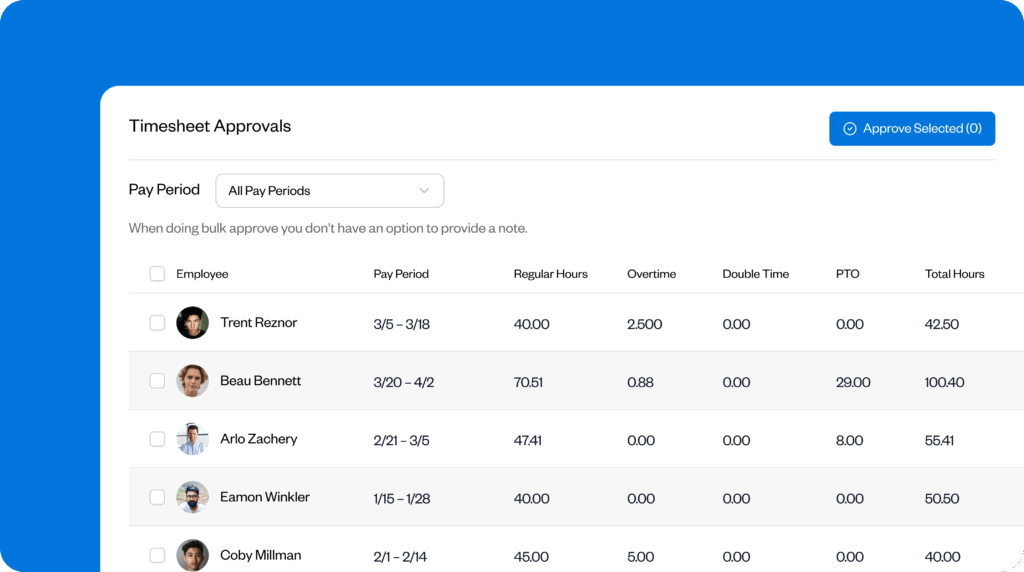
- Time entries are automatically updated in the system, and managers can review and approve them at any time, without needing to track down physical timesheets.
That means no more timesheets getting lost in transit between the office and job site or turning up at the wrong site as plans change at the last minute.
The one remaining chance for a bottleneck to happen now is if managers leave approvals until the last minute, despite having instant access. Some time tracking platforms, like Buddy Punch, let you send automated reminders to check and approve timesheets — for example, a week before the pay period — so managers can compare submitted timesheets to schedules and keep approvals flowing smoothly.
2. Payroll corrections become routine
If there’s one thing worse than timesheets not being submitted at all, it’s timesheets being submitted with incorrect information. At least when you don’t receive a timesheet, you can quickly flag it as an issue. But when the wrong job code is entered or the handwriting is illegible, it can be tricky to spot and confusing to correct. This adds to the admin burden for managers and payroll staff.
Here are some possible reasons why payroll errors might increase as construction businesses expand:
- A growing disconnect between the people designing the system and the workers using it
- Different sites and teams develop their own informal systems and methods over time
- Limited time for proper training as the business scales quickly
- Increasing payroll complexity (such as multiple roles, sites, or pay rates)
What it means for your business
A constant cycle of payroll corrections can damage trust between managers and workers, especially when suspicions about accuracy arise. It can also create tension between office managers and supervisors on the ground, an existing friction point in many growing construction companies managing their own payroll.
But payroll mistakes also have wider and more serious implications, taking us further up the risk scale than simple approval delays. If payroll errors go unnoticed — for instance, if a worker’s schedule doesn’t match the recorded hours — and are later flagged in an audit, you may be obliged to cover any owed wages. Plus, there’s the possibility of accuracy-related penalties and legal action.
Even if you notice errors before a payroll run and correct them, it can still cause audit issues. Often, payroll managers clarify mistakes with managers or workers and correct them in the system themselves but forget to record why they did so or where they got the information from.
Lo Choe, Owner of Aura Fire Safety, explains:
“A deceptive issue with retro edits is that once you change a cell in a spreadsheet, there is no permanent record, and disputes become heuristic against heuristic. I’m far less concerned about accuracy and far more concerned about traceability. Traceability is what maintains payroll integrity and job costing credibility.”
When sticking to manual timesheets, traceability is tough to achieve, and all-important records can often go missing.
How to scale up
By going digital, you automatically remove some of the simplest errors described above. For instance, you won’t run into misunderstandings about whether a worker wrote a one or a seven if everything is entered digitally instead of handwritten.
A digital system also removes the time lag that typically accompanies errors because everything can be checked in real time. If someone enters the wrong job code because they’re confused about which site an employee was working on, managers can spot and correct it quickly — as long as they regularly check timesheets.
However, as Lo Choe stresses above, it’s crucial to build traceability into the process.
On Buddy Punch, every time you make an edit, a digital ledger outlines exactly what has changed and who made the change. This way, you can view the entire revision history instead of relying on memory. You can also write a note explaining why you made a change, making compliance (comparatively) smooth sailing.
3. Job costing starts to drift
Job costing drift occurs when a project’s actual costs or hours differ from the original estimates. This could be due to factors such as rising costs for materials or, in many cases, inefficient or inaccurate time tracking.
Tell-tale signs that recorded hours aren’t reflecting reality include timesheets full of round numbers or predictable job durations — for instance, a roofing job that always takes four hours, regardless of the client or the specifics.
Some common behaviours that contribute to job cost drift when using manual timesheets include:
- Rounding hours: Workers rounding up their start or end times, inflating recorded labor.
- Buddy punching: Employees clocking in or out for each other, reducing the accuracy of time entries.
- Failing to separate add-ons: Extra tasks aren’t distinct from the original job, obscuring actual labor costs.
- Scope changing mid-project: Clients increase their demands beyond what was originally agreed, and extra labor and resources are needed.
- Inaccurate descriptions: Workers don’t break down how they split their time, so timesheets don’t explain where a budget was allocated.
- Relying on guesswork: Foremen estimate hours at the end of the week instead of recording the actual hours worked.
Bill Dudley, President at A Gunite, learned about job costing drift the hard way when paper timesheets didn’t adequately record how his project had evolved beyond the original plans:
“In a commercial pool project in ’98, we added a spa mid-build, and my foreman’s scratched notes couldn’t separate original scope hours from add-on work. We ate $8,000 because I couldn’t prove the extra labor to the client.”
Most construction businesses introduce timesheets to ensure they pay their workers fairly while simultaneously capturing the true cost for each job. But as a business grows, it can be almost impossible for manual time tracking processes to keep pace. There are simply too many workers, too many projects, and too many variables.
What it means for your business
Labor costs are among the highest that businesses face, especially in the construction industry, where they can account for 30–50% or more of total costs. As a result, losing sight of the hours worked can quickly lead to serious financial consequences.
If time recordings overestimate the number of hours worked, the company is paying out more than it should, impacting the bottom line and hurting profit margins. This becomes particularly pernicious in growing businesses, as the larger scale of operations can lead to a complete distortion of what a project costs.
For example, let’s say a construction company has a team of 40 workers split across three job sites. They all record their hours on manual timesheets, and to make their paperwork easier, they often “smooth out” how they allocated work between the sites. For instance, a worker might record that they spent 20 hours on site A, 10 hours on site B, and 10 hours on site C. In reality, however, the time was 18 hours on site A, 12 hours on site B, and 10 hours on site C.
Individually, these might sound like minor adjustments, but if all 40 workers shift just two hours between projects in this way, it works out to 80 hours a week being billed to the wrong projects.
At an average wage of $40 per hour, that’s $3,200 every week being entered into the wrong columns. This can hide the reality of a project’s profitability — in this case, site B looks more efficient than it actually is. The business may continue bidding on projects based on unreliable profit-margin data, amplifying the issue.
How to scale up
Firstly, digital timesheets eliminate rounding errors. As soon as a worker clocks in, the software accurately tracks their time, ensuring hours are recorded in real time rather than estimated later.
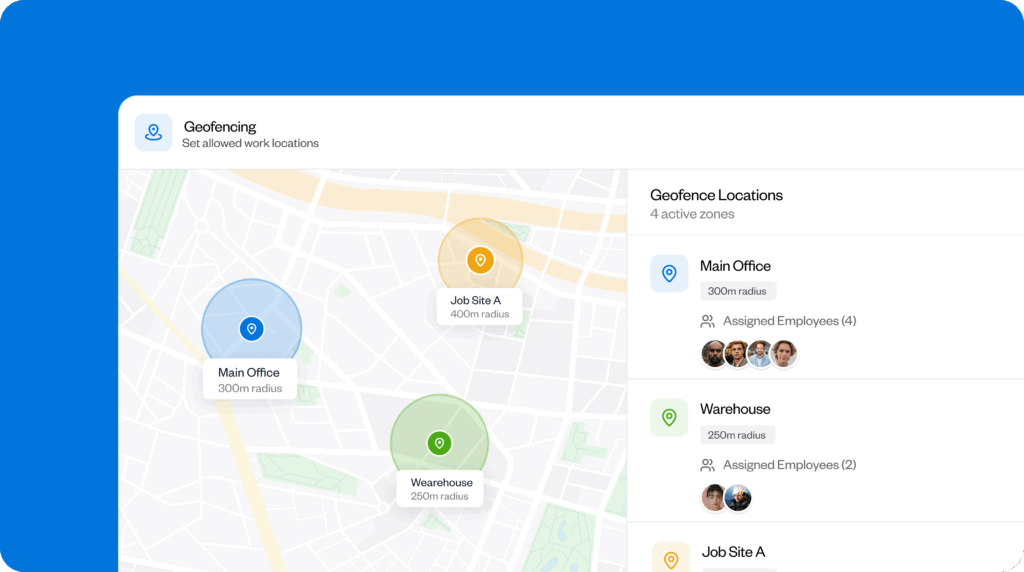
Some time tracking platforms, like Buddy Punch, offer the option to require workers to be within a specific GPS radius when they clock in, known as a “geofence.” This feature reduces the risk of hours being allocated to the wrong project and job costing being distorted.
Cameron Figgins, President of Absolute Maintenance & Consulting, saw great results with a GPS time clock app:
“Digital punches that included location stamps and forced job selection cut our office edits in half and improved job costing after one pay period.”
Businesses can further reduce job-costing drift by using the reporting features that often come with digital time tracking software.
For instance, if you notice that recorded hours are beginning to drift from the hours estimated in a bid, you can investigate early — a much better tactic than waiting until you’re already close to using the labor hours you budgeted for. With early interventions, it’s much more feasible to adjust staffing or processes, preventing significant cost overruns.
4. Overtime becomes excessive
When a business grows fast, you often have to use stopgap solutions to fix the difference between the resources available today and the demands of new work. For example, if you’ve just landed a new project that you need to start immediately, you might decide to assign everyone more hours if there isn’t enough time to recruit and vet a whole new team.
At first, this may seem like a practical solution, but if it happens regularly, you may start to experience overtime creep. This is when overtime hours gradually accumulate beyond the labor projections for the job. For example, you may not have accounted for how many workers would be pushed over the typical 40-hour threshold into a higher pay rate.
If you regularly see more workers than expected entering overtime, it may be a sign that manual timesheets no longer provide the real-time information your business needs to keep labor costs under control.
What it means for your business
Overtime might not seem as serious a problem as some of the issues on this list, but it can be problematic if it throws off accounting.
For example, if a business makes financial plans based on the assumption that the team will work a total of 300 hours a week, but overtime pushes that to 350 hours, profit estimations become unreliable. You might have thought that labor costs were low enough to land a healthy profit, when in reality, you’re dealing with razor-thin margins.
Travis Hoechlin, CEO of RizeUp Media, experienced this firsthand. On one project, his labor costs were off by just 5% on the paper timesheets, but “that 5% was actually run right over nearly half of the expected profit.”
In construction, estimates are critical because bids rely heavily on projected labor costs. With manual timesheets, it’s extremely difficult to see whether the hours your team is working match the initial estimates or if overtime creep is becoming excessive. This can pose an even greater threat to margins than rounding errors since the gap between expectations and reality can be substantial.
How to scale up
In construction, profit margins are often threatened when the hours the back office expects workers to complete don’t match the hours they actually work. With manual timesheets, this mismatch is more likely because of the time lag between working the hours, recording them, and submitting the timesheet.
When everything is digital and recorded in real time, however, it’s much easier for everyone to stay in the loop. With Buddy Punch, for example, you can track or even limit when your team is working overtime. You can also set up alerts to notify managers or administrators every time a worker’s hours reach a specified threshold.
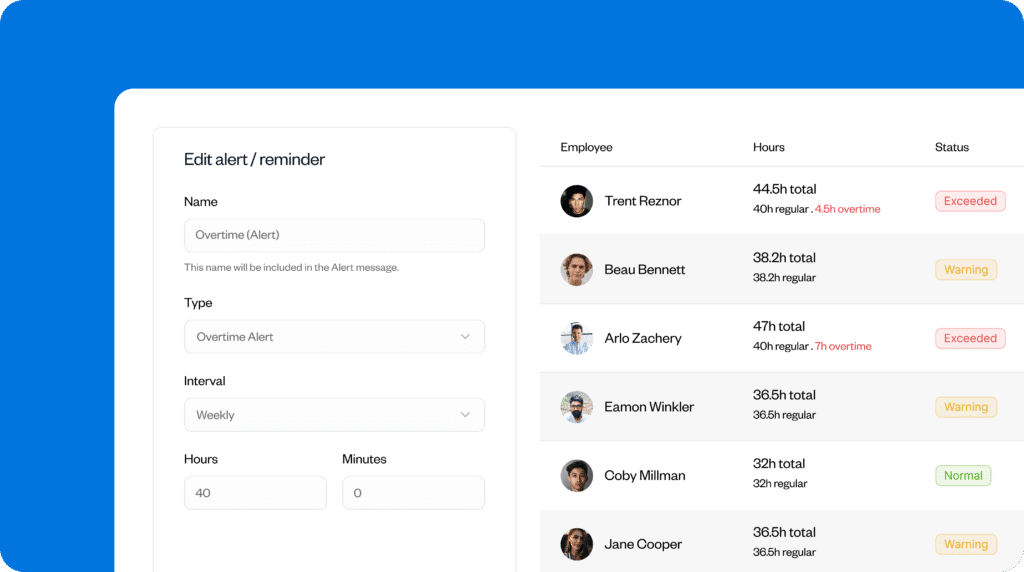
Rather than simply imposing a blanket ban on overtime, managers can now consult their financial plans, check whether they’re still on course to make a profit, and adjust if necessary. For instance, they might streamline the next phase of the project or coordinate with the client to keep everything on track.
5. Leadership loses visibility into labor costs
When a business grows quickly, changes happen fast, making it increasingly difficult for managers to see how labor costs are mounting in real time. In construction, where new workers can be hired at the drop of a hat, tracking of hours, wage rates, and staffing assignments can be particularly complex, especially without up-to-date information.
Here are some of the warning signs that you might be losing visibility into your labor costs:
- Projects are taking more time than initially anticipated.
- Additional workers are needed urgently due to changes to plans.
- Workers move between tasks or projects, resulting in wages or hours that don’t match projections.
These events are manageable as long as you can keep up with the changes and make adjustments accordingly. But in a growing business, the risks multiply across more sites, teams, and projects. And with manual timesheets, the time lag between when the hours are worked and when the labor data is analyzed makes this loss of visibility more likely.
What it means for your business
Without a clear, real-time picture of where your construction business is using its labor resources, managers are constantly reacting to problems since they don’t have the information far enough in advance to prevent them from happening in the first place.
Scott Flores, CEO at Empire Parking Lot Services, talked about his experiences with outdated labor data:
“When using paper timesheets, your labor information is basically 5–7 days old. This age slowed my ability to manage the crews if I noticed we were falling behind. For example, on a 40,000 square foot mill and overlay job that spanned 4 nights, I realized too late we had used 18 more hours than we had planned.”
Not only can cost and profit estimates be off, but misinformed decisions can lead the whole project management system off track. Smaller inefficiencies or underestimations can compound across multiple projects, leading to missed deadlines, insufficient staff, and eroded margins that threaten the overall health of your business.
How to scale up
Once a business has accurate data from digital timesheets about labor hours in a project, it can use that information strategically to bridge gaps or reallocate resources.
Going digital offers valuable real-time visibility into how much a project is costing, so managers can make informed, proactive decisions about whether it’s time to consult their client or adjust the budget before costs escalate.
Many platforms have advanced analytics and reporting capabilities that make it easier to make sense of data, so there’s no need to trawl through endless sheets to know what’s going on. For instance, in Buddy Punch, you can generate a report comparing actual vs. scheduled hours. If there’s a discrepancy, managers know they need to adjust the scheduled hours going forward.
Over time, as businesses learn the true demands of their projects, they can use this data to fine-tune their estimations and organize projects more effectively.
Are manual timesheets right for you?
Manual timesheets have their place, and not every construction business experiences every single problem outlined here.
But the more complex a business is, the more likely it is that these problems will crop up — especially when you have a larger workforce or multiple sites.
The scale below can help you assess your situation based on the warning signs you’ve seen, so you can decide whether it’s time for your business to make the switch:
Low risk
- Bottlenecks appearing in the approvals process (1 point)
Medium risk
- Payroll correction becoming routine (2 points)
- Job costs start to drift (2 points)
High/very high risk
- Overtime becoming excessive (3 points)
- Leadership losing visibility into labor costs (3 points)
Tally the points for each problem your business is experiencing, and add everything up.
Here’s how to interpret your score:
- 0–5: You may be okay to continue with manual timesheets for now. But revisit the idea as you continue to grow, as the signs discussed could crop up further down the line. Consider implementing an annual review.
- 6–10: Your timesheet system has some merits, but you have enough warning signs to seriously consider implementing a digital version instead. Start discussing the idea with managers in the relevant departments.
- 11: You’re struggling with every single sign on this list and are at risk of operational failure, so switching to digital timesheets needs to move to the top of your priorities list. Monitor the two high-risk signs carefully as you implement your new system.
Move on from manual timesheets
Most businesses start off with manual timesheets, so it can feel like they are simply too much of a built-in system to change easily. But as teams expand and projects become more complex, choosing between manual and digital timesheets is no longer just about familiarity.
Sticking to manual processes can waste admin time, eat into profits, and mask significant mismatches between your estimations and a project’s real labor demands, resulting in operational and financial problems.
You can reduce these risks by putting everyone in the business on the same (digital) page, with instant access to logged hours, scheduled projects, and more.
Contributors
- Lo Choe, Owner, Aura Fire Safety
- Bill Dudley, President, A Gunite
- Cameron Figgins, President, Absolute Maintenance & Consulting
- Travis Hoechlin, CEO at RizeUp Media
- Scott Flores, CEO at Empire Parking Lot Services

