

The 6 Best Agriculture Staff Scheduling Software in 2026

Written By: Mark Fairlie
Last Updated April 27, 2026
Scheduling farm employees across multiple fields is difficult if you don’t have a single view of who’s working where, how many hours they’ve logged, and whether each crew has the people it needs.
Without that visibility, one field can end up short-handed, and work falls behind before you have a chance to move people over. Another might have too many hands, and crews end up waiting on each other for trailers, equipment, or the next instruction — hours you’re still paying for.
If you’re driving from field to field to check who’s clocked in where, then chasing down hours from different crews just to calculate weekly wages, you’ll know that spreadsheets and group texts weren’t built for this — especially when the schedule has to change at short notice.
In this guide, I compare the six best agriculture staff scheduling software, from general-purpose schedulers to tools built specifically for harvest crews and field operations. My aim is to help you pick the one that matches your crew size, your fields, and how often your schedule has to change at short notice.
| Feature | Buddy Punch | Deputy | When I Work | FieldClock | ClockShark | Croptracker |
| Best for | Companies with multiple fields | Compliant scheduling | Seasonal farm crews | Farm labor tracking with | Real-time crew locations | Harvest crew tracking |
| Starting price | $5.49/user | $5/user | $2.50/user | $7/user (minimum $100) | $9/user | $27.50/user (minimum 10 users) |
| Free trial | 14 days | 31 days | 14 days | Not available | 14 days | Not available |
| Location tracking | ✅ | ✅ | ✅ | ✅ | ✅ | ✅ |
| Schedule notifications to workers | ✅ | ✅ | ✅ | ❌ | ✅ | ❌ |
| Shift swaps or open shifts | ✅ | ✅ | ✅ | ❌ | ❌ | ❌ |
The 6 best agriculture staff scheduling software
Here are my detailed reviews of the six best agriculture staff scheduling software: Buddy Punch, FieldClock, Croptracker, Deputy, When I Work, and ClockShark.
1. Buddy Punch: Best for companies with multiple fields

Buddy Punch is an easy to use and affordable scheduling and time tracking tool that’s ideal for agricultural businesses with hourly and seasonal teams working across multiple fields, tasks, and sites.
Key features
- Drag-and-drop schedule builder with day, week, and month views
- Reusable schedule templates and repeating shift patterns
- Scheduling by location and role for multi-field crews
- GPS clock-in paired with geofences to prevent offsite punches
- Overtime alerts to prevent unexpected labor expanses
- Mobile app in English and Spanish for multilingual field crews
Pros
- Field crews pick up the app quickly with little or no training
- Early catching of overtime building across scattered field crews
- Break rules handled automatically in states with stricter agriculture laws
Cons
- No free plan
- No piece-rate tracking or harvest production volume recording
Why I chose Buddy Punch: What stood out to me was how quickly a farm manager can go from paper rosters to a working digital schedule. You can see who’s on site, where overtime is building, and get hours ready for payroll in the same place. Field crews can also pick up how to use it with little or no training.
Here are four other ag-related features that impressed me about Buddy Punch:
Reuse shift patterns week to week and season to season

In the off-season, there’s a handful of staff. By the time harvest comes, farms have multiple crews on-site, including pickers, sorters, and forklift drivers. Buddy Punch’s schedule templates let you save a full week’s worth of shifts and reapply the same pattern the next week, including crew assignments, start times, and field locations. This is ideal for periods like the planting season, which can last roughly five to eight weeks.
I also like how the template holds all the details, so you don’t have to rebuild the same week from scratch. It’s not just week-to-week, either — you can pull entire schedules from previous seasons and adjust them to this season’s crew sizes and field plans. This saves a lot of time and stops scheduling eating into your evenings.
See who’s in every location from one screen
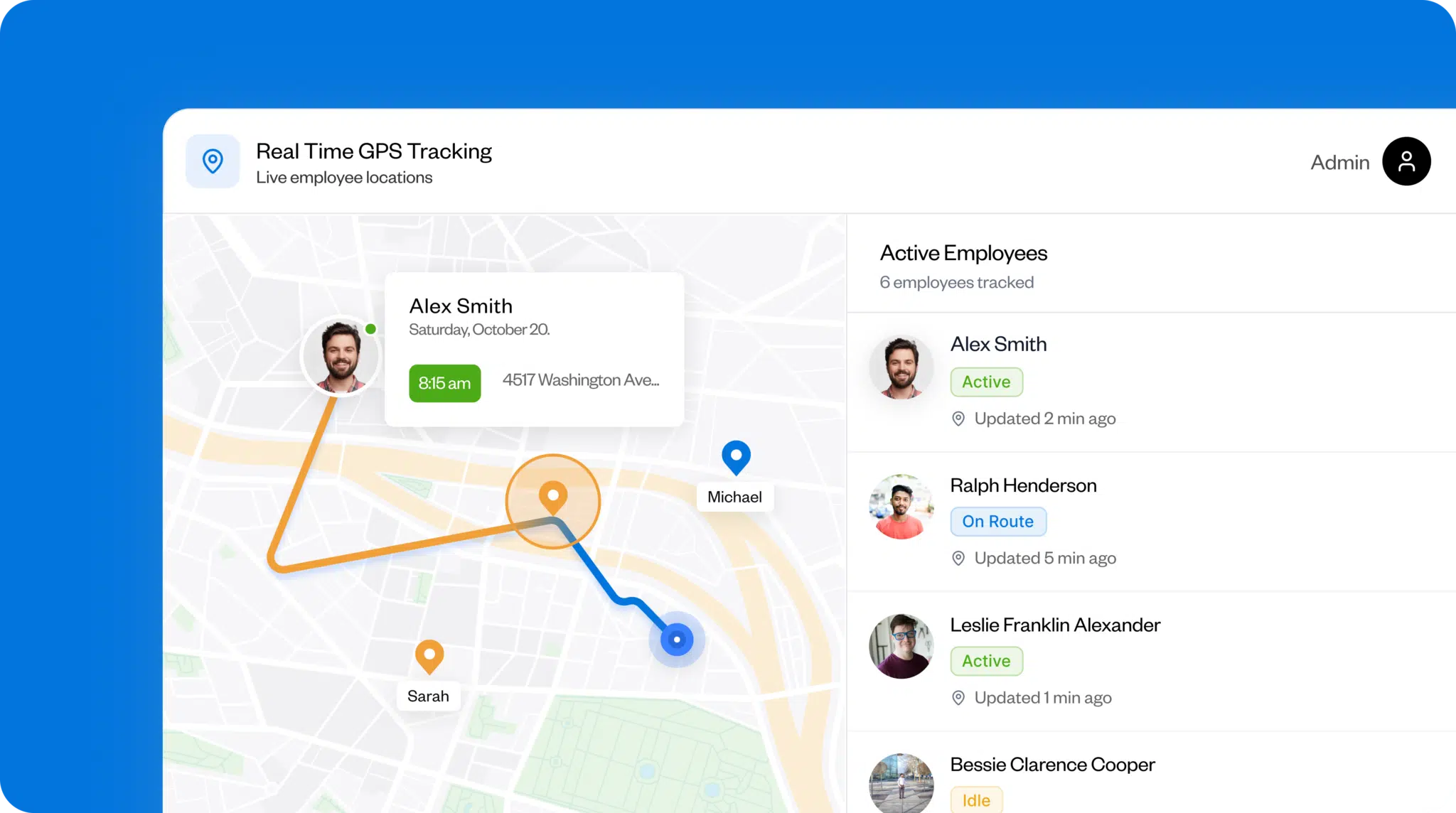
Finding out you’re short-handed at harvest means either leaving produce in the fields or pulling people off another job to cover it. Buddy Punch’s Locations feature sets each field or site up separately, and you can also label roles like driver, packer, or supervisor using the Positions option.
What I like about this setup is that the manager can see where cover is thin and who’s turned up before crews head to the field. Managers don’t have to drive between fields every morning to check headcount. I was similarly impressed by the geofencing — the 1,500-meter radius is wide enough to encompass a large field block. You can check that people are logging in at the right field, so you know where they are if you have to pull them onto another job.
Stay on top of labor hours and costs

By midweek during harvest, you need to know the week’s wage bill. Buddy Punch’s weekly schedule view shows the total labor cost for published shifts, so you have a live picture of hours across locations and roles. Overtime alerts tell you when workers are approaching their thresholds via email or push notification, so there’s still time to spread the remaining hours across the crew.
In addition, payroll exports pull hours split by Location, Department Code, and Position, so you don’t have to prepare that breakdown by hand before sending it to the bookkeeper. I appreciate how well the break rules on BuddyPunch help keep hours accurate, too. You can run paid and unpaid breaks on different rules, with automatic deductions or manual start-and-stop, so break time is already recorded instead of being one more thing to sort out by hand at the end of the week.
Get schedule changes to field crews fast

When the weather turns bad, a vital piece of equipment breaks down, or a produce collection is brought forward, plans have to change. Buddy Punch lets you update a shift and notify affected workers when you publish, so the new plan is circulated before people start heading to the wrong field. I like how the mobile app supports English or Spanish, so crews can read the schedule, get updates, and clock in using their chosen language.
If crew members can’t make their assigned shift, they can request a swap, with optional manager approval, depending on your settings. You can also post open shifts for workers to claim, or check who’s available before assigning the shift directly. I like that workers only get the update once the manager has published the final plan, so there are fewer first-thing calls to sort out and fewer people heading to the wrong field.
Integrations
Buddy Punch integrates with over 20 payroll providers, including QuickBooks Online, QuickBooks Desktop, ADP, Gusto, Paychex, Paylocity, Paycor, and Rippling. You can also integrate with other apps via its API interface.
Price
- Starts at: $19/month base fee + $5.49/user/month (Starter plan: $4.49/user/month + $1/user/month for scheduling, billed annually)
- Free trial: 14 days, no credit card required
- Free plan: No
What users say about Buddy Punch
Buddy Punch earns a score of 4.8 out of five stars on Capterra and G2, based on over 1,500 user reviews. Customers value its user-friendliness, with one user saying that “employees are very happy with [the] easiness of the system.” There’s also praise for the app’s time tracking, payroll, and clock-in/out features.
Learn more about Buddy Punch
- Start a free trial — no credit card required
- View pricing
- Watch a video demo
- Take an interactive product tour
- Request a personalized demo
2. FieldClock: Best for farm labor tracking with job-based scheduling

FieldClock is a labor management tool built by farmers for tracking time, attendance, piecework production, and scheduling across field crews.
Key features
- Job-based scheduling with day, week, month, and agenda views
- QR badge scanning for field time and attendance tracking
- Piece-rate and piecework tracking with custom pay calculation
Pros
- Workers can check their own hours and piece counts through the employee portal
- Offline mode keeps recording hours when the field signal drops out
Cons
- The schedule shows what work needs doing, not which workers are doing it
- No notifications to workers when the work plan changes
What FieldClock offers: FieldClock is an agriculture-specific app with time and scheduling features. It records hours and piece counts in the same place, so managers can see what staff produced between clocking in and out. Unlike other apps that assign workers to shifts, managers build schedules around individual jobs and locations.
Job-based scheduling and labor projections
FieldClock’s scheduling feature lets managers plan labor needs by job, with day, week, and month views available. It’s also possible to carry over recurring jobs from week to week in one click. Because there are certain times of year when farms have to focus on what needs to be done rather than who’s doing it, I like this aspect of FieldClock. However, if you need to know in advance exactly which workers are on shift, it may take one or two more steps to find that out.
QR badge scanning for field attendance
Each worker gets a printed QR badge, and crew bosses scan them in and out using a phone or tablet. The app works offline and syncs when connectivity returns, which is important for remote field teams with patchy cell coverage.
Piece-rate tracking and custom pay calculations
I like how you can track production alongside working hours, making the app very useful for farms that pay by the bin, box, or piece and need to work out each worker’s pay accurately.
Managers can set the rates for each job. In addition, the system automatically handles minimum-wage top-ups and can export payroll data to most ag-specific payroll providers or to FieldClock Payroll Powered by ADP.
Integrations
FieldClock exports payroll data compatible with most ag-specific enterprise resource planning (ERP) services and includes a built-in payroll option — FieldClock Payroll Powered by ADP — for farms that prefer to manage payroll within the same platform.
Price
- Starts at: $7/user/month (subject to a minimum $100 charge)
- Free trial: No
- Free plan: No
What users say about FieldClock
FieldClock is a highly specialized product and currently has no G2 or Capterra reviews. Their Agent app on the App Store scores 4.5 out of five stars across 200 reviews, with one customer commenting that it “takes a lot of weight from our shoulders, especially during harvest time.”
3. Croptracker: Best for harvest crew tracking and crew-based scheduling

Croptracker is a farm management tool built for fruit and vegetable growers that combines crew scheduling, punch-clock attendance, and piecework tracking.
Key features
- Daily planning view for assigning crews to jobs and locations
- Kiosk mode with QR badge scanning for crew clock-in and out
- Automatic minimum-wage top-up when piece earnings fall short
Pros
- Offline punch clock keeps recording hours when the field signal drops out
- Hours and piece counts are kept together for simpler wage calculation
Cons
- Scheduling is crew-based, with less individual shift-level control
- No shift swaps or open shifts, so changes must go through the team leader
What Croptracker offers: Farms where crew-level planning and piece-rate tracking matter more than individual shift scheduling should consider Croptracker. Managers build crew schedules on their computers, assign staff to specific crew leaders, and track clock-ins through an on-site kiosk system. The kiosk sends production and hours data back to the app to work out crew output and payroll.
Crew-based scheduling and work planning
On fruit and vegetable farms with several crews in the field, daily plans are typically built around which crew is assigned to each field, block, or job, rather than which individual is working a specific shift. Croptracker mirrors this approach, allowing managers to assign entire crews to jobs and locations and quickly see where each crew is working in the app’s daily view.
Field-level tracking through the crew leader role
Managers plan the schedule at the crew level, while crew leaders handle the field side, scanning workers in via the kiosk badge and tracking production as it progresses. I like how no one has to download an app to start work or learn a new tool on their first day.
Piece-rate tracking and payroll calculation
As with FieldClock, managers can set Croptracker to pay by the bin, box, or piece alongside tracking production volumes and hours. It pairs worked hours with piecework production, accounting for minimum wage and calculating wages based on the rates decided for each job.
Integrations
Croptracker exports payroll reports that can be imported into external payroll systems and also offers an API for custom integrations. However, based on its current public documentation, it doesn’t appear to offer direct integrations with payroll providers.
Price
- Starts at: $27.50/user/month (minimum of 10 users)
- Free trial: No
- Free plan: No
What users say about Croptracker
Customers rank Croptracker 4.5 out of five stars on Capterra and 4.8 on G2. Users say they’re happy with the app’s schedule mapping across multiple farm activities, its ease of use, and the staff tracking. One user said the app is “great for tracking labor expenses.”
4. Deputy: Best for compliant scheduling

Deputy is a scheduling and compliance tool for shift-based teams that need break rules, overtime limits, and labor-cost tracking built into the roster.
Key features
- Auto-scheduling based on expected staffing needs and labor budget
- Adjustable break, overtime, and pay rules with pre-built templates by location
- Open shifts and shift swaps with manager approval
Pros
- Short-staffed crews are spotted before anyone heads to the field
- Weekly scheduling takes minutes when the same pattern repeats
Cons
- No agriculture-specific features like piece-rate or crop tracking
- No QR badge or kiosk scanning for crews without smartphones
What Deputy offers: For farms operating in states with stricter break and overtime requirements, Deputy’s compliance-first approach is worth considering. It also includes auto-scheduling and automatic posting of open shifts, so roster building and last-minute cover are handled in the same place.
Break and overtime compliance tools
Because break and overtime laws are complex and vary by state, Deputy lets managers set rules for each location. It then highlights potential compliance issues as they’re building the schedule. Managers also get an alert when a worker’s hours are approaching the overtime limit.
Auto-scheduling with labor cost targets
Auto-scheduling is a useful feature for farms with consistent shift patterns, like a packhouse with the same production targets each week. I was impressed by how Deputy can automatically build a roster based on expected staffing needs, worker availability, and labor budgets, and managers can simply review and adjust before publishing.
Open shifts and shift swaps
Deputy helps fill last-minute gaps by posting open slots to workers who are available and qualified. Staff can also swap shifts with each other through the app. In both cases, managers review and approve the change to keep schedules accurate.
Integrations
Deputy integrates with QuickBooks, Xero, ADP, Gusto, Square, BambooHR, and Paychex for payroll and POS.
Price
- Starts at: $5/user/month (Lite plan, billed annually)
- Free trial: 31 days, no credit card required
- Free plan: No
What users say about Deputy
Deputy has a 4.6-star rating on G2 and 4.5 on Capterra. Customers mainly praise the system’s ease of use and intuitive scheduling. One reviewer noted that “the tool has magnificent time tracking capabilities, which saves on time and includes GPS tracking.”
5. When I Work: Best for shift coverage across seasonal farm crews

When I Work is a scheduling app suitable for farms where crew numbers change through the season, and workers often move between different jobs.
Key features
- Auto-assign shifts based on worker qualifications and availability
- Shift-swap and open-shift selection with optional manager approval
- One-step bulk import of multiple seasonal workers from spreadsheets
Pros
- Easier to fill shifts when workers can cover more than one role
- Schedule changes instantly pushed to workers’ phones
Cons
- No way to restrict individual workers to specific fields or sites
- No auto clock-out when workers leave the site at the end of the day
What When I Work offers: With features like role tagging, auto-assignment, and bulk onboarding of seasonal staff, When I Work is a practical fit for farms that scale up quickly at busy times. It suits operations where managers need to send shifts out fast and want a more flexible approach to shift swaps and cover.
Filling shifts across a multi-role seasonal crew
On many farms, staff move between jobs — they might be picking one week, packing the next, and driving a forklift the week after. To address this, When I Work lets managers tag each employee with the roles they’re capable of doing and are trained for. Then, when building a shift, only qualified staff appear as options.
I like how, during seasonal peaks, managers can upload many new workers from a spreadsheet in one go and tag them with roles straight away so they’ll appear in the right shifts.
Shift swaps and open-shift claims
Workers can pick up open shifts in the app, with only shifts they are qualified for appearing as options. They can also swap shifts with each other. The manager can choose whether swaps need approval or go through automatically.
GPS clock-in and location stamps
For farms with crews spread across several fields, knowing where each worker clocked in helps the manager decide where to send cover if a crew is short. When I Work records the location of each punch, and the manager can set a boundary around each site to stop workers from clocking in before they arrive.
However, unlike Buddy Punch, which lets you set individual geofences for each worker and each site, When I Work only allows blanket restrictions that apply to everyone.
Integrations
When I Work integrates with QuickBooks, ADP, Gusto, Paychex, and Square for payroll and POS. Zapier is available for connecting to other apps.
Price
- Starts at: $2.50/user/month (Essentials plan)
- Free trial: 14 days, no credit card required
- Free plan: No
What users say about When I Work
Capterra’s reviewers award When I Work 4.5 out of five stars, while its rating on G2 is 4.4. Clients appreciate its ease of use and how much time it saves them when scheduling shifts. One customer remarked, “The clear layout and real-time updates help keep everyone on the same page”.
6. ClockShark: Best for seeing a live map of crew locations

ClockShark is a time-tracking and scheduling platform, primarily designed for field service and construction teams that need GPS-verified attendance and job-coded time entries.
Key features
- Drag-and-drop shift scheduling with saved job assignments
- Live crew location map with GPS stamps and movement tracking
- Job-coded time entries that feed detailed labor cost reports
Pros
- Clear visibility of where every crew member is when they’re clocked in
- Offline clock-ins sync automatically when the cell phone signal comes back
Cons
- No shift swaps between employees, and no way to claim available shifts
- No piece-rate or piecework tracking for harvest operations
What ClockShark offers: ClockShark is built for construction and field service, not agriculture. But it earns its place on this list because it addresses a core challenge in farming: visibility into worker location. It includes a live map and also lets managers assign shifts by job and site.
Live crew map and GPS tracking
ClockShark’s live map shows which employees have clocked in and where they are working. Every punch gets a GPS stamp with coordinates, and a breadcrumb trail shows movement throughout the shift. Managers can also set geofences around job sites to prompt employees to clock in upon arrival at their scheduled location.
Drag-and-drop scheduling with recurring jobs
I found the scheduling interface clear and easy to read. Managers can build schedules using a drag-and-drop calendar, assigning shifts by job and employee. Shifts can be saved and reused, so recurring schedules don’t need to be rebuilt from scratch.
However, because the app doesn’t include auto-scheduling or open shifts, managing larger crews can be time-consuming. Managers need to assign each shift manually, and unlike Buddy Punch, where crew members can swap shifts and pick up open ones with optional manager approval, ClockShark requires the manager to handle all changes.
Job-coded time entries and cost reports
When staff work on different tasks or in different fields, ClockShark records hours against each one separately, so the manager can see what each shift has cost. The figures feed straight into payroll without needing to be re-entered manually.
Integrations
ClockShark integrates with QuickBooks Online, QuickBooks Desktop, ADP, Gusto, Xero, and Sage 100 Contractor for payroll and accounting.
Price
- Starts at: $40/month base + $9/user/month
- Free trial available: 14 days, no credit card required
- Free plan available: No
What users say about ClockShark
On Capterra, ClockShark scores 4.7 out of five stars, while on G2, users give it a 4.6-star rating. There are favorable comments on its ease of use, visibility over staff schedules, and tracking capabilities. One farmer stated, “We moved from a complicated spreadsheet and paper timesheets to this system, and it has been a fantastic overhaul.”
Learn more about ClockShark
- Read our in-depth ClockShark review
- Compare Buddy Punch vs. ClockShark
- Discover the best ClockShark alternatives
The benefits of using agriculture staff scheduling software
With labor shortages common and harvest windows tight, scheduling mistakes on a farm can directly hit productivity and revenue. The right software helps in several ways:
Cross-field crew visibility
A single view of the schedule across each field and site lets managers see the whole day ahead before anyone leaves the yard. Now, you can get enough people onto a short-handed crew before work starts, avoid putting too many hands in one place, and sort out the day’s plan without losing the first hour.
Overtime tracking across scattered crews
Without a running total of everyone’s hours, unplanned overtime can build quickly during the week, and you might only spot it at payroll. Many scheduling platforms will send an alert before a worker’s hours tip into overtime, so you can spread the work around. This keeps hours more even across crews and stops costs from rising late in the week.
Seasonal schedule reuse
Crew sizes on a farm swing from a handful of workers in winter to full packhouse, loading, and harvest teams by midsummer. Instead of having to remember and rebuild last year’s shift patterns for each team, scheduling software enables you to use saved templates and adjust them for this season.
Get schedule changes out to crew, fast
On days when the weather turns, vital equipment breaks down, or an urgent last-minute order comes in, you need to get the new plan out to workers fast. Phone and app alerts ensure people get to the right field first time — and picking, packing, and loading stay on track.
Hours ready for the pay run
Scheduling apps record when each worker clocks in and out by crew, field, and role — no need to chase punch cards from different teams. The app catches incomplete time records and helps ensure break records are complete, which matters in states with stricter agricultural break rules. At the end of the week, hours are sorted and ready for the pay run.
The bottom line on agricultural staff scheduling software
Running a farm with a handful of people is manageable. But once you’re coordinating crews across multiple fields, with numbers fluctuating season by season and bad weather disrupting plans at short notice, keeping everything on track becomes much harder.
With the right agriculture staff scheduling software, however, you can control the week’s schedule, crew numbers, attendance, and labor costs all from one place. When plans change, managers can respond quickly, and crews get the update on their phones straight away, helping keep operations running smoothly — whatever the weather.
How I chose the tools on this list
I reviewed 33 general scheduling platforms and five agriculture-specific apps before narrowing my shortlist down to seven. For the top six, my criteria were:
- How well each tool handles seasonal crew changes and the kind of complex, multi-team week-to-week scheduling farming operations need
- How effectively each manages workers across multiple fields, job sites, and roles
- How fast managers could get schedule changes out to field crews’ phones
- How accurately each platform records staff hours, breaks, and attendance for payroll
A final key consideration was ease of use. Apps often bury great features, and I wanted the list to include fully featured apps that are easy enough to use with minimal instruction.

