
The 8 Best Manufacturing Employee Scheduling Software

Written By: Mark Fairlie
Last Updated July 20, 2026
When building a manufacturing schedule, there’s more to consider than making sure each line is covered.
As a manufacturing manager, you have to balance complex shift patterns alongside labor costs, certifications, availability, and compliance requirements — all against a backdrop of multiple crews and production lines, and constantly changing conditions. One mistake can leave a line dangerously understaffed or an operator working a machine they’re not cleared to run.
In practice, the spreadsheet, whiteboard, or rigid ERP system isn’t built to handle this complexity. They lack real-time visibility and automation, making shift changes slow and difficult to communicate across rotations. That’s where purpose-built scheduling comes in, helping managers stay on top of these moving parts. This guide compares the leading manufacturing employee scheduling software, highlighting where each tool excels and where it falls short, so you can make the right choice for your business.
| Feature | Buddy Punch | Connecteam | Deputy | When I Work | Snap Schedule 365 | Homebase | Sling | Celayix |
| Best for | Best all-arounder for manufacturers | Auto-scheduling shifts to correctly certified staff | Break, rest, and overtime compliance | Tracking shift costs and overtime risk | Complex 24/7 rotations with automated call-outs | Teams whose certifications need regular renewal | Low-cost scheduling with labor cost tracking | Finding qualified cover when operators are no-shows |
| Free plan | ❌ | ✅ | ❌ | ❌ | ❌ | ✅ | ✅ | ❌ |
| Prices start at | $19 base + $5.99/user/month | $29/month for 30 users | $5/user/month | $2.50/user/month | $450/yr per scheduler + $36/yr per employee | $24/location/month | Free for 30 users; $1.70/user/month (Premium) | Custom quote |
| Free trial | 14 days | 14 days | 31 days | 14 days | 30 days | 14 days | 15 days | Yes |
| Schedule templates for multi-week rotations | ✅ | ✅ | ✅ | ❌ | ✅ | ❌ | ❌ | ✅ |
| Position/qualification-based scheduling | ✅ | ✅ | ✅ | ✅ | ✅ | ✅ | ❌ | ✅ |
| Labor cost visibility during scheduling | ✅ | ✅ | ✅ | ✅ | ✅ | ✅ | ✅ | ❌ |
| Overtime alerts before threshold | ✅ | ✅ | ✅ | ✅ | ✅ | ✅ | ✅ | ❌ |
| Break tracking and alerts | ✅ | ✅ | ✅ | ✅ | ✅ | ✅ | ❌ | ❌ |
| Connected time tracking | ✅ | ✅ | ✅ | ✅ | ✅ | ✅ | ✅ | ✅ |
The 8 best manufacturing employee scheduling software systems in 2026
Below, you’ll find my detailed reviews of Buddy Punch, Connecteam, Deputy, When I Work, Snap Schedule 365, Homebase, Sling, and Celayix — eight of the best manufacturing employee scheduling tools.
1. Buddy Punch: Best all-around for manufacturers
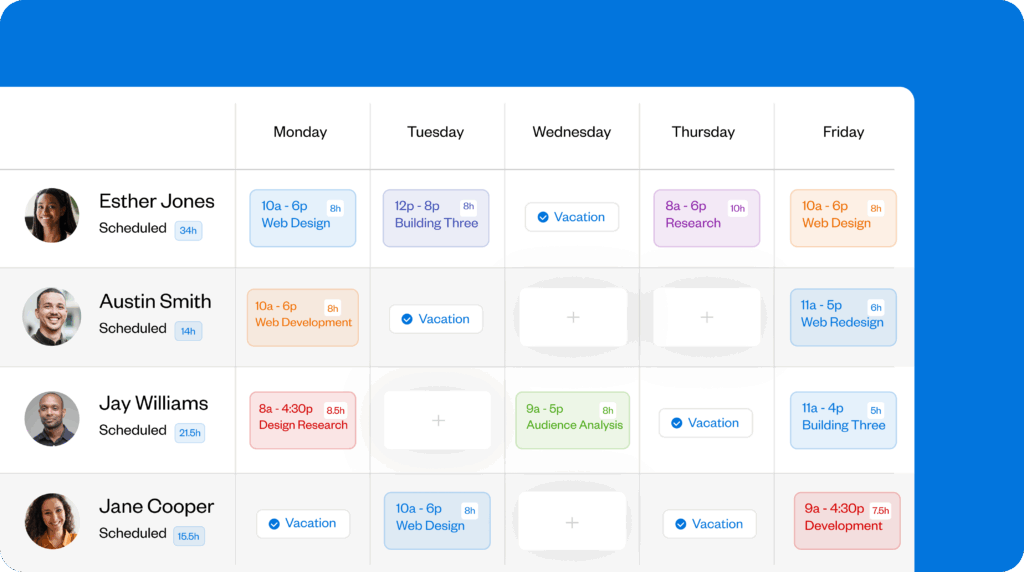
Buddy Punch brings together employee scheduling, time tracking, and payroll integrations in a single platform built for small and mid-sized manufacturing teams employing hourly workers.
Key features
- Built-in templates for saving and reusing shift patterns
- Operator role and position filters on the schedule
- Labor costs displayed on published weekly schedules
- Separate pay rates for night, weekend, and hazardous duty shifts
- Alerts if staff miss breaks or assigned hours approach overtime thresholds
- Auto-repeating shifts for fixed weekly operator schedules
Pros
- Employee availability and time off are visible while building the schedule
- Staff get shift notifications on their phones when you publish
- Payroll exports automatically split hours by department and position
Cons
- No auto-scheduling, so you have to build each shift manually
- Position filters don’t block you from scheduling unqualified operators
Why I chose Buddy Punch: I love how quickly I was able to create a whole manufacturing scheduling workflow from scratch in one place. I managed to add the team, build a schedule, and set up time tracking in minutes. Getting it to work my way was easy, too, and setting up alerts for overtime warnings and missed breaks only took a few clicks.
Here are four of Buddy Punch’s scheduling features that really stood out to me:
Reuse rotating shift patterns instead of rebuilding them

A four-week DuPont rotation covers 28 days of shifts across three or four crews. Plotting that by hand every month means working out who’s on days, who’s on nights, who worked last weekend, and who’s already on six shifts in a row. It takes up hours of your time before anyone’s even clocked in their first hour.
Buddy Punch’s schedule templates solve this problem by letting you save a full rotation and reuse it in the next cycle with the crew assignments already in place. I set up a DuPont pattern once and applied it to the following month in just a couple of clicks. If your factory staff work the same hours throughout the cycle, all you have to do is repeat them, not recreate them shift by shift.
Scheduling for a plant with three rotating crews can mean an evening’s work. With Buddy Punch, you reduce that to 30 minutes at the most.
Match operators to the roles they’re qualified for

Who’s qualified to run which machine on a production floor is a crucial safety question: An uncertified press operator or an untrained forklift driver is a risk to themselves and the business if they get injured. Not just that, but they can disrupt production, leading to lost output and potential shutdowns.
Buddy Punch’s Positions feature lets you set up roles and link each employee to the ones they’re qualified for. When you’re looking for staff for a shift, you can view employees assigned to that position. For example, in a metal fabrication shop where different lines need different certifications, the filter narrows your options to operators cleared for each specific line.
The published rota shows who’s on each line and shift, so there’s less risk of someone ending up on a line they shouldn’t be on. I was also impressed that I could create on-call positions so that standby operators would know they might be needed for that shift.
See what each shift will cost before you publish

You pay the staff on night shifts, weekend shifts, and hazardous duty assignments at different rates. The problem is, while you make sure you hit production targets, you don’t see just how much it has cost you until payday.
I love how Buddy Punch overcomes this. First, you set different rates for premium shifts, such as nights and weekends, in addition to role-based pay rates. Then start building your weekly schedule, and you’ll see on-screen what each day and week will cost you before anyone starts a shift.
This is very handy when production levels fluctuate. You can adjust crew sizes and shift allocations to keep the line staffed while also keeping labor costs tight enough to protect your margins.
Catch overtime and missed breaks before they become problems

In manufacturing, overtime builds up shift by shift, often becoming visible only at the end of the month. Breaks are similarly difficult to track, as staff may skip them because the line’s busy and stopping feels like falling behind. Many managers miss these issues until the wage bill comes in too high or there’s an incident due to fatigue.
I really like how Buddy Punch tackles these two issues head-on. It sends you an alert when your employees’ hours approach their overtime threshold, giving you time to rework the schedule before premium rates kick in. And if staff don’t take their breaks, you get a notification so you can sort it out immediately.
Integrations
Buddy Punch integrates with ADP, QuickBooks, Gusto, Paychex, and other payroll providers. Payroll exports can split hours by location, department, and position. Additional integrations are available through Zapier.
Pricing
- Starts at: $19/month base fee + $5.99/user/month (Starter plan: $4.99/user/month + $1/user/month for scheduling, billed annually)
- Free trial: 14 days, no credit card required
- Free plan: No
What users say about Buddy Punch
Buddy Punch has a rating of 4.8 out of five on both G2 and Capterra. Reviewers consistently mention how quickly scheduling, time tracking, and payroll work together without switching between systems. Payroll processing speed and report accuracy also come up frequently. One Capterra reviewer called it “a great program for scheduling,” noting that “it is very self-explanatory” and “easy to use.”
Learn more about Buddy Punch
- Start a free trial — no credit card required
- View pricing
- Watch a video demo
- Take an interactive product tour
- Request a personalized demo
2. Connecteam: Best for auto-scheduling shifts to correctly certified staff

Connecteam offers manufacturing employee scheduling tools that focus on allocating qualified staff to the right roles.
Key features
- AI auto-scheduler matches operators to shifts by training and credentials
- Staff licenses and expiry dates are stored in each employee profile
- Qualification renewal reminders go to both the scheduler and the employee
Pros
- Helps avoid safety incidents caused by lapsed certifications
- Easy to filter by credentials
Cons
- No way to assign standby shifts, so gaps must be filled manually
- Covers far more than scheduling, which may mean more setup and usage time
What Connecteam offers: Connecteam provides scheduling, time tracking, messaging, and certification management in one app. It holds the production team’s qualifications, availability, and shift history so managers can build schedules knowing who’s qualified for what.
Scheduling and qualification matching
Whether chosen by a manager or the built-in AI auto-scheduler, only staff with the right certifications, availability, and approved time off get put forward for shifts. There’s no way to designate on-call positions for standby operators like you can in Buddy Punch, but for standard shifts, the system handles the qualification checking automatically.
Certification document storage and expiry tracking
In manufacturing contexts, operators might hold certifications for equipment such as presses and forklifts, and hazardous materials — each with its own expiry date. I like how Connecteam lets scheduling managers see which ones are up to date before building the next rotation. Employees and the scheduler get a reminder when a qualification is due for renewal.
Mobile schedule access and shift communication
Connecteam’s mobile app provides floor staff with access to their schedule, push notifications when shifts change, and a team chat facility. Everything runs through the same app they use for clocking in, so managers don’t need to manually distribute shift patterns.
Integrations
Connecteam integrates with QuickBooks, Gusto, Paychex, Xero, and ADP for payroll. Each integration is accessed through linked payroll pages on the Connecteam platform.
Pricing
- Starts at: $29/month for 30 users (Operations Hub, Basic plan, billed annually)
- Free trial: 14 days, no credit card required
- Free plan: Yes, up to 10 users
What users say about Connecteam
Connecteam scores 4.6 out of five stars on G2 and Capterra. Reviewers like having scheduling, compliance documents, and communication in one app; one user said, “This platform is all-inclusive — scheduler, communications, time off, timesheet, and more.”
Learn more about Connecteam
- Read our in-depth Connecteam review
- Compare Buddy Punch vs. Connecteam
- Discover the best Connecteam alternatives
3. Deputy: Best for break, rest, and overtime compliance

Deputy is an employee scheduling app designed for shift-based teams that need labor law compliance built into their scheduling process.
Key features
- Enforced minimum rest periods between back-to-back shifts
- Sends alerts when an employee’s hours may trigger overtime rates
- Local overtime and premium pay rates applied automatically
Pros
- Breaks that are missed or cut short are instantly highlighted on timesheets
- Automatically finds available replacements for absent staff
Cons
- Demand forecasting is tied to sales data, which may not reflect actual production needs on the floor
- Payroll exports hours grouped by location only — not department or role
What Deputy offers: Deputy simplifies compliance during scheduling by requiring managers to set rules only once. The system then applies them automatically before each roster is published.
Break and rest period enforcement
Some states require staff to take breaks during long shifts, and many plants also set their own rules on rest periods between shifts. Deputy enforces both during scheduling and highlights missed or shortened breaks on timesheets. If a company has plants in different states, it can assign different rules for each.
Overtime and shift rate compliance
Deputy automatically applies local pay rules and workplace agreements to calculate overtime and premium rates on timesheets. Managers need to set daily overtime thresholds, weekly limits, and premium rates only once. Each shift then reflects the applicable rules for that jurisdiction without the need for manual checking.
Demand-based scheduling and labor forecasting
Deputy uses historical sales and order data to estimate staffing needs and align crew sizes to expected demand across different days and seasons. Getting that right helps reduce overstaffing and keeps overtime in check.
However, because these forecasts are based on sales and delivery signals rather than on-the-floor production requirements, they may not always reflect true operational needs in a manufacturing environment.
Another drawback is that payroll exports allow hours to be split by location and area, but not by department or position, unlike Buddy Punch. Managers will need to sort the data manually after export.
Integrations
Deputy integrates with ADP, Gusto, Paychex, QuickBooks, and Xero for payroll. HR integrations include BambooHR and HiBob. SSO is available through Okta and Microsoft Azure.
Pricing
- Starts at: $5/user/month (Lite plan, billed annually)
- Free trial: 31 days, no credit card required
- Free plan: No
What users say about Deputy
Deputy’s customers rate it 4.6 out of five stars on G2 and Capterra, with regular praise for its break visibility and labor law compliance. One reviewer commented, “It’s user-friendly, keeps track of important scheduling information, and makes managing shifts a lot easier.”
4. When I Work: Best for tracking shift costs and overtime risk

When I Work is a combined scheduling, time tracking, and team communication tool for shift-based hourly teams.
Key features
- Auto Assign fills shifts using trained positions and availability
- Each shift’s labor cost shows on screen as staff are added
- Green and yellow badges indicate which staff have seen their shifts
Pros
- Helps catch budget overruns by measuring scheduled hours against weekly labor targets
- Overtime risks highlighted on the roster before publishing
Cons
- Templates only save daily or weekly patterns, not multi-week rotations
- No separate rates for nights, weekends, or hazardous duty shifts
What When I Work offers: In When I Work, managers can see estimated shift costs during scheduling. Its payroll integrations can also pull worked hours directly from timesheets, so managers don’t have to re-enter them to run payroll.
Labor cost monitoring during scheduling
Manufacturing labor budgets need to factor in costs for factors like overtime, shift mix, and hourly rate variations each week. When I Work displays shift costs on screen as managers build the schedule. Managers also receive alerts when employees approach their overtime threshold, so the risk is flagged even outside the scheduling screen.
One drawback is that, unlike Buddy Punch, When I Work costs night and weekend shifts at the standard rather than the premium hourly rate. That means the on-screen total may understate the actual wage bill for plants running mixed shifts.
Auto Assign and position-based scheduling
Production teams often include staff qualified to work on different machines and stations. When I Work’s Auto Assign takes this into account — along with availability and approved time off — when building schedules. Spreading shifts across certified staff keeps individual hours under control, reducing the risk of overtime building up.
Shift communication and confirmation
Staff can see schedules and changes in their app before their next shift starts. I was impressed by how managers can see who has responded to shift notifications and who hasn’t, allowing them to spot gaps early and line up replacements.
Integrations
When I Work integrates with ADP, Gusto, Paychex, QuickBooks Online, Rippling, Square Payroll, and OnPay for payroll.
Pricing
- Starts at: $2.50/user/month (Essentials plan, billed annually)
- Free trial: 14 days, no credit card required
- Free plan: No
What users say about When I Work
When I Work is ranked 4.4 on G2 and 4.5 on Capterra. Company owners say employees adopt it quickly with little training needed. One user said, “We would suggest it to any small business looking to simplify the scheduling process.”
5. Snap Schedule 365: Best for 24/7 rotating shifts and automated call-outs

Snap Schedule 365 gives manufacturers a scheduling platform built for complex shift environments.
Key features
- Fixed, rotating, split, and on-call shifts are all managed in one place
- Automatically contacts qualified replacement staff for absence covers
- Qualified staff see open shifts and can put themselves forward for work
Pros
- Rosters roll into the next period if no rotation changes — no rebuild needed
- Pay rates adjust automatically for nights, weekends, and on-call shifts
Cons
- Staff don’t get alerts showing new schedules, increasing risks of no-shows
- Rules like overtime caps and rest periods can be hard to set up
What Snap Schedule 365 offers: Snap Schedule 365 is built for continuously operating plants. Supervisors can plan weeks ahead across multiple crews and shift types from a single screen, without the need to start from scratch each cycle.
Rotating shift patterns and shift type support
Facilities running day crews, night crews, split shifts, and on-call coverage need all these variations managed within one schedule. Snap Schedule 365 handles this by allowing supervisors to set recurring patterns that carry over into the next period. When changes arise, they can adjust rosters without rebuilding the entire plan.
Automated call-outs and shift bidding
When someone is absent, the platform alerts certified and available personnel via SMS, in-app, or voice messages, depending how you choose to notify them. Managers can also post open shifts so qualified operators can put themselves forward.
Unlike Buddy Punch, Snap Schedule 365 doesn’t push new schedule notifications to staff phones, so employees need to check the app for updates. The call-out and bidding tools handle the urgent gaps, though.
Keeping 24/7 rotations compliant
Overtime leading to budget overruns and employee fatigue is harder to control in around-the-clock, rotating shift environments. Snap Schedule 365 monitors both, enforcing labor and union rules across every crew’s rotation and spotting overtime patterns before they become problematic.
The app automatically tracks regular, on-call, overtime, shift premium, and incentive pay types. Its 60+ built-in reports give managers the data they need for audits and payroll.
Integrations
Snap Schedule 365 offers direct API integration and CSV export to ADP, SAP, Workday, and Kronos. Custom plug-in support is available for additional payroll and external systems.
Pricing
- Starts at: $450/year per scheduler + $36/year per employee for mobile access (billed annually)
- Free trial: 30 days
- Free plan: No
What users say about Snap Schedule 365
Customers rate Snap Schedule 365 at 4.4 out of five stars on Capterra. It had fewer reviewers than many of the other apps on this page, but manufacturers rank it highly, with one user saying it was “very simple, efficient, and easy to use.”
6. Homebase: Best for teams whose certifications need regular renewal

Homebase is a workforce management platform for hourly teams, featuring scheduling, time tracking, payroll, and team communication.
Key features
- Alerts sent to managers 10 days before certification expiry
- Training requirements visible to staff next to their shifts in the app
- Auto-scheduling recommendations based on availability, roles, and time off
Pros
- Stores all operator certifications in one place, ready for audits
- Untrained staff can’t be scheduled into roles that need specific certifications
Cons
- Weekly schedule repeats exclude rotating cycles like DuPont
- No minimum rest rules between back-to-back shifts to manage fatigue
What Homebase offers: Managing employee certifications is critical for avoiding compliance gaps and ensuring only certified staff are scheduled for a shift. Homebase centralizes qualification tracking, giving managers clear visibility of who’s certified and who’s due for renewal — without cross-referencing spreadsheets, emails, or manual records.
Certification expiry alerts and document storage
When a team member’s certification is approaching its expiry date, I like how Homebase sends managers an alert 10 days before. Centrally storing all qualification documents means companies can immediately present proof of every operator’s credentials during a surprise audit or a safety investigation.
Training requirements linked to scheduling
Tasking someone with a responsibility they’re not qualified for is a safety and production capacity risk. Homebase connects training records to its scheduling feature, so it allows only trained employees to be assigned to a specialist shift.
Auto-scheduling recommendations
Homebase’s auto-scheduler recommends shift assignments based on availability, roles, time off, and qualifications, so managers don’t have to start scheduling from scratch. However, it doesn’t factor in premium pay rates for nights or weekends the way Buddy Punch does. Managers scheduling mixed shifts will need to check costs separately to make sure they stay within budget.
Integrations
Homebase integrates with ADP, Gusto, Paychex, and QuickBooks for payroll. Timesheets sync hours, overtime, wage rates, and tips to the connected provider.
Pricing
- Starts at: $24/location/month (Essentials plan, billed annually)
- Free trial: 14 days, no credit card required
- Free plan: Yes, 1 location, up to 10 employees
What users say about Homebase
Homebase scores 4.5 on G2 and 4.6 on Capterra. Reviewers say setup is straightforward even for non-technical managers. One user also praised its ability to manage staff qualifications such as food safety certificates.
Learn more about Homebase
- Read our in-depth Homebase review
- Compare Buddy Punch vs. Homebase
- Discover the best Homebase alternatives
7. Sling: Best for low-cost scheduling with labor cost visibility

Sling manages shift scheduling, time tracking, and team communication for hourly teams from a single platform.
Key features
- Shift swaps, open shifts, and time-off requests are all handled in the app
- Labor costs are shown against revenue targets as shifts are being built
- Overtime alerts when a shift allocation would push someone past their limit
Pros
- Schedule changes and shift notes reach the whole team through one app
- Staff arrange their own cover and swaps without manager involvement
Cons
- No way to track operator qualifications or certifications
- No manager alerts when staff miss required breaks during a shift
What Sling offers: For smaller manufacturing teams of up to 30 users, Sling provides day-to-day scheduling, shift swaps, and time-off management at no charge. Labor cost tracking, overtime alerts, reporting, and other features are available as paid add-ons.
Labor and overtime visibility
Sling calculates shift costs as schedules are being created and warns when assigning a shift would tip someone into overtime. However, if an employee misses a required break, there’s no manager alert — managers need to track break compliance separately.
Filling gaps so production keeps moving
When someone is absent, Sling lets managers post the open shift to the team. Staff can also swap shifts with each other, which managers can then approve or reject through the app before anything changes on the schedule.
Keeping everyone on the same page
Sling’s app includes a live schedule view with notifications when a new roster is posted or an existing one is changed. The built-in messaging brings shift notes, roster changes, and team updates together in one place.
Integrations
Sling exports payroll data in CSV and XLS formats. It integrates with Toast, Square, Gusto, Harbortouch, Restaurant Manager, POSItouch, and more.
Pricing
- Starts at: Free for up to 30 users; $1.70/user/month (Premium plan)
- Free trial: 15 days
- Free plan: Yes, up to 30 users
What users say about Sling
Sling scores 4.4 out of five stars on G2 and 4.6 on Capterra. Reviewers praise its feature set and the ease of use, with one user highlighting the “minimal learning curve.”
8. Celayix: Best for finding qualified cover when operators are no-shows

Celayix is a rules-driven scheduling platform for shift-based industries, such as manufacturing, healthcare, and security.
Key features
- Find Replacement feature matches available qualified staff to open shifts
- Replacement shortlist ranked by overtime hours, rules, and availability
- Only staff certified for the role get notified about open shifts
Pros
- No-show cover arranged in minutes without chasing staff by phone
- Easy to trust that every assignment meets qualification requirements
Cons
- No break tracking or alerts for monitoring compliance during shifts
- Shift costs aren’t visible on the scheduling screen as assignments are made
What Celayix offers: Celayix helps fill gaps quickly with the right people through an automated qualification check and contact process.
Find Replacement and qualification matching
Celayix’s Find Replacement helps cover no-shows by identifying eligible staff and ranking them by overtime hours, scheduling rules, and availability. It then contacts them automatically, but the manager only sees who’s accepted the offer rather than having to work through a list themselves.
Certification tracking and expiry alerts
I found it useful that Celayix stores expiry dates for each operator’s certifications and sends alerts 30 or 60 days before one lapses. If a certification isn’t renewed on the system, the platform removes the operator from the pool, so they’re not put forward for shifts they’re no longer qualified for.
Rules-based scheduling with Autofill
Celayix’s Autofill distributes shifts based on overtime limits, union agreements, and availability, helping to balance workloads across teams. Unfortunately, shift costs aren’t visible on the scheduling screen — unlike in Buddy Punch — so managers need to manually track labor costs to check they’re within budget.
Integrations
Celayix exports scheduling, billing, and time data in CSV and flat-file formats with payroll providers including Sage, QuickBooks, ADP, and Paychex.
Pricing
- Starts at: Custom quote
- Free trial: Yes, customized by industry
- Free plan: No
What users say about Celayix
Celayix scores 4.7 out of 5 stars on Capterra, with users highlighting the ease of setup and use, and its ability to stop double booking. One user noted that “Celayix has reduced the time we spend on manual scheduling and administrative tasks, allowing me to focus more on strategy and execution.”
The benefits of manufacturing employee scheduling software
Manufacturing employee scheduling software delivers these four key benefits:
Keeping the right people on the right machines
Assigning qualified staff to specific roles on a shift used to require having the timetable and each operator’s qualification records open simultaneously.
Scheduling software stores those records internally and checks them against each assignment before the roster goes out. That means the people with the right skills do the job, supervisors spend less time double-checking names, and the schedule itself becomes part of the qualification check.
Stopping overtime from creeping up unnoticed
Wages account for a large part of a factory’s overhead, so even small spikes in overtime can damage company profits.
With traditional scheduling methods, it isn’t possible to see in real time who’s approaching the overtime threshold. Scheduling software, on the other hand, lets you track labor costs to spot where overtime is building up before publishing the schedule. You stay in budget and avoid any payroll surprises.
Saving rotation patterns instead of rebuilding them every cycle
Rotations often stay the same for months, but you still have to rebuild the schedule every cycle, whether due to staff changes or new orders.
Scheduling tools let you save rotation templates that you can roll forward — keeping what’s working and adjusting to changes. This eliminates hours of manual planning, reduces errors, and frees up your time to focus on the problems that actually need your attention, like absences and rush orders.
Making sure schedule changes reach the floor before the shift starts
When a machine goes down or someone calls out, the updated roster needs to reach the crew. If it doesn’t, operators turn up for the wrong shift or miss the change altogether, and supervisors end up chasing people one by one before the shift starts.
Employee scheduling software allows you to push changes to staff phones as soon as you update the schedule, so the crew sees the latest version sooner, and supervisors spend less time on individual calls or emails to confirm it.
The bottom line on manufacturing employee scheduling software
Employee scheduling in manufacturing is more complex than in most sectors: Managers must juggle rotating shifts, operator qualifications, labor costs, and last-minute changes across 24/7 teams.
Choosing the right manufacturing employee scheduling platform can help you bring shift planning, rostering costs, and qualification checking together in one place. It gives you the control and oversight you need to keep each line properly staffed, so you can spend less time rebuilding next week’s rota and more time on the floor.
How I chose the tools on this list
I evaluated 38 scheduling tools before selecting my eight best manufacturing employee scheduling software solutions. My focus was on:
- How well each handles complex rotating shift patterns like DuPont and Pitman schedules for multiple crews
- How effectively they prevent assigning an unqualified operator to a shift
- How easy the platform makes controlling labor costs, overtime risk, and shift coverage when building shifts
- How efficient each one is at communicating schedules and schedule changes to staff
I also factored in ease of use, because manufacturing managers often need to make quick scheduling decisions to handle absences, machine breakdowns, and production pressure.
As part of my research, I also considered MRP and ERP systems specifically for the manufacturing sector. The five platforms I looked at were:
- MRPeasy: This has workforce planning that estimates how many workers a department needs each day, but it’s built around departments, workstations, and production calendars rather than employee rosters.
- Fishbowl: You can track time and labor through Fishbowl Time, but I couldn’t confirm it had drag-and-drop employee shift building, shift swaps, or cover-request workflows in my research.
- Rockwell: Its Finite Scheduler accounts for workforce availability and skilled or certified employees, but it focuses more on production scheduling than employee shift scheduling.
- Epicor Kinetic: Although Epicor offers a separate workforce scheduling tool for retailers, called Scheduling+, I couldn’t find an equivalent companion product positioned for Kinetic manufacturing users.
- DELMIAWorks: This came closest to including the features I was looking for. I still decided against including it because it’s part of a much broader manufacturing ERP that most small plants would not want to invest in for staff scheduling alone.
My goal in this piece was to review software that fits the day-to-day needs of a production supervisor.

