

How to Finally Overcome Scheduling Issues: Advice from Seasoned Managers

Written By: Christian Rigg
Last Updated January 12, 2026
Scheduling issues usually aren’t caused by one big mistake. They mostly show up in small, everyday ways: missed shifts, last-minute callouts, or swaps you didn’t know about.
At first, these problems are inconvenient. But over time, they become exhausting. Before long, you’re spending more time fixing schedules than running your team, and your employees stop trusting what’s on the calendar.
So, how do you solve this?
To find out, we spoke with experienced managers about the scheduling issues they’ve faced and what finally helped them get things under control.
Avoid no-shows and confusion with a single source of truth

Scheduling issues are hard to avoid when key information is scattered. Managers have to check availability, paid time off (PTO), and shift changes across emails, spreadsheets, text messages, or separate apps. That constant switching makes it easy to miss important details, such as whether a change was approved or who can actually work a particular shift.
This was once the reality for Jesse Singh, founder of Maadho, a supply chain solutions company operating across multiple locations. He tells Buddy Punch:
“We had relied so heavily on antiquated tools that hindered communication from one [location] to another; as a result, one person may have updated the schedule in a shared document, a second person was texting the changes to their team, and a third person was completely out of the loop.”
When there’s more than one place where “the schedule” lives, it becomes unreliable, and no-shows and confusion follow.
The solution
The folks at Maadho solved this problem by creating a single source of truth: one place where the schedule lives and where all changes to it are made. “It will keep your operation consistent and organized instead of chaotic,” Singh notes.
That source of truth could be a carefully monitored spreadsheet or document, a shared calendar, or even a dedicated group chat. But many managers find that a single scheduling system is much easier and more reliable for all types of work schedules they use. It’s what Singh and his team went for:
“We decided to use a centralized, mobile-accessible scheduling tool. With this new tool, everyone has access to real-time updates, automatic notifications of shifts, and approved shift exchanges.”
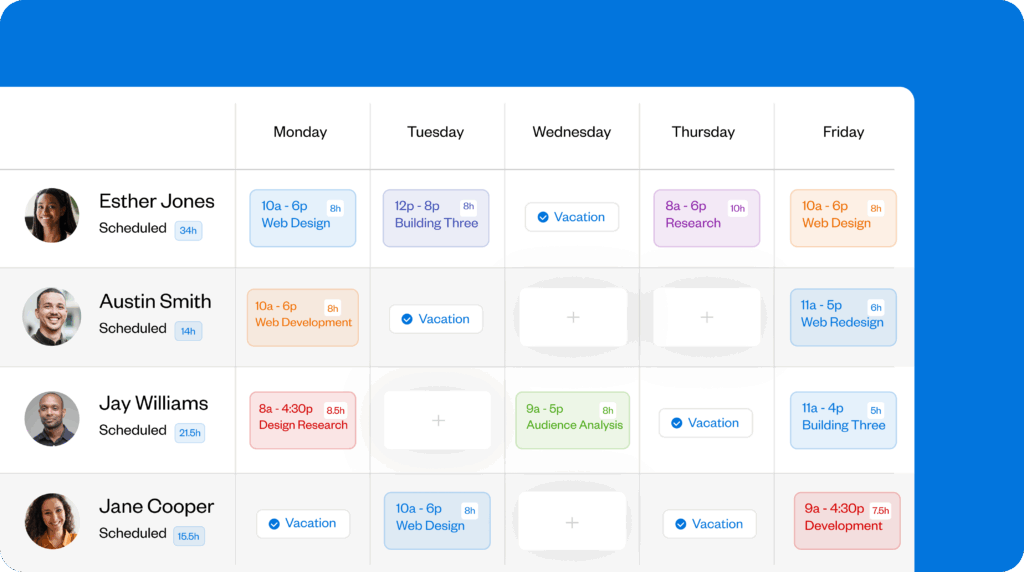
The best employee scheduling apps keep the schedule itself — plus availability, PTO, and other details — in one place so everyone knows where to find information and can trust that what they’re seeing is accurate.
Schedules fall apart — plan for real-world constraints
Another major source of managers’ stress is schedules that seem workable but break down once the day begins.
Ty Tarchane, owner of Everything Knoxville Remodeling & Handyman, says the issue usually comes down to “being too optimistic” about how much can fit into a day.
“On paper, it looks easy to stack four or five jobs in a day. In reality, you lose time driving, forgetting one in a hundred things, loading and unloading, changing orders, and walk-throughs with customers,” he explains. “If you don’t plan for that, the schedule starts slipping by late morning, and everyone feels behind.”
Tarchane calls this gap “invisible time”: the parts of work that have to happen but don’t always show up on a schedule. And it doesn’t just impact field teams; for office teams, invisible time can include time zone differences, daily commutes, or meetings that run long.
When this happens occasionally, it’s not as big a deal. But when it happens every day, it’s a red flag.
“If you always feel behind,” Tarchane adds, “you’re probably trying to fit a super, super unrealistic day into a real calendar.”
The solution
Instead of creating work schedules around “what you wish you could fit in,” Tarchane says, build them around reality.
Your employees are your best resource for getting this right. Ask them to walk you through what their days actually look like, step by step, including everything that slows things down. Compare that to your current schedule and adjust where needed.
In practice, that can mean planning extra coverage for handovers at the start and end of shifts, or adding buffers where delays consistently happen.
Tarchane and his team adopted a few other habits that helped schedules hold up:
- For jobs that move, schedule geographically. Instead of bouncing all over the city, cluster jobs by area.
- Use realistic time blocks. “We book into windows of 8 a.m. – 11 a.m., 11 a.m. – 2p.m., and 2 p.m. – 5 p.m.,” Tarchane says. “It’s easier for customers to understand and gives us room to absorb small delays.”
- Add intentional buffers. A good rule of thumb is 1–2 hours between smaller jobs and 1–2 days between bigger jobs, such as construction, to help absorb downtime.
- Meet regularly to discuss potential issues. Tarchane’s team gathers every morning to look at the schedule and ask, “What’s going to slow us down?” Even a five-minute chat gives the team a chance to adjust for late materials or weather issues so they don’t derail the day.
Now, that extra time will increase scheduled labor costs, but packed schedules often end up costing more. Minor delays can turn into unexpected overtime, and workers are more likely to make costly mistakes when they feel rushed. More realistic schedules are better for your bottom line, your employees’ satisfaction, and your business’s reputation.
Take it from Tarchane, who tells us, “When we stopped being over-optimistic on the day and started being honest about how long things take, those moments of ‘Ah, shoot, we’re going to have to reschedule’ dropped off, the team was less burned out, and customers were happier.”
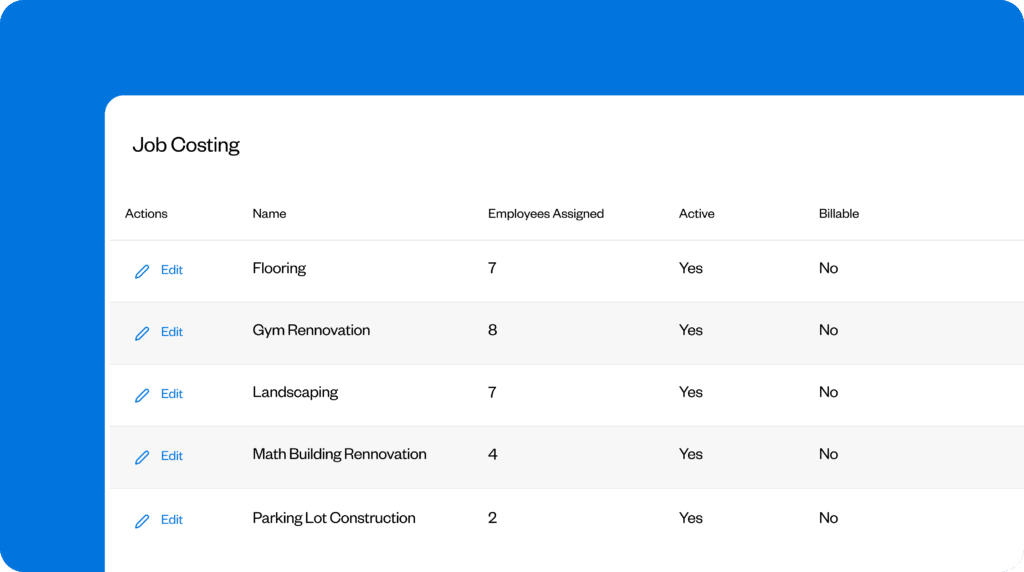
Job costing helps you see the real cost of your schedule. With Buddy Punch, you can create job codes for different kinds of work, from projects to moments like driving, handover, and site prep. Employees select a job code when they punch in and can switch codes as their days change.
As a manager, you can then view reports by location, department, role, and, of course, job code. This gives you a true-to-life picture of where labor time and costs are actually going, making it easier to optimize future schedules.
Reduce short-notice callouts by setting firmer, broader rules
Most employees don’t call out at the last minute because they’re careless. More often, it happens because expectations around notice, especially what counts as “last minute,” are unclear.
An employee may feel they gave enough warning, while their manager is left scrambling to find coverage, and their coworker is frustrated at having to step in on the fly. No one meant to cause a problem, but everyone ends up stressed.
For several managers we spoke to, absences with little heads-up were once their primary source of frustration. But the fix turned out to be simple: create clearer, more complete guidelines and make them easy to follow.
The solution
For Michael Pedrotti, co-founder at GhostCap, that started with a firm notice requirement:
“We set a minimum advance notice [for] time-off requests, with the possible exception of emergencies, which allowed us time to find a substitute instead of rushing last-minute.”
That rule can make a noticeable difference, but it won’t solve this scheduling issue on its own. Employees also need to know how to call out, who to contact, and what applies in different situations.
The best way to cover all this is through a comprehensive employee attendance policy. Like your schedule, it will act as a single source of truth, so list every key attendance rule and explain each one clearly.
Regarding callouts specifically, your attendance policy should explain:
- The types of absences, such as PTO, sick days, emergencies, and no-shows.
- Notice requirements for callouts, e.g., at least 24 hours as standard, or as soon as possible for same-day absences.
- The callout process, including who employees should notify, how they should give notice (by phone, in-app request, etc.), and whether they need to help find coverage.
- Limits on unplanned absences, e.g., 2–3 per quarter.
- Consequences for ongoing issues, detailing what happens when employees repeatedly miss shifts or don’t follow the callout process despite warnings.
Need help getting started? No sweat. Use Buddy Punch’s free employee attendance policy template to get all the basics in place quickly.
“Silent” shift swaps break schedules — require approval and make every change visible
Informal, or “silent,” shift swaps make it nearly impossible for managers to see what’s really happening on the schedule.
When changes happen casually or in tools that managers aren’t regularly checking, problems start to creep in. You get hit with unexpected overtime, people showing up for shifts they aren’t trained for, missed breaks, and surprise no-shows.
Pedrotti used to run into this issue regularly. As he explains:
“The most frequent [issues with] shift swaps and on-call coverage were due to […] team members making swaps informally based on messaging, but these never [made] it onto the official schedule, leading to confusion when incidents happened and the wrong person [being] paged.”
The solution
Fixing this problem is as straightforward as going from informal to formal swaps. Any changes to shifts need to be visible to everyone affected: the employees swapping shifts, their manager(s), and, if appropriate, the client(s) or customer(s).
- For the most important shifts (e.g., those that demand specific skills), employees should be required to request swaps and have their manager review and approve or deny them. This ensures critical shifts are covered and that the right people are aware of the change.
- For more flexible shifts (e.g., those that don’t require special training), you may still want to allow employees to trade shifts and manage their own schedule. But it’s essential that employees only swap with the right people and that the schedule is updated straight away.
In both cases, you need a solid system in place to avoid absences or overstaffing.
You could use a shared spreadsheet or calendar for this, but it’s not ideal. These can work in a pinch, but they get really messy, really fast when everyone on a team can edit them.
Or you could build a swap request system in a project management tool like Asana or Monday.com. But you’d have to create your own workflows, set up automations, and still manually update schedules.
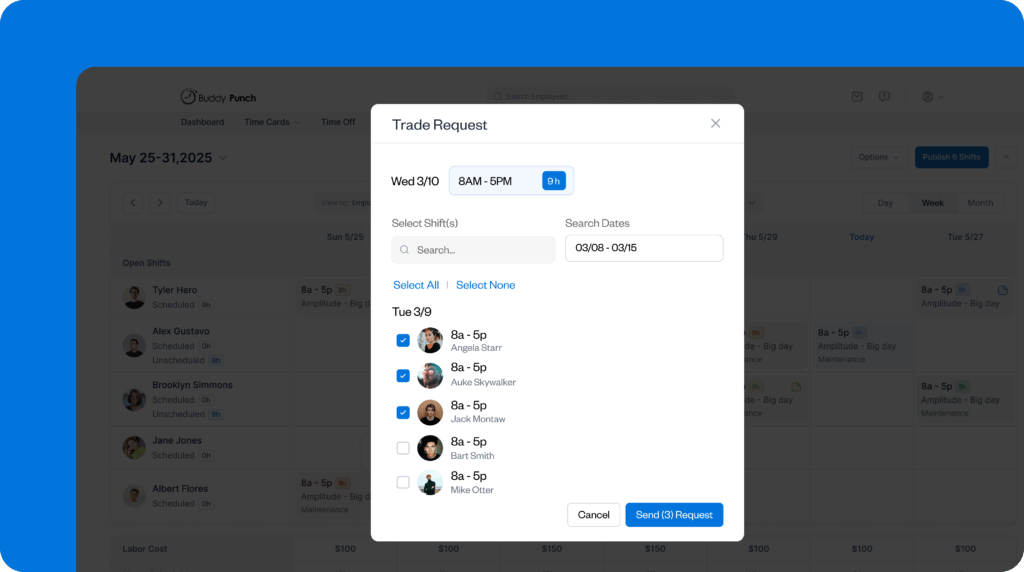
A better solution is to use a scheduling app with built-in change management. For example, Buddy Punch allows employees to request shift trades or covers, with optional manager approval. As a manager, you can control which shifts are available to whom, submit requests on behalf of employees, and view a complete history of changes for any shift, which helps keep everyone accountable.
Stop last-minute changes by locking schedules earlier
No company can afford scheduling chaos, and the managers we consulted agree that last-minute changes beyond callouts are a key source of it.
“We work in various time zones, factories, and fulfillment centers, which means scheduling has to be carefully managed; otherwise, it can cause significant stress and operational difficulties,” says Singh of Maadho. “Our product line is growing, and our timelines are tighter, [so] we simply cannot afford for production and logistics operations to fall into chaos.”
Last-minute adjustments confuse employees and can lead to dangerous mistakes if the wrong people end up in the wrong place. Plus, they trap managers in a time-consuming cycle of fixing schedules. This eventually drives burnout, overtime, and frustrated customers.
The solution
There are 3 steps to combat this issue.
1. Freeze schedules ahead of time
Start by freezing schedules a set number of hours or days in advance.
“A basic habit that helps keep us on the ground is the clearly defined freeze window; 48 hours before every single shift, we lock our schedule down,” says Eliot Vancil, CEO of Fuel Logic. “This one rule has been able to reduce last-minute changes to about 30% and give our team 2–5 hours back per week.”
How far ahead you’ll lock your schedules depends a lot on your industry, but here are some rough guidelines:
| Industry | Freeze Window | Reason |
| Retail & Hospitality | 48–72 hours | Staffing needs can change, but employees still need some predictability. |
| Healthcare & Care Services | 3–7 days | Proper coverage and handovers are crucial; last-minute changes increase both safety risks and costs. |
| Manufacturing & Warehousing | 5–7 days | Shifts depend on one another, and late updates disrupt productivity, safety, and output. |
| Construction & Field Services | 3–7 days | Travel, materials, permits, and job sequencing make last-minute changes very expensive. |
| Logistics & Transportation | 5–7 days | Route planning, compliance, and driver availability take more time to adjust. |
2. Treat changes as exceptions and explain their impact
“If anything gets changed inside of this window,” continues Vancil, “we label it as an exception, identify the person who made the decision, and have a real dollar amount associated with the change.”
That connection helps workers and managers understand the full impact of schedule changes, Vancil explains:
“Once people see the ripple effect in time and dollars, they become more thoughtful with adjustments and the entire schedule becomes calmer and easier to manage.”
To really make this stick, explain in your employee attendance policy how last-minute changes affect workers (e.g., shorter notice before shifts or longer days due to overtime) and offer tips to avoid them (e.g., requesting time off early and flagging potential conflicts ASAP).
Also, clarify why a frozen schedule is good for employees: less stress during shifts, easier planning outside of work, fewer long days and late evenings, etc.
3. Track when and why exceptions were made
Lastly, you’ll want to understand why late changes happened so you can prevent them. A great way to do this is by requiring employees to provide a strong reason for requesting changes during the freeze period.
Buddy Punch makes this easy with Trade and Cover Requests. In both cases, employees must enter a reason for their shift swap, which managers can view before approving or denying the request. Managers can also see past shift swaps and their reasons, which makes it easier to spot recurring scheduling issues to address.

Get on top of scheduling with Buddy Punch
Some scheduling issues are an unavoidable part of work life. But with the right tips and tools, you can dramatically reduce the number of serious problems.
Buddy Punch offers easy-to-use digital scheduling, so you can ditch printed schedules, spreadsheets, and scattered details. It allows employees to request shift trades but requires them to provide a reason and have a manager sign off. When changes do happen, they’re pushed live to everyone’s schedule, whether on desktop or mobile.
Try Buddy Punch free for 14 days to see how clearer schedules and fewer surprises can change how you and your team work.
Contributors
- Jesse Singh, Maadho, Founder
- Ty Tarchane, Owner, Everything Knoxville Remodeling & Handyman
- Michael Pedrotti, GhostCap, Co-Founder
- Eliot Vancil, Fuel Logic, CEO

