

The 8 Best Payroll Software for Home Healthcare in 2026

Written By: Lucy C.
Last Updated July 22, 2026
Running payroll for a home healthcare agency can be complex. Unlike healthcare staff working at a single location, caregivers travel to multiple patients’ homes throughout the day, often starting and ending their day at different locations. Accurately tracking hours, travel, and mileage can take hours every week.
You also need to calculate varying payments every month for your workers, who may be earning different rates per visit, for overnight or weekend shifts, or by the hour. And you need to do all this while maintaining correct records for compliance with EVV, Medicaid, and other regulatory requirements.
It’s not hard to see why payroll can be one of the hardest challenges for home health agencies.
The right payroll software can take away much of the manual work while reducing the risk of errors. In this article, I review the best payroll software for home health agencies and highlight where each software performs best, helping you find the right solution for your needs.
| Platform | Best for | G2 rating | Free trial | Starting price |
| Buddy Punch | Combined time tracking and payroll | 4.8/5 | 14 days | $12.99/user/month |
| Viventium | Processing pay per visit | 4.7/5 | No | Contact for pricing |
| Alora Home Health | Medicare-certified home health agencies | 4.5/5 | No | Contact for pricing |
| HHAeXchange | EVV compliance | 4/5 | No | Contact for pricing |
| CareSmartz360 | Patient management | 4.8/5 | No | Contact for pricing |
| Gusto | Small or growing home health agencies | 4.6/5 | No | $6/employee/month |
| Paycom | Employee self-service | 4.5/5 | No | Contact for pricing |
| Netchex | Caregiver onboarding and retention | 4.5/5 | No | Contact for pricing |
1. Buddy Punch – Best for combined time tracking and payroll
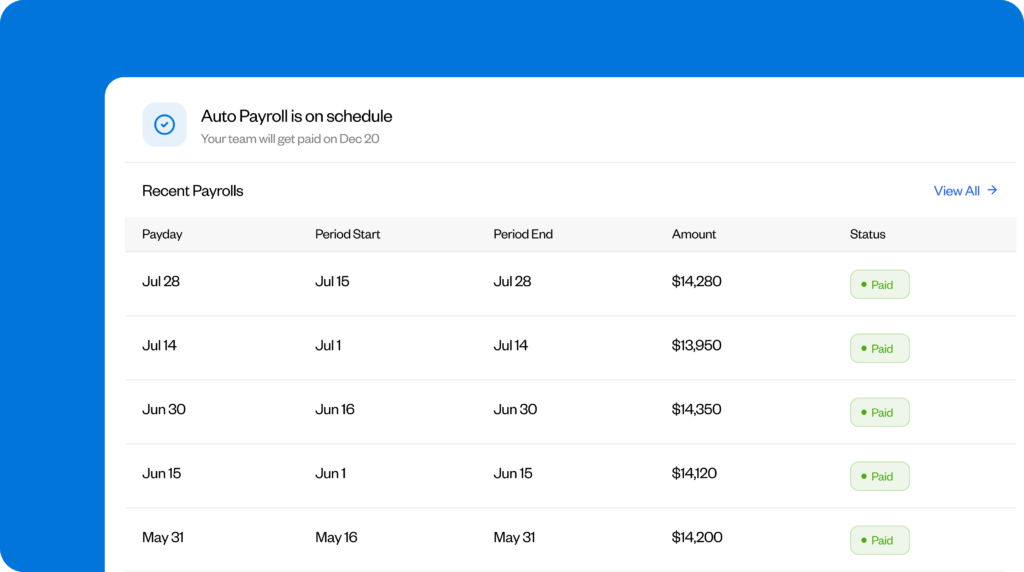
Buddy Punch’s affordable software combines scheduling, GPS time tracking, and payroll into a single, easy-to-use platform, making it a strong choice for home healthcare agencies looking to simplify workforce management.
The flexible drag-and-drop scheduler makes it easy to coordinate caregivers working across multiple patients’ homes. Employees can add their availability to the app, so you can quickly find cover for last-minute cancellations or emergency callouts without endlessly chasing your team. You can also see their live GPS locations, so you can assign the closest available caregiver and keep travel and mileage costs to a minimum. Employees receive real-time notifications of schedule changes.
Schedules flow directly into time tracking. Caregivers can clock in and out using their mobile phone as they travel between patient homes. GPS tracking and defined geofences ensure they can clock in only when they’re at the right location, meaning time is tracked accurately.
Buddy Punch then uses time clock data to automatically calculate hours worked, overtime, paid time off, and shift differentials. You can easily set different pay rates based on care type, caregiver qualifications, or shift worked. For example, you can set one rate for personal care visits, another for specialist nursing, and yet others for overnight care, weekends, or emergency visits.
Buddy Punch also calculates benefits deductions, saving you hours of complex calculations. Once payroll is finalized, you can process direct deposits to employees’ bank accounts.
The built-in reporting tools are valuable. They provide direct visibility into the hours workers spend with each patient. This can help monitor labor costs and prepare invoices for private pay clients.
Pros
- Automated pay calculations based on actual hours worked or patients attended.
- Strong GPS and geofencing tools.
- Can handle complex pay differentials.
- Flexible drag-and-drop scheduling tool where workers can mark their availability.
- Strong reporting tools to support private pay invoicing.
Cons
- While caregivers’ mileage can be tracked, reimbursements must be added manually.
- Pay stubs are available via the web portal only and not the app.
Pricing
Buddy Punch’s payroll feature is available as an add-on to its time tracking plans, which start at $4.99 per user per month (billed annually) plus a $19 base fee. For payroll, it’s an additional $8 per user per month plus a $49 monthly base fee.
Learn more about Buddy Punch
- Start a free trial — no credit card required
- Watch a video demo
- Take an interactive product tour
- Request a personalized demo
2. Viventium – Best for processing pay per visit

If you’re looking to minimize the complex manual calculations involved in paying caregivers by visit alongside hourly rates for training time, meetings, and travel, Viventium is a solid choice.
Let’s say a caregiver visits five patients during a shift, completes mandatory infection control training, and then spends an hour updating client records. Rather than relying on payroll administrators to calculate each element separately, Viventium combines all these different pay types into a single pay run, automatically applying the pay-per-visit rate, plus the relevant hourly rates for training and admin tasks. If needed, it can also calculate travel time and mileage reimbursements as part of the payroll process.
When the caregiver exceeds their standard working hours, it automatically applies weighted overtime. This eases the work involved in complying with the Fair Labor Standards Act.
Another advantage is that Viventium integrates with electronic health records (EHR). This means completed visits records and visit information flows automatically between your clinical and payroll systems, reducing manual data entry and ensuring employees are paid correctly for the care provided.
The pay stubs provide a clear breakdown of completed visits, service dates, pay type, rates, and overtime, helping employees understand how their earnings were calculated and reducing payroll queries.
One drawback is that additional pay for workers covering emergency callouts or unscheduled shifts can’t be added to the current week’s pay once payroll has been finalized. But the tool does calculate these earnings and add them automatically to the next payday.
Pros
- Supports mixed pay models with pay per visit and multiple hourly rates.
- Integrates with other healthcare software tools, including EHR systems.
- Applies weighted overtime without the need for complex manual calculations.
Cons
- You can’t add extra hours once payroll has been processed.
- Not all EHR tools are compatible with the tool.
Pricing
Viventium doesn’t publicly list its prices. Contact the sales team for a customized quote based on the specific payroll features you need.
3. Alora Home Health – Best for Medicare-certified home health agencies

If your agency bills Medicare or Medicaid, incomplete or inaccurate documentation can delay reimbursement, sometimes indefinitely. Alora helps keep payroll and billing aligned by bringing clinical documentation, patient records, and payroll together in a single platform.
Caregivers record each visit in the Alora app before leaving the patient’s home and add any visit notes and signatures. Once the visit is complete, that same information goes to payroll and billing. So instead of entering the same information multiple times or reconciling data across various systems, office staff work from a single record that stays consistent throughout the reimbursement process.
For payroll, Alora applies the correct rate based on the patient, service, or caregiver. It also records mileage as caregivers travel between patient homes, so travel reimbursements can be processed as part of each payrun.
Alora is a full home health management platform, so while it’s feature rich for larger Medicare-certified agencies, smaller providers may find a simpler payroll solution more cost-effective and easier to implement.
Pros
- Automatically verifies visits to support Medicare and Medicaid billing.
- Live visit monitoring helps managers arrange cover quickly when needed.
Cons
- May be overly complex for smaller home health agencies.
- Requires integration with a payroll provider to process payments and generate pay stubs.
Pricing
Alora’s prices are customized based on your business size and needs. For smaller agencies, prices can range from $295 to $800 per month, while they can go above $2000 for larger agencies.
4. HHAeXchange – Best for EVV compliance

If you’re a larger health agency relying on multiple tools to manage your workforce, it’s easy to end up with inconsistencies between your workers’ electronic visit verification (EVV) records and payments. HHAeXchange keeps payroll accurate by connecting these systems.
Instead of relying on manual timecards or paper records, caregivers clock in and out on the HHAeXchange mobile app. Once a visit has been electronically verified, data flows directly into payroll, so they’re paid only for verified and approved visits.
Real-time visibility into workers is a useful feature for managers. The live dashboard flags missed, late, unscheduled, or incomplete visits, so you can take action at short notice to ensure uninterrupted patient care.
It also tracks caregiver certifications and alerts you when a team member’s mandatory training is due to expire. This can help you remain compliant during scheduling by, for example, avoiding allocating a caregiver whose hoist training has lapsed to a patient with mobility needs.
I appreciate how this platform supports agencies as they scale. New hires can join in short time using digital onboarding tools. You can choose from a variety of pay schedules, such as monthly payments for office staff and weekly payments for caregivers, which can offer flexibility as your workforce grows. And as you expand into neighboring states, it helps you stay compliant with the different minimum wages and overtime rules across states.
Pros
- EVV data flows directly to payroll, preventing data entry errors and inconsistencies.
- Multiple features to support home health agencies as they grow.
Cons
- The learning curve is steeper than for standalone payroll software.
- It may be too costly for small agencies.
Pricing
HHAeXchange has custom pricing plans based on agency size and requirements. You’ll need to contact their sales team for a quote.
5. CareSmartz360 – Best for patient management

If patient care is one of your top priorities alongside payroll, CareSmartz360 is a strong choice. It combines patient management, scheduling, EVV, billing, caregiver management and payroll in one system, helping agencies coordinate care without relying on disconnected tools.
Unlike standalone payroll software, CareSmartz360 supports the entire patient journey, from capturing referrals and inquiries through to care planning, scheduling, visit tracking, and payment. When a family member contacts your agency, you can create a patient profile, document care needs, and assign a suitable caregiver without switching between systems. This significantly reduces the time between the initial inquiry and first visit.
One of its biggest strengths is matching the right caregiver to the right patient. You can assign caregivers based on their skills or qualifications rather than simply filling an open shift with whoever’s available. If a patient with dementia needs additional evening support, for example, you can instantly see which caregiver with similar experience is located close.
It also helps you respond promptly when patient needs change at short notice. Caregivers receive schedule updates and visit assignments through the mobile app, so they can reach a patient’s home very soon to maintain continuity of care.
For caregivers, the app supports accurate, integrated payroll. Workers can complete visit documentation inside the system, and the approved data flows directly into payroll. CareSmartz360 then automatically calculates taxes, overtime, and complex pay rules, including weekend premiums, split shift payments, or multiple caregiver pay rates.
CareSmartz360 is best suited to large or growing home health agencies looking to provide better patient care. While the initial investment can be high, it can significantly reduce the admin burden of managing a mobile healthcare workforce, allowing staff to devote more time to patient care. The one gap is that you’ll need to export payroll reports into providers such as QuickBooks or Paychex for final processing.
Pros
- One system to manage the entire patient workflow from inquiry to billing.
- Good caregiver matching tools.
Cons
- Implementation can be complex, and initial training requirements can be significant.
- It can become expensive as more modules are added.
- Requires integration with a payroll provider to process payments and generate pay stubs.
Pricing
CareSmartz360 offers custom pricing based on agency size and number of clients. Plans are split into growing, large, and enterprise plans. Contact sales to request a personalized quote.
6. Gusto – Best for small or growing home health agencies

Gusto is ideal for small and growing home health agencies with limited HR resources. Easy to use and implement, this all-in-one payroll and HR platform brings hiring, onboarding, payroll, and benefits together in one affordable platform, reducing the need for staff to spend time inputting information in multiple tools.
Gusto is designed to support you in the initial stages, when your workforce may largely include salaried caregivers or workers with consistent hourly rates. At this stage, you don’t need to handle complex pay-per-visit models or multiple patient-specific pay rates, and don’t yet need features like EVV or Medicare billing.
Gusto offers a straightforward way to handle these basic payroll needs. It calculates payroll based on approved hours and handles taxes, PTO, and deductions. Caregivers can access their pay stubs via the app and, on the higher plans, also submit mileage or expenses for approval.
As you grow, hiring can become time consuming. The app simplifies this with its digital onboarding process. Instead of spending hours on sending paperwork back and forth, new hires can complete tax forms, upload identification, enter direct deposit information, and sign contracts directly in the platform, so you can focus on training and preparing them for their first patient visits.
Gusto can even coordinate benefits such as retirement plans or health insurance through the same platform, without you having to spend on additional HR tools as your workforce grows.
However, the app may become difficult to scale once you start onboarding workers on complex pay models and significant pay differentials.
Pros
- Strong digital onboarding tools that speed up caregiver hiring.
- Employee self-service tools reduce payroll administration for busy office teams.
- Short implementation time.
Cons
- Less suitable for larger home health agencies with complex pay differentials or patient-specific rates.
- Mileage reimbursement approvals are only available on the Plus and Premium plans.
Pricing
Gusto’s plans start at $49 per month plus $6 per employee per month (billed monthly). Discounts for annual payment may be available during sign-up.
7. Paycom – Best for employee self-service

Paycom stands out for its employee self-service features. While it’s not built specifically for home health, it has many features that can help reduce payroll admin work and improve pay transparency for your employees.
A feature worth highlighting is Beti, Paycom’s employee-guided payroll tool, which gives caregivers greater control of their earnings. Employees can update their direct deposit details, tax information, or home address via the mobile app without contacting HR — handy for mobile caregivers who don’t report to a fixed healthcare facility.
Beti also keeps a track of the payroll process and notifies employees when they need to complete any pending task — for example, if any punches are missing. It automatically finds any incomplete items and flags them for the worker to fix before submission.
By giving workers visibility into their earnings before payday, it helps them stay on top of their own payroll and reduce issues that can hold up payday, so they receive their pay on time, without unexpected delays. They can also view their pay stubs, tax documents, and pay history at any point.
While Paycom can help reduce payroll administration, it’s not a specialist platform. Larger home health agencies may need to use Paycom alongside additional specialized healthcare software to manage patient records and verify visits.
Pros
- Improved accountability for employees to monitor their own earnings.
- Clear visibility of shift patterns, PTO accruals, and tax documents.
Cons
- While employees can flag errors, it’s still the admin or manager’s responsibility to resolve them.
- Large home health agencies may require additional integrations with home health software.
Pricing
Paycom’s pricing is based on the number of caregivers and features selected, plus a one-time implementation fee. Contact Paycom for a customized quote.
8. Netchex – Best for caregiver onboarding and retention

Hiring and retaining skilled and reliable caregivers is one of the biggest challenges in home health, and this is where Netchex’s flexible payroll software excels. Its strong recruiting, onboarding, and compliance tools can help build a pool of efficient caregivers.
When you need to hire new workers, including temporary staff, Netchex lets workers apply for these vacancies in minutes via a QR code. This helps you find talent swiftly to maintain continuity of care. Once you appoint someone, the system completes all pre-employment paperwork, from tax forms and direct deposit details to policy acknowledgments and uploading copies of certifications. This ensures all caregivers are payroll-ready before their first shift.
A standout feature of Netchex is FlexPay. This lets caregivers view their earnings in real time on the self-service app, with a clear breakdown of overtime, pay differentials, and split shifts. This transparency can build trust and reduce payroll-related questions.
FlexPay also gives caregivers access to their earned wages before payday at no additional cost. If unexpected expenses arise before payday, they can request to receive a part of their pay early.
These features can set your agency apart in a competitive market and be a great tool for attracting and retaining caregivers.
Netchex also helps home health agencies stay updated with changing compliance requirements as the workforce grows. It keeps track of worker certifications and licenses and notifies managers when they’re due to expire. You can also restrict open shifts to caregivers with the required qualifications and training.
Pros
- Strong digital onboarding tools to speed up hiring.
- Certification tracking to aid compliance.
- Early wage access for caregivers to improve retention.
Cons
- Requires integration with additional healthcare software for EVV.
- More complex learning curve than standalone payroll software.
Pricing
Netchex doesn’t publicly outline its pricing. You’ll get a custom price based on the number of caregivers, locations, patients, and modules.
Feature comparison
| Platform | Mobile time tracking | GPS/EVV tracking | Multiple pay rates | Payment processing |
| Buddy Punch | Advanced | GPS and geofencing | Advanced | Directly or via integrations |
| Viventium | ✅ | EVV integrations only | Advanced | ✅ |
| Alora Home Health | Advanced | EVV and GPS | Advanced | Via integrationsonly |
| HHAeXchange | Advanced | EVV | Advanced | ✅ |
| CareSmartz360 | Advanced | EVV and GPS | Advanced | Via integrationsonly |
| Gusto | ✅ | GPS and geofencing | ✅ | ✅ |
| Paycom | ✅ | GPS and geofencing | ✅ | ✅ |
| Netchex | ✅ | GPS and geofencing | ✅ | ✅ |
How I chose the tools on this list
For this review, I researched over 20 different payroll providers — some designed specifically for home health and healthcare providers, some general payroll services, and others offering payroll features alongside broader time and workforce management tools.
Rather than considering payroll processing alone, I considered how well each software could support the day-to-day management of mobile caregivers. I looked to balance the presence of specialist healthcare features against affordability and overall ease of use.
To narrow down to the top eight, I assessed:
- Payroll automation: How effectively each software reduces administrative effort by automatically calculating pay, overtime, PTO, shift differentials, benefit deductions, and taxes
- Payroll processing: Whether the software can process direct deposits or needs to integrate with other software to process payments
- Workforce flexibility: Whether it can accommodate pay-per-visit, hourly, salaried, part-time workers with multiple pay rates based on patient, care type, task performed, certifications, qualifications, or shift patterns
- Time tracking and attendance verification: The accuracy of time capture through mobile clock-ins, GPS tracking, geofencing, scheduling integrations, and EVV
- Mileage tracking: How easily the tool can track travel time and mileage costs for traveling caregivers
- Reporting and billing: How easy it is to retrieve payroll data for private pay invoicing, labor cost reporting, or integration with healthcare billing systems like Medicaid or Medicare
- Employee experience: The quality of employee self-service features, including mobile access, self-service, and pay stub access
- Ease of use and support: Usability for managers and admins, training and implementation requirements, and availability of customer support

