

How Construction Companies Track Labor Hours by Job Site

Written By: Reem Abouemera
Last Updated May 25, 2026
Your plumbing crew starts the day on a commercial build, gets pulled onto an emergency call after lunch, then finishes the shift helping on a third project before heading home. That’s when construction labor tracking usually starts breaking down.
When employees move between multiple job sites or projects during shifts, they often miss logging hours in real time and later try to reconstruct them from memory. This leaves much room for hours to end up under the wrong project.
And once hours stop being tied to the correct project, payroll corrections increase, job costing gets less reliable, and project reports stop matching what actually happened in the field.
This guide looks at where the most common breakdowns happen in manual construction time tracking, what accurate project and job-site reporting requires, and how to build stronger tracking processes across multiple active projects and crews.
Why manual time tracking fails across multiple job sites
If your employees split time between different sites but you’re tracking time manually, you’re likely to run into some common issues.
Employee hours get lumped under the wrong site or project
This usually happens when employees switch between sites without updating their hours records in real time. They may:
- Forget to update paper logs or spreadsheets after moving to another site
- Group multiple stops under one site instead of separating hours
- Record hours without noting which project or site they were working at
In these situations, they end up estimating hours worked days after their shift. And when logging hours from memory, they often assign time to whichever site or project is easiest to remember: the one they worked on first, last, or took up most of the shift.
You can try to piece together where employee hours should’ve been logged in retrospect using texts, handwritten notes, or schedules. But once multiple crews, sites, and projects are involved, there’s usually no reliable way to confirm this if you’re tracking time manually.
Kameron Khan, Founder and Managing Director at SilverWater Plumbing, said cases like these can create major discrepancies in recorded hours:
“For example, when a technician starts a Parramatta commercial job and finishes the same day in Chatswood from a residential job, that alone can create up to 40–60% discrepancy between the hours of work that were recorded, if not done in real time.”
Employee hours become harder to verify
Even if employees record their hours on the same day, manual tracking still makes it difficult to confirm whether those records are complete, accurate, or properly reviewed before payroll is finalized. This means you may have:
- Duplicate or overlapping hours across different projects or records
- Work logged under the same pay rate even after employees switched responsibilities or labor categories
- No separation between travel time and active work hours
- Undocumented time records for short service calls, temporary assignments, or breaks
These issues usually get caught later during timesheet reviews, after someone notices a missing punch, inconsistent hours, or a pay rate discrepancy. You may end up having to compare schedules against timesheets, check who was assigned to each site that day, or ask employees to explain gaps from memory.
This approach can work occasionally, but it becomes harder to sustain as you scale crews, projects, and sites.
And this is when payroll issues become easier to miss, and what started as a missed punch or incorrect pay rate can later turn into inaccurate pay, retroactive pay corrections, or payroll disputes.
How inaccurate labor data affects the larger business
Manual tracking problems don’t just create more administrative work in correcting them. They also make it harder to trust the records you rely on for staffing, scheduling, payroll, and project decisions.
This can lead to problems across the business, including in project costing, scheduling, overtime management, operational reporting, and payroll accuracy.
| What happened in the field | How manual tracking broke down | Business impact |
| Employees move between two job sites in one shift | Hours stay under the original project because time is updated later from memory. | One project absorbs labor hours it never actually used. |
| Employees switch roles during the workday | Pay rate changes are missed during manual payroll review. | Employees are paid under the wrong rate, and payroll has to be corrected later. |
| Several short service calls happen in one shift | Hours from multiple jobs are grouped together into one timesheet entry. | Project reports don’t reflect where time was actually spent. |
| Employees miss punches while moving between locations | Missing time has to be reconstructed afterward. | Payroll records become harder to verify accurately. |
| Employees travel between several sites during the day | Travel time is never logged separately from active work time. | Supervisors lose visibility into whether overtime was caused by work or excessive travel. |
| Employees log the same hours in multiple records | Duplicate or overlapping entries are missed during manual review. | Payroll hours and project reports become less accurate. |
A few quick questions can help you identify whether these tracking problems are already affecting your operations.
- Can you confidently track where each employee spent time throughout the workday?
- Can you break down employee hours by project or job site without reviewing or correcting records manually?
- Are employee hours verified using accurate records instead of relying on self-reported construction timesheets?
- Do payroll records, project reports, and job costing data consistently match?
What accurate construction time tracking actually requires
Accurate construction labor tracking depends on more than just knowing how many hours your employees worked each week. You need data detailed enough to be able to:
- Cost projects accurately
- Separate employee hours between job sites
- Manage multiple pay rates and labor categories
- Verify field activity while work is happening
- Review profitability at the project level
That means your tracking process needs to consistently capture where employees worked and what work they performed. Here’s what you need for that.
Project-level labor attribution
Knowing an employee worked eight hours isn’t enough if you can’t tie those hours back to the correct project. You need to be able to see:
- Which sites employees worked from
- How long they stayed there
- When they moved between sites
Without this visibility, it becomes harder to cost projects accurately because employee hours can’t be reliably separated between projects or cost codes. Over time, that affects profitability reporting, since one project absorbs hours it never used, while another appears more profitable, efficient, or on-budget than it really was.
That level of detail also gives payroll and operations teams cleaner records for invoicing, certified payroll reporting, union work, and projects with multiple labor classifications.
Role and pay rate tracking
Construction employees don’t always perform the same type of work for an entire shift. They may switch between labor categories, responsibilities, or projects with different pay rates.
That’s why project-level tracking alone isn’t enough. You also need to track what type of work your employees were performing while those hours were being logged.
For your data to stay accurate, it needs to capture:
- Which role the employee was working under
- Which pay rate or labor category applied to those hours
- When role changes, if any, happened during the shift
If different types of work end up grouped together under the same codes, it makes it harder to identify which projects are absorbing higher-cost labor and where labor estimates are starting to break down.
In contrast, when role and pay rate tracking is done right, you can separate standard field work from higher-skill labor, specialty work, or prevailing wage tasks, simplifying payroll, reporting, or billing tasks.
Verification and approval workflows
By the time payroll is processed, you should already know for certain where employees worked, which projects they logged time under, and whether supervisors reviewed and approved those hours beforehand.
Verification works best while crews are still in the field instead of days later. You need ways to confirm, in real time, that:
- Employees were actually on site
- Hours were logged under the correct project
- Timesheets were reviewed before hours were approved
That kind of verification makes workforce records much easier to trust. Without clear steps like these, incorrect project assignments, missing hours, or inaccurate timesheets can continue moving through the system without anyone noticing until much later.
Consistent verification also makes it easier for supervisors and project managers to resolve scheduling issues, confirm where employees worked, and review activity before reporting gaps start affecting project progress.
How you can improve time tracking across multiple job sites
Now that you know what information your time tracking process needs to capture, the next step is building workflows that collect that data consistently. Here’s how you can do that using both day-to-day operational processes and software like Buddy Punch.
Track employee hours as work changes throughout the day
To start with, move away from weekly timesheets, end-of-day reporting, or foremen manually reconstructing employee hours after shifts are over. Instead, have employees update time records during the day as projects, locations, or responsibilities change.
That may look like:
- Keeping clipboards with individual paper logs in each truck so crews can record site changes and short service calls as they happen
- Requiring employees to write down project or site names and arrival and departure times on these paper logs before driving to the next job instead of trying to remember everything later
- Setting a daily check-in time for crews to confirm roles, locations, and hours they’ve worked
Emily Demirdonder, Co-founder and Director of Operations at Proximity Plumbing, shared how her team does exactly that and has seen fewer job code errors as a result:
“The solution that worked was to send out a prompt to each plumber’s phone asking them to verify their job codes by 4:30 pm. This usually only takes two minutes, catches approximately 80% of the errors before payroll is processed, and doesn’t require plumbing teams to change their entire routine to make it work.”
Mike Feazel, CEO of Roof Maxx, also reported how similar rules helped his company improve accountability and tracking accuracy across crews:
“When I was managing my first roofing company, we decided to really tighten accountability and timing, and that’s when things started to improve. We implemented a much stricter same-day, job-specific reporting and ensured clear ownership was being followed at the crew level.”
But keeping records updated manually takes too much coordination between crews and supervisors, especially when multiple sites and projects are involved. Software can help minimize that. For example, on Buddy Punch:
- You can create project-specific job codes, labor categories, and pay rates so employee hours are automatically tracked under the correct work.
- Employees clock in to the correct project or location directly from their phones before starting work.
- Employees switch into different job codes, roles, or labor categories as their tasks change during their shift.
- Automatic reminders prompt employees to clock in or clock out before hours are missed or recorded incorrectly.

Review and approve hours before they reach payroll
To verify that employees logged time under the correct project, hours were entered properly, and entries match what happened in the field, build review steps into your workflow instead of waiting until records are already being reviewed for payroll. That could include:
- Requiring foremen to spend five minutes reviewing crew hours before everyone leaves the site so missing job names and incorrect hours get fixed the same day
- Comparing handwritten crew sheets against dispatch schedules at the end of each day to confirm employees were logged under the correct jobs
- Reviewing timesheets weekly for unusually long shifts, missing breaks, or duplicate hour entries
- Requiring supervisors to sign off on finalized timesheets before they’re sent to payroll
- Having payroll staff flag incomplete or inconsistent records for supervisor review instead of correcting them without confirmation
However, reviewing timesheets manually often involves comparing schedules, texts, spreadsheets, and employee records, making it a slow process prone to errors. Software like Buddy Punch can help simplify those reviews by:
- Giving supervisors one place — instead of having to check information in multiple documents and channels — to review missing punches, overtime hours, overlapping hours, and incorrect job assignments
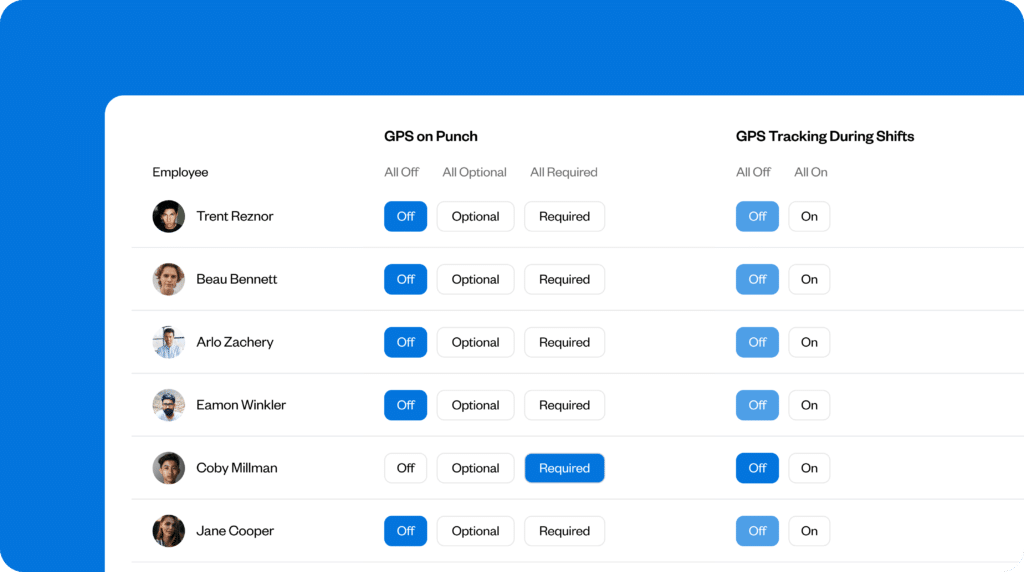
- GPS tracking and geofencing automatically confirming which project location employees clocked into during the day
- Showing edit histories so supervisors can see when timesheets were changed and who made those changes
- Connecting time tracking directly to payroll and project reporting so hours don’t need to be reviewed across multiple systems separately

Caleb John, Director of Exceed Plumbing & Air Conditioning, found GPS tracking particularly useful for his team.
“We changed to GPS-verified digital clock-ins tied to the job site itself and, as a result, the amount of time I have to spend rectifying timesheets decreased from approximately four hours a week to just under 45 minutes. Also, job costing is done accurately, which has meant that we have addressed our under-quoting issue on multi-day jobs.”
Use verified labor data to catch project overruns earlier
Once you’ve put processes in place to ensure that employee hours are consistently tied to the correct project and role, you can start using the data to spot issues before they affect staffing, scheduling, or project profitability.
Build regular reviews into your workflow so supervisors or project managers can catch labor overruns before projects go over budget.
- Compare estimated employee hours against actual hours every Friday before approving additional overtime on already over-budget jobs.
- Check whether emergency calls or last-minute schedule changes are repeatedly pushing certain projects over labor estimates.
- Review which crews consistently finish projects under or over estimated labor hours before assigning future work.
- Review service calls that repeatedly require return visits or additional crews to identify work that’s being under-scoped.
Reviews like these help you spot crew-intensive work earlier, rebalance crews between projects, adjust staffing plans, and improve future labor estimates using actual, accurate field data instead of assumptions.
But manually analyzing project hours often means spending hours processing large amounts of data before you can identify problems clearly. Software can help bring those records together easily. Buddy Punch lets you:
- Generate reports showing employee hours by project, job code, role, or employee so supervisors can compare actual labor hours against estimates more quickly
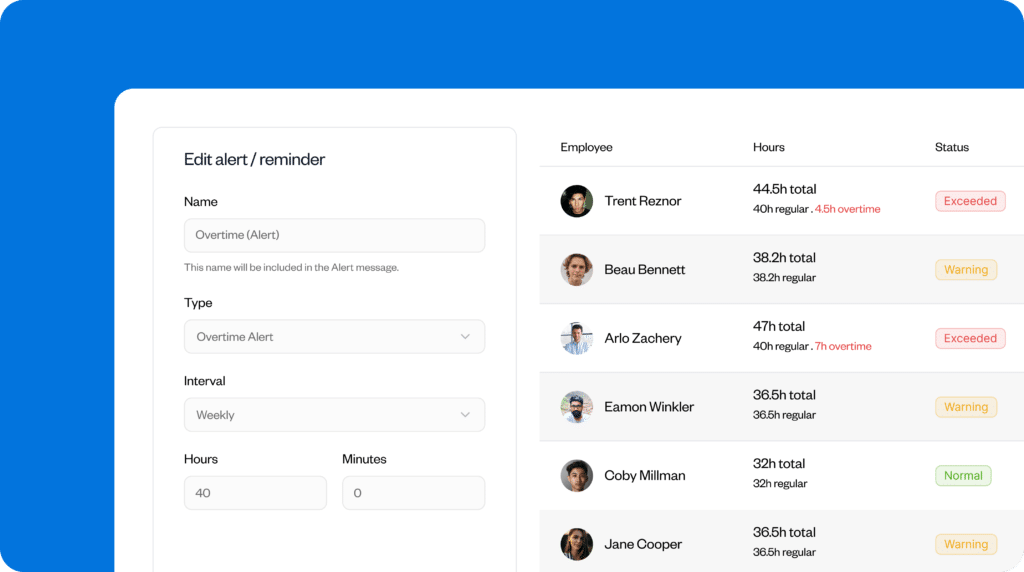
- Flag overtime hours, missed punches, and unusually long shifts automatically before they create larger payroll or staffing issues
One thing to keep in mind: While software can make job-site tracking much easier, accurate records still come down to having the right setup and crews using the system consistently in the field.
Give your team a more reliable way to track project hours
Construction labor tracking often breaks down when employees move between multiple job sites and roles during the day or log hours after shifts from memory. Even the smallest gaps in reporting eventually affect payroll accuracy, job costing, staffing decisions, and project visibility.
Accurate tracking depends on capturing where employees work, what work they performed, and when project or role changes happened throughout the day. This requires consistent workflows for real-time tracking, timesheet verification, and labor reviews before issues affect payroll or project profitability.
Buddy Punch can help simplify the process, letting employees track hours by project, location, and role directly from the field while giving supervisors tools to review timesheets, approve hours before payroll, and generate cleaner project-level reports.
Contributors
- Kameron Khan, Plumber and Founder and Managing Director, SilverWater Plumbing
- Mike Feazel, CEO, Roof Maxx
- Emily Demirdonder, Co-founder and Director of Operations, Proximity Plumbing
- Caleb John, Director, Exceed Plumbing & Air Conditioning

