
The 7 Best HVAC Scheduling Software in 2026

Written By: Carissa McCollom
Last Updated February 19, 2026
Heating, ventilation, and air-conditioning (HVAC) schedules tend to fall apart fast, whether it’s an emergency job that bumps a planned maintenance call or traffic delays that throw off your whole team’s afternoon. Next thing you know, you’re scrambling to avoid double-booking, idle time, and missed appointments.
Most scheduling tools promise to fix these issues, but many don’t hold up well in practice. Some lack real-time updates, so your dispatchers and technicians end up working from different schedules. Others cause more work, especially if they don’t connect to payroll or time tracking.
Fortunately, HVAC scheduling software has come a long way, and there are many great options in 2026.
Below, I rank the top seven HVAC scheduling tools for the year, outlining their key features, pros, and cons, so you can pick the one that’s right for your business.
Methodology: How I chose the HVAC scheduling apps on this list
I created this list by comparing each tool side by side and assessing them against the same set of criteria, including:
- Core HVAC scheduling capability: I prioritized tools with dependable scheduling for field work, including visibility of technician availability, fast rescheduling, and the ability to handle emergency callouts without disrupting the day.
- Usability for dispatchers and technicians: I assessed how simple each platform is to use, the setup required, and how well technicians can access schedules in the field.
- Pricing: I compared each tool’s pricing model, looking at whether costs are per-user or a flat monthly fee, what’s included in the base plan, and how pricing scales as HVAC teams grow.
- Verified client reviews: I reviewed user ratings and testimonials from trusted sources, including Capterra, G2, and Trustpilot, to assess how each tool performs.
The best HVAC scheduling software: Quick comparison
Runner-up: Connecteam — an all-in-one app offering time tracking and real-time communication, ideal for remote and field-based teams.
Best free option: Workiz — great for small teams seeking a basic time tracking tool or wishing to test the benefits of time tracking apps before committing to a paid plan.
| Buddy Punch | Connecteam | ServiceTitan | Housecall Pro | Jobber | Workiz | ServiceTrade | |
|---|---|---|---|---|---|---|---|
| Best for | Best overall | Mobile-first teams | Large HVAC operations | Home service businesses | Ease of use | Small HVAC teams | Commercial HVAC teams |
| Free plan? | ❌ | ✅ (up to 10 users) | ❌ | ❌ | ❌ | ✅(up to 2 users) | ❌ |
| Prices start at | $19 base fee + $4.99/user/month | $29/month (up to 30 users) $0.80/month per additional user | Pricing available on request | $59 per user/month | $39/user/month | $225/month for first 3 users | Pricing available on request |
| Drag-and-drop scheduling | ✅ | ✅ | ✅ | ✅ | ✅ | ✅ | ✅ |
| Mobile access | ✅ | ✅ | ✅ | ✅ | ✅ | ✅ | ✅ |
| Real-time job updates | ✅ | ✅ | ✅ | ✅ | ✅ | ✅ | ✅ |
| Geofencing time tracking | ✅ | ✅ | ❌ | ❌ | ❌ | ❌ | ❌ |
| Job costing | ✅ | ✅ | ✅ | ✅ | ✅ | ✅ | ❌ |
| Location tracking | ✅ | ✅ | ✅ | ✅ | ✅ | ✅ | ✅ |
The 7 best HVAC scheduling software
1. Buddy Punch: Best all-around tool for HVAC scheduling
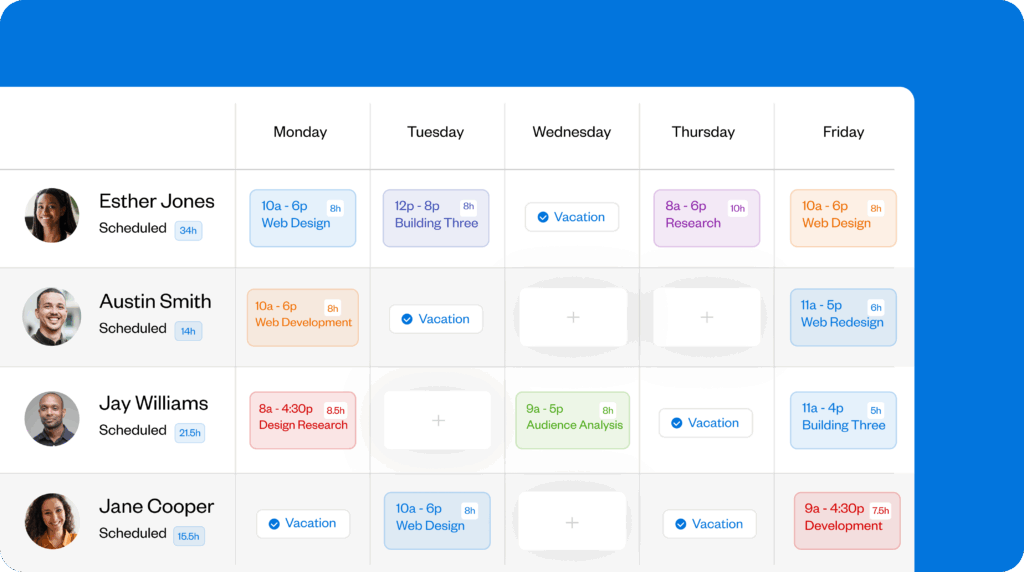
Buddy Punch is an easy to use and affordable mobile-first tool that helps field service teams schedule jobs, manage clock-ins, verify employee locations, and prepare accurate payroll reports without manual timesheet processing.
Key features
- Recurring job scheduling for maintenance contracts
- Employee self-service with easy scheduling and shift requests
- Travel time tracking and attendance monitoring
- Attendance alerts for late arrivals, early departures, and missed shifts
- Automated tracking between jobs for both unpaid and paid breaks
Pros
- User-friendly drag-and-drop schedule builder
- Employee scheduling by location
Cons
- No free plan, but there are no hidden costs
The reason I went with Buddy Punch: I found Buddy Punch solves the core problem HVAC businesses face: ensuring technicians are at the right job at the right time. It does this by combining time tracking, GPS location tracking, and a job costing feature that lets you set up job codes you can tie to locations, if needed.
I also like how Buddy Punch’s payroll integrations cut processing time from hours to minutes.
Let’s take a closer look at Buddy Punch’s features and how you can use them to improve your HVAC operations.
Mobile time tracking
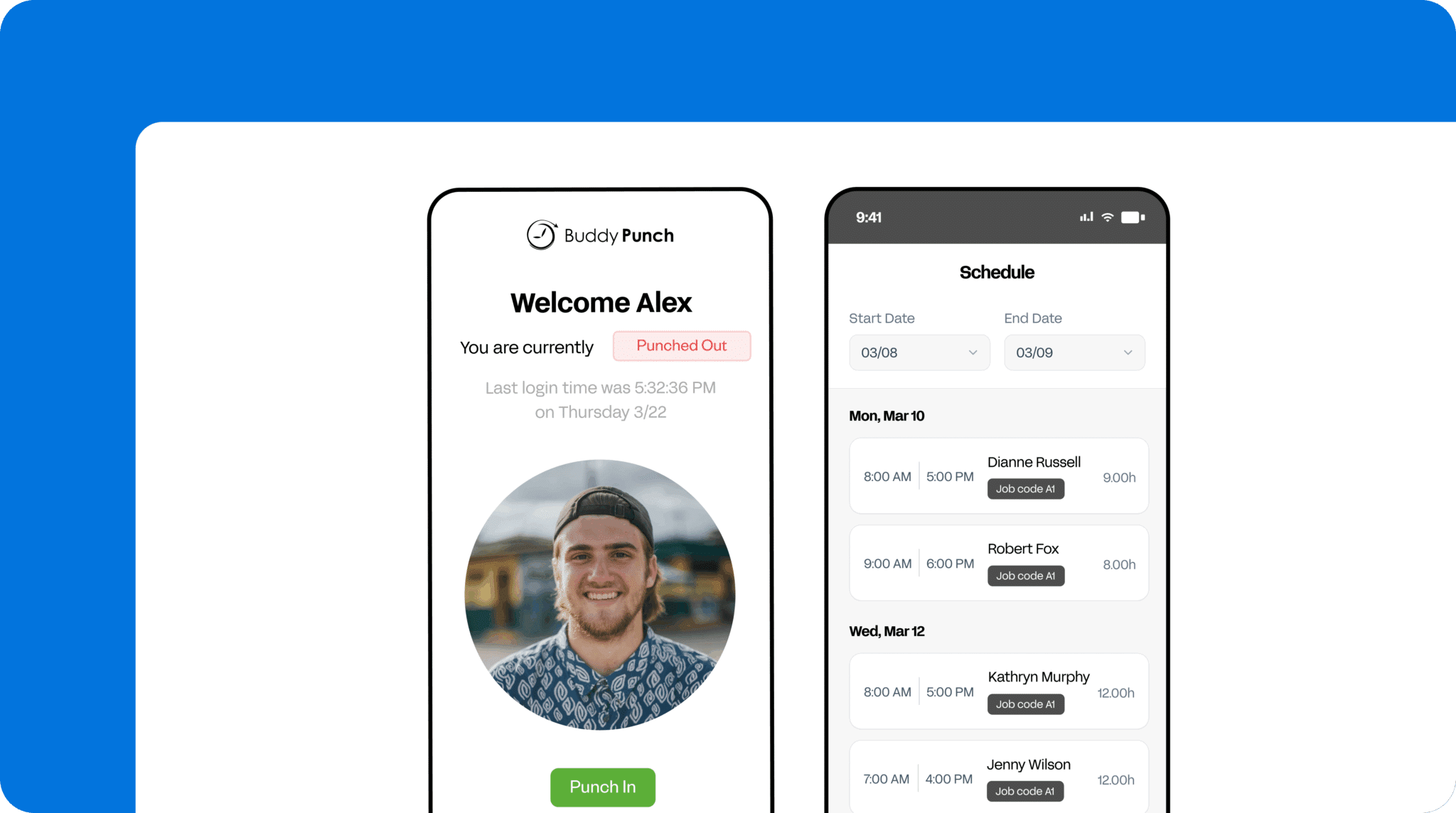
One of my favorite things about Buddy Punch is how straightforward it is to use. Employees can pull up Buddy Punch on their device, tap to clock in, select the job they’re working, and switch job codes with just a few taps — no extensive training required.
Together, mobile-friendly time tracking and real-time scheduling help you stay on top of what’s happening in the field, making it easier to manage route changes, emergency calls, and customer questions.
Job costing that ties time to billing

Buddy Punch’s job costing features make it easy to track exactly how much time employees spend on specific service calls. When technicians clock in, they simply need to choose the right job code from the dropdown list. You can then run reports to check exactly how many labor hours to charge customers for.
This is where I believe Buddy Punch really helps with HVAC billing accuracy. Instead of trying to remember how long a repair took or relying on technicians to log their time manually at the end of the day, you can view exact clock-in and clock-out times.
I also like how you can see patterns over time. For example, if certain types of jobs consistently take longer than quoted, you’ll spot it in the reports and can then adjust your estimates — and your schedules.
Employee location tracking

I find Buddy Punch’s GPS tracking features really useful. It’s easy to log employees’ locations when they clock in and out to ensure they’re at the scheduled location. On the premium plan, you can also track their real-time location throughout the workday — useful if a customer calls asking for an arrival update.
In addition, Buddy Punch’s geofencing technology ensures employees can clock in or out only when they are at the job location. This helps prevent punches at sites where they are not scheduled to work, as well as time padding and early clock-ins, whether accidental or intentional.
Attendance tracking and overtime management
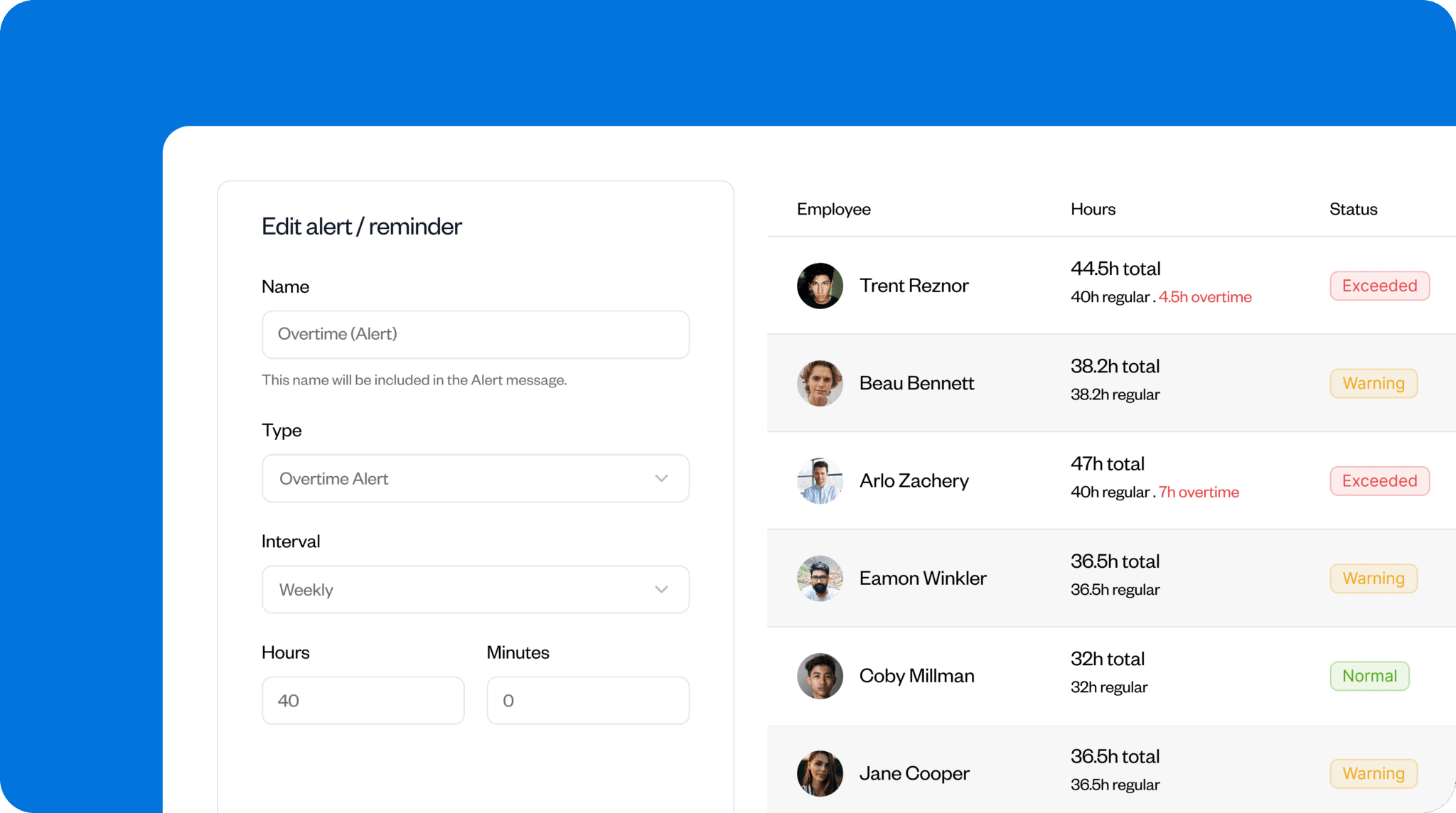
With Buddy Punch, you get push or email notifications when employees clock in late, clock out early, or miss a shift, allowing you to quickly reassign jobs if necessary.
I also appreciate that you can download reports to easily identify any attendance issues, such as patterns of excessive lateness or no-shows.
In addition, Buddy Punch can track overtime hours based on your company policy and automatically calculate overtime pay. To avoid paying unexpected overtime, you can set up alerts for when employees approach the overtime threshold, and then adjust schedules or reassign callouts.
Integrations
Buddy Punch integrates with the following accounting and payroll platforms:
- QuickBooks
- Gusto
- ADP
- Paychex
- Zapier, and more
Pricing
- Starts at: $19 base fee per month + $4.99 per user/month
- Free trial: Yes (14 days), no credit card required
- Free plan: No
What users say about Buddy Punch
“The software is quite user-friendly. I appreciate how it notifies us about late, early, or missed shifts, and I also like that there is an option to disable all alerts if needed. My primary use for the program is scheduling, though I have also made use of a few reports. It is very easy to use and generally easy to adjust. I utilize the app on a daily basis. It’s very easy to set employees up and make adjustments. The app is useful and convenient.” – Kristina C
“Buddy Punch has made my entire payroll process much simpler, thanks to its clear instructions, user-friendly interface, and reliable stability that I have quickly come to depend on.” – Serio S
Learn more about Buddy Punch
- Start a free trial — no credit card required
- View pricing
- Watch a video demo
- Take an interactive product tour
- Request a personalized demo
2. Connecteam: Best all-in-one app for small HVAC teams
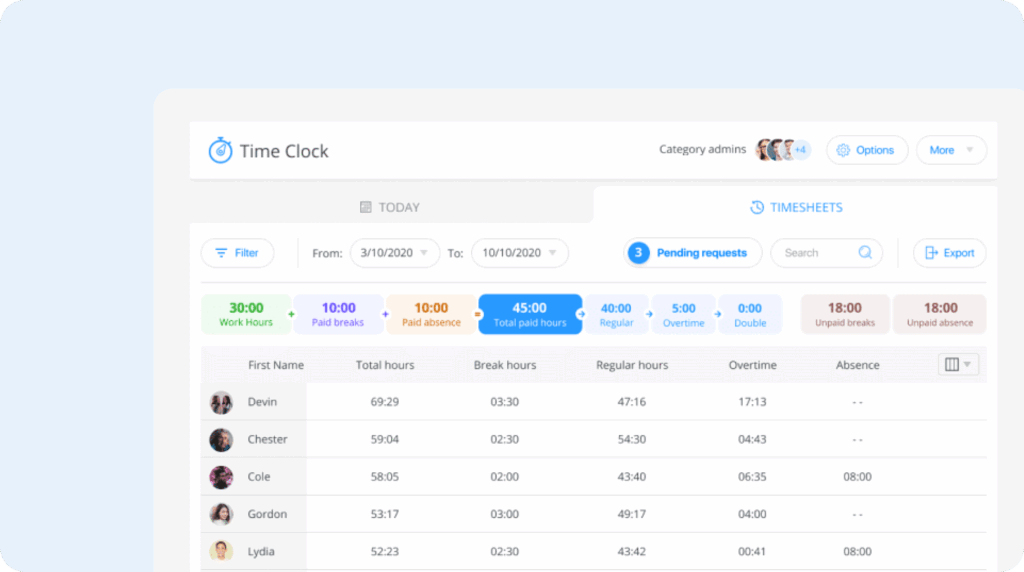
Connecteam is an employee management platform that combines time tracking, scheduling, and team communication tools. It offers a free plan for small HVAC businesses with up to 10 employees.
Key features
- Mobile scheduling with job location and task details
- Geofencing time tracking with real-time technician location view
- Digital timesheets automatically logged for payroll and billing
- Task assignment and progress tracking for individuals and teams
Pros
- Free plan available for up to 10 users
- Built-in communication tools
Cons
- Requires a stable internet connection
- Reporting is limited on the basic plan
What Connecteam offers: Connecteam is a top pick for small HVAC businesses because it’s free for up to 10 users and offers essential features in one place. It shows businesses where technicians are in real time, handles schedule changes, and automates timesheets.
However, while Connecteam tracks time and provides basic visibility into total hours, it doesn’t offer overtime alerts to warn managers before employees hit their threshold, unlike Buddy Punch.
Customized scheduling and dispatching
Connecteam lets managers build work schedules that their teams can access directly on their mobile phones or devices. I like how easy it is to add job information so technicians know exactly what they’re dealing with when they arrive.
It’s also easy to manage availability and make last-minute changes. For example, if a technician needs to swap shifts or an emergency call comes in, the manager can adjust the schedule and notify everyone immediately.
Team communication tools
Connecteam’s real-time communication tools enable managers to communicate with staff wherever they are. For an urgent announcement, you can send a message to all staff or speak with individuals in a secure chat. You can also see who’s read your messages.
Integrations
Connecteam integrates with several payroll and accounting platforms, including Gusto, QuickBooks, Paychex, Xero, and more.
Pricing
- Starts at: $29/month (up to 30 users). $0.80/month for each additional user
- Free trial: Yes (14 days)
- Free plan: Yes, capped at 10 users
What users say about Connecteam
“Connecteam has made scheduling and daily operations incredibly easy. Shifts, time tracking, tasks, and team communication are all in one simple, reliable platform. The mobile app is intuitive, updates are instant, and employees always know where they’re supposed to be.” – Dan
“Price is very high, I mean it is great for small businesses, but the jump up from 10 staff is very high in price.” – Branden V
Learn more about Connecteam
- Read our in-depth Connecteam review
- Compare Buddy Punch vs. Connecteam
- Discover the best Connecteam alternatives
3. ServiceTitan: Best for larger HVAC operations

ServiceTitan is an all-in-one field-service platform designed for larger residential and light-commercial HVAC teams. The software offers scheduling, dispatching, and mobile job management.
Key features
- Real-time scheduling with drag-and-drop updates
- Live technician status and job cycle tracking
- Custom tags to prepare techs for every job
- Mobile app for estimates, photos, and payments
Pros
- Real-time visibility for dispatchers
- Skill-based dispatching
Cons
- High cost may not suit smaller teams
- Feature-heavy for simple operations
What ServiceTitan offers: I found that ServiceTitan offers the depth of scheduling and dispatch tools that larger HVAC teams rely on. Its ability to show where each technician is in their job cycle helps reduce delays when booking follow-on work or handling emergency jobs in the same area.
Unlike Buddy Punch, however, it doesn’t offer employee-driven scheduling features like self-service shift swaps or detailed availability settings — its focus is primarily on dispatching technicians to customer jobs.
Real-time job cycle tracking
ServiceTitan gives dispatchers real-time visibility into each technician’s job cycle, allowing them to see exactly where a technician is in their current tasks and how soon they’ll be available for the next job.
Custom tags to categorize jobs
To match technicians to tasks, ServiceTitan lets teams categorize jobs using custom tags such as required tools, languages spoken, or whether a job has been rescheduled.
Integrations
ServiceTitan integrates with a range of accounting tools, including Sage, Xero, and QuickBooks.
Pricing
- Starts at: Pricing available on request
- Free trial: No
- Free plan: No
What users say about ServiceTitan
“In terms of functionality, the advanced scheduling algorithm suggests accurate project timelines, and the full-featured dashboard allows simple, real-time monitoring of the team’s work and project progress to identify the distribution of resources.” – Sasha T
“I can’t call customers from the app and instead have to copy and paste the number into my phone.” – Aiden
4. Housecall Pro: Best for home service HVAC businesses

Housecall Pro is a field service management platform designed for home service professionals, including HVAC contractors.
Key features
- Drag-and-drop scheduling with color-coded jobs
- Job costing and profit/loss tracking per invoice
- Real-time dispatching with GPS tracking
- Online booking with 24/7 customer self-scheduling
Pros
- Customer self-scheduling
- Flat-rate price software
Cons
- No built-in route optimization
- Limited syncing with external calendars
What Housecall Pro offers: Housecall Pro is a solid choice for mid-sized HVAC businesses that need easy-to-use scheduling tools, along with dispatching, invoicing, and customer management. Its drag-and-drop scheduling is easy to adjust when emergencies come in or jobs run late.
However, the platform doesn’t automatically convert technician hours into billable items on invoices, so they have to be added manually. This creates additional work compared with tools that offer better time tracking integration, such as Buddy Punch.
Color-coded scheduling
Housecall Pro provides a centralized scheduling system for both recurring maintenance and one-off service calls. Jobs on the schedule are color-coded by assigned technician.
I like how straightforward it is to set up recurring tasks. You click a tile on the schedule, enter the task details, and set it to recur according to the service agreement. You can also use job templates when scheduling routine work.
The downside is that Housecall Pro doesn’t support automatic call logging or task creation. So when a customer requests a service, the operative must manually input the information into the schedule, which can be time-consuming for high-volume HVAC businesses.
Real-time dispatching with GPS tracking
Housecall Pro’s GPS tracking lets managers see exactly where each technician is and how far they are from the new job site — handy when emergency calls come in. You can also plan dispatch routes based on technician locations and send automated “on my way” texts to customers.
Integrations
Housecall Pro integrates with accounting software such as QuickBooks. It also integrates with the lead-generation tool Thumbtack and automation tools like Zapier to sync data between apps.
Pricing:
- Starts at: $59 per month
- Free trial: Yes, for 14 days
- Free plan: No
What users say about Housecall Pro
“Real automation without a complicated learning curve. It is possible to schedule appointment reminders, automatic charges, and follow-ups without needing to be a software expert.” – Ing. Saul P
“The reporting features are not the greatest. It is very easy to pull reports; however, getting the data you actually want can be a task. You have to export Excel files and do a lot of sorting and filtering to really get the data you want.” – Rozie
5. Jobber: Best for ease of use

Jobber is a cloud-based field service management platform offering scheduling, quoting, invoicing, and customer management.
Key features
- Drag-and-drop calendar that simplifies rescheduling
- Team push notifications for schedule changes
- Real-time progress tracking for each technician
- Automated route optimization with GPS tracking
Pros
- Client hub reduces phone and admin work
- User-friendly, even for non-technical teams
Cons
- Per-user pricing is expensive for larger teams
- Limited reporting
What Jobber offers: Jobber is well-suited for teams that prefer simple processes. For instance, I like how easy it is for customers to book appointments through the client hub. I also appreciate how quick it is to drag and drop jobs when emergencies arise or when jobs run over.
However, Jobber can become very expensive for teams of more than five, and its reporting tools are less sophisticated than those on other platforms.
Easy to use drag-and-drop calendar
Jobber’s calendar lets you quickly schedule maintenance or commercial HVAC jobs. I also appreciate how simple it is to reassign jobs to another technician using the drag-and-drop function.
When an emergency call comes in or a job runs over, you can move appointments by dragging them to new time slots or to technicians who have availability.
Team push notifications
With Jobber, managers can set up team push notifications to keep workers informed when there’s a schedule change during their workday.
The notifications can also include job details, customer information, and directions.
Integrations
Jobber offers a range of integrations through its app marketplace, including accounting tools such as QuickBooks, the website platform WordPress, and payroll software like Gusto.
Pricing
- Starts at: $29 per month/user when billed annually
- Free trial: Yes, 14 days with no credit card required
- Free plan: No
What users say about Jobber
“Jobber keeps almost everything we need in one place, from scheduling to invoicing to client communication, making it a powerful and easy-to-use solution for running our business.” – Andrea D
“The Thumbtack integration does not pass through job costs, which makes accurate job costing and reporting difficult and defeats the purpose of the integration.” – John B
6. Workiz: Best for AI-powered scheduling

Workiz is a field service and customer relationship management platform for small to medium-sized home service businesses, such as HVAC companies.
Key features
- Genius Scheduling feature automatically suggests optimal time slots
- Drag-and-drop calendar interface
- Built-in client communication in the calendar
- Document attachment and sharing capabilities with teams and customers
Pros
- AI-powered scheduling
- Direct client communication
Cons
- Limited custom reporting
- Advanced features require training
What Workiz offers: I like how Workiz’s AI-powered scheduling automatically suggests optimal time slots for jobs, factoring in travel time between jobs. It also lets managers identify the nearest technician for emergency calls and message clients directly from the calendar.
Unlike Buddy Punch, Workiz’s reporting tools are limited, and more advanced options are only available with paid add-ons.
Genius Scheduling
Workiz’s Genius Scheduling uses AI to schedule jobs based on technician availability and location, reducing manual planning.
Direct communication
Workiz lets users communicate with customers via email or text directly from the drag-and-drop calendar, which is helpful when technicians are running behind schedule.
Managers can also provide techs with necessary information before their next appointment without switching between tools, or send service agreements to customers before a technician arrives.
Integrations
Workiz integrates directly with QuickBooks Online for accounting. It also connects to GPS tracking via Linxup and offers built-in support for various payment processors and communication tools.
Pricing
- Starts at: $187 per month (with annual billing) for first three users
- Free trial: Yes
- Free plan: Yes, for up to two members
What users say about Workiz
“We really liked the ease of use of the system, as it offers a very intuitive interface. Additionally, we value that all functions are integrated into a single platform: scheduling, billing, and communication with clients. We also appreciate that the implementation did not take us much time.” – Marco Antonio G
“There’s a bit of a learning curve for new users, especially when setting up automations and templates. Also, the reporting features could be more customizable — we’d love to filter reports in more detailed ways. Occasionally, syncing across devices isn’t instant.” – Penelope S
7. ServiceTrade: Best for commercial HVAC teams

ServiceTrade is a field-service management platform built specifically for commercial HVAC, mechanical, and fire protection contractors.
Key features
- Smart map-based scheduler shows technician routes
- Real-time dispatch boards for assigning jobs and monitoring progress
- Automated maintenance scheduling and asset tracking to track equipment and service history
- Real-time client communication to update clients and send documentation
Pros
- AI-assisted scheduling
- Instant customer portal updates
Cons
- No free trial
- Limited integrations
What ServiceTrade offers: I found ServiceTrade’s AI-enhanced map scheduling useful for larger commercial HVAC teams that prioritize efficient route planning and detailed job reporting. I like how it shows technician locations and nearby jobs, and suggests optimal time slots.
Smart scheduling and routing
ServiceTrade’s map-based scheduler shows all upcoming maintenance, installations, and repair jobs in one interface.
Real-time client communication
Technicians can capture photos, notes, and service details through the mobile app. These automatically populate in the customer’s service portal, providing clients with a clear record of service reports, deficiency lists, and proof-of-work documentation required for commercial maintenance agreements.
Integrations
ServiceTrade supports fewer integrations than some other providers on this list, but it does integrate with accounting and enterprise resource planning (ERP) platforms, including Sage, QuickBooks, and Acumatica.
Pricing
- Starts at: Pricing available on request
- Free trial: No
- Free plan: No
What users say about ServiceTrade
“It has cut down on the time it takes for scheduling, helps us assure that our repeat services are on track, and makes it easy to communicate deficiencies with our clients.” – Hope M
“There is currently no built-in reporting for managers. It would be nice to have a spot managers of divisions could go in and see information such as revenue, margins, etc. (I do think this is something they have discussed working on, though).” – Nicole Y
The benefits of HVAC scheduling software
With the right HVAC scheduling software, you can get the following benefits.
Efficient use of time and fewer idle periods
Clear, accurate schedules help technicians move smoothly from one job to the next without unnecessary downtime. When your team knows where they’re going and what’s expected when they arrive, they focus on the work rather than chasing information.
Flexible and accurate scheduling
Technician schedules can change quickly because of emergency callouts, delays, or cancellations. HVAC scheduling software helps keep the day on track by providing real-time updates to everyone. This reduces the risk of double-booking appointments and missing scheduled jobs.
Payroll accuracy
Digital scheduling tools, such as Buddy Punch, record technicians’ hours and job details as they happen. This cuts admin time and supports accurate payroll, as timesheets update automatically rather than relying on manual entry. It also reduces errors caused by tracking information across different systems.
The bottom line on HVAC scheduling software
HVAC teams face constant schedule changes, job overruns, and emergency callouts, leaving technicians spread thin. Without a reliable system, this leads to missed appointments, confusion, and payroll errors.
Good scheduling software prevents chaos by keeping all updates visible in real time, helping you respond quickly as the day changes and ensuring jobs stay on track. The right tool improves visibility, responsiveness, and reliability without forcing small HVAC teams into overly complex systems. With a clear, shared schedule, your team spends less time firefighting and more time delivering consistent service.

