

How to Schedule Employees: Methods & Best Practices
Learn how to schedule employees: methods to use, best practices to follow, and mistakes to avoid to get you started on the right track.

Written By: Krystin Morgan
Last Updated April 6, 2026

Effective employee scheduling is important to keep your business running smoothly, but more than half of U.S. employees still report facing unpredictable, unstable work schedules. This causes attendance issues, employee dissatisfaction, burnout, and high labor costs.
The core problem is that most schedules seem to follow the rules but ignore real-life constraints.
Building a practical schedule isn’t complicated, but you do need an intentional approach. This guide covers how to schedule employees, including methods to use, best practices to follow, and mistakes to avoid when scheduling to get you started on the right track.
What does a good schedule look like?
The answer ultimately depends on your unique business needs and the needs of your team members. That said, there are some key criteria schedules should meet to be reliable and effective. A good schedule is:
- Aligned with business demand: Your staffing needs can change from week to week or by season. Monitor and analyze work volume trends to understand when to expect your busiest days and hours.
- Employee aligned: Take employee availability, preferences, and strengths into account. If you’re constantly scheduling employees for shifts and roles they’re unavailable or unqualified for, you may face frequent callouts, which can impact the quality of your customer service. You also risk burning out your staff.
- Unlikely to change: You can’t realistically account for every last-minute emergency (such as a sudden illness), but you can take precautions. Keep employee details up to date so you can reach them quickly — especially when you need last-minute cover.
- Cost effective: Clearly understand the resources you have at your disposal, how many shifts you have to fill, and each shift’s coverage needs. Your schedule should consider your budget and staffing needs.
- Compliant with labor laws: Stay up to date on relevant laws in your jurisdiction and adhere to them. Non-compliance can lead to fines, civil actions, and operational burdens.
A step-by-step guide to building a realistic work schedule
Building a work schedule that actually holds up — one that accounts for real-world demand, employee energy, and the inevitable curveball — takes more than plugging names into time slots. Here’s how to do it in six steps.
Step 1: Define coverage requirements
Begin by identifying what work must be completed in which shift. An important goal to meet here is knowing when to expect peak times.
To predict busy periods, refer to historical demand data — for example, sales, foot traffic, or production data from the last year, quarter, and month — then translate that into staffing needs.
Here’s what this may look like for you:
- A clothing store in a mall is likely to see low foot traffic between 8 a.m. and 10 a.m., so it can have just one or two employees on shift at this time.
- A coffee shop, which may see increased foot traffic during this same slot, will need to schedule more employees.
- Meanwhile, a logistics company might see the highest shipping demand on Tuesdays, so it schedules more workers on that day every week.
Step 2: Gather team availability
Having reliable, accurate, up-to-date data on employee availability is important for efficient scheduling. Before scheduling, collect your team’s availability using either availability forms or employee scheduling software, like Buddy Punch, that lets employees enter their availability so you can see it while creating work schedules.

Keep paid time off in mind as well. Many businesses require employees to request time off at least two weeks in advance. But if an employee requests time off at the last minute, this leaves you short on staff.
Additionally, factor in more than just availability. Chris Kirksey, Founder and CEO of Direction Inc., shares:
Scheduling for availability instead of energy levels is the most common mistake. […] Having someone on the clock and having someone perform well are two different things, and most schedules ignore that gap entirely. Managers look at who is free and plug them in, but a tired person in a demanding shift slot will fall short no matter how many hours they log.
Remember: Availability can change, so get updates frequently from the team.
Step 3: Select the right scheduling tool
Employers commonly use these four common methods.
Paper
If you prefer creating schedules with pen and paper, use a template (such as in Google Docs or Microsoft Word) that can be printed on a single sheet of paper. You can then hang these at the workplace. One advantage of paper schedules is that they are low cost, but if you make a mistake, you may have to scrap the one you’re creating and start over from scratch.
→ Download our free employee schedule templates
Spreadsheet
Spreadsheet schedules can also be printed and hung up. Programs like Google Sheets or Microsoft Excel include helpful features that allow you to easily calculate the total number of hours an employee is scheduled for. This can help avoid unintentionally scheduling employees for overtime.
→ See how to create schedules in Google Sheets or Microsoft Excel
Calendar apps
The advantage of using a calendar app like Google Calendar or Microsoft Outlook is that employees will get an email notification when they are scheduled for a shift. You can also create repeating shifts easily by setting a meeting to repeat.
→ Learn how to create schedules in Google Calendar
Employee scheduling apps
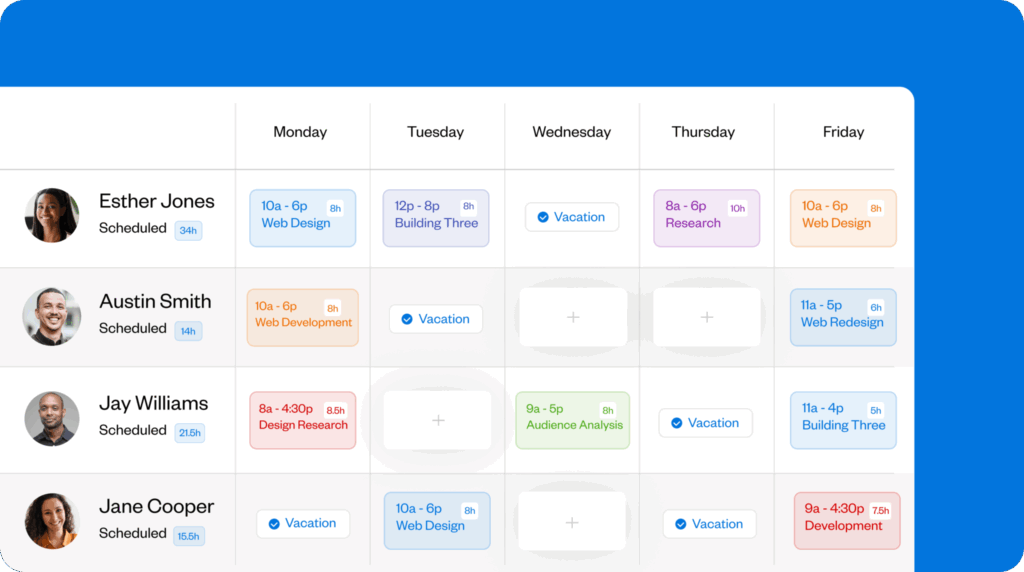
The fastest and easiest way to create employee schedules is to use employee scheduling software like Buddy Punch. Buddy Punch comes with many powerful employee scheduling and time tracking features.
To build schedules, simply open the weekly schedule view and click the cell where you want to add a shift. Once you add the details, you can adjust the settings so that the shift repeats for employees, specify the location where the employee will be working and the role they’ll fill, and add any notes. Once your schedule is set, you can also automatically notify workers.
What’s the right tool for you?
To determine the best fit for your company, take into account:
- Your team size
- How often you create and update schedules
- How you prefer to distribute them
If you have a small team with relatively predictable needs, you can use spreadsheets. But for a growing company with many moving parts, scheduling software will be more efficient.
Step 4: Design the schedule
Once you have a good idea of shift needs and employee availability, you’re ready to start putting a schedule in place.
Schedule the hardest shifts first
Look for peak demand periods or shifts that might be difficult to cover. Schedule for these first before moving on to easier shifts.
Take it from Dr. Jason Schroder, Medical Director and Co-Founder of Craft Body Scan:
I have learned that most managers build their schedule backwards. They typically schedule the simple shifts first and hope that the difficult ones will fall into place later. I instead start with the peak demand times and build the rest of the schedule out from there. Those peak demand times are not negotiable, and everything else is built around them.
Balance skills across shifts
Divide workers based on their skillsets and experience. On each shift, include at least one fully qualified and highly experienced worker to guide and mentor the rest of their team. Think through what work may be required on each shift, then fill in workers depending on their skills.
Add a buffer
A buffer ensures you have more workers on shift than the bare minimum needed and lets you keep things running even during unforeseen challenges. Dr. Madelyne Salo, Dentist and Owner at Salo, knows this well:
I keep a 20% buffer on every shift at our practice. This means that we are never running on the bare minimum staffing level. Dental practices are very fluid, and you don’t know what’s going to happen from one minute to the next. A patient shows up late, a procedure runs longer, someone comes in with an emergency toothache, etc. If you’re running on the bare minimum, one of these issues can throw your entire afternoon off.
Dmitrii Malashkin, Founder and CEO of Born to Move, backs this up:
After we switched to always scheduling 15% more than our lowest coverage demands on each shift, our last-minute scramble to find someone reliable to cover a call-out, swap, or request for schedule change decreased by more than 80%, and our overtime spending in Boston alone dropped by around $2,000/month because we never had to fill in gaps at a premium again. More importantly, we didn’t experience our usual mid-season burnout and turnover rates, as evidenced by our year-over-year Q3 voluntary quits dropping from 10 to 3.
This can be especially relevant for newer managers. From Dr. Salo:
If you’re new to running a practice, I would say you’re better off staffing up a little bit more in the beginning, just so you can get a feel for the rhythm of the practice, and then you can start scaling back from there. It’s easier to scale back than it is to burn your team out and try to win them back.
“To make this buffer staff not “deadweight,” we cross-train them to maximize operational efficiency — movers are trained to dispatch, dispatchers are trained on packing, etc. During slow periods, the excess scheduled coverage works on training, special projects, and other process improvement initiatives so their skills don’t atrophy and they remain motivated to keep on top of their game when the surge hits.”
To determine when to use a buffer, focus on shifts where there may be fluctuating or unpredictable demand. Alternatively, build a buffer into all schedules if you know your business sees frequent callouts.
Step 5: Publish and clearly communicate the schedule
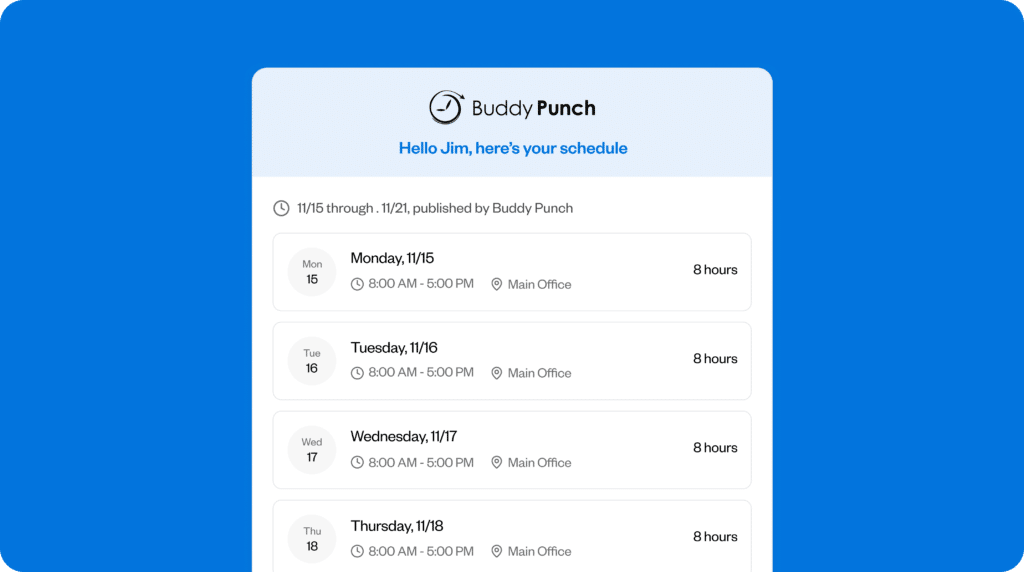
The perfect work schedule can fail if your team members aren’t aware they’ve been placed on it. Make sure you’re notifying them as soon as you publish schedules — ideally via multiple channels (text messages, email, etc.) — as well as when you make any changes. This can help avoid scheduling conflicts.
Tools like Buddy Punch can automatically notify employees when you publish or update schedules. This can reduce last-minute callouts and shift swaps.
Step 6: Monitor and iterate
Reflecting on past schedules to see what did and didn’t work will give you an idea of how to improve things next time. Look at signals like:
- How many shifts needed swaps
- How many workers called out or didn’t show up
- Whether shift performance was in line with expectations
To complement your observations, collect employee feedback. This will give you information you may not pick up on your own, such as employees wanting more hours or different types of shifts.
When you get an idea of how things are going, consider how you can update your schedules going forward. For instance, multiple swaps is a sign that the schedule didn’t work for your employees — this means you may need to double check their availability before creating the next schedule.
Common scheduling mistakes and how to avoid them
Most scheduling issues are predictable and can be avoided with some careful planning. Here are a few of the most common mistakes and how to prevent them.
Using outdated availability
Dr. Jason Schroder sees this frequently:
You create a schedule based on the six-month old availability data and question why it explodes every time. The truth is that people’s lives change and that staff member who was available to work every Saturday last spring now has a child playing soccer on Saturdays.
His advice: Collect your team’s availability at the start of the year and update it every quarter.
Scheduling for the best case scenario
Dr. Schroder says:
The biggest mistake I see is managers scheduling for the best case version of their week. Everybody shows up, nobody’s tired, everything goes smoothly. That is not a schedule, that’s a wish.
When creating schedules, factor in delays, no-shows, and last-minute changes so you’re not caught off guard. Another thing to look out for is tired or overworked employees. This can impact shift performance as much as being shortstaffed.
Overrelying on certain employees or unfairly distributing work
As you build your schedules around your team’s strengths, don’t fall into the trap of giving too many hours to a few specific employees over others. Team members constantly being scheduled week after week may burn out, while others may feel frustrated at having fewer hours.
Instead, strive for balance, fairness, and transparency. As Productivity Radar Founder Russell Taris says:
Real fairness means employees understand how scheduling decisions are made, and no one is repeatedly assigned the worst shifts. I have seen managers overload their reliable team members by consistently giving them the hardest shifts, but reliability should not be penalized. Managers should rotate less desirable shifts and clearly communicate their process. Your top performers will notice if you don’t.
5 signals that you’re scheduling wrong
| Signal | What To Do |
|---|---|
| Employees constantly ask when they work next | Publish the schedule well in advance (and in accordance with any local laws). Communicate the schedule through various channels to ensure you reach everyone. |
| The same employees are stuck covering schedule gaps | Run another availability check to make sure you have everyone’s most up-to-date availability. Add a buffer to avoid the need for last-minute coverage. |
| Employees frequently call out last minute | Make a list of employees who are open to picking up last-minute shifts. Advance notice of the schedule can also help here. |
| Shifts are regularly overstaffed or understaffed | Forecast demand based on historical trends. Schedule for peak times and difficult shifts first, then tackle the rest. |
| Employees often swap shifts | Revisit availability and employee needs. Use scheduling software that allows employees to swap shifts on their own, without manager intervention. |
Best practices for scheduling employees
Once you understand how to build a good schedule, it’s about getting it right week after week. Here are some tips to help you do so consistently.
Understand federal and state laws related to employee scheduling
Before you dive into crafting work schedules, look into any laws that might be relevant for your business, city, and state. For example, you may want to avoid clopenings and overtime shifts. Depending on where you operate, you may also be subject to Fair Workweek laws.
Understand shift differentials
Shift differentials are additional pay — usually 10–15% more — given when employees work a shift outside of the standard 8 a.m. to 5 p.m. workday. Shift differentials are different from overtime hours, because hours set at odd times do not necessarily exceed the standard workweek.
Consider employee preferences along with shift differentials. For example, if you need to accelerate road construction to meet a deadline, you may temporarily add on a few night shifts. And if you know an employee is willing to work nights, they’d be an easy fit for a late night shift.
Don’t overlook work–life balance
While you realistically can’t build schedules around every team member’s preferences, it can help to note their personal circumstances. For example, someone may have caregiving responsibilities, be undergoing major life changes, or want to observe religious holidays. Accommodate these kinds of situations as much as possible.
By keeping this in mind when scheduling, you set yourself apart as a manager — and set your team up for success.
Contributors
- Russell Taris, Founder, Productivity Radar
- Dr. Madelyne Salo, Dentist and Owner, Salo
- Dr. Jason Schroder, Medical Director and Cofounder, Craft Body Scan
- Dmitrii Malashkin, Founder and CEO, Born to Move
- Chris Kirksey, Founder and CEO, Direction Inc.

