

Workforce Scheduling Optimization: Tips & Best Practices

Written By: Reem Abouemera
Last Updated June 4, 2026
You finish building the next week’s schedule on Thursday afternoon. By Friday, you’re already dealing with shift swaps, overtime requests, coverage gaps, and a Monday staffing problem that wasn’t obvious.
In many cases, the problem isn’t understaffing. It’s that the schedule was built reactively without enough visibility into employee availability, workload demand, or projected hours. That leaves you making schedule adjustments without fully understanding the ripple effects, leading to avoidable overtime and coverage gaps.
Preventing these issues starts with an optimized workforce scheduling process that gives you better oversight before problems begin to build.
In this guide, you’ll learn how scheduling inefficiencies drive overtime and coverage gaps, how to create more reliable schedules, and how scheduling software supports better visibility and control.
What workforce scheduling optimization really involves
Workforce scheduling optimization involves aligning employee schedules with actual business demand so the right employees are covering the right roles at the right time.
A schedule can look fully staffed on paper and still create overtime and coverage problems if it ignores:
- Demand patterns: when workload demand rises and falls across different days and time blocks
- Employee availability: who’s available to work each shift
- Skill distribution: whether the right employees are covering the right responsibilities
- Labor budgets: how many employee hours the business can realistically support
- Coverage requirements: the staffing levels needed to keep shifts properly covered
If you’re not optimizing schedules for these factors, you’re likely taking a reactive approach. The table below highlights the biggest differences between reactive and optimized scheduling:
| Scheduling area | Reactive scheduling | Optimized scheduling |
|---|---|---|
| How schedules are built | Manually from memory or last week’s template | Built around demand patterns, employee availability, labor budgets, skill distribution, and coverage requirements |
| How demand fluctuations are handled | Staffing levels stay largely the same regardless of workload fluctuations | Staffing is adjusted based on workload patterns across the week |
| How staffing decisions are made | Shifts are assigned without fully considering availability, projected hours, or role coverage | Shifts are assigned after reviewing availability, projected hours, and coverage needs |
| How overtime risk is managed | Identified after extra hours have already been accumulated | Flagged early by reviewing projected hours and labor costs before schedules are finalized |
| How coverage gaps are handled | Gaps are addressed reactively after schedules are already published | Coverage gaps are identified and resolved during scheduling |
| How schedule changes are managed | Ongoing fixes and last-minute adjustments | Fewer disruptions because schedules are more stable from the start |
How reactive scheduling creates overtime and coverage gaps
Most recurring overtime and coverage gaps stem from reactive scheduling decisions made without enough visibility into how the workweek is shaping up. This approach causes some common operational failures.
Scheduling based on “usual patterns” instead of current availability
Many managers build schedules around who they expect to be available instead of reviewing evolving availability. That often happens because availability information is scattered across texts, spreadsheets, group chats, and informal conversations.
Managers eventually start relying on memory and routine instead — who usually closes, works certain days, or picks up extra shifts.
But employee availability changes constantly due to:
- Training schedules and staffing changes
- Reduced-hour arrangements and shift restrictions
- Time off requests and changing personal circumstances
When schedules are built using outdated or incomplete availability information, coverage gaps don’t become visible until after the schedule is live. This can leave you scrambling for last-minute coverage.
Emily Demirdonder, Director of Operations and Marketing at Proximity Plumbing, recalls how they repeatedly ran short on Wednesday mornings and Friday afternoons despite having enough staff available.
“It took me three months to uncover the root cause of these ongoing issues… It appears that approximately 65% of the gaps in coverage that we faced during that time could be attributed to informal availability preferences that the scheduler did not have access to when building the schedule.”
Hidden overtime caused by low hour visibility
Overtime rarely comes from one obvious scheduling mistake. It builds gradually through a series of coverage decisions, typically because managers don’t have a clear view of each employee’s projected hours while approving shift swaps, extending shifts, filling emergency gaps, or reassigning coverage.
Without that running total, overtime can accumulate before managers realize how much additional time has been assigned.
Guillermo Triana, Founder and CEO at PEO Marketplace, explained how easily this happens with manual scheduling systems:
“Most spreadsheet calendars can’t tell you who’s creeping up on 40 hours. So when you add shifts on Wednesday or Thursday to cover Monday and Tuesday, those first two days don’t factor into your decision. When someone needs coverage Friday evening and you have to dip into overtime to fill the shift, that’s 1.5x rate ($37.50/hr) getting approved blindly… I would estimate 35%-45% of unnecessary overtime is caused by this lack of visibility.”
But overtime visibility problems are also about who repeatedly absorbs schedule disruptions.
Olga Bachilo, Plastic Surgeon at Glamour Plastic Surgery and Med Spa, shared how uneven shift swap distribution drove overtime:
“As soon as I began recording the frequency of slot swaps and the level of skill of the people who were getting them, the pattern became apparent. We were continually shifting coverage around amongst the high-skill team members, and more intentional shifts of those coverage swaps helped regain our scheduled balance without hiring more people. These top-skill staff were doing about 70% of all slot swaps while representing less than 40% of the team.”
This not only drives unnecessary labor costs, but also creates higher burnout risk for overworked employees.
Scheduling evenly across uneven demand
Without clear demand data, many managers end up staffing based on broad weekly averages instead of real workload patterns across specific days and time blocks. However, most businesses experience predictable demand spikes and slower windows.
That can lead to:
- Overstaffing during low-demand periods, unnecessarily increasing labor costs
- Understaffing during peaks, creating coverage gaps and rushed overtime decisions
Manny Soto, Director of Operations at Burning Daily, illustrated how staffing to weekly coverages can create problems that headcount reports don’t fully capture:
“Managers who create schedules based on weekly averages are missing the gaps that quietly eat up labor dollars. Most of the schedule templates I’ve seen so far are based on daily totals. The issue is that there is a sudden increase in the volume of orders placed in a fulfillment operation between 10 a.m. and 2 p.m., followed by a sharp decrease in the volume of orders placed. Staffing to the average will result in an approximate 18% overage during low-demand periods and an 18% shortage during high-demand periods.”
Last-minute changes with no clear process
Coverage and overtime problems build quickly when schedule changes are managed across disconnected tools and informal communication channels instead of one centralized process.
A single callout before a shift can trigger a chain reaction across the schedule: texts to multiple employees, uncertain coverage, overtime approvals to patch the gap, or managers stepping in themselves to keep operations moving.
Because these changes are handled reactively and documented across different places, it increases the risk of:
- Schedule updates getting missed across conversations
- Multiple employees turning up for the same shift
- Employees working from outdated versions of the schedule
- Open coverage gaps staying unresolved because managers can’t track responses
- Overtime being approved without a centralized view of projected labor costs
Over time, this creates ongoing coverage instability while making overtime harder to track and control.
How to build a more optimized scheduling workflow
You don’t need to overhaul your entire scheduling process to reduce overtime and coverage issues. The biggest improvements come from:
- Better labor visibility
- Stronger scheduling systems
- Clearer processes for handling coverage
1. Start with workload demand, not headcount
Many overtime and coverage problems start when schedules are built around evenly distributed staff instead of real coverage demand.
To prevent that, first identify when workload demand rises and falls across the week by:
- Pulling four to six weeks of operational data your business already tracks — POS sales reports, appointment volume, service tickets, labor reports, production data, or customer traffic trends.
- Breaking demand down by day and time to identify your highest- and lowest-demand periods across the week.
- Aligning shift start and end times to those demand patterns instead of defaulting to the same coverage blocks every day. For example, if coverage demand consistently spikes between 10 a.m. and 3 p.m. on Tuesdays, staff more heavily during those hours.
Employee scheduling and time tracking software like Buddy Punch lets you set up reusable templates and recurring shifts instead of manually recreating the same schedule week after week.

2. Gather employee availability before building the schedule
Before starting each schedule cycle, collect updated employee availability using a standardized process so coverage decisions aren’t based on outdated availability from previous weeks.
You could:
- Set up an employee availability form where employees can submit which days and times they’re available, upcoming time off, and any scheduling restrictions.
- Set a weekly form submission deadline. For example, ask employees to send in their updates every Thursday for the following week’s schedule.
- Close submissions before schedule planning begins so coverage decisions use finalized availability information.
- Cross-reference employee availability against your workload demand map before assigning shifts.
- Build the schedule using the finalized demand and availability data.
When you collect availability information before scheduling starts, it becomes easier to prevent coverage gaps, last-minute shift changes, and overtime caused by avoidable scheduling conflicts.
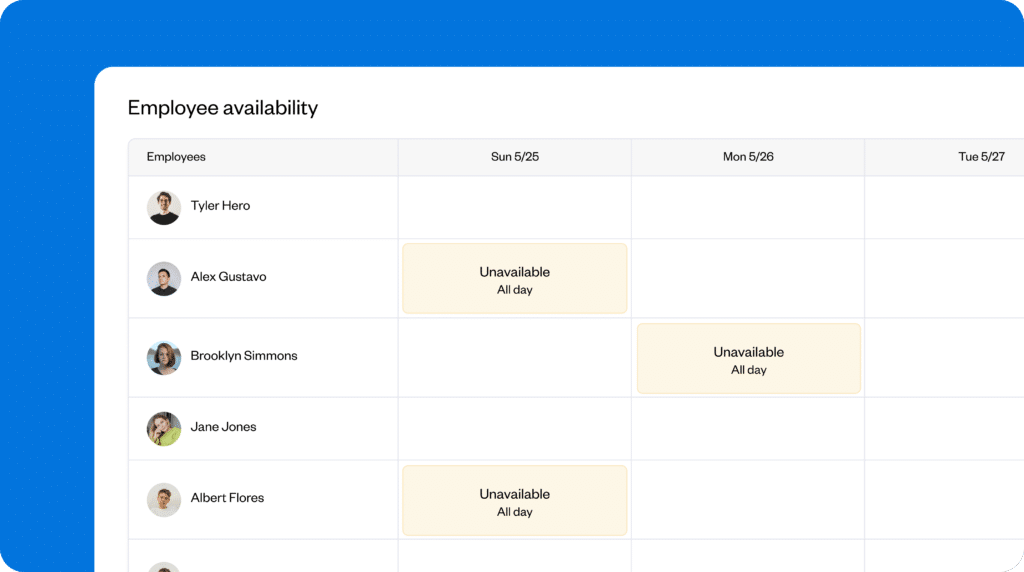
Buddy Punch helps you move away from manually piecing together availability updates, PTO requests, and scheduling restrictions across different channels. The tool keeps this information directly inside the scheduling workflow while you build the schedule, reducing the amount of follow-up needed later in the week.
3. Review staffing balance and projected hours before the schedule goes live
Overtime problems frequently come up when there’s limited visibility into projected employee hours or how coverage is distributed across the team.
As you build the schedule, review projected hours and staffing balance in real time by:
- Calculating a running total of scheduled hours per employee as shifts are assigned
- Identifying which employees are approaching overtime thresholds
- Checking whether the schedule relies too heavily on the same experienced employees to cover high-demand or specialized shifts
- Reviewing clopening shifts to avoid exhausting back-to-back schedules
If you manage field teams, don’t overlook how jobs are being sequenced when reviewing projected hours. Overtime can sometimes be caused more by inefficient routing than employee workload. Kameron Khan, Founder and Managing Director at SilverWater Plumbing, explained:
“If you do not consider geospatial factors when dispatching technicians, a team of 10 technicians can end up wasting two–three hours daily in unnecessary travel time alone. At SilverWater, we were able to resolve this issue by incorporating geographic zones into our daily schedules. We implemented this one simple change, and as a result, we reduced average drive time per technician by approximately 25%.”
From there, you can rebalance coverage before the schedule is finalized instead of reacting to overtime, burnout, or staffing pressure later. That could involve:
- Reassigning shifts from employees already approaching overtime to employees with lower projected hours
- Redistributing specialized coverage responsibilities across more team members instead of relying on the same experienced employees
- Reworking clopening shifts so the same employees aren’t repeatedly scheduled for short-turnaround shifts
- Reorganizing routes or service areas to reduce excess travel time between jobs
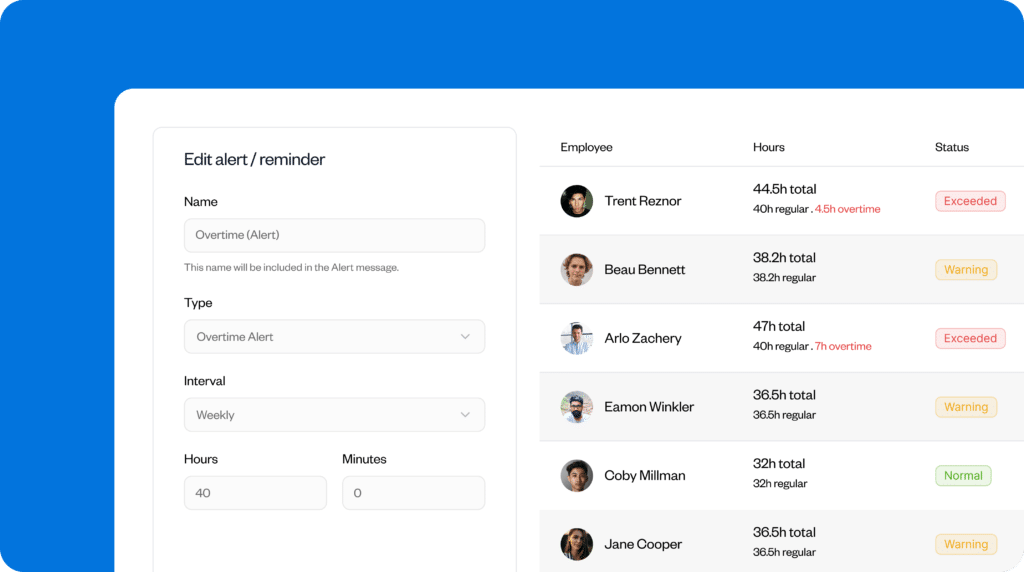
Overtime risk changes constantly while you adjust the schedule, so you may need to review projected hours multiple times before finalizing it. Buddy Punch gives you a live view of employee hours as you build and edit the schedule and automatically alerts you when employees are nearing overtime thresholds, so visibility stays updated even as coverage changes.
4. Reduce last-minute confusion with earlier schedule publishing
Schedules published too close to the workweek leave very little time to catch conflicts before the morning of a shift, which increases the likelihood of reactive coverage changes, overtime extensions, and same-day staffing problems.
Depending on where your business is located, publishing schedules at the last minute can also put you at risk of violating Fair Workweek laws.
To reduce that pressure:
- Publish schedules at least three to five days before the workweek begins so employees have time to identify conflicts, request shift trades, and arrange coverage if needed.
- Send a group text or scheduling notification once the schedule is published so employees know to review it.
- Establish a clear cutoff time for employees to communicate scheduling issues or coverage requests.
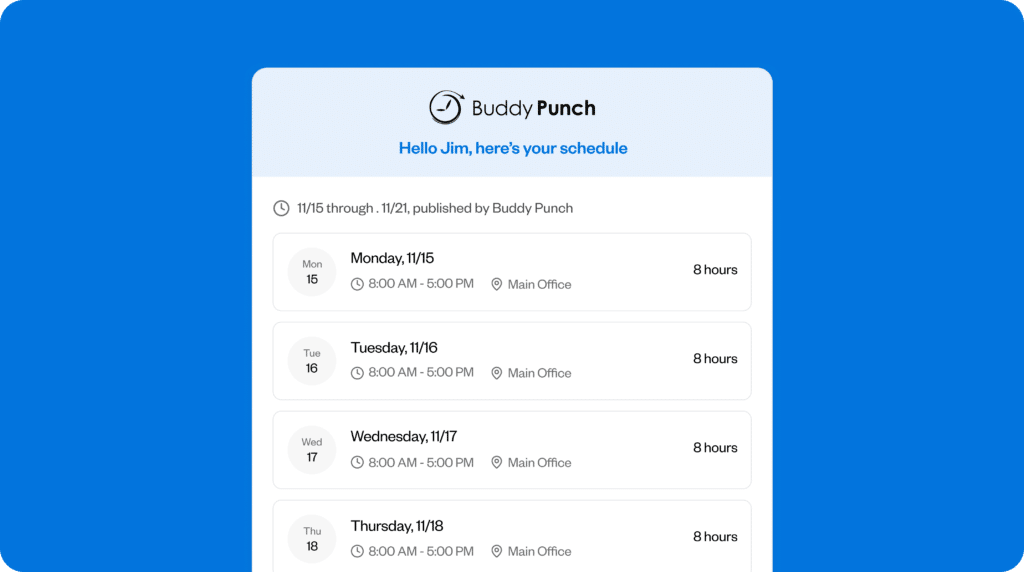
Once schedules are published, employees can easily miss updates if schedule changes are communicated manually. Buddy Punch automatically notifies employees whenever schedules are published or edited, so everyone is working from the latest version of the schedule.
You also needa clear process for how coverage requests are handled once they start coming in. That means defining:
- Where shift trades, callouts, conflicts, and overtime requests should be communicated. For example, employees must contact one designated manager number or email address.
- Who approves schedule changes and overtime requests and under what circumstances. For example, any overtime extension beyond a scheduled shift must be approved by the department manager before it happens.
- When and how unresolved coverage gaps should be escalated. For example, if a shift is still uncovered by the evening before, the issue gets escalated to a manager responsible for backup staffing.
- How schedule updates and emergency coverage changes are documented and tracked. For example, all approved schedule changes must be updated on the shared schedule immediately.
That way, coverage issues follow one consistent process instead of being handled differently each time.
Shift trades and cover requests create much less administrative work when they move through one approval workflow. With Buddy Punch, employees can submit requests directly through the app while managers review and approve them in one place, and the schedule updates automatically afterward.

5. Use the previous week’s schedule as a planning benchmark
Schedules become less reliable over time when small coverage adjustments gradually turn into permanent staffing patterns without anyone reevaluating whether those changes are still necessary.
Before building the next schedule, compare the previous week’s planned schedule against what happened operationally:
- Compare scheduled hours against worked hours to identify where overtime or shift extensions occurred.
- Look for days where staffing levels were heavier or lighter than workload demand required.
- Review which shifts repeatedly required coverage adjustments.
- Look for roles, locations, or time blocks that were short-staffed despite appearing fully covered.
Billy Rhyne, Owner at Horseshoe Ridge RV Resort, explained why this matters:
“If yesterday’s coverage worked at seven people on a Wednesday, your build for next Wednesday shouldn’t quietly drift to eight because two staff swapped. Side-by-side actuals vs. plan is the scheduling data we wish we’d had earlier.”
Using previous schedules as a benchmark creates a feedback loop that helps staffing decisions become more accurate over time instead of drifting away from actual coverage needs.
Scheduling metrics to track
The best way to know whether your scheduling process is improving is to review these metrics consistently each month. Focus less on hitting perfect numbers and more on trend direction over time.
| Metric | What it tells you | How to calculate it | Sign it’s improving |
| Weekly overtime | Whether staffing balance and hour visibility are reducing overtime | Total overtime hours ÷ total hours worked × 100 | Overtime hours gradually decrease week after week |
| Coverage gap rate | How often shifts remain understaffed after schedules are published | Uncovered or understaffed shifts ÷ total scheduled shifts x 100 | Fewer understaffed or uncovered shifts after schedules are published |
| Schedule changes post-publishing | How stable schedules are once they go live | Manually track the total schedule edits made after publication each week | Fewer reactive schedule edits and last-minute coverage adjustments |
| Demand-to-staffing accuracy | How closely staffing levels match real workload demand | Scheduled labor hours – actual labor demand hours | Smaller differences between scheduled staffing levels and true workload demand across the week |
Build schedules that hold up under real-life challenges
Most overtime and coverage problems don’t come from one difficult week. They happen when schedules are adjusted reactively, coverage gaps are patched at the last minute, and managers lose visibility into how labor hours are accumulating.
Your goal should be to move from reactive scheduling to a repeatable process that keeps coverage stable and labor hours under control as the schedule evolves.
Buddy Punch supports that process by centralizing scheduling, availability, overtime tracking, shift trades, and schedule updates so you can build more reliable schedules upfront and maintain constant visibility.
Contributors
- Billy Rhyne, Owner, Horseshoe Ridge RV Resort
- Emily Demirdonder, Director of Operations and Marketing, Proximity Plumbing
- Guillermo Triana, Founder, CEO, and Principal Consultant, PEO Marketplace
- Kameron Khan, Founder and Managing Director, SilverWater Plumbing
- Manny Soto, Director of Operations, Burning Daily
- Olga Bachilo, MD, FACS, Plastic Surgeon, Glamour Plastic Surgery and Med Spa

