
Employee time and location tracking software
On the clock means on the job
Buddy Punch records where employees clock in and out, maps their routes in real time while they’re on the clock, and blocks punches from outside the job site. Every timesheet entry is backed by when and where the work happened.

What is employee location tracking software?
Employee location tracking software is a system that employers use to monitor where employees are located while they’re on the clock. It uses a mobile app — often a combined time and location tracking app like Buddy Punch — along with the GPS technology built into smartphones to either take a snapshot of an employee’s location when they clock in/out or track it in real time throughout the workday.
Buddy Punch’s employee location tracking features

Basic GPS
Log employees’ locations on their timesheets when they clock in, clock out, and switch jobs mid-shift. View any punch on a map and see its latitude and longitude coordinates.
Real-time GPS
See where your clocked-in employees are in real time. View each person’s current location on a map, or switch to route view to see the path they traveled while on the clock.


Geofencing
Create a virtual boundary around each job site and assign it to the employees who work there. If someone tries to clock in or out when they’re not inside of the geofence, the app blocks the punch.
Automatic job costing
Connect a geofence to a location or department code to automatically assign the hours employees work at those locations to the jobs or projects that those worksites belong to.


Punch reminders
When employees enter and exit geofences, Buddy Punch can send them push notifications reminding them to clock in, clock out, or switch the job they’re billing time to.
Geofence exit alerts
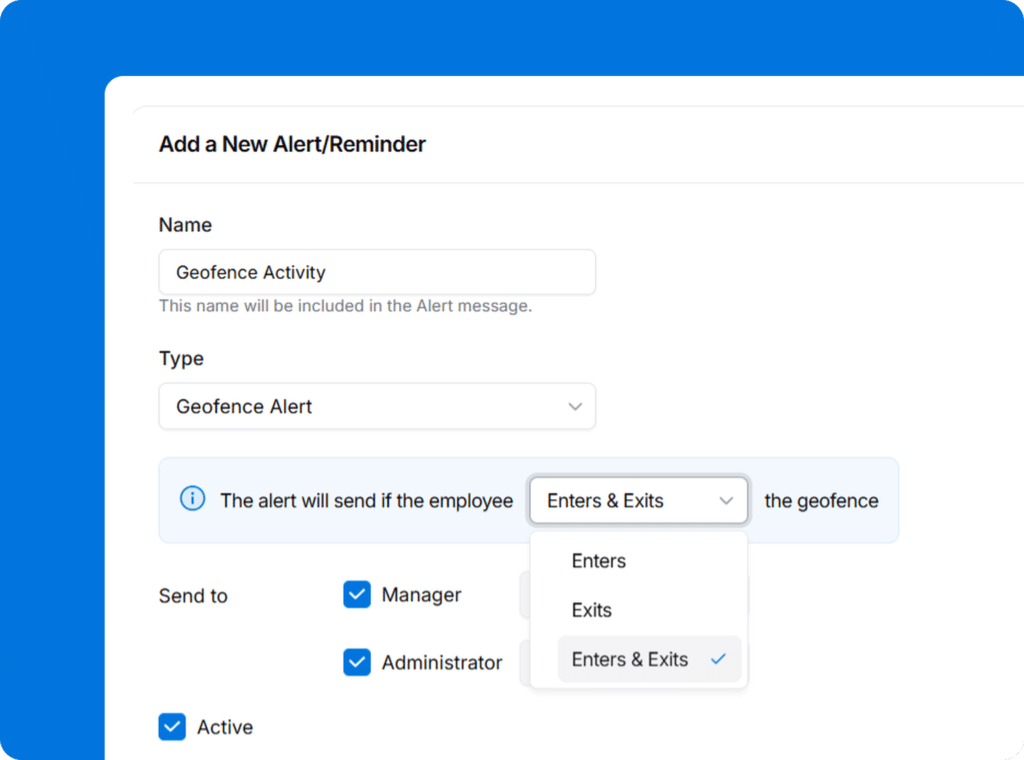
Managers can get an email or push alert when an employee leaves a geofence while clocked in — useful for updating timesheets for accuracy or identifying time theft.

Blocked punch records
When a geofence blocks a punch, Buddy Punch can alert managers by email or push notification right away. There’s also a report showing every blocked punch attempt.
How location tracking works in Buddy Punch
Buddy Punch tracks hours and location in the same tap. Here’s how it works:
- Turn on the GPS features you want to use and choose who they apply to. Features can be required for all employees or required only for employees you select.
- Employees clock in using Buddy Punch’s mobile app. Geofencing makes sure they’re at the right place, basic GPS logs their locations, and real-time GPS starts recording.
- See where your team is working. The live map shows each clocked-in employee’s latest location, and the route view traces where they went during the shift.
- Get the answers you need. Check geofence alerts to see if employees leave work while clocked in. Check a clock-in’s location to make sure the right client was billed.
Location tracking that stops when the shift does
Buddy Punch records employees’ locations only while they’re on the clock. Once someone clocks out, tracking stops.

Employees grant permission
The app can’t collect GPS until the employee allows location access on their phone.
Route maps stay with managers
Employees can see their own punch locations on their timesheets. Full routes are visible only to admins and the managers you give permission to.
Route history isn’t kept forever
Real-time GPS data is deleted after 30 days.
Off-the-clock reminders aren’t stored
If you turn on geofence reminders, the app checks location to know when to send them, but that location isn’t saved.
Who uses employee location tracking?
Construction and field services
Geofence each job site so crews can only clock in on site and log hours to the right job.
Home health care agencies
Confirm caregivers clocked in at the client’s home and see their visit routes across the day.
Cleaning and landscaping
See who’s at which property and send the closest employee when a new job comes in.
Multi-location retail and restaurants
Prevent employees from clocking in offsite. See if they left work while still on the clock.
Why choose Buddy Punch for employee location tracking
Unlimited geofences
Every plan with geofencing lets you add as many job sites as you need; many other tools restrict how many geofences you can create.
Hours and location in one app
Location tracking sits inside the same app as your timesheets, overtime, scheduling, PTO, and payroll — not in a separate tool.
Small-business pricing
At least one employee location tracking feature is included in every Buddy Punch plan, and plans start at $4.99 per user per month.
Ease of use
Buddy Punch is rated 4.8 out of 5 on Capterra for ease of use, and we’ve won awards for best ease of use every year for the last six years (2021-2026).
What customers say
Buddy Punch has made timekeeping so much easier to track
I really like the punch in/out feature for our employees. Our customers also have confidence they know who is on the job via the GPS capability. The whole integration and set up was easy, and our employees were able to get started right away. Customer support has been very helpful and responds quickly.
Powerful features, simple interface, a top-tier time tracking app
In the healthcare field, accountability is everything. Features like geofencing and GPS tracking give me peace of mind by showing exactly where my team is when they clock in, and the map visualizations make managing multiple sites a breeze.
Buddy Punch makes payroll a breeze!
Buddy Punch allows all of our employees and contractors to use an easy app to track their time. Staff finds it easy to use and navigate, and our team loves that we can easily edit timestamps and see the location(s) where employees clock in and out. Payroll goes so much faster now that we have Buddy Punch.
Simple and reliable time tracking that gets the job done
What I like most is how easy it is to use. Very user-friendly. I also appreciate the location tracking and approval features because it keeps time entries accurate and avoids confusion. Overall, it just does its job without being complicated.
Geofencing powerhouse with easy setup
I love the geofence feature. Location tracking in the app is something I enjoy because being able to see and have proof of time and location for employees is great. The initial setup was super easy.
A great timekeeping solution for our nonprofit janitorial business
Buddy Punch is allowing us to gather time and attendance for payroll and allowing us to geofence sites so we know employees are actually at the site when they punch in and punch out.
Employee location tracking FAQs
Do employees need a smartphone and the app for location tracking to work?
Yes. Buddy Punch’s GPS tracking features depend on the GPS technology built into smartphones, so employees must have smartphones and the Buddy Punch mobile app installed for the system to use its location-tracking features.
Do employees need location services turned on for location tracking to work?
Yes. Employees must turn their phones’ location services on in order for you to use Buddy Punch’s location-tracking features.
Does Buddy Punch only track location while employees are clocked in?
Yes. Buddy Punch maintains your employees’ privacy by only tracking their locations while they’re clocked in.
Are employees notified or aware that their location is being tracked?
Yes. Employees must give the Buddy Punch mobile app permission to track their locations. We also recommend creating and distributing a GPS tracking policy that notifies employees that their locations will be tracked, explains why, and states who will have access to location data.
Can employees see live location data, or only admins?
Users with the Buddy Punch “Employee” role can never see any location data for other employees in Buddy Punch.
If you are using real-time GPS, users with the “Administrator” role can see live location data for all users, and users with the “Manager” role can see live location data for employees who have been assigned to them in the system.
Can Buddy Punch remind employees to clock in or out when they arrive at or leave a location?
Yes. If you’re using real-time GPS and geofences, Buddy Punch can send an alert to employees when they enter and exit geofences to remind them to clock in, clock out, or switch to the appropriate job code for the location they’re arriving at.
Can Buddy Punch clock employees in automatically when they arrive on site?
No. Employees always clock in themselves. However, geofence alerts can be used to remind them to clock in, clock out, or switch job codes when entering a new geofence.
Can Buddy Punch track mileage and travel distance?
No. Buddy Punch’s real-time GPS feature does not capture employee mileage data.
Can I block employees from clocking in unless they are at the job site?
Yes. Using Buddy Punch’s geofencing feature, you can create virtual borders around all of your job sites, then assign those job sites to the employees who work at them. Once an employee is assigned to a geofence, they can only clock in when they’re located inside of that geofence. If they’re outside of the geofence, they’ll get an error message that shows where the worksite is located and tells them to move to the correct location to clock in.
Can I be alerted when a punch happens outside the allowed location?
Yes. You can get a real-time email or push notification when an employee tries to punch in while not located within an assigned geofence, and you can also view all failed punch attempts over any timeframe you select using the employee error log report.
Does Buddy Punch automatically record where employees punch in and out?
It automatically tracks where employees clock in and out if you turn on the basic GPS feature, which is included in all Buddy Punch plans. You can choose whether or not you want to enable the feature and if you want it to be applied to all employees or only specific employees. Once you turn it on and select who it applies to, it automatically records where employees were when they clocked in and when they clocked out.
Can I turn GPS tracking on for only some employees?
Yes. You have full control over which Buddy Punch features apply to which employees. If you don’t want to make GPS tracking required for everyone, you can select only the specific employees you want to make it required for.
Where do I see punch locations: on the time card or on a map?
Both. You can see punch locations on employees’ time cards, on a map, and on the administrator dashboard where you can see a list of employees who are currently clocked in.
Do I need a geofence to capture GPS location on punches?
No. Geofences and basic GPS (GPS location on punch) are two separate features that do not have to be used together. You can create geofences if you want to restrict employee punches to specific job sites, but if you just want to be able to see where employees were when they clocked in and out, you only need to turn on basic GPS.

