

6 Best Time and Attendance Software for Healthcare in 2026

Written By: Carissa McCollom
Last Updated February 11, 2026
Managing employee time in healthcare brings unique challenges. Nurses, therapists, and support staff often work rotating shifts, cover multiple locations, and deal with last-minute callouts. When time tracking systems fail, the consequences aren’t just administrative — payroll errors, staffing gaps, and stress ripple into patient care.
In this guide, I’ll review the leading time and attendance software for healthcare in 2026, highlighting where each tool stands out and where it falls short, so you’re equipped to choose the best option for your team.
| Buddy Punch | Connecteam | Workforce | Jibble | QuickBooks Time | TimeTrex | |
|---|---|---|---|---|---|---|
| Best for | Best overall | Small teams | Complex schedules | Budget-conscious teams | QuickBooks users | Complex teams |
| Prices start at | $4.99/user/month | $29/month | Quote-based | Free | $8/user/month | Quote-based |
| Clock-in methods | Mobile app, web browser, kiosk, text-to-punch, and group punch | Mobile app, web browser, or kiosk | Mobile app, web browser, or terminal | Mobile app, web browser, kiosk, or Chrome extension | Mobile app, web browser, or kiosk | Mobile app, web browser, or biometric terminals |
| Automatic timesheets | ✅ | ✅ | ✅ | ✅ | ✅ | ✅ |
| Employee scheduling | ✅ | ✅ | ✅ | ✅ | ✅ | ✅ |
| Shift trades and covers | ✅ | ✅ | Limited | ❌ | ❌ | Limited |
| Attendance tracking | ✅ | ✅ | ✅ | ✅ | ✅ | ✅ |
| GPS location tracking | ✅ | ✅ | ✅ | ✅ | ✅ | ✅ |
| Built-in payroll | ✅ | ❌ | ❌ | ❌ | ✅ | ❌ |
| Payroll integrations | ✅ | ✅ | ✅ | ✅ | ✅ | ✅ |
The best 6 employee time and attendance software for healthcare
Below, you’ll find my detailed reviews of each of the tools I selected as the best options for time and attendance tracking for healthcare teams and companies.
1. Buddy Punch: Best all-around time and attendance software for healthcare professionals

Buddy Punch is a time tracking app designed for hourly and shift-based teams. It combines employee clock-ins with scheduling visibility and payroll-ready reports, specifically helping healthcare teams reduce errors and improve coverage.
Key features
- Simple time tracking with GPS location
- Geofencing for preventing offsite punches
- Mobile-first clock-in/out
- Multiple punching options
- Job-based reporting
- Payroll integrations
Pros
- Flexible and reliable scheduling with shift trades and covers
- Works equally well for facilities and mobile caregivers
- Good security features to protect against time-theft
- Automated timesheets for fast and simple payroll
- Early, late, and no-show notifications for managers
Cons
- Add-ons may be less cost-effective for solo practices
- Very large hospitals may need more sophisticated analytics
The reason I went with Buddy Punch: I’ve seen first-hand the challenges clinical teams face between juggling shifts and managing last-minute callouts, and I love how practical, simple, and accurate Buddy Punch is for time tracking. From GPS-validated punches to attendance and overtime alerts, it feels like this software has genuinely been built with shift workers in mind.
Let’s take a closer look at Buddy Punch’s capabilities and how you can use them to improve your time and attendance workflow.
GPS-validated time tracking
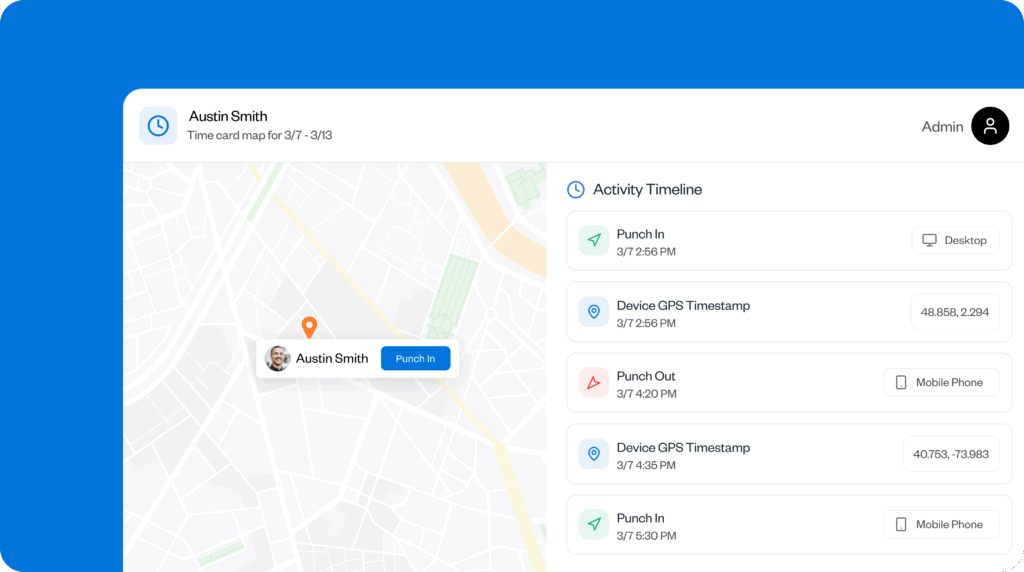
One of the things I really like about Buddy Punch is its GPS-validated time tracking. In settings such as home healthcare visits and multi-site clinics, it’s essential to know not just when staff clock in but exactly where they are. This feature automatically confirms punches at the correct locations — workers can only clock in once they’ve arrived on site.
Another great feature is Face ID at clock-in, so you don’t need to worry about buddy punching.
GPS tracking also makes redeployment easier, as you can see directly on the map who’s closest to a clinic or home job-site and can get there first.
Geofencing
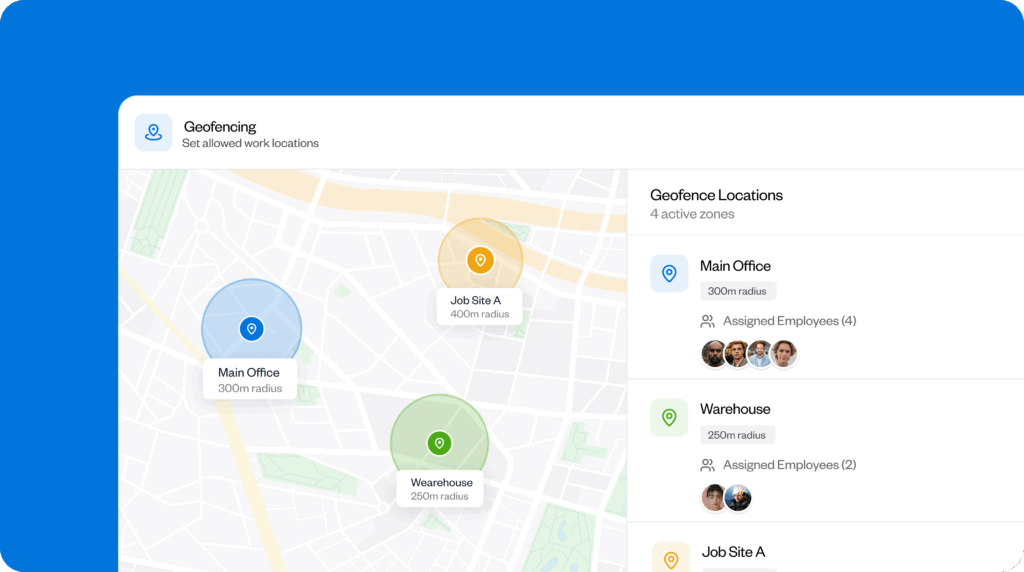
Buddy Punch’s geofencing makes time tracking even smarter by automatically tying hours to specific job sites or patient locations. I like how it works in the background, so staff don’t need to take extra steps to prove they’re where they should be. Even better, I found this feature really simple to set up.
It’s a win-win for home healthcare providers too, as it provides peace of mind that visits are accurately recorded. For clinics with multiple sites, it eliminates confusion about which department or location hours should be assigned to, creating clear, auditable attendance records without adding to your team’s workload.
Mobile-first access
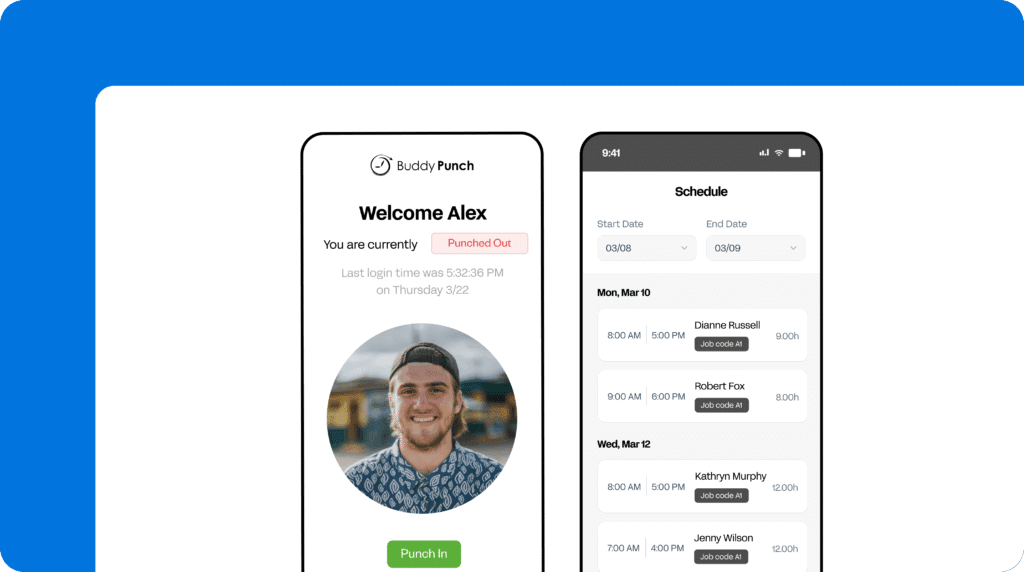
Healthcare staff are constantly on the move, often wearing gloves or working in environments where a desktop computer isn’t practical. With one-tap clock-ins that work offline and sync automatically once connectivity returns, I found Buddy Punch’s mobile-first approach perfect for the healthcare context.
I like that the interface is clean and intuitive so even non tech-savvy staff can punch in without errors. This feature alone saves hours of follow-up, prevents missed punches, and keeps payroll accurate.
Job-based reporting
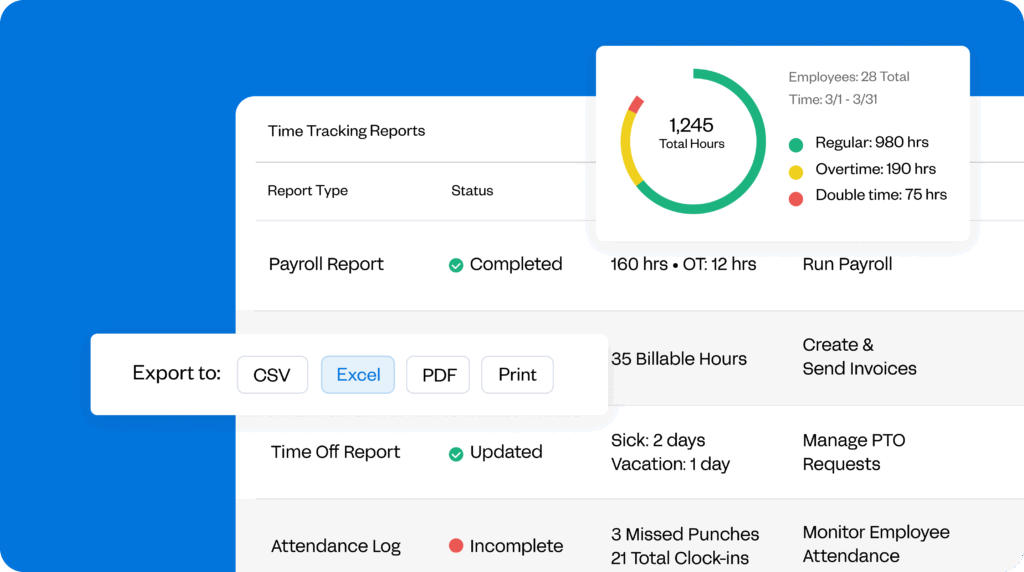
Another standout for me is Buddy Punch’s job-based reporting, which allows you to see exactly how hours are distributed across shifts and departments. You can also keep track of any upcoming paid time-off (PTO) and overtime summaries. This is highly beneficial for payroll accuracy and job costing, as it eliminates the guesswork of manually assigning labor hours.
Even better, reports are particularly easy to generate, export, share, and interpret, making it straightforward to spot trends and make staffing adjustments quickly. For healthcare managers, this level of clarity helps ensure proper coverage, maintain compliance, and reduce administrative overhead while giving staff confidence that their time is recorded correctly.
Scheduling visibility across sites
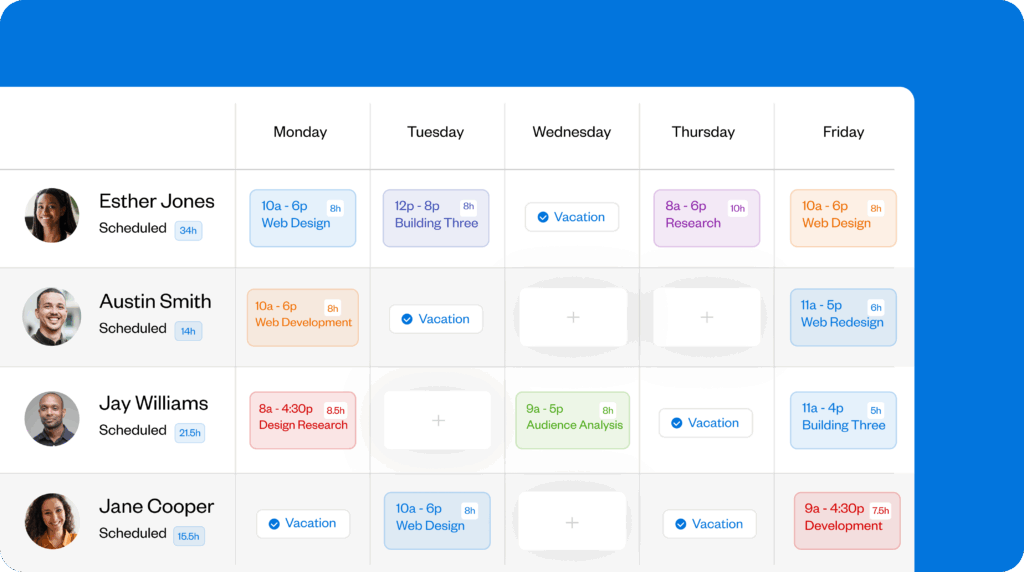
Buddy Punch really impressed me with its schedule visibility. Managers can see in real time where employees are clocked in across multiple locations, and adjust coverage seamlessly.
I also like that this isn’t just a dashboard — managers can act on the information immediately, moving staff to where they’re needed most and preventing idle time or gaps in patient coverage. For multi-site clinics or home healthcare teams, this reduces the stress of last-minute callouts and ensures every shift is covered without overburdening staff. Not only that, but the drag-and-drop format makes it super user-friendly.
Integrations
- Gusto
- QuickBooks
- SurePayroll
- ADP
- And more
Pricing
- Starts at: $19 base fee per month + $4.99 per user/month
- Free trial: Yes (14 days), no credit card required
- Free plan: No
What users say about Buddy Punch
“What I like the most about Buddy Punch is the usage simplicity. It’s so user-friendly; other than that, it’s well organized and helps keeping track of time.” – Khalil O.
“Love it! BuddyPunch has been a huge tool in simplifying payroll and time tracking.” – James C.
Learn more about Buddy Punch
- Start a free trial — no credit card required
- View pricing
- Watch a video demo
- Take an interactive product tour
- Request a personalized demo
2. Connecteam: Good for small practices
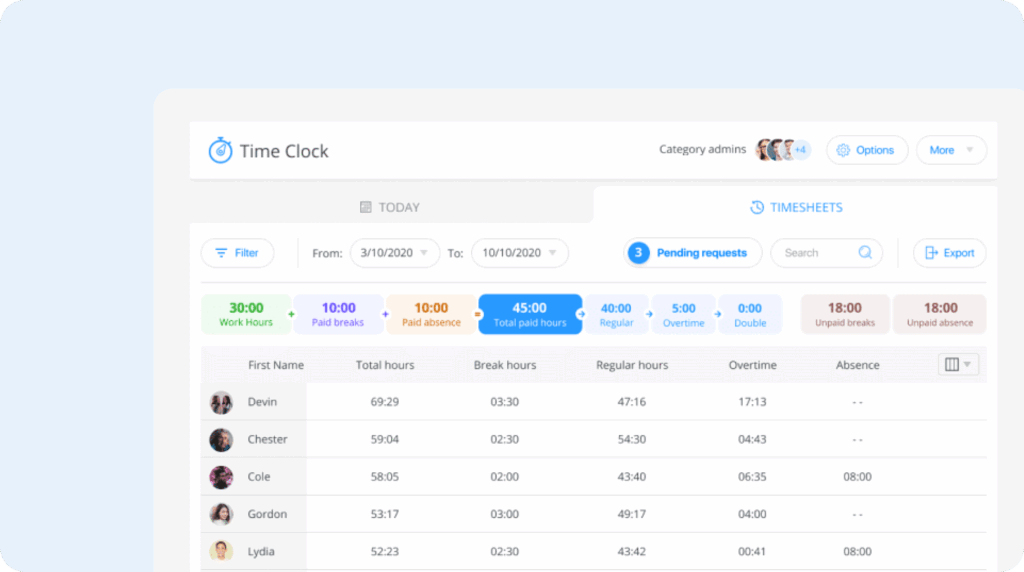
Connecteam is an employee management platform designed to streamline communication and enhance daily operations.
Key features
- Shift-based scheduling
- GPS-enabled mobile time clock
- Attendance reports with manager approvals
Pros
- Intuitive interface
- Mobile-friendly
- All-in-one app
Cons
- Full feature access tied to higher tiers
- Fairly steep learning curve for managers
- Fewer payroll integrations
What Connecteam offers: Connecteam works well for small clinics or therapy practices that need straightforward scheduling, mobile clock-ins, and basic attendance reporting in one place.
Shift-based scheduling with availability control
In Connecteam, schedules can be built using a visual editor, copied from previous weeks, or created from templates. Availability preferences and time-off requests are handled directly in the app, reducing manual coordination.
One of the more practical elements is shift reassignment. Staff can release shifts they can’t work, allowing qualified coworkers to pick them up, with optional manager approval to maintain oversight. I also like that coverage views make it easier to spot understaffed shifts.
GPS-enabled time clock
Connecteam includes a mobile time clock with GPS capture and geofencing options. Staff clock in and out from their phones, and managers can restrict punches to approved locations.
I was impressed by the automatic clock-out feature, which ensures employees don’t have to worry about forgetting to punch out when they leave a geofenced area. However, while the time clock works well for basic attendance tracking, it’s not as well-tailored to healthcare workflows as tools like Buddy Punch, which make time tracking the primary focus rather than a component of a larger system.
Attendance reports and approvals
I like how time data in Connecteam flows into digital timesheets that track hours, including breaks and overtime. Managers can review, edit, and approve timesheets, with changes logged for accountability. Reports also provide visibility into attendance patterns, such as late arrivals.
That said, reporting tends to be fairly high-level on Connecteam. If you need granular insights across locations or departments, you might find that reporting requires more manual effort.
What users say about Connecteam
“It’s been a reliable tool that helps streamline scheduling, time tracking, communication, and task management for our team. While there have been a few minor bugs or delays, the app works well overall and continues to meet our needs effectively.” – Isaias S.
“If you only clock in and out and have no corrections to make, it works fine. If not, it’s not very intuitive. I’m pretty good with apps but I found this one to be difficult to use beyond the basic actions.” – Ginger L.
Pricing
- Starts at: $29/month
- Free Trial: Yes
Learn more about Connecteam
- Read our in-depth Connecteam review
- Compare Buddy Punch vs. Connecteam
- Discover the best Connecteam alternatives
3. Workforce.com: Good for shift-based teams

Workforce.com is an employee app that combines HR, scheduling, and payroll.
Key features
- Time and attendance tracking with compliance controls
- Demand-based scheduling driven by workload and staffing ratios
- Overtime, break, and burnout prevention tools
Pros
- Compliance controls make it well-suited to regulated healthcare environments
- Powerful scheduling
Cons
- Heavier setup
- More complex than smaller teams need
What Workforce.com offers: Workforce.com stood out to me because its scheduling is built around real demand and staffing ratios, making it especially strong for large healthcare teams that need to balance compliance, coverage, and cost across multiple locations.
Demand-based scheduling based on staffing ratios
Workforce.com’s scheduling is built around demand rather than static templates, allowing managers to plan shifts based on resident needs, staff-to-patient ratios and required qualifications.
Managers can set minimum staffing ratios and qualification requirements, preventing shifts from being published if they fall short. While this is valuable in regulated settings, it requires more setup time compared to simpler tools like Buddy Punch, which prioritize speed and ease for smaller teams.
Time and attendance with compliance controls
Workforce includes mobile time tracking with GPS clock-ins, helping confirm attendance and location across shifts. Clock-ins, breaks, leave, and absences are captured in a single system, and reminders prompt staff to correct missed punches. Managers can then review and approve changes to create a clear audit trail.
In Workforce.com, attendance data is tightly tied to compliance. Timesheets track paid and unpaid breaks, split shifts, and leave types, supporting employment law requirements and inspections. However, this level of detail may be too granular for smaller, less strictly regulated practices that only need clean, payroll-ready hours.
Overtime, break, and burnout prevention
I really like that burnout prevention is a core focus of the Workforce.com system. Managers can set maximum hours, receive real-time overtime alerts, and enforce legally compliant breaks. Alerts allow action during a shift — not after payroll runs — helping reduce excessive labor costs and staff fatigue.
Pricing
- Starts at: Quote-based
- Free trial: Yes
What users say about Workforce.com
“Overall it is a great product that helps with quick flexible changes to schedules.” – Shaun S.
“I like having easy access, but it’s a bit of learning curve to learn how to navigate. It took me quite a while to even find time records.” – Anonymous
4. Jibble: Good free option

Jibble is an employee time tracker that allows you to monitor employee attendance and track work hours and projects in real time.
Key features
- Facial recognition and GPS-based clock-ins
- Project time tracking with activity monitoring
- Live location tracking for mobile teams
Pros
- Strong identity checks
- Generous free plan
Cons
- Limited scheduling
- Basic compliance controls
What Jibble offers: It delivers reliable attendance and project-based time tracking with strong verification tools, making it a good option for small clinics.
Facial recognition and GPS-based clock-ins
I liked how Jibble offers several ways to confirm attendance, including GPS location checks and AI-powered facial recognition. Facial recognition is checked at clock-in and clock-out to help reduce buddy punching, notably at kiosks.
Geofencing adds another layer of control by limiting where employees can clock in. Administrators have flexibility in how strict clock-in location boundaries should be, so this works well for multi-site or home visit-based roles.
Project time tracking and activity monitoring
I found Jibble’s project-based time tracking to be pretty advanced and useful for teams that want visibility into how work hours are spent across tasks or clients. Employees can track time against specific projects, and managers can review breakdowns without complex setup.
On desktop, Jibble offers lightweight activity monitoring that captures periodic screenshots while users are clocked in, rather than logging keystrokes or application usage. I see this as a middle ground — useful for basic oversight, but not detailed enough for teams that need deeper productivity analytics or strict labor enforcement.
Live GPS tracking for mobile teams
For mobile or field teams, Jibble includes live GPS tracking and route history. Managers can see where employees are during a shift, which helps verify visits or confirm time spent on-site.
That said, route tracking is quite high-level. Locations are connected by straight lines rather than detailed turn-by-turn paths, which limits precision. For teams that need accurate travel logs or mileage tracking, I worry this would fall short.
Pricing
- Starts at: $2.49 per user/month
- Free trial: Yes
What users say about Jibble
“The platform provides an intuitive interface that makes time tracking, attendance monitoring, and productivity management straightforward for both employees and managers.” – Israel O.
“My overall experience has been time consuming and irritating… it is not able to adjust to a fiscal year instead of a calendar year. On January 1st, everything resets.” – Marguerite M.
5. QuickBooks Time: Good for QuickBooks users

QuickBooks Time offers scheduling, payroll, and time and location tracking that integrates seamlessly with QuickBooks.
Key features
- GPS-enabled time tracking and job costing
- Mileage and travel tracking
- Payroll and accounting integrations
Pros
- Custom fields to keep timesheets organized
- Seamless QuickBooks integration
Cons
- Limited scheduling
- Higher base costs
- Dated and clunky web app
What QuickBooks Time offers: I found QuickBooks Time to be very well-suited to small to medium-sized businesses (SMBs) already in the QuickBooks ecosystem, as it integrates so well with their products. It also provides accurate mileage tracking to reduce administrative burden for mobile healthcare workers.
GPS-enabled time tracking and job costing
I appreciate how reliable QuickBooks Time’s core time tracking is, especially for mobile and field-based teams. Employees can clock in and out from their phones, tablets, or shared kiosks, and GPS data is captured automatically with each punch.
Time can also be tied to specific jobs, patients, or service codes, providing clean records for billing, payroll, or internal cost tracking. Timesheets are straightforward to review and approve, with edits logged for a clear audit trail. That said, while location data is consistently captured, tools that support on-site presence are less comprehensive than those offered by more healthcare-focused systems.
Mileage and travel tracking
QuickBooks Time differentiates itself with its mileage tracking. When enabled, the app auto-detects driving during work hours and logs mileage without manual input. Mileage logs are stored directly alongside timesheets, which simplifies reimbursements and reporting.
However, mileage rates aren’t automatically applied, so reimbursement calculations still require an extra step. For teams that travel frequently, it’s a strong feature — but it’s clearly designed for general field services rather than healthcare-specific workflows that require more detailed, patient-specific logs.
Payroll and accounting integrations
QuickBooks Time is built to integrate tightly with the broader QuickBooks ecosystem. Time data flows seamlessly into payroll and invoicing, reducing double-entry and manual reconciliation. For organizations already using QuickBooks for accounting, the integration feels natural and stable.
Outside of payroll, though, flexibility drops off. Scheduling tools are fairly basic, and there’s limited support for complex shift rules, rotating schedules, or qualification-based assignments. In healthcare environments where compliance, coverage ratios, and fatigue management are key, this can become a constraint as teams grow.
Pricing
- Starts at: $20 /month + $8/user
- Free trial: Yes
What users say about QuickBooks Time
“QuickBooks Time makes scheduling and payroll easier for small teams with daily hours. Mobile check-ins are simple, and reporting integrates directly with QuickBooks Payroll.” – Preksha B.
“The interface feels familiar because of the similarities to QuickBooks payroll and bookkeeping, but otherwise I don’t love the interface.” – Mitch S.
Learn more about QuickBooks Time
- Read our in-depth QuickBooks Time review
- Compare Buddy Punch vs. QuickBooks Time
- Discover the best QuickBooks Time alternatives
6. TimeTrex: Good for complex teams

TimeTrex is a cloud-based platform that automates time and attendance, payroll, and HR management.
Key features
- Rule-based time and attendance controls
- Biometric and location-based clock-ins
- Advanced scheduling supporting complex work patterns
Pros
- Detailed time-tracking controls
- Highly flexible scheduling logic
Cons
- Interface feels dated
- Setup can be complex
WhatTimeTrex offers: TimeTrex impressed me as a highly configurable, open-source system. I liked the detailed control it gave me over time and attendance rules — although the granularity may be too complex for some teams.
Rule-based time and attendance
TimeTrex tracks work hours, breaks, overtime, and leave in real time, with all data feeding into a single system. Rather than relying on simple punch-in, punch-out logic, the platform lets you define detailed restrictions on where, when, and how employees can clock in. This includes device-level controls, browser access limits, and location-based rules using GPS and geofencing.
For healthcare environments with strict attendance policies, such as long-term care facilities or multi-site clinics, this level of control can be useful. That said, getting these rules right takes time. I found the setup powerful but not especially intuitive, particularly compared to apps like Buddy Punch or Workforce.
Biometric and location-based clock-ins
TimeTrex supports multiple clock-in methods, including browser-based punches, mobile apps, and biometric facial recognition. The latter is designed to reduce buddy punching, especially in settings such as care homes where shared devices or centralized time clocks are common.
Location enforcement is also built in, including geofencing to ensure employees are clocking in from approved sites. In practice, these tools work as advertised, but they add complexity — particularly around employee consent and privacy — which may feel burdensome for smaller healthcare teams.
Advanced scheduling with employee input
TimeTrex’s extensive scheduling tools are clearly built for organizations with complex staffing needs. For example, you can create schedules from scratch, use templates, or manage multi-week rotating shifts. I also noticed that the platform takes a “bottom-up” approach, allowing employees to submit availability and scheduling preferences directly into the system.
Pricing
- Starts at: Quote-based
- Free trial: Yes
What users say about TimeTrex
“It’s difficult to get set up and going but the customer support is amazing on getting it tailored to your needs and once it’s set up it works great.” – Samatha G.
“I would love to see a more streamlined view with each feature readily accessible from the same place regardless of what page you are on.” – Jessica M.
The benefits of time and attendance software for healthcare professionals
Reliable attendance management is critical in healthcare, where even small delays have a real impact on patient care. Here’s how modern time and attendance software supports healthcare professionals day-to-day.
Better coverage and reduced disruption across shifts
A robust time and attendance platform provides managers with real-time visibility into who is on shift, who’s late, and where coverage may be at risk. This allows teams to respond to last-minute callouts faster, reassign staff with confidence, and avoid understaffing as well as unnecessary overtime.
Fewer payroll errors and better accountability
When time tracking is inaccurate, payroll disputes and manual corrections become routine. Reliable attendance data eliminates the guesswork by capturing hours correctly the first time. Clear records of hours worked, breaks, and overtime improve accountability for staff and give HR teams confidence that payroll is fair and accurate.
Reduced administrative burden, plus improved compliance and visibility
A modern platform automates reporting, simplifies approvals, and produces clear, auditable records that support compliance requirements. Location verification through GPS or geofencing also adds confidence for multi-site clinics and home healthcare teams, ensuring staff are where they’re needed without adding friction or micromanagement.
The bottom line on time and attendance software for healthcare
Healthcare operations demand accuracy, reliability, and usability. Missed punches, complex shifts, and callouts can cause payroll headaches, staffing gaps, and tons of stress. The right time and attendance software reduces these risks while supporting patient coverage and improving staff confidence.
Buddy Punch stands out by combining practical usability, GPS-validated clock-ins, offline access, and clear reporting. For small clinics or large hospitals, it ensures accurate attendance, fewer payroll disputes, and simplified management without adding undue complexity.
Methodology: How I chose the tools on this list
I evaluated each tool side by side, looking at:
- Core time and attendance functionality for healthcare environments
- Ease of adoption for clinical staff and managers
- Reporting accuracy and shift support
- Additional capabilities like GPS validation, geofencing, offline access, and payroll integrations

