

How to Track Employee Breaks (and Ensure They’re Taken)

Written By: Kristina Proffitt
Last Updated April 1, 2026
Breaks are critical for both employees and employers, but implementing them isn’t always easy.
Managers may not always have the knowledge or resources they need to enforce breaks. And sometimes, despite managers’ best efforts, employees may choose not to take the breaks they are entitled to.
In this post, we take a look at the most common reasons workers don’t take breaks, how you can use technology to improve compliance, and why, even with software, human oversight is still necessary.
Why breaks matter for employees and companies
Taking proper breaks benefits both employees and companies.
For employees, regular breaks mean fewer health risks. A recent study found that skipping breaks, or being interrupted during breaks, led to back, neck, and shoulder pain, as well as physical and emotional exhaustion. Even “micro-breaks” (breaks shorter than 10 minutes) can help employees preserve energy and control fatigue.
Time away from work also allows workers to decompress during busy shifts and gives them a fresh set of eyes to problem-solve with.
For employers, breaks help maintain performance and keep you compliant with any state break laws.
When employees don’t take breaks, their colleagues or direct reports may feel uncomfortable doing so, too. This can have ripple effects for the larger workforce and affect overall productivity. Regular breaks are especially crucial in physically demanding jobs like construction, as they help reduce fatigue-related mistakes and safety risks.
Additionally, companies must comply with the rest and meal break laws of their state (if any) to avoid penalties. However, in some states that mandate breaks, you can waive them if an employee also agrees to the waiver.
How to track employee breaks
Tracking when and for how long employees take breaks helps with:
- Compliance: It gives you a paper (or digital) trail to fall back on should you be audited. This is particularly important in states where you can be fined if employees don’t take breaks.
- Payroll accuracy: Tracking breaks lets you remove unpaid breaks from employees’ total hours so you know you’re paying them only for the time they spent working.
- Protection from disputes. Records can serve as proof of the breaks you offer and the breaks that employees actually take. This lowers the likelihood of employees making break-related complaints and gives you stronger protection if such claims do come up.
What you need is accurate documentation that shows shift start times, start times for all breaks, end times for all breaks, and shift end times. There are two common ways to get this data.
Use manual methods
If your employees track their time using paper timesheets, you can have them add their break start and end times to their timesheets in addition to their clock in and out times. Then, you can have employees’ supervisors review those timesheets and sign off on them at the end of each shift.
If you’re using a physical punch clock, you can have employees punch in and out for breaks. This gives you detailed time records showing when employees took breaks and how long they stayed on break.
However manually tracking breaks creates a lot of issues for teams with more than a few employees:
- Employees may forget to clock out and back in for their breaks.
- Payroll teams have to not only manually calculate total hours but also subtract unpaid break times.
- If you have multiple locations or employees working in the field, it can be hard to collect all timesheets.
- You’ll need a physical space to store historical timesheets for your records.
Use time tracking software
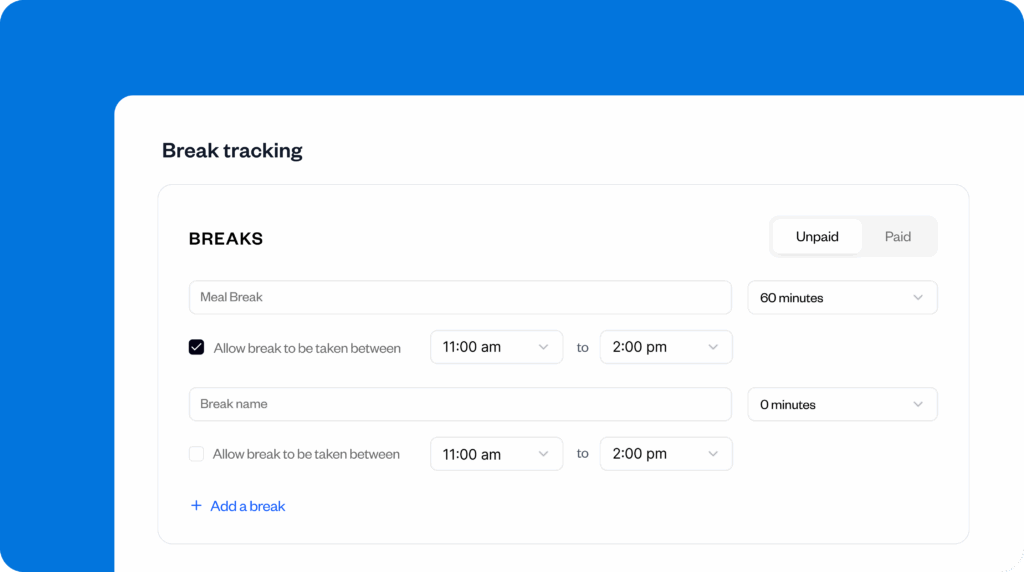
Time tracking software with robust break tracking features solves all of the problems that result from using manual methods and gives you tools that help ensure breaks are taken. For example, in Buddy Punch:
- You can set up break rules. Specify when breaks must be taken, how long the break should be, and whether or not the break is paid or unpaid. Alerts remind employees when it’s time to take a break, and you can even prevent them from clocking back in before their break is scheduled to end.
- You can capture when breaks were waived. If an employee voluntarily waives their break (in states where this is allowed), you can have them leave a note on their timesheet stating that they voluntarily opted out of taking their break that day.
- Timesheets are stored digitally for a minimum of three years. You’ll have access to historical timesheets showing when employees clocked in, when they took breaks, when they clocked out, and any notes they left for a minimum of three years, which is helpful if issues come up or if you’re audited.
5 ways to ensure employees actually take their breaks
Many times, employees don’t know what breaks they’re required to take. Even if they know, they may choose not to take breaks: maybe their manager is pushing them to hit deadlines, or maybe they simply forget to take breaks on time, especially during busy shifts.
Follow the tips below to ensure your employees actually take the breaks they’re entitled to.
1. Draft a clear employee break policy
A clear employee break policy is the foundation that can make sure employees know the rules. Should employees fail to follow them, you can point them in the direction of the policy to remind them of the importance of taking breaks and their commitment to doing so.
A great break policy must be accurate. It needs to get the numbers and facts right, and it needs to be easy to understand for both employees and managers. The more complicated it is, the harder it will be to enforce.
Make signing the policy a part of your onboarding process so that new employees know exactly what they’re entitled to (and what’s required of them) from the start. Once it’s signed, scan or photocopy the document for the employee, and keep the original for your records.
Any time you update the policy, highlight what’s changed and why the change has been made, and ask employees to sign the new copy.
Download it here: PDF | Microsoft Word | Google Docs
2. Support managers in adhering to your break policy
In a study that analyzed employees’ break-taking behaviors, 8% of workers didn’t take breaks because their supervisor discouraged them directly. Another 6% didn’t do so because they believed it would make them look bad in front of their supervisor.
The key to resolving manager-related reasons for employees skipping breaks is to empower managers to implement your break policy effectively:
- Organize training sessions for managers. Bring managers together so they can share best practices on how they implement the policy even during busy shifts or challenging conditions.
- Review and update operational processes. For example, make reviewing timesheets (and break times) a mandatory part of managers’ daily tasks.
- Use the company’s physical and digital infrastructure. Hang up break reminders around the office, or share reminders via internal communication channels.
- Include employee break-taking in managers’ performance assessments. Regularly review employee timesheets and address issues with managers if their team is missing or delaying breaks consistently.
- Provide escalation channels for employees. Many employees may not be comfortable raising the issue directly with their manager or a senior leader.
3. Schedule breaks without disrupting work
Improper break scheduling can create messy situations, especially with a larger or on-site workforce. Using scattered schedules for shift start times and break times helps ensure that you’ve always got someone to keep an eye on work and that everyone gets the chance to take a break.
When scheduling breaks, ask yourself these questions:
- Are there enough people around at the right time who have the relevant skills?
- Does everyone get a break of the right length?
- What happens if someone misses a break?
- What happens if someone needs to take an unscheduled break?
- Do workers know who is responsible for approving or monitoring breaks during their shift?
- Does the break schedule still work if there are last-minute changes in shifts or staffing?
If you choose to assign break rules to certain employees, periodically review them to ensure they’re still relevant. For instance, if an employee starts working more hours, they may be entitled to longer or more frequent breaks.
4. Remind employees when it’s time to take a break
It’s easy to forget to take a break when you’re busy; employees may not realize how much time has passed when they’re engrossed in their work. It’s helpful to have managers or supervisors keeping an eye on the schedule to make sure employees are taking breaks when they need to, but if managers are also busy, you can use time tracking software to remind employees when it’s time to take a break.
For example, in Buddy Punch, you can set up break alerts when employees need to take breaks. These alerts can be sent to employees via a push notification on their phones or an email, and the alerts can also be sent to managers for an additional layer of oversight.

Manager alerts let them act on missed breaks immediately, following up with the employee to find out what happened. If the employee didn’t take the break voluntarily, the manager can get it in writing.
Arsen Misakyan, CEO and Founder at LAXcar, found that employees weren’t taking breaks when they needed to, so the company changed to “manual starting of breaks with soft alerts. If breaks were not taken within a timeframe of five hours, supervisors received an alert.”
Within six weeks, LAXcar saw:
- A 38% decrease in missed breaks with no forced deductions or micromanagement
- Lowered escalations by approximately 60%
All it took was gently nudging employees to take their breaks by nudging their supervisors.
5. Review past time data to identify recurring issues
Alerts improve your policy’s efficiency by catching issues in real time, but it’s also helpful to review historical timesheets over time to look for recurring issues. If you start to see a regular pattern of missed or delayed breaks, you can intervene before it spirals into something more serious.
For example, you can reference Buddy Punch’s Paid & Unpaid Break Time Report to see who is often skipping their breaks, which is helpful for identifying employees who are more prone to missing breaks (and needing reminders) than others. Senior leaders can also periodically review break data to understand:
- Did everyone who was entitled to a break take one? What reason(s) were there for people who didn’t go on breaks?
- Were too many people on a break at once?
- Were there any other anomalies?
Software is great for tracking breaks, but don’t depend on it alone
Your best efforts may fail if you don’t take proper precautions. What happened at LAXcar shows that even if software is doing what it’s expected to do — like sending automatic break alerts — it doesn’t always mean breaks are being taken as they should.
Dr Kamaljit K Tiwana, MBBS, MD, Sr. CRA, Executive Director at CCRPS, admits:
“Time tracking software is great at recording when someone starts or ends a break… But software can’t make anyone actually take a real break. I’ve seen employees log their break time, then stay at their desk answering emails anyway.”
Rather than assuming compliance, managers must actively confirm employees are taking breaks.
- For desk jobs, require employees to leave their desks during breaks.
- For on-site roles, you could ask them to move to a designated break area.
- Walk through work areas during break periods. If you see anyone who’s “on break” but still working, talk to them immediately.
- Include break-related questions — for example, “Were you able to take your full break today?” — every time you check in with employees.
Finally, lead by example. When managers take proper breaks themselves, it signals to employees that stepping away from work is expected, even encouraged.
Contributors
- Arsen Misakyan, CEO and Founder at LAXcar
- Loris Petro, Head of Digital Marketing at Kratom Earth
- Mark Friend, Company Director at Classroom365
- Dr Kamaljit K Tiwana, MBBS, MD, Sr. CRA, Executive Director at CCRPS

