

6 Common Payroll Errors and How to Prevent Them

Written By: Brooke Flemming
Last Updated March 27, 2026
Payroll errors cost companies thousands of dollars every year. And they’re difficult to catch on time: A wrong shift entry, missed deduction update, or overtime miscalculation can slip through. If they aren’t fixed before running payroll, admin burden increases, employee trust is hit, and audit risk goes up.
Thankfully, multiple business leaders agree that it’s possible to prevent payroll errors with the right processes in place. Below, we walk through the six most common payroll errors and share several experts’ insights on how you can prevent them at the source.
1. Time information doesn’t get recorded in payroll
This happens when employees’ work hours never enter the payroll system. If you use physical timesheets or punch cards, you may lose employees’ time information at any stage:
- Before submission, timesheets may be damaged or lost, or employees and managers may simply forget to submit them.
- Once submitted, timesheets can get misplaced when they’re being transferred between departments, or payroll administrators may fail to record smudged or illegible entries.
Look out for these signs of this error:
- Employees reporting missing shifts on paychecks
- Gaps in time records
- Mismatch between information in approved timesheets and payroll
If time information is lost, you may be relying on employees or their managers to tell you how many hours they worked. This is a situation you’d want to avoid because there’s a very slim chance that human memory will be 100% accurate.
Prevention: Create backups
If you use physical processes, you could:
- Implement a scheduling system. By mapping out employees’ work ahead of time and building schedules, you make sure there’s always something to refer back to — even if timesheets go missing.
- Add an extra review step to ensure timesheets are filed without exception. For example, you could ask supervisors or managers to sign off on timesheets daily or weekly.
But even with strong systems in place, the use of physical timesheets frequently causes delays and errors. According to Mark Friend, Company Director at Classroom365, the most common payroll mistake is “not a software glitch; it’s the ‘legacy lag’ caused by manual data entry from paper timesheets.”
Timesheet software can remove this “lag” by linking time information directly to payroll. Employees can enter their work hours into a digital system that managers and admins can view in real time. With regular reviews, you can catch missing entries long before payroll is run.
You can make this process even more automatic using Buddy Punch. For instance, you can set up alerts when workers don’t clock into a shift at the scheduled time. Managers can then quickly check what’s happening: Is the employee just late to work, or did they forget to clock in?

But the best solution is to have physical and digital processes running simultaneously. Todd Cechini, President at Dun-Rite Home Improvements, tried this approach and saw results.
— Todd Cechini, President at Dun-Rite Home Improvements
2. Time information gets recorded, but incorrectly
In these cases, employees’ time information enters the payroll system, but inaccurately. This can happen for different reasons:
- Employees may clock in or out on behalf of each other.
- They may round their hours up or down for simplicity or, in some cases, maliciously.
- If they fill timesheets long after completing their work, they may be relying on memory, which can reduce accuracy.
- If they are traveling, employees may not be able to access timekeeping tools on time.
- Administrators may make mistakes when inputting time entries into the payroll system.
Look out for these signs of this error:
- Mismatch between scheduled and logged hours
- Employees disputing their recorded time
- Multiple edits to timesheet entries
Prevention: Design stricter timesheet submission and approval rules
First, figure out why hours are getting logged incorrectly, then introduce a process to prevent it.
For example, if workers are traveling between jobs, require them to track:
- When they start traveling to a site
- When they arrive at a job location and start working
- When they leave the job location and start traveling
- When they stop traveling for the day
To adapt this approach for offices, you can ask employees to sign a sheet that details the time they arrive at and leave the building. Managers can check this sheet before at the end of each day to make sure everything looks correct.
Another solution is to require approval from managers after timesheets are submitted and before they are processed. For instance, if payroll is run monthly, managers can review hours weekly to look for possible discrepancies, leaving plenty of time to fix the issue.
Software can make this task simpler. With Buddy Punch, you can set up automated reminders to nudge managers to approve time cards.

3. Taxation or benefits are calculated incorrectly
Payroll issues can arise in the payroll department itself if administrators misapply tax rules, especially in the case of small businesses. Some common examples of these errors are:
- Worker misclassification
- Incorrect benefit deductions
- Misapplication of federal or state employment laws
Multi-state businesses are particularly vulnerable to these types of errors, as they must apply the rules of the state a worker is located in — not the rules of the state the business is located in.
Look out for these signs of this error:
- Sudden changes in employee pay without role or salary change
- Compliance warnings during audits
- Employees frequently asking about deductions
Prevention: Regularly review laws and worker classification
The simplest way to prevent worker misclassification is to regularly review whether contractors are veering into “employee” territory. This is especially important if a contractor has been working continuously for a long period. It’s likely that the terms of association for these workers change over time, which may warrant reclassification.
In general, the probability of misclassification increases if:
- You have provided a contractor with equipment, tools, or supplies.
- A contractor has to follow the same rules that employees do, such as following a dress code or taking their lunch break at a fixed time.
- You have provided significant onboarding or training to a contractor.
If you’re doing payroll yourself, keep an eye out for contractors who meet one or more of these criteria. In those cases, consult a legal expert to understand if reclassification is needed.
To prevent errors related to legal compliance, use software. These tools keep track of changes in employment laws and alert you if your team’s hours and responsibilities don’t comply with requirements. This is particularly useful for multi-state businesses that need to keep up with regulations that vary across state borders.
And Buddy Punch can help you avoid errors involving benefit deductions. Ask employees to update their information in the tool when:
- Their address changes, especially if they move to another state. This can affect which labor rules apply to them.
- They amend their qualified deductions.
4. Pay is miscalculated
Calculating pay correctly requires precision, especially when the terms of association are complex. The following situations often create complexities in pay calculation:
- An employee works in different roles and is entitled to different pay rates. For example, they earn $20 an hour as a general laborer, but sometimes work as a team lead at $27 an hour.
- There are changes in an employee’s qualified deductions. Maybe they decide to cancel their health insurance.
- An employee earns a mix of standard and premium pay. They may be working both day and night shifts, earning a standard rate of $25 an hour for day shifts and $30 an hour for night shifts.
Look out for these signs of this error:
- Inconsistencies in pay for similar roles
- Employees disputing pay
- Pay unchanged despite change in role or salary
Prevention: Collect all pay details accurately and promptly
To set up a strong foundation, start by understanding the various costs involved in payroll and offering training to administrators. To avoid pay miscalculations:
- Require workers to specify their job role — often done via job codes — when logging time. This ensures clarity regarding the pay rates they’re entitled to for the hours they have worked.
- Ask employees to complete and submit a form whenever their deductions change. This can alert payroll administrators that their information in the system needs to be updated.
- Add an extra column on timesheets that workers must tick if they’ve worked a night shift or are entitled to a premium rate. To avoid inaccuracies, payroll administrators can check whether the information entered by workers matches their hours worked.
According to Rocky Chai, CEO, Ultra Cleaning, the easiest way to ensure all pay details are captured accurately and swiftly is to use software.
— Rocky Chai, CEO, Ultra Cleaning
To avoid errors in rate calculations, “program the rules into your system so they calculate automatically depending on when the shifts occurred,” Rocky says.
For instance, in Buddy Punch, you can set up multiple pay rates for employees based on which site they’re working at, when, and in what role.

5. Failure to identify overtime hours correctly
Overtime rates being ignored or misapplied is a type of pay miscalculation, but because it’s so widespread, I believe it warrants its own section.
In my experience, a common confusion is around when exactly overtime premium kicks in. This may be because:
- Managers or administrators are not fully aware of overtime policies.
- Different policies are applicable in different states where the business operates.
- There are last-minute schedule changes, so managers don’t notice an employee is working overtime.
Look out for these signs of this error:
- Unexpected spikes in overtime costs
- No distinction between regular and overtime hours in timesheets
- Employees regularly working beyond their scheduled hours
Prevention: Combine human training with automated overtime detection
Regular training and refresher sessions for managers and administrators can help keep everyone up to speed. Instead of giving them documents to read or videos to watch, opt for activities where managers get hands-on practice at identifying situations where overtime has kicked in.
Complement this with a digital time tracking tool, which keeps track of overtime without any human effort. In Buddy Punch, you can set up custom overtime rules and define the number of hours at which an employee hits overtime. Any overtime rate then gets automatically applied to their pay.
Administrators and managers can also receive automatic alerts once a worker hits overtime. This gives you a heads-up before payroll and reduces the chance of errors.

6. Time theft
Employees may be clocking in much before their shift starts, clocking out long after they’ve ended work, or going on breaks without clocking out — either unintentionally or maliciously. And even one employee engaging in time theft can cost companies thousands of dollars over time.
Look out for these signs of this error:
- Predictable patterns on timesheets
- Mismatch between hours logged and work completed
- Patterns of breaks without corresponding clock-outs
Prevention: Implement physical and digital checks
The more closely you keep track of what employees are doing, the less likely they are to commit time theft.
If your company doesn’t use software, managers or administrators could:
- Stand nearby for 15 minutes when workers are signing in or out on timesheets
- Compare employees’ work completed against their schedule and timesheet to see if the hours logged sound reasonable
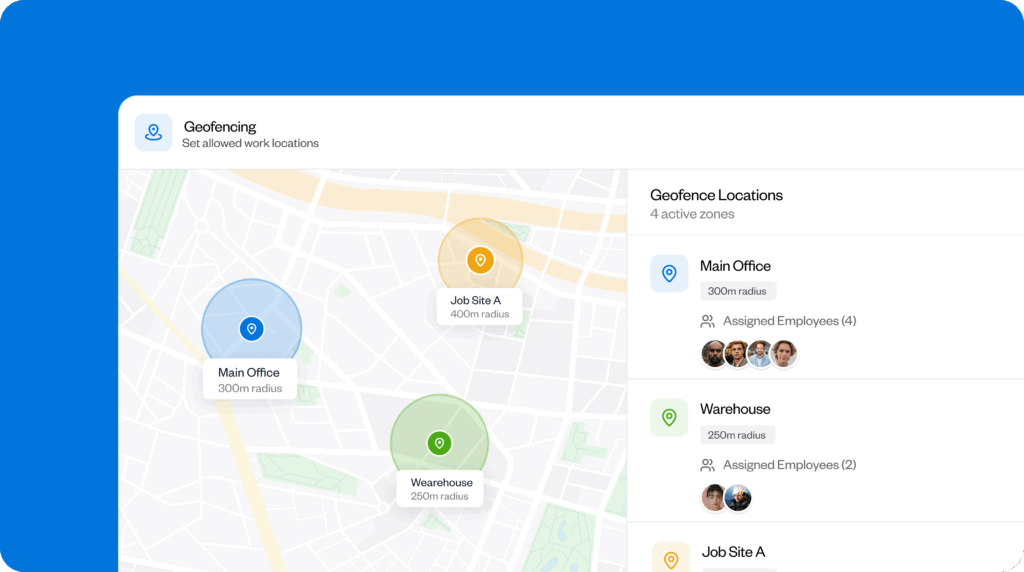
If you’re using digital time tracking tools, oversight becomes easier. For instance, Buddy Punch offers geofencing rules that allows employees to clock in only when they are at a defined location. Its photos on punch feature also requires employees to take a picture of themselves when clocking in and out so they can’t punch in on behalf of each other.
Lexi Petersen, Founder and Chief Creative Officer at Cords Club, has a note of caution: Automation only works if the foundation it’s built on is “100% error-proof.”
“I learned this the hard way when we tried to DIY automate our payroll system. It ended up backfiring because automation only produced more errors if the foundations weren’t properly set up: incorrect tax rules, error codes for benefits, etc. We had to fork out expenses for our payroll provider to tailor our automation processes, and since then, we haven’t had issues with missed deductions or miscalculations.”
“It also saves us from scraping the bottom of the barrel due to compliance mistakes as we hire more personnel that span across different tax jurisdictions.”
Prevent payroll errors before they happen
Payroll errors are rarely one-off issues. By spotting the signs early and putting the right checks in place, you can prevent them before payroll runs. Review your current workflow and strengthen it with systems that connect everything end to end.
Contributors
- Mark Friend, Company Director at Classroom365
- Todd Cechini, President at Dun-Rite Home Improvements
- Lexi Petersen, Founder and Chief Creative Officer at Cords Club
- Rocky Chai, Chief Executive Officer at Ultra Cleaning

