

Payroll Outsourcing: A How-To Guide for Small Businesses

Written By: Annie Troup
Last Updated May 14, 2026
When you began managing payroll in-house, it was likely straightforward. But now your team has grown and business has expanded, and you’re spending much more time on payroll while facing a higher risk of errors.
At this point, many businesses consider outsourcing. But the decision to outsource may not be ideal if you don’t know whether these issues are temporary growing pains or signs that your in-house processes are no longer sustainable.
In this guide, we break down the warning signs to watch out for, how to prepare if you decide to outsource, and how software can simplify payroll processing, whether in-house or with an external provider.
Signs you’re outgrowing in-house payroll management
Some key indicators can help you decide if it’s time to move from in-house payroll management to alternatives like outsourcing.
Your team size is growing
When your team is small, managing payroll in-house is simple. But as your headcount grows, you’re processing more hours, pay rates, schedule changes, and employee records.
For companies, this often means more frequent errors. When the team grew at Alliance Medical Revenue Group, Yahya Khan, Founder, saw increasing instances of “missed overtime, wrong hours after swaps, and even a duplicate payment once.”
In fact, “any business with over 10 employees is complicated by variable hours….(and) calculation of shift differentials,” says Nick Heimlich, Founder and Attorney at Nick Heimlich Law.
- Your team has grown beyond 10 employees.
- Payroll errors tied to increased headcount, such as incorrectly logged hours, are becoming frequent.
- Employee complaints about paycheck errors and delayed payments are increasing.
Shifts are becoming increasingly complex
When your schedules are fixed and predictable, in-house payroll is easier to manage. But as your business grows, shifts often become more complex in terms of hours, locations, and roles.
This makes time tracking and payroll harder to manage as you may need to account for shift differentials, travel time, and multiple job sites.
Domonique Jenkins, Owner of Grade A Rentals, shares the following:
“It wasn’t the sheer number of employees that broke our manual system; it was the variable hours. Managing shift differentials for late-night tear-downs…and tracking driving time versus on-site labor time turned payroll into a multi-day nightmare.”
Payroll can become even more complicated when employees are subject to different pay rates. Raymond Gong, Senior Partner at Profitability Partners, says businesses may have to account for “varying compensation models including hourly, commission-based, and fixed pay for office staff,” sometimes across “thousands of jobs on a monthly basis.”
- You’ve started managing 24/7 schedules or variable shifts with manual systems.
- Payroll errors due to missed shift differentials are becoming frequent.
- You’ve onboarded employees on different compensation models (hourly, commission, overtime).
The time you’re spending on managing payroll has increased
At the start, you were likely spending a few hours managing payroll every pay period. But when you’re spending hours on it every week, it can drain productivity.
Domonique Jenkins realized their current process had become unsustainable when “the administrative burden of payroll started pulling [them] away from actually growing the business and talking to clients.”
For Lexi Peterson, Founder of Cords Club, the warning sign came when quick payroll adjustments started taking “twice the amount of hours it used to take.”
- Payroll-related tasks take more than 4–5 hours every pay period.
- You have to cross-reference multiple documents — spreadsheets, timecards, project records, and more — to run payroll.
- Payroll administration is taking time away from core management or business growth responsibilities.
Overtime has become the norm
When overtime becomes a regular part of your operations, payroll calculations become harder, because overtime pay often involves different pay rates, varying eligibility rules, and stricter compliance requirements.
And when you’ve to calculate and apply overtime manually each pay period, mistakes become more likely.
Angela Hernandez, Founder and CEO of AI Accounting Agency, shares that for one of their clients, “each pay period took roughly two hours just to reconcile timesheets and calculate overtime. Most of the mistakes were misclassifying project codes or miscalculating overtime.”
Even small overtime errors can have major consequences. When Lexi Peterson’s team went into overtime during product launches and promotional campaigns, “it resulted in three human errors in our record of hours worked, which in turn, led to three Zelle transactions in the middle of the night, followed by three in-person next-day apologies and a subsequent HR file note.”
- Overtime has become a regular part of your scheduling, not an exception.
- You’re manually calculating and adjusting overtime pay every pay period.
- Payroll revisions due to missed or incorrect overtime payments happen more than 1–2 times a year.
You’ve to keep up with compliance requirements across jurisdictions
Staying on top of constantly evolving regulations to ensure compliance can be overwhelming, especially if your business operates across states or countries.
When Angela Hernandez tried to do this in-house, the team “missed certain filing requirements, which later resulted in late fees and interest charges.”
And even small compliance mistakes can be costly, with fines for single violations ranging from $200 to $10,000.
According to Nick Heimlich:
“The retroactive cost of remediating [a payroll] issue is likely to result in an amount many times larger than what an appropriate system might have cost in the first place.”
- You have faced a penalty due to a labor law violation.
- The company has missed tax filing deadlines two or more times.
- You’re maintaining separate payroll rules or tax setups for employees in different jurisdictions.
What payroll outsourcing involves
If any of the signs above sound familiar, consider outsourcing payroll management.
Payroll outsourcing is when a business hands over some or all payroll responsibilities to an external third-party provider.
For small businesses with hourly teams in industries like retail, hospitality, and healthcare, outsourcing payroll can reduce the administrative workload and minimize errors that often come with manually processing payroll in-house.
Third-party payroll providers typically support businesses with:
- Wage calculations and direct deposits
- Payroll tax withholdings, filings, and deposits
- Overtime and shift differential calculations
- Benefits and deduction management
- Reporting and recordkeeping
- Labor law and tax compliance
How to prepare for payroll outsourcing
Before you hand off payroll tasks to a third party, you need to organize your internal processes and records. Here’s how to prepare for a smooth transition.
1. Document current processes and rules
Before outsourcing, document how payroll currently works at your company. This gives your provider a clear picture of how you calculate payroll.
Yahya Khan, Founder at ARMG, suggests the following:
“Have cleaner time tracking and clearer rules around shifts and overtime from the start. Without that, even good systems struggle.”
Before you bring a third party on board, capture:
- Payroll components: wages, bonuses, deductions, commissions, etc.
- Rules surrounding overtime, shift differentials, hourly rates, payment deadlines, etc.
- Tax obligations, including past company tax filings and employee tax records
2. Consolidate existing data
Apart from documenting necessary details, it’s important to ensure that the information already on record is reconciled.
“A vendor who carries on to his system the unfinished records of time, or records of classification which are inconsistent, will propagate his errors in a new system,” – Nick Heimlich.
Lexi Peterson learnt first-hand the consequences of not doing this before outsourcing.
“We went headfirst into migrating unmaintained, unverified, and uninformed loose worktimes, employee info, and more spreadsheet records, which resulted in us suffering an onboarding week.”
Lexi’s advice:
“Do not waste loose, unlinked, or unverified timekeeping records and information when you outsource, because having stored and integrated them beforehand is what will guarantee a smooth onboarding experience.”
Before transitioning, make sure that:
- Employee information (names, payment details, job roles) is correctly recorded, with no duplicate entries.
- Year-to-date payroll records are complete, with no missing information.
- Tax filings and payment records are up to date.
- Payroll data spread across different databases are merged into one single source.
3. Define your requirements
Before outsourcing payroll, understand what you actually need help with. Some businesses outsource only payroll processing, while others also outsource tax filings and compliance management.
Identify if your goal is, for example, to:
- Reduce payroll errors
- Improve compliance
- Integrate payroll with HR or scheduling systems
- Strengthen payroll data security
Based on this, shortlist providers that can best support you with your specific goals.
Clarifying your requirements early can also help you understand if the expenses on outsourcing would be worth it.
Dmitrii Malashkin, owner and founder of Born to Move, began by comparing their in-house payroll costs to outsourcing and found that “by outsourcing, [they] saved around $11,000 per year.” This convinced them of the decision to outsource.
4. Assign internal ownership and create approval workflows
Even if you outsource payroll, someone in-house still needs to oversee if the provider is handling everything efficiently.
Assign a team member to act as the point of contact with your provider. This person should understand your current processes well enough to review reports, approve payroll runs, and flag issues quickly.
Create an internal process for reviewing and approving payroll every pay period before it’s finalized. Let an internal team member review items like:
- Employee working hours
- Deductions
- Tax updates
To reduce risk during the transition, run payroll in-house in parallel with your new provider for the first six months. This gives you time to compare both and catch issues before they affect paychecks.
5. Communicate changes clearly to employees
Payroll changes affect employees directly, so clear communication is important. If your team has already experienced payroll mistakes or delays, vague or informal communication during the transition can create even more uncertainty.
Communicate payroll changes through structured team meetings or one-on-ones, covering everything from the larger, strategic “why” to how things will change on a day-to-day basis for your team members.
When communicating the transition:
- Inform employees of the change.
- Explain the benefits of the new system.
- Demonstrate new processes — for example, how employees can verify their hours and access their paychecks going forward.
- Answer any questions that workers may have.
- Industry expertise. If your payroll processing requires industry-specific knowledge, prioritize providers with experience in your field.
- Operational locations. If you operate across multiple states or countries, prioritize providers that can handle multi-jurisdiction tax filings and compliance requirements.
- System integrations. If you already use HR, accounting, or scheduling software and want to keep these systems running, prioritize providers that integrate directly with those systems.
- Employee self-service features. If your team frequently needs to access payslips or tax forms, prioritize providers with employee portals and mobile apps.
- Data security and privacy protocols. If your business handles sensitive employee or financial data, prioritize providers with strong encryption and access controls.
- Scalability and flexibility options. If your team is growing quickly or hires seasonal workers every year, prioritize providers that can easily scale payroll volume and support changing team structures.
- Transparent pricing. If you prefer predictable payroll costs, prioritize providers with clear per-employee or flat-rate pricing.
- Support and resources. If your internal payroll team is small, prioritize providers that offer dedicated support teams, onboarding help, and fast issue resolution.
How software can simplify payroll challenges
Payroll software can often be a simpler, more flexible, and cost-effective option that you can use in-house or with an external provider.
Manage employee payroll requests efficiently as your team grows
As team size increases, so do employee requests for payslips, tax documents, worked hour records, and more. Payroll software reduces administrative load by giving employees direct access to their information.
On Buddy Punch, for example, employees can add and update their personal information, access timesheets directly, and download payslips without needing their manager to step in. This frees up managers so they can focus on high-value work.

Automate pay calculations for complex shifts
Software simplifies payroll management for teams working variable shifts, across locations, or under different pay structures by connecting time tracking directly to payroll.
With Buddy Punch, employee pay is automatically calculated based on hours worked and shift rules, and payroll is processed by the deadline you set. This removes the need for manual calculations, reduces errors, and ensures timely, accurate payments.

Reduce time spent on calculating pay
Payroll software cuts down the time you spend on payroll by automating repetitive tasks and keeping payroll data in one place.
Buddy Punch, for example, gives you real-time access to employee pay data, lets you generate detailed reports instantly, and flags discrepancies before payroll is processed. This reduces the need to manually cross-check timesheets and pay records every pay period.

Simplify management of overtime and variable pay
Payroll software calculates salaries for different employees based on their role, location, and pay rates, without needing someone to manually track this information each pay period.
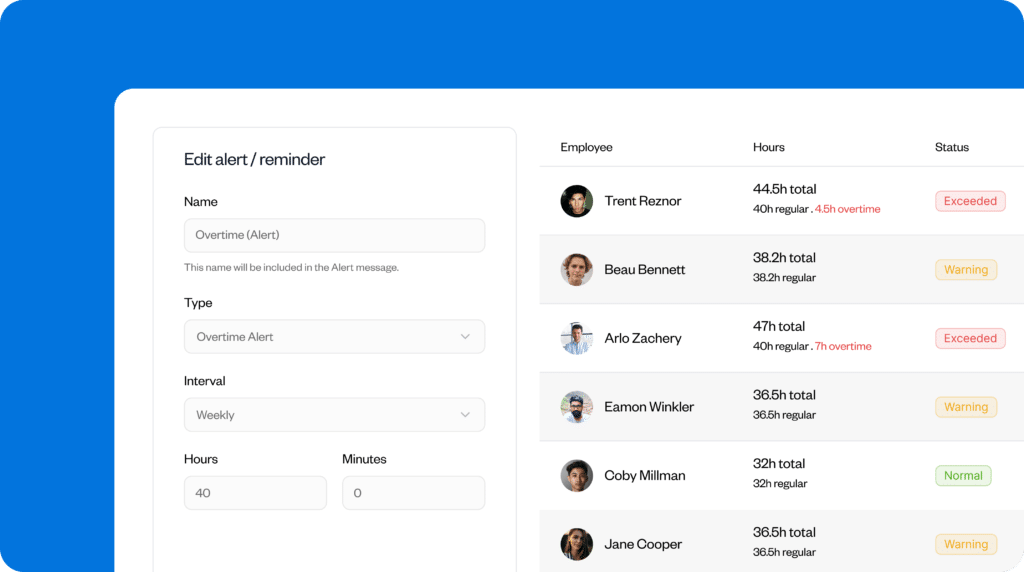
On Buddy Punch, you can set rates for overtime, commissions, shift differentials, deductions, and more, ensuring payroll stays accurate even when pay varies from one period to the next. This reduces the need for corrections after payroll is run.
Stay compliant across states and jurisdictions
Payroll software helps businesses stay compliant by tracking tax requirements and filing deadlines across jurisdictions.
For example, Buddy Punch tracks local and federal tax laws and supports payroll management for employees working in different states. This reduces the risk of missed filings, penalties, and interest charges.

Should you outsource, or will payroll software be enough?
If you’re considering whether to outsource payroll or use payroll software, use this chart to see which solution may be the best option.
| Payroll software | Payroll outsourcing | |
| Best for | Small to mid-sized businesses | Large, rapidly growing companies |
| Cost | Lower subscription cost, higher internal time costs | Higher service fees, lower internal time costs |
| Control | Complete control over company data, payroll timing, and last-minute adjustments | Dependent on provider deadlines and schedules |
| Compliance | Internal responsibility, software supports tax filings and labor compliance | Provider handles compliance and filings |
| Flexibility | Highly customizable and easy to change or adjust | Low customization, changes may require advanced notice |
| Security | Sensitive data is kept in-house | Sensitive data is shared with the vendor |
| Speed | Immediate adjustments and reporting | Potential lag time |
Making the switch to payroll outsourcing
When in-house payroll management becomes too complex, you end up spending hours tracking work, calculating pay, and fixing errors. At that point, the goal is to find a system that can keep up with your company’s needs.
For some teams, that may mean outsourcing payroll. Outsourcing requires careful planning, but can offer managers a way to improve payroll accuracy and efficiency.
Using Buddy Punch either in-house or with an external provider can simplify payroll processing. By automating payroll and seamlessly integrating it with time tracking, Buddy Punch saves you hours, reduces payroll errors, and helps you stay compliant with changing laws.
Contributors
- Angela Hernandez, Founder and CEO, AI Accounting Agency
- Dmitrii Malashkin, Founder and CEO, Born to Move
- Domonique Jenkins, Owner, Grade A Rentals
- Lexi Peterson, Founder, Cords Club
- Nick Heimlich, Founder and Attorney, Nick Heimlich Law
- Raymond Gong, Senior Partner, Profitability Partners
- Yahya Khan, Founder and Medical Billing Specialist, Alliance Medical Revenue Group

